
noteful-mcp
Let an AI agent read and write your Noteful notebooks.
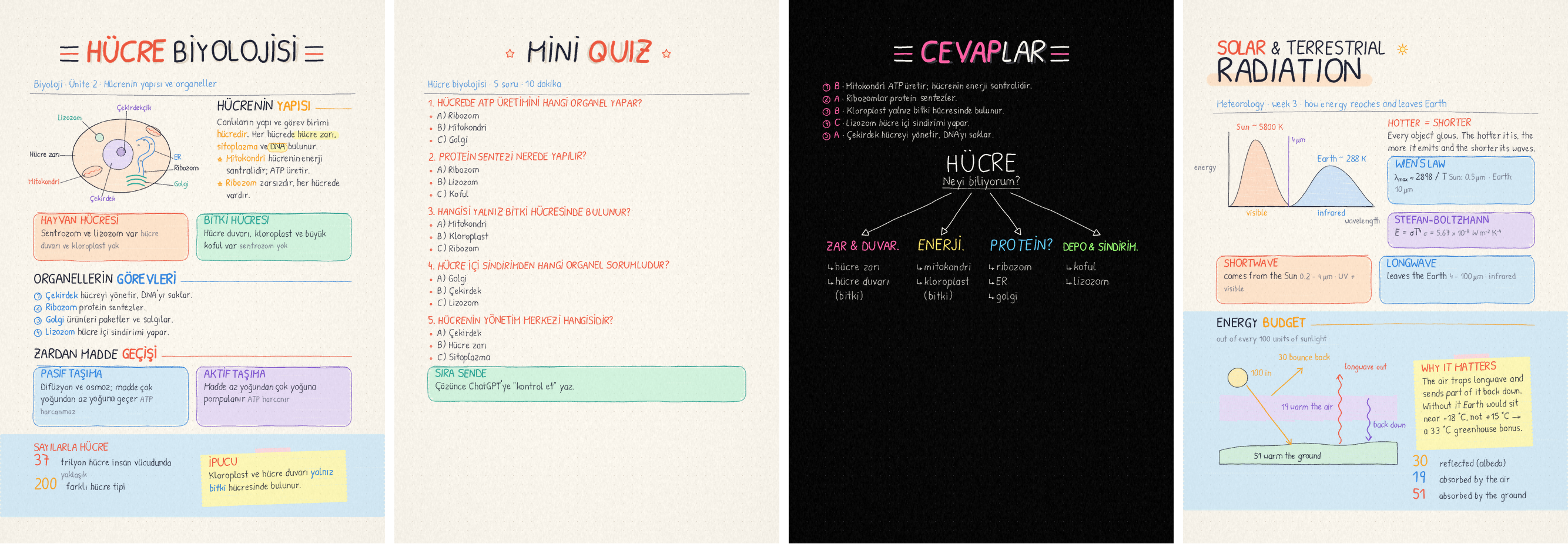
An MCP server for the iPad note-taking app Noteful. It sees your pages the way the app draws them, knows what you highlighted and what you hid under tape, and writes new pages in real, editable Noteful ink: handwriting, highlighter, hand-drawn diagrams. Everything runs on your own computer.
Beta. Noteful's format is reverse engineered. Reading never changes your library and writing only creates new files, but expect rough edges, and please report pages that read or render wrong.
Features
- Read every notebook of your library live (with Noteful for Mac) or from exported
.notefulfiles: page images, typed and PDF text search, highlighted passages, taped answers. - Write notebooks and pages from Markdown in natural handwriting, annotate existing pages, and draw diagrams. The result is real Noteful ink: lasso it, recolour it, erase it.
- Study notes look: composed summary pages and dark tree pages with titles, cards, columns, colour zones, sticky notes and pastel-coloured diagrams the agent draws as SVG.
- Copy a page design: have an image model draw the page, then the server copies it into ink, drawings included: same layout, sizes and colours, correct words (optional, with your own Google key).
- Science-ready handwriting: Greek letters, super/subscripts, arrows and math signs.
- Private by design: no cloud service of ours; nothing leaves your computer unless you turn on mockups. Your library and source files are never modified.
The .noteful format is undocumented; it was reverse engineered from real notebooks and
checked against the app, see docs/FORMAT.md.
Quick start
You need uv, which brings its own Python. Add the server to your MCP client; for Claude Code:
claude mcp add -s user noteful -- uvx --from git+https://github.com/openninoor/noteful-mcp noteful-mcp
Other clients (Claude Desktop, Gemini CLI, …) run the same command as a stdio server. ChatGPT only connects to remote (HTTPS) MCP servers; built-in support is coming, until then you can put the server behind your own HTTPS endpoint with any stdio-to-HTTP MCP bridge. Then check what the server can see on this computer:
uvx --from git+https://github.com/openninoor/noteful-mcp noteful-mcp doctor
How it works
iPad (Noteful) ──iCloud──▶ Mac (Noteful for Mac, same library) ──▶ noteful-mcp ──▶ agent
                                                                       │
iPad ◀── Files: "Noteful MCP" folder ◀── written .noteful files ◀──────┘
With a Mac (Apple silicon, recommended). Install Noteful from the App Store on the Mac and
sign in with the same Apple ID as the iPad. The server reads that synced library directly:
every notebook, always current, nothing to export. If macOS blocks access, doctor says so:
give the app that runs the server (Terminal, Claude) Full Disk Access. If the Mac lags behind
the iPad, quit and reopen Noteful on the Mac.
Without a Mac (Windows, Linux, Intel Mac). Export notebooks from the iPad as .noteful
files into a synced folder (iCloud Drive/Noteful, or Dropbox / Google Drive via
NOTEFUL_ROOTS). All tools work on those files; export again after changes.
Writing back. The server never writes into your library or over a source file. It writes a
new .noteful file into iCloud Drive/Noteful MCP and, on a Mac with Noteful, opens it in
Noteful right away; Noteful asks where it goes and syncs it to the iPad:
- a new notebook (
create_notebook): Create New Notebook; - new pages or a clean copy for a notebook in your library (
add_pages,clean_copy), or a marked-up copy of one of its pages (write_on_page): open that notebook at the page, then Add to Current Notebook › After current page. The tool's reply says which to pick.
Without a Mac, open the file on the iPad from the Files app instead. Pass
open_in_noteful=False (or set NOTEFUL_OPEN=0) to only write the file.
Configuration
To use a Mac that stays at home from another machine, run the server there over SSH:
ssh user@host uvx --from git+https://github.com/openninoor/noteful-mcp noteful-mcp.
Tools
A typical study session: page_marks finds what you highlighted and taped, the agent reads
those regions and writes you a quiz with create_notebook. You answer it on the iPad; the agent
reads your answers with render_page, finds each option with page_layout and grades the page
with write_on_page: ticks, a circle around a wrong pick, the right answer highlighted and a
score.
Study notes look
Written pages default to look="study", distilled from a frame-by-frame study of a well-known
medical-student note-taking video (docs/STYLE.md): composed summaries on
ivory paper (theme="light") and fast question and tree pages on black (theme="dark").
The pages at the top come from the gallery of example pages.
# THE **CARDIAC** CYCLE
_Cardiology · lecture 4_
>> [coral] SYSTOLE → HIGH PRESSURE: the muscle **contracts** || [sky] DIASTOLE → LOW PRESSURE: it **refills**
!columns 55
!draw 480
<svg viewBox="0 0 400 300"> ... organ outline, parts, <text> labels ... </svg>
!end
!col
## **Electro**physiology
The **SA node** fires an ==action potential== ((~70 per minute)).
1. SA node starts the beat
2. AV node delays it
!end
!zone sky
!stat 70 beats per minute at rest
!sticky [yellow] Remember: valves move **passively**, only with pressure.
!end
- Titles: thick block capitals with a soft shadow and stripe bars, the
**word**in colour, or two lines (TOP // BIG) on a marker band;:sun:-style doodles. - A pen-weight hierarchy (title > headings > felt-tip body) and mixed-case body text with colour, highlighter, pills and grey details only where they mean something.
- Cards, two-column layouts, full-width colour zones, taped sticky notes, big numbers,
circled steps,
!maptree diagrams with hollow arrows and ↳ lists. !drawdiagrams: the agent draws organs, cells, graphs or models as plain SVG; outlines become hand-drawn ink, fills pastel highlighter colouring (real Noteful highlighter strokes, editable on the iPad),<text>labels handwriting.write_on_pagetakes the same SVG.- Science writing: Greek letters,
T^4,m^{-2},CO_2, arrows, ≈ ± ° ≤ ≥.
Examples for the agent
Agents write better pages when they can see good ones. The server ships a gallery of example pages and drawings (summary, clean copy, quiz, tree; organ, cell, graph, process, probability tree) with their source and a preview, and the rules that keep pages from looking generated:
- the
example_pagestool (works with every client), - resources
noteful://examples,noteful://examples/{name},noteful://examples/{name}/previewandnoteful://style, - prompts that start a task with the right example:
summary_page,quiz,grade_quiz,clean_copy_page,tree_page.
Handwriting fonts: patrick (default, rounded print) and caveat (quick slanted hand) are
single-line pen fonts derived from the OFL fonts Patrick Hand and Caveat; titles use a
block-letter version of Patrick Hand. Options: hand = neat / natural / messy,
pen = fineliner / ballpoint. look="classic" gives a plain notebook page instead.
Copying a page design
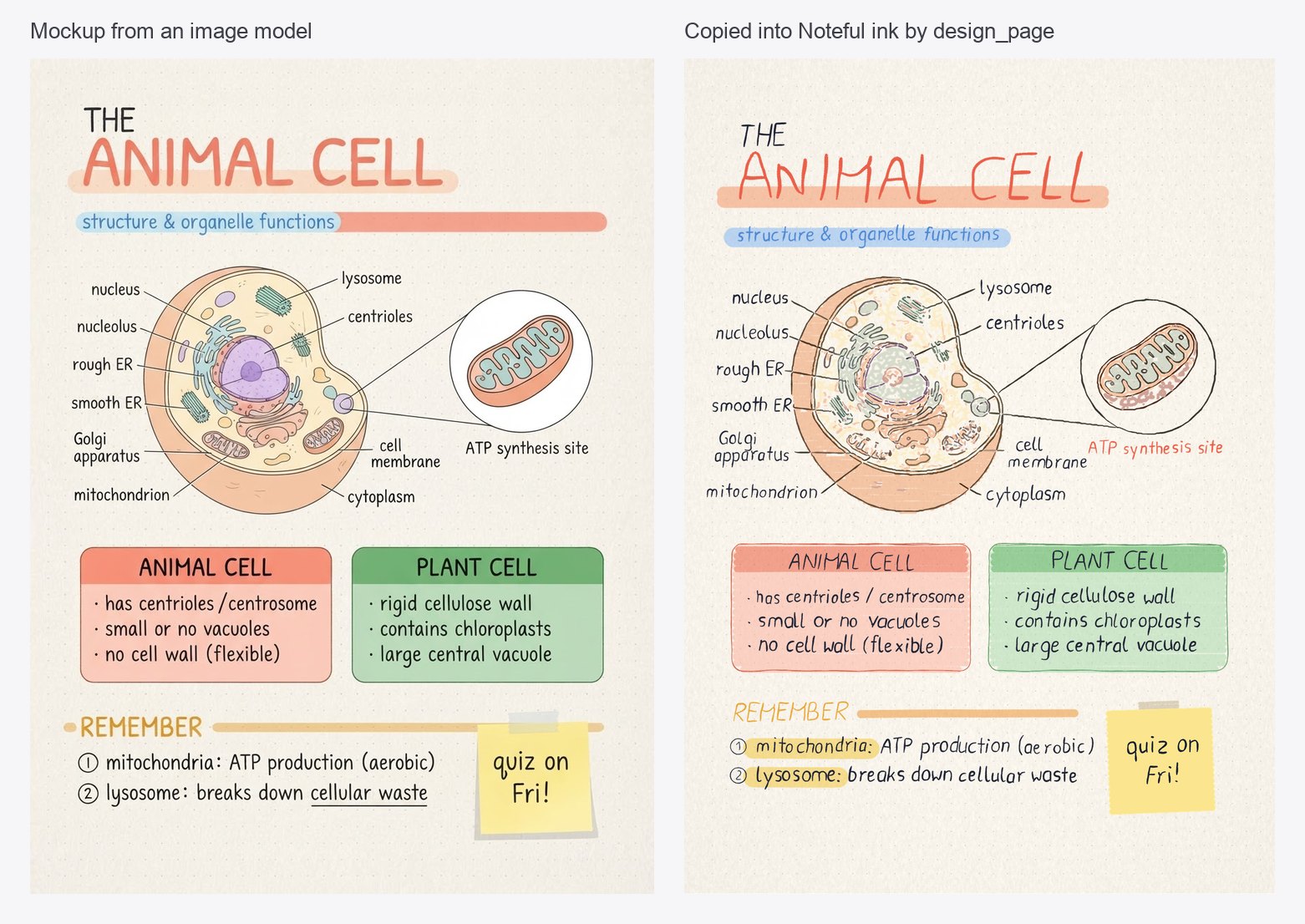
Composing a beautiful page from rules has limits; image models know a far wider range of
layouts. So the server can work from a picture instead: an image model draws the page
(design_mockup), the agent lists what is on it in the picture's pixels, with the correct words
since image models garble small text, and design_page redraws it as Noteful ink. Drawings are
traced straight from the picture: outlines become pen strokes, colour areas highlighter (or pen,
for colours highlighter cannot show), so they keep the model's quality and stay editable.
look="rich"for summary pages,look="calm"for plain lecture notes; mix them.- Pass the previous page's mockup as
referenceand a multi-page note keeps one style. - A spec part can be drawn at
scale0.5: two mockups fill one page in half-size handwriting, paragraphs re-wrapped to the page width. - Any picture works, not only generated ones: a page the user likes, a screenshot.
- Text never runs into its neighbours: lines shrink to their room, and text that still overlaps is pushed down together with what is under it.
Mockups run on your own Google account: set GEMINI_API_KEY or NOTEFUL_VERTEX_PROJECT and
install the extra (uvx --from 'noteful-mcp[design] @ git+https://github.com/openninoor/noteful-mcp' noteful-mcp).
The page content you describe is sent to Google to draw the picture; nothing else is.
We built and tuned this with Nano Banana 2 Lite (gemini-3.1-flash-lite-image): fast,
cheap (about 4 US cents a page) and good enough to copy from. A larger image model will likely
give better pages; set NOTEFUL_IMAGE_MODEL to try one.
Development
See CONTRIBUTING.md. In short: uv sync, uv run pytest,
uv run ruff check ., and uv run python examples/build.py to build the gallery pages.
License
MIT. The fonts in src/noteful_mcp/fonts are under the SIL Open Font License (see the
OFL*.txt files next to them).
Noteful is a trademark of its owners; this project is not affiliated with or endorsed by them. Use it with your own notebooks.