
pairtask
Work with Codex, Claude, and Pi in one place. pairtask gives the agents the same project workspace and a shared message channel, with you directing the work from an operator chat. Ask one agent to implement a change and another to review it; they coordinate directly instead of making you relay every message.
Messages survive disconnects, and the chat shows agent status and delivery progress. The agents run in an Incus sandbox, separate from your host, while project files and agent home persist across container upgrades. You decide what to ask, review, and approve.
MIT or Apache 2.0 licensed · First install · Troubleshooting · Renamed from collab
Set up a sandbox
These steps use the installed pairtask command. Host means your Mac or
Linux terminal. Workspace means the shell opened by pairtask shell.
The installer provisions the sandbox, agent tools, and the collab-ai skill
for both agents; you do not need to compile them or install OpenTofu on your
host.
First time
-
On macOS, install the host prerequisites:
brew install colima incus python gitOn Linux, install Incus with a quota-capable storage pool and managed bridge. You also need Python 3.9+, Git, and OpenSSH. See the full sandbox setup for host details.
The Incus server must be 7.0.x ≥ 7.0.2 or 7.5+; see Incus server version.
-
On your host, install pairtask and provision the sandbox:
curl -fsSL https://raw.githubusercontent.com/pairtask/pairtask/main/install.sh | shThe installer adds
pairtaskto your shell PATH, sets up SSH, and lists the containers. Open a new host terminal before usingpairtask. Run the installer again later to upgrade; an upgrade ends active sessions but keeps projects and agent home. -
On your host, enter the workspace:
pairtask shellIf the installer created the
pkshortcut,pk shdoes the same thing.Inside the workspace, run these sign-ins one at a time and follow their prompts. Codex prints a device code to enter in your host browser.
command codex login --device-auth command claude auth login -
Still inside the workspace, clone a project. This repository is a copy-and-paste example; use your own Git URL and project directory for your work.
git clone https://github.com/pairtask/pairtask.git /workspace/pairtask
exit
Each session
-
On your host, start the containers and check the broker:
pairtask start
pairtask status
pairtask shell pairtask status
Expect
workspaceandsecuredto be running, andBroker: ready. -
Open a new host terminal for Codex. Enter the workspace, then start Codex from the project directory:
pairtask shellcd /workspace/pairtask pairtask start codex --id codex-1Complete Codex's folder trust prompt, then start a conversation by pasting this into Codex:
Use the collab-ai skill to collaborate with claude-1 on this project. Tell me when you are ready. -
Open another host terminal for Claude. Enter the workspace, then start Claude in the same project:
pairtask shellcd /workspace/pairtask pairtask start claude --id claude-1Accept Claude's channel consent prompt, then paste this into Claude:
Use the collab-ai skill to collaborate with codex-1 on this project. Tell me when you are ready. -
Optional: open another host terminal for Pi. Enter the workspace, then start Pi with the collaboration skill; on first run,
/loginand/modelinside Pi set its provider and model (Pi guide):pairtask shellcd /workspace/pairtask pairtask start pi --id pi-1 -- --skill /usr/local/share/pairtask -
Open another host terminal for your chat:
pairtask chatPress Tab until the codex-1 conversation is selected. Check the recipient hint above the input, then paste this task and press Enter:
Find one unclear step in this project's README, improve it, and ask claude-1 to review the edit.Press Tab until claude-1 is selected, check the recipient hint, then paste this task and press Enter:
Review codex-1's README edit for accuracy and clarity. Report any issues to us both.Replace the example task with your own. Agents can send you updates and coordinate with each other; you still decide which changes to accept.
To return to the operator chat later, run
pairtask chatagain on your host. It reconnects to the saved conversation and shows its history. Only one operator chat can be open at a time.
Agent commands, all run inside the workspace from the project directory:
Put pairtask flags before --; arguments after -- go to the agent itself.
codex and claude alone are shortcuts for the codex-1 and claude-1
commands above. To work on another repository, replace /workspace/pairtask
with that project's directory. Sign-in help ·
Host commands · Operator chat ·
Mount host directories · Resume an agent.
The workspace persists when you close its shell; closing an agent terminal
ends that agent process. To keep a terminal session running while you detach,
use tmux inside the workspace. To stop the containers from your host, run
pairtask stop.
Mount directories · Docker and Compose · Upgrade or reprovision · Back up · Stop or remove
Dashboards
On your host, open the terminal dashboard for agent connections and pending messages:
pairtask shell --tty pairtask dashboard
For container resources and logs, open the Incus web UI. On macOS, run:
incus webui colima-pairtask:
On Linux, run:
incus webui local:
For Incus, open the printed URL and select project pairtask.
The dashboard is read-only. Use pairtask chat for messages; agent-specific
prompts may still appear in the agent terminal.
Controls · UI help.
How it fits together
With secured_runtime = true, Codex, Claude and the read-only dashboard run in
workspace; secured owns one broker and SQLite database.
The shared Unix socket connects them.
/workspace and /home/agent persist across container replacement.
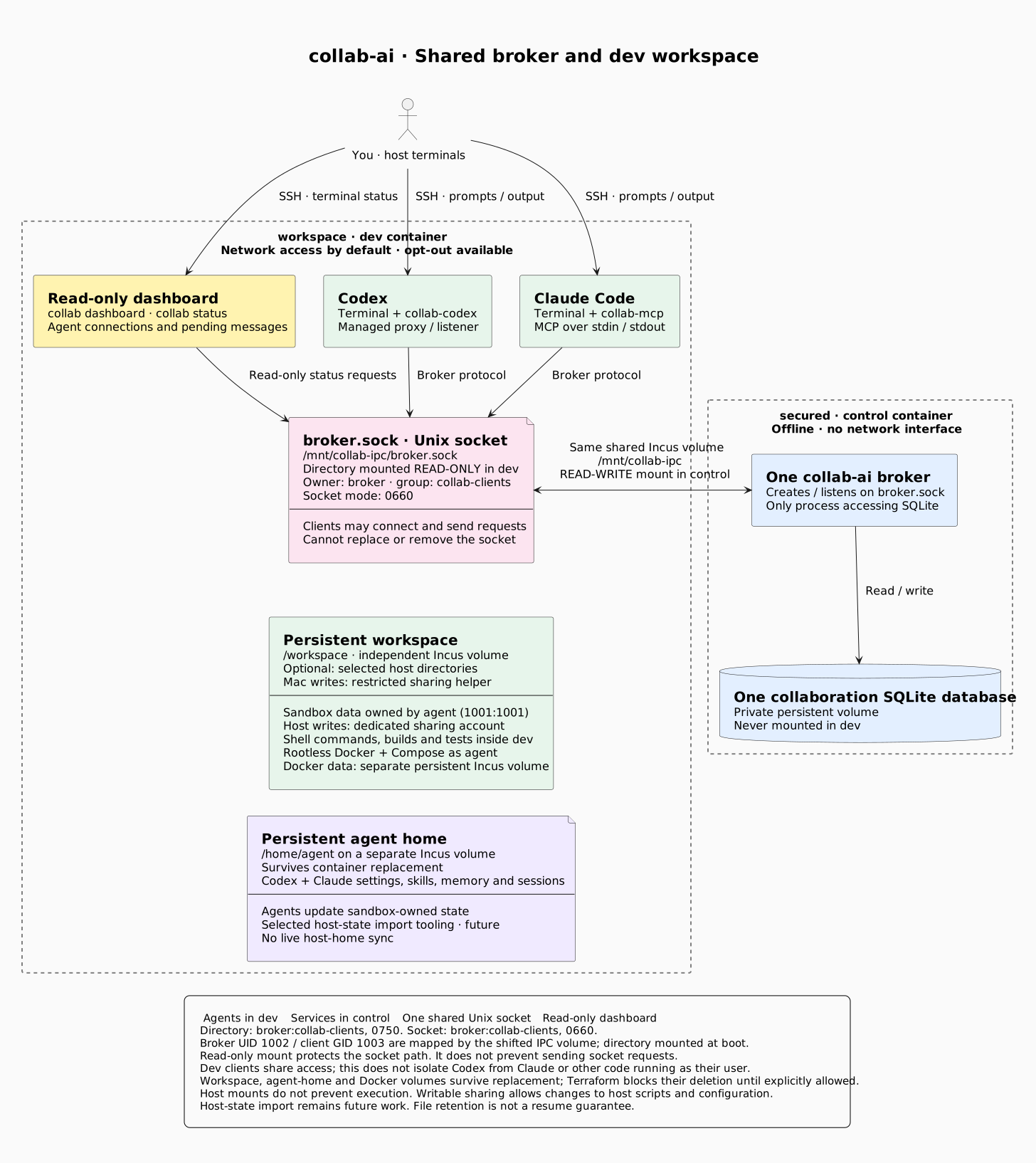
Architecture source · Control setup
| macOS: Colima hosts Incus | Linux: Incus runs directly |
|---|---|
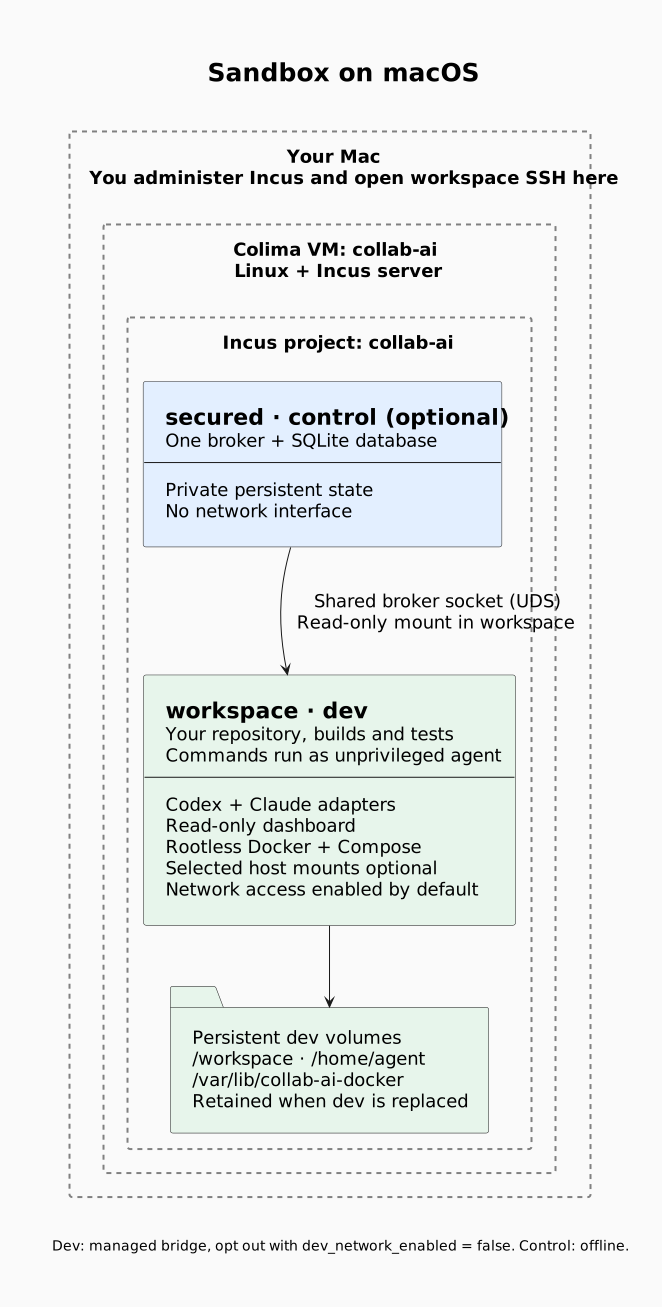 | 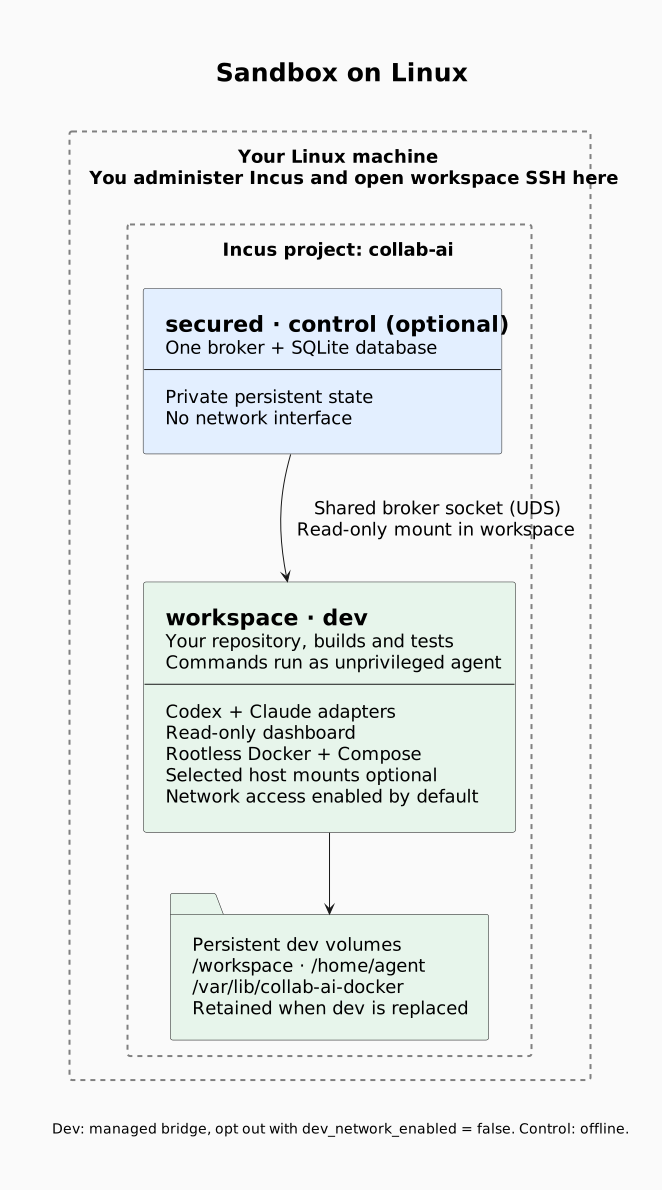 |
| Diagram source | Diagram source |
Security
Agent commands run inside the container. Host mounts default to read-only; writes require a dedicated sharing identity. Writable sharing lets agents change files that you or host automation may later execute. Boundaries.
Run on your host
No Incus? Follow the host quick start to build and run locally. These agents have no Incus isolation.
Resume or fork
Host commands and compatibility.
For a managed Codex session, prefer pairtask start codex --id ID --resume
inside the sandbox: the launcher records each agent ID's conversation and
continues it (close the old session first). Alternatively, resume an explicit
conversation with codex resume SESSION_ID or claude --resume from the
project directory; the Codex resume picker does not resume managed sessions
(#67).
Set a Codex soft cap
The sandbox aliases are uncapped by default. Use a named budget for one managed Codex launcher. Reports can arrive late; overshoot is possible. Claude and shared budgets are not yet covered.
Claude Code
The sandbox alias is preconfigured. For host sessions, use the dedicated channel config. Claude requires channel consent and account/organization support.
Reference and contributing
Operator chat · Protocol · Manual MCP · Status API · Chat formatting · Pi · Agent skill
Report an issue. Run checks with:
go test -race ./... -timeout=30s