
Pattern
Pattern checks a coding agent's UI decisions against your own design system before it builds, whether that lives in code or in Figma. It helps the agent reuse what the product already has and build only what is actually missing. An opt-in enforcement boundary can make that check required, and every decision is recorded in an auditable ledger you can verify later.
Website · npm · Report an issue
- Install · What Pattern Does · How it works · Quick Start · Recommended workflow · Try it · Validation examples
- Enforcement boundary: hook + CI gate (require the call, don't just log it)
- Core tools (on by default -- see Tool tiers):
register_design_system·recommend_component·extract_requirements·verify_component·record_component_decision - Advanced tools (
PATTERN_TOOLS=full):get_figma_evidence·read_ledger·report_build_cost·report_outcome_proxy· Feature cost attribution · Outcome proxies · Per-project judgment ledger ·check_ledger_liveness·sweep_ledger_liveness·export_ledger_provenance·backfill_ledger_snapshot_ref·post_ledger_provenance_to_github· Ledger integrity and decision provenance - Per-project decision memory · Security and privacy · Telemetry
- Cost: The
_metafield · Prompt caching · Measured cache and fetch behavior · Search limits · Ensemble cost · Session call cap - Local call log · Known limitations
Install
npx pattern-mcp init
This is the only command you run yourself. It downloads Pattern,
detects which MCP client(s) you have (Claude Code, Claude Desktop,
Cursor, or Codex CLI), connects each one for you, and offers to add
your Anthropic API key. Then register your design system (see
register_design_system) -- Pattern has
nothing to judge against until you do. See Quick Start below for what it
does step by step, or
Connect Pattern to your MCP client
if you'd rather connect a client by hand.
Unattended (a script, or a coding agent running it for you):
npx pattern-mcp init --yes asks nothing. It connects the clients it finds,
and writes ANTHROPIC_API_KEY / FIGMA_ACCESS_TOKEN into the client config
if they are exported in your shell (the key is never printed). Add
--design-system <components folder> or --figma <file link> to register
your design system in the same command. It ends with Status: SETUP COMPLETE
or Status: SETUP INCOMPLETE -- missing: ..., and exits non-zero (2) only if
no client was connected, so a caller can tell "connected but not finished"
from "nothing happened".
Add or change a key later: npx pattern-mcp keys prompts with the input
hidden and writes the key into every Pattern entry it finds (Claude Code,
Claude Desktop, this project's Cursor config). Use --from-env to take
ANTHROPIC_API_KEY / ANTHROPIC_WORKSPACE_ID / FIGMA_ACCESS_TOKEN from the
shell instead. Re-running init does the same for an entry that already
exists. Keys are never sent through the agent or chat; restart your client
afterward.
What Pattern Does
Pattern looks at what you need, checks the components in your own registered design system (code or Figma) against that need, and tells the agent whether to:
- Use an existing component from your design system
- Build a custom component, when nothing already covers the need. The checklist shows which requirements the closest components miss, so the agent builds only the gap
A free, automatic check compares a custom_build verdict against
every registered candidate's real name, props, and description, and
flags any real overlap it finds, so a wrong "build it from scratch"
doesn't pass by silently.
Pattern is designed for agents to use while they are building. An opt-in enforcement boundary can make the check required instead of optional, and every decision it leads to lands in an auditable ledger you can verify later.
It exposes fourteen tools. Five are on by default -- the ones the register → extract → recommend → build → verify path actually needs -- and the rest reveal themselves once you need them. See Tool tiers.
Core, on by default.
register_design_system— points Pattern at your design system (a Figma file, a components folder, or a manifest). Required beforerecommend_componentcan judge anything.recommend_component— evaluates a UI component need against your registered design system and returns a structured recommendation.extract_requirements— runs just the requirement-extraction step on its own, so you can inspect or hand-edit the checklist beforerecommend_componentscores against it.verify_component— run after the build: checks the built file against the requirement checklist item by item, with quotes the server confirms are really in the file, and records the outcome in the receipt.record_component_decision— records what the agent actually did so future recommendations in the same project can take that decision into account.
Advanced, behind PATTERN_TOOLS=full.
Cost/outcome tracking, and ledger
provenance/liveness. See Advanced tools for the full
list.
Tool tiers
By default Pattern's tools/list response advertises only the five
core tools above, so a first-time agent sees a small, obvious surface
instead of all fourteen at once. Every tool still works when called
directly, tiering only changes what gets advertised -- so a script or
an agent that already knows a tool's name (e.g. from this README) can
still call read_ledger without setting
anything. Set PATTERN_TOOLS=full in the server's environment to
advertise all fourteen tools immediately, e.g. for the "verify and export
old decisions" or cost-tracking workflows described below.
How it works
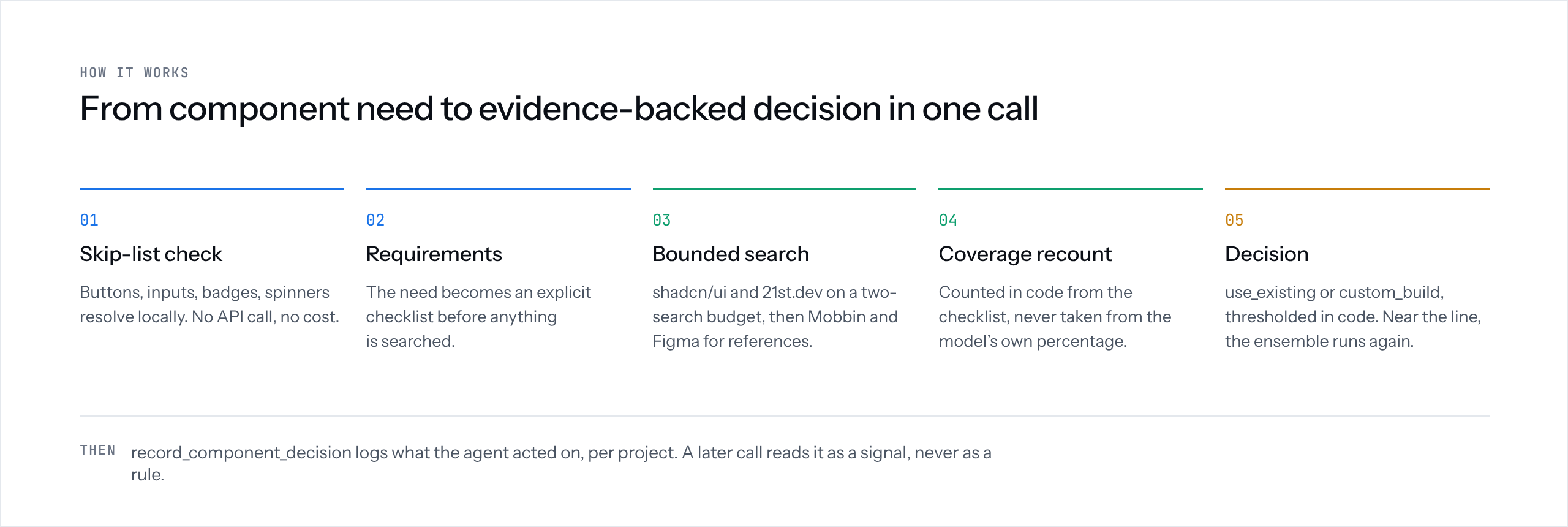
For each recommend_component call, Pattern:
- Checks whether the need is a simple primitive that doesn't need scoring.
- Requires a design system registered for the
project_id; otherwise it returns an error asking you to register one. - Turns the request into a set of specific requirements, unless a
checklist was already supplied (see
checklist). - Checks each registered candidate against the requirements using the props, descriptions, and Figma data captured at registration.
- Calculates how much of the requirement is covered.
- Decides whether to use an existing component or build a custom one. On a custom build, the unmet requirements show what to build.
- Returns the result as structured JSON the calling agent can act on.
Coverage is calculated by the server from the individual requirements it checked. It does not simply trust the percentage returned by the model.
A result can also be:
use_existingcustom_buildno_candidates_foundskip_listledger_cache_hit— served from a recent, matching prior judgment instead of a fresh search+score (see Per-project judgment ledger).
no_candidates_found is kept separate from a low-coverage result. Not
finding a candidate is different from finding candidates that don't cover
the requirements.
If project_id is supplied, Pattern also checks for past confirmed
decisions on that project and factors them in as a consistency signal —
never a rule that overrides a genuinely better match found in the current
search. Separately, project_id also enables the judgment ledger: a
high-confidence prior judgment matching this exact
component_need/domain/framework/existing_stack, recorded recently enough,
can be served directly (ledger_cache_hit) instead of running a fresh
search+score. This is the one deliberate exception to "every recommendation
searches and scores again" — see
Per-project judgment ledger for the exact
rules and why it's safe.
Every result includes computed_at, because coverage is a snapshot of the
search at that point in time, not a permanent fact. Every result also
includes _meta — the timing and token cost of that specific call (see
Cost).
Boundary-risk checks
The same evidence can sometimes be judged slightly differently between model runs. When a result is close enough to a decision threshold that it could change the verdict, Pattern automatically runs the judgment two more times and uses the majority result.
If the three runs disagree, Pattern returns:
{
  "confidence": "low",
  "ensemble": {
    "triggered": true,
    "runs": ["use_existing", "custom_build", "use_existing"],
    "agreement": "2/3"
  }
}
Results that are clearly inside a threshold don't trigger extra runs — see Cost below for the measured impact.
Simple primitives
These are handled locally without an API call:
This keeps trivial requests fast and avoids unnecessary API usage.
What powers the judgment
Each tool call makes one or more requests to the Anthropic Messages API,
using claude-sonnet-5 by default, with a system prompt that defines the
full decision process. No web search or fetch tools are enabled: the
candidate pool is your registered design system, passed inline.
That process includes:
- Skip-list checks
- Requirement extraction
- Evidence-based coverage scoring against your registered candidates
- Decision thresholds
The model returns structured JSON. Pattern then applies important checks itself, including recalculating coverage and applying the decision threshold.
Quick Start
1. Install and connect
npx pattern-mcp init
This is the only command you need to run yourself -- npx downloads
pattern-mcp on demand, then init detects which clients you have
installed and offers to connect each one:
- Claude Code -- runs
claude mcp addfor you (asks whether to make Pattern available in every project or just this one); skips if already connected (claude mcp listalready shows it). - Claude Desktop and Cursor -- merges a
patternentry into the client's own config file, showing the exact change before writing it and never touching any other server already configured there. - Codex CLI -- prints the config snippet to add by hand (Codex's config is TOML; this doesn't auto-edit it).
Optionally pastes your ANTHROPIC_API_KEY into whichever configs you set
up (visible in plain text as you type it, and in the files it writes) --
press Enter to skip and add it yourself later, see
step 2 below. Run non-interactively with
--yes (skips the API key prompt entirely, accepts every detected
client).
If init doesn't detect your client, or you'd rather set it up by
hand, see Connect Pattern to your MCP client
below for the same configs, per client, done manually. The server
command either way is npx pattern-mcp -- this is what your client's
config launches; you shouldn't need to run it yourself. If you do run
it bare in your own terminal (e.g. to double check the install), it
will just sit there waiting for a client and periodically remind you
to run init -- that's expected, not a hang.
git clone <this repo>
cd pattern-mcp
npm install
npm run build
Use node /absolute/path/to/pattern-mcp/dist/index.js in place of
npx pattern-mcp everywhere in this README, including inside init's
own generated client configs.
2. Add your Anthropic API key
Skipped it above, or want to change it? Pattern requires:
ANTHROPIC_API_KEY
The API account associated with this key pays for the requests Pattern makes (see Cost below).
TYPESAFE_API_KEY (optional) turns on Jev scoring, which is faster and
cheaper than the Anthropic scorer -- see
Scoring your design system with Jev.
With both keys set, Jev picks the match and Anthropic only runs when Jev
finds nothing that fits.
You get the key from the Anthropic Console under Settings → API Keys. API billing is separate from Claude.ai or Claude Code subscriptions. A Claude Pro or Max subscription does not include API usage.
Connect Pattern to your MCP client
Step 1 above (npx pattern-mcp init) does
this automatically for every client it detects -- the sections below
are the same configs done by hand, for a client init didn't detect,
or if you'd simply rather edit the config yourself.
Claude Code
You can add Pattern to your project's .mcp.json or register it with the
CLI.
For the current project:
claude mcp add pattern \
  -e ANTHROPIC_API_KEY=sk-ant-... \
  -- npx pattern-mcp
This uses the default local scope, so the server is available to the current project.
To make Pattern available across your projects:
claude mcp add pattern \
  -e ANTHROPIC_API_KEY=sk-ant-... \
  --scope user \
  -- npx pattern-mcp
Important: put -e/--env and --scope before the --. Everything
after -- is treated as the command and its arguments.
Check the connection with:
claude mcp list
You should see Pattern with a ✔ Connected status.
claude mcp add stores the configuration in ~/.claude.json. Avoid
claude mcp get pattern when possible because it can print your API key
in plaintext.
Cursor
Add Pattern to:
.cursor/mcp.json
Codex CLI
Pattern can be configured globally in:
~/.codex/config.toml
or at the project level in:
.codex/config.json
Use the MCP configuration format supported by your Codex CLI version.
Claude Desktop
Add Pattern through Claude Desktop's MCP settings.
The configuration looks like:
{
  "mcpServers": {
    "pattern": {
      "command": "npx",
      "args": ["pattern-mcp"],
      "env": {
        "ANTHROPIC_API_KEY": "sk-ant-..."
      }
    }
  }
}
Restart your MCP client after adding Pattern.
Then ask your agent to list its available MCP tools and look for:
recommend_component
Recommended workflow
The order that gets the most out of Pattern, with the call that carries each piece of context:
- Register once per project --
register_design_system({ project_id, figma_file_key | figma_json_path | directory_path | manifest_path }). For a Figma file, scope it withfigma_pages/figma_exclude_pages; components-mode registration also stores the raw Figma facts (sizes, spacing, nested components) for later steps. Runnpx -p pattern-mcp pattern doctorfirst if anything about setup is unclear. - Extract the checklist --
extract_requirements({ component_need, domain, project_id }). With aproject_idthat has a Figma registration, the checklist uses the file's real values and every item is taggedfigma-evidenced/inferred/general-practice. Review or edit it. Skip this step to letrecommend_componentextract its own. - Recommend, with the file path --
recommend_component({ ..., project_id, checklist, file_path }). Passfile_path(the file you are about to write) now, before writing: the enforcement hook and the receipt match on it, and a receipt created after the fact is only a retroactive record. - Build. On
custom_build, themet: falseitems are the gap to build; onuse_existing, reuse the named design-system component. - Verify --
verify_component({ project_id, file_path }). Treatfailitems as work left,unverifieditems as needing a human look, andgeneral-practiceitems (accessibility, keyboard behavior) as things a design file can never prove -- expect them to stay unmet against a Figma-only registration. - Record --
record_component_decision(...)when you acted on the verdict (optional; it feeds the project's decision memory).
Things that will bite you if skipped: put ANTHROPIC_API_KEY (and
FIGMA_ACCESS_TOKEN / TYPESAFE_API_KEY if used) in the MCP server's own
env block, not just your shell; never paste a token into chat; restart the
client after init so the hook loads.
Try it
Just ask for the UI, the way you would anyway:
Build me a price breakdown showing nightly rate, cleaning fee, service fee, and taxes. I'm building an Airbnb-style booking checkout in React with Tailwind.
You do not need to mention Pattern. When the agent is about to build or
prototype a non-trivial component, page or screen (especially from a Figma
link, mockup or screenshot), it should check the design system first. Two
things make that happen: the server sends the agent short usage instructions
when it connects (set PATTERN_NO_INSTRUCTIONS=1 to turn that off), and
npx pattern-mcp init offers to install a Claude Code skill at
~/.claude/skills/pattern/SKILL.md. It also offers to update an older Pattern
skill, which matters if you installed one before 0.18: that one still tells the
agent to search shadcn/ui and Mobbin. Models can still ignore instructions, so
if you want it guaranteed, turn on the enforcement boundary.
The agent should use the result to make the next decision:
- Use the recommended component from the design system, or
- Start a custom build that covers the requirements in
requirements_checkedmarkedmet: false.
For an existing component, component_description explains what it does,
grounded in the data captured when you registered the design system.
Validation examples
Pattern's validation suite uses five UI needs from an Airbnb-style rental marketplace:
- Price breakdown with fees and taxes
- Cancellation policy display
- Host earnings dashboard
- Property image gallery
- Host-guest messaging inbox
Together, these cover different outcomes, including clear matches, false-positive-prone searches, no candidates, and decisions close to the threshold.
Enforcement boundary: hook + CI gate
Decisions can be enforced, not just tracked. An opt-in PreToolUse
hook can block a new component from being written until a matching
ledger entry exists; a paired GitHub Action can also fail the PR if that
decision record isn't committed alongside the code.
The gap this closes: SKILL.md instructs the calling agent to call
recommend_component before scaffolding a new, non-trivial UI component,
but nothing before this feature enforced that -- an agent could simply
skip the call, and nothing server-side would know. This is opt-in and
Claude-Code-specific for the hook half; a consuming repo that never wires
either piece up gets Pattern exactly as it worked before, and any other
MCP host (Cursor, Codex, etc.) is entirely unaffected either way.
Set it up with one command:
npx -p pattern-mcp pattern-check-gate init
Confirms each step independently rather than one blanket "proceed?", and
never auto-commits -- review with git status/git diff and commit
yourself when ready:
- Confirms a project id (pre-filled from
package.json'sname, or your git remote/directory name -- accept it or type your own). - Writes or merges
.claude/settings.json-- if one already exists, it parses it, leaves any unrelated hooks untouched, and only appends thePreToolUseentry if it isn't already there (safe to rerun). - Writes
.github/workflows/pattern-gate.yml, if a GitHub remote is detected and the file doesn't already exist with different content (never silently overwritten). - Asks, as its own explicit yes/no: mark the check required in branch
protection? Needs
ghinstalled and authenticated with admin rights on the repo; skips with clear next steps otherwise. Deliberately only offered when no branch protection exists yet on the default branch -- GitHub's branch-protection API replaces the entire configuration on write, not just the required-checks list, so this refuses to guess at merging into whatever you already have rather than risk silently dropping an unrelated setting (e.g. required PR reviews). If protection already exists, addpattern-gateto it by hand instead.
Run non-interactively with --yes (accepts every safe default; branch
protection is never auto-confirmed even then -- it's the one step that
reaches outside your local filesystem into real, shared GitHub config).
You don't have to find this section to learn this exists. Every
npx pattern-mcp run surfaces it at the same first-run moment as the
telemetry notice:
- Always, in every context, including when a real MCP client has
spawned this as a subprocess: a one-time, non-blocking stderr mention
that the enforcement boundary exists and the command above sets it up.
Same "prints once, gated by a marker file" discipline as the telemetry
notice -- tracked at
~/.pattern/enforcement_notice_shown(PATTERN_ENFORCEMENT_NOTICE_PATHto override), never repeats after that regardless of whether you act on it. - Only when stdin is a real terminal (
process.stdin.isTTY) -- meaning a human rannpx pattern-mcpbare in their own shell, never true for a real MCP client's spawned subprocess -- it also offers a genuine interactive prompt right there: "Set it up now?" A yes runs the exact sameinitflow described above. The same JSON-RPC-channel constraint that rules out an interactive telemetry prompt (see Telemetry) applies here too, which is why this only ever asks when nothing is piping protocol messages into stdin to begin with.
Set PATTERN_NO_ENFORCEMENT_NOTICE to suppress both halves. See
offerEnforcementSetupOnce in src/init-enforcement.ts for the
implementation.
Or set it up by hand, two pieces, neither installed automatically:
.claude/settings.jsonwired to runnpx --yes pattern-check-gate-hookonPreToolUse(seetemplates/claude-settings/settings.jsonfor the exact shape) -- a Claude Code hook that runs onWrite/Editcalls. For a genuinely new.tsx/.jsxfile that exports a non-trivial component, it looks up a ledger entry (via~/.pattern/ledger.jsonl, same as everywhere else in Pattern) whosefile_pathmatches the file being written. A match writes a receipt and allows the write; no match blocks it with a reason fed back to the model as retryable guidance, not a hard failure. This is the one new exception where Pattern writes into your repo (.pattern/receipts/<feature_id>.json) -- everything else described in this README is read-only.project_idno longer needs to be set by hand either -- it's derived the same wayinitpre-fills it (seesrc/project-id.ts); setPATTERN_PROJECT_IDonly to override that.templates/github-workflows/pattern-gate.yml-- a required PR check that reads the same receipt files back out of the diff. It never touches~/.pattern/(not reachable from a CI runner) and needs noGITHUB_TOKEN-- it trusts the committed receipt as the artifact of record, the same way it would trust a committed test fixture.
Receipts are schema_version: 1 at creation. verify_component upgrades the
receipt for the file to schema_version: 2 by adding a verification block;
the CI check matches on file_path alone, so v1 and v2 receipts are both
accepted.
Components added inside existing files. The check above looks at new
files, so a component declared inside a file that already existed used to
slip through. The CI check now also diffs each modified .tsx/.jsx file
against the base branch and treats every PascalCase component name that
did not exist before (a function, a const X = () => / memo / forwardRef,
or a class that extends something) as needing a decision. It is name-based,
not size-based, so it has no threshold to tune. A new name is covered by
either:
- a receipt for that file whose
componentslist names it. Mint one withpattern-check-gate write --file <path> --components Pill,Tagafterrecommend_componentwas called with thatfile_path; or - an explicit skip, a comment on the line above the declaration (honored for
new files as well as modified ones; a new file is exempt when every component
it declares is skipped):
// pattern-mcp:skip reason="CSS-only variant of Hero". The reason is required, and every skip is shown in the PR as a workflow annotation and a job-summary table, so an exemption is visible to a reviewer. A file-level// pattern-mcp:override reason="..."skips every new component in that file.
Limits: a component rewritten under the same name is not detected (the name
is not new), and detection is line-start pattern matching, not a parser.
Workflows installed before this change keep working: without --base the
modified files are simply not inspected. Copy the new
templates/github-workflows/pattern-gate.yml over your workflow to turn it on.
The join between the two depends on file_path being passed to
recommend_component/record_component_decision -- if it's omitted, the
gate has nothing to match against and fails closed (blocks) rather than
guessing. Pass file_path whenever you know it.
An escape hatch exists for both a whole-hook kill switch
(PATTERN_NO_ENFORCEMENT_HOOK, local only -- does not affect the CI
check) and a per-file override (a // pattern-mcp:override reason="..."
comment) -- the override still writes a receipt recording
manual_override: true and the reason, so it stays visible rather than
silent. See src/component-gate.ts, src/gate-receipt.ts,
src/check-gate.ts (the pattern-check-gate CLI, this project's first
entry point separate from the stdio MCP server), src/check-gate-hook.ts,
and src/init-enforcement.ts for the implementation, and BACKLOG.md's
"Enforcement boundary" entries for the fuller design writeup.
Tool: recommend_component
Input
{
  "component_need": "price breakdown with fees and taxes",
  "domain": "Airbnb-style rental marketplace",
  "framework": "React + Tailwind",
  "existing_stack": "already using shadcn/ui",
  "project_id": "my-booking-app"
}
component_need should describe the actual UI you need, not just a
category.
Good: price breakdown with fees and taxes
Too vague: pricing
Vague requests can produce misleading matches. For example, a generic SaaS pricing table may look like a match for "pricing" even though it doesn't work for a booking checkout.
project_id
project_id is optional.
When provided, Pattern can use decisions previously recorded for the same project (see Per-project decision memory) as a consistency signal.
A previous decision can help the model stay consistent with similar UI decisions, but it cannot override a better match found in the current search.
Pattern still searches and scores every request from scratch. Past decisions never cause a search to be skipped.
If you leave out project_id, Pattern does not use project memory.
checklist
checklist is optional -- an array of requirement strings.
When provided, recommend_component skips its own internal requirement
extraction entirely and scores coverage against exactly the items you
passed, instead of extracting its own checklist. Search and scoring still
run fresh every call; only the extraction step is skipped.
This is meant to be used together with extract_requirements:
call extract_requirements first, inspect (or hand-edit) the checklist it
returns, then pass that checklist here. That gives you a chance to catch a
misread requirement before Pattern spends its search+score budget.
Leave checklist out to keep today's default behavior: recommend_component
extracts its own checklist internally, exactly as before this option
existed.
feature_id
feature_id is optional -- a stable identifier for the feature this
component need belongs to (e.g. a ticket id or branch name). Its only use
is joining this call's cost with a later
report_build_cost call for the same feature.
Omit it to have one derived deterministically from project_id +
component_need; only meaningful together with project_id. See
Feature cost attribution.
file_path
file_path is optional -- path (relative to PROJECT_ROOT) where this
component decision is expected to be implemented, if already known.
Usually not known yet at call time, since the decision typically precedes
the file existing. When provided, it's stored on the resulting ledger
entry and check_ledger_liveness can later
confirm the file still exists and still references chosen_candidate. It
cannot currently be attached to an entry after the fact -- see Ledger
integrity and decision provenance.
Is the checklist actually skipped, not just re-derived? Checked, not
assumed. breakdown_ms.extract for a checklist-provided call is smaller
than the default path's, but not near-zero -- which raised the question of
whether the model is still doing some of the extraction work in that
window rather than treating the checklist as fixed input. Reading the
model's actual reasoning (via thinking with display: "summarized",
5 runs: 3 with checklist provided, 2 default) answered it: the
checklist-provided runs' pre-search reasoning was a short, generic
"search shadcn/ui and 21st.dev" thought with no mention of the checklist's
content, e.g. "I should look for existing image gallery component options
on shadcn/ui and 21st.dev" -- consistently ~3-4 seconds. The default
runs' reasoning, by contrast, explicitly enumerated and derived the
checklist items ("...mapping out the checklist: a photo grid with hero
and thumbnails... a full-screen lightbox with next/prev navigation,
keyboard support...") and took roughly 2x longer (~7-8 seconds). The
remaining time in the checklist-provided path is baseline model latency
before it decides to search, not re-extraction -- it doesn't scale with or
reference the checklist's content.
Output
{
  "verdict": "use_existing | custom_build",
  "confidence": "high | medium | low",
  "reason": "scored | no_candidates_found | skip_list",
  "computed_at": "2026-08-23",
  "requirements_checked": [
    {
      "requirement": "...",
      "met": true,
      "evidence": "..."
    }
  ],
  "coverage": "5/7 (71%)",
  "recommendation": {
    "source": "design_system | null",
    "install_command": "string | null",
    "component_description": "string | null",
    "reference": null
  },
  "ensemble": {
    "triggered": false
  },
  "checklist_source": "extracted | provided",
  "_meta": {
    "total_ms": 41516,
    "breakdown_ms": { "extract": 5006, "search": 0, "score": 33396 },
    "tokens_used": { "input": 8400, "output": 620 },
    "estimated_cost_usd": 0.14
  }
}
The past_decision_signal field is included only when there is a
relevant previous decision for the supplied project_id.
checklist_source is always present: "extracted" when Pattern derived
the checklist itself (the default, unchanged behavior), "provided" when
you passed one in via checklist.
_meta is always present. See Cost for what each field means,
how breakdown_ms is measured, and what it means when the ensemble
triggers.
Custom builds
recommendation.reference is always null. Pattern no longer searches
Mobbin or Figma Community. On a custom_build verdict, read
requirements_checked: the items with met: false are what the closest
registered candidates do not cover, and the evidence text says why.
Installation commands are not trusted
The install_command comes from search results. It is not verified
against a package registry, and Pattern does not execute it.
The calling agent should:
- Show the command to the user.
- Get confirmation.
- Run it only after confirmation.
See SECURITY.md for more details.
Tool: extract_requirements
Runs only the requirement-extraction step recommend_component normally
does internally, and returns just the checklist -- no search, no scoring,
no verdict.
This is an opt-in, two-call pattern for agents that support tool search or
code-mode style tool use: call extract_requirements first, inspect (or
hand-edit) the checklist it returns, then pass that checklist to
recommend_component's optional checklist input to score against it
directly, skipping recommend_component's own internal extraction.
The single-call default -- just calling recommend_component with no
checklist -- is unchanged and is still the recommended path for most
callers. Reach for extract_requirements when you specifically want to
catch a misread requirement before Pattern spends its search+score budget,
not as a routine first step.
Input
{
  "component_need": "image gallery for a property listing",
  "domain": "Airbnb-style rental marketplace"
}
Same fields, same meaning, as recommend_component's component_need and
domain. Optionally pass the same project_id you register and recommend
with: when that project has a Figma design system registered (components
mode), the extractor is shown the exact sizes, spacing and composition of the
most relevant components and writes the checklist with those real values.
There is no framework input here -- extraction is grounded in
the domain, not the framework, so framework doesn't affect the checklist
in recommend_component either.
Output
{
  "checklist": ["...", "...", "..."],
  "checklist_items": [
    { "item": "...", "basis": "figma-evidenced", "evidence": "size 320x224; vertical auto-layout, gap 16" },
    { "item": "...", "basis": "inferred" },
    { "item": "...", "basis": "general-practice" }
  ],
  "grounded_in": { "project_id": "my-booking-app", "candidates": ["Alert Dialog", "Button"] },
  "extraction_confidence": "high | medium | low",
  "_meta": {
    "total_ms": 6798,
    "breakdown_ms": { "extract": 6798, "search": 0, "score": 0 },
    "tokens_used": { "input": 275, "output": 302 },
    "estimated_cost_usd": 0.0036
  }
}
checklist is the plain list of items, a drop-in for recommend_component's
checklist input. checklist_items tags each item with what it rests on:
figma-evidenced (it quotes a fact from the design file; the server downgrades
the tag to inferred if no evidence was shown or none is quoted), inferred
(derived from the need and domain), or general-practice (expected behavior a
design file cannot show -- accessibility roles, focus handling, keyboard
support). grounded_in is null when no stored Figma evidence was used.
In a measured run, figma-evidenced items were met 13 of 14 times and
general-practice items 0 of 6, which is the design file's limit, not a bad
match.
Typical latency is a few seconds -- one small API call with no tools
declared, versus recommend_component's full search+score pipeline.
extraction_confidence is a placeholder heuristic, not a validated
signal. It's currently derived from how specific component_need is
(word count) -- the same "vague category name" problem the rest of this
README warns about elsewhere. It is not based on any measured correlation
with actual extraction quality. Treat "low" as a prompt to reread your
component_need, not as a calibrated confidence score. This is flagged
here as a known gap, to revisit once there's real usage data to base a
better signal on.
Trivial primitives (see Simple primitives) return an
empty checklist with extraction_confidence: "high" and no API call, the
same local skip-list short-circuit recommend_component uses.
Tool: record_component_decision
Use this tool after the agent has actually acted on a component decision.
For example, call it after:
- Installing an existing component
- Completing a custom build
Do not call it for every recommendation.
The tool only saves the decision. It does not run a judgment or make an Anthropic API call.
Input
{
  "project_id": "my-booking-app",
  "component_need": "price breakdown with fees and taxes",
  "domain": "Airbnb-style rental marketplace",
  "action": "custom_built",
  "source": "custom",
  "timestamp": "2026-08-25T14:32:00.000Z",
  "time_saved_minutes": 25
}
project_idis required and should be stable. A project directory path or project name works well.actionmust be"installed"or"custom_built".sourcecan be"design_system"or"custom".timestampis optional. If omitted, Pattern uses the current time.time_saved_minutesis optional -- the calling agent's own estimate, in minutes, of how much time this decision saved by having Pattern's verdict instead of researching candidates and judging fit from scratch. This is entirely self-reported. Pattern has no way to measure a counterfactual ("how long would this have taken without Pattern?"), so unlike_meta(Pattern's own real cost/latency for the call that produced the verdict), this number is never computed or verified -- it's just recorded as-given. Omit it rather than guess a number to fill the field.
Output
{
  "status": "recorded",
  "project_id": "my-booking-app",
  "entry": { "..." }
}
Tool: verify_component
Run it after you build. It checks the built file against the requirement
checklist that recommend_component recorded for that file_path, and
reports per item: pass, fail or unverified.
Input
{ "project_id": "my-booking-app", "file_path": "src/components/ConfirmDialog.tsx" }
file_path must be the same relative path you passed to
recommend_component -- that is how the ledger entry and its checklist are
found. Files over 80,000 characters are refused rather than truncated.
How it decides
- Every checklist item is split into atomic clauses ("Escape cancels", "focus
returns to the trigger", "visible focus ring"), and each clause needs its own
verbatim quote from the file. The server checks the quote is really
there (whitespace-insensitive); a
passwith no real quote is downgraded tounverified. - An item's status is derived by the server from its clauses:
passonly if every clause passes,failif any clause fails, otherwiseunverified. - A clause that must be absent ("no Tailwind classes", "LTR only") cannot be quoted, so the model names search terms and the server searches the file itself (comments ignored, whole-identifier match). It passes only if none occur.
- Up to five divergences from the Figma values are listed (size, spacing,
radius, layout, composition) -- only for a Figma registration with stored
evidence. The server keeps a divergence only if it can back it up: the Figma
component and value are really in the evidence shown, the code snippet is
really in the file, both sides are the same element, and the numbers actually
differ. Text, labels, sample copy and colors are never divergences. Dropped
ones are returned as
divergences_dropped(reason + raw) but not stored in the receipt.
Output and receipt
{
  "ledger_entry_id": "...",
  "file_path": "src/components/ConfirmDialog.tsx",
  "file_sha256": "...",
  "summary": { "pass": 7, "fail": 0, "unverified": 2, "total": 9 },
  "items": [ { "item": "...", "status": "pass", "evidence": "...", "clauses": [ { "clause": "...", "status": "pass", "evidence": "..." } ] } ],
  "divergences": ["..."],
  "receipt": { "updated": true, "feature_id": "my-booking-app-confirm-dialog" },
  "_meta": { "estimated_cost_usd": 0.05 }
}
If the enforcement gate already minted a receipt for this file, the result is
written into it as verification and the receipt becomes schema v2 (v1
receipts stay valid; verification never creates a receipt on its own). The
stored file_sha256 lets anyone see when the file changed after it was
verified. pattern-check-gate verify in CI reports verified, stale,
unverified_receipts and failed_items -- informational, it does not block.
Each result is also appended to ~/.pattern/ledger_verifications.jsonl
(PATTERN_LEDGER_VERIFICATIONS_PATH).
Limits
It judges what the code says, not how it renders or behaves at runtime. A
quote proves a snippet exists, and per-clause quoting shrinks but does not
remove the chance that a clause is satisfied more loosely than it reads.
Results vary a little between runs (on a real 9-item component, 6-7 items
passed and the same one or two items flipped between fail and unverified
across runs); treat unverified as "look at this", not "fine". Divergences are
deliberately conservative: an empty list is common, and a divergence the model
could have reported but did not is not caught. One call costs a few cents (measured $0.045-0.056
on a ~7 KB component).
Advanced tools
Not advertised by default -- set PATTERN_TOOLS=full to see these in tools/list, or call them directly by name at any time (see Tool tiers).
Tool: register_design_system
Registers this project's own design system as the candidate pool
recommend_component scores against. Required: without a registration
for the project_id, recommend_component returns an error asking you to
register one. Works for your own component library, a Figma file, or a
design spec (shadcn/ui itself can be registered as one). Local and
per-project: registering for a project_id replaces any prior
registration for it. There's no shared/remote ledger, no
multi-user attribution, and no team auth in this scope -- those are
deliberately deferred to a team phase, only if this use case proves out.
Input
Exactly one of manifest_path or directory_path is required, both
relative to the project root (PATTERN_PROJECT_ROOT, defaults to this
server's working directory) -- never an absolute path.
{
  "project_id": "my-booking-app",
  "directory_path": "src/components"
}
manifest_path-- a components manifest. Two recognized shapes:- A hand-authored JSON array of
{name, props, description, usage_example}objects, optionally wrapped in{"components": [...]}. - A Storybook-exported
stories.json/index.jsonfile (an object with a top-levelentriesorstoriesmap). Component names only in this case -- Storybook's basic export doesn't carry prop data, so candidates from this path start with an emptypropslist.
- A hand-authored JSON array of
directory_path-- a directory of real component source files, scanned recursively for.jsx/.tsx/.js/.tsfiles (excludingnode_modules/dist/build/.gitand.test./.spec./.stories.files). Each exported, uppercase-named function or const component found becomes a candidate -- including names inexport { A, B }lists and generic components likefunction List<T>(;export { X } from "./x"re-exports are not candidates themselves (X is scanned in its own file) but are recorded in areexportsfield on that file's candidates. Props are read in priority order from a<Name>Propsinterface/type, a.propTypesblock, the component's own destructured parameters, or (last resort) the file's other*Propstypes. A/** ... */comment directly above a component's definition becomes itsdescription; components without one getnull. This is a heuristic scan, not a full parser -- a sparse or partial props list for some components is expected, not a bug, especially on plain JS with no prop typing at all.figma_json_path/figma_file_key-- a Figma file as the design system (see below).
Output
{
  "status": "registered",
  "registration": {
    "project_id": "my-booking-app",
    "source_kind": "directory_scan",
    "source_path": "src/components",
    "registered_at": "2026-09-03T18:04:11.201Z",
    "candidate_count": 29,
    "candidates": [
      { "name": "ReferralBanner", "props": ["code", "bonusAmount"], "description": null, "usage_example": null, "file_path": "rewards/ReferralBanner.jsx" }
    ]
  },
  "resolved": { "project_root": "/home/me/my-booking-app", "design_systems_path": "/home/me/.pattern/design_systems.json" }
}
resolved echoes where relative paths were resolved from (the server's
project root is often not the repo you are working in) and where the
registration is stored.
Large registrations return a summary. Up to 25 candidates the full
candidates list is returned as above. Above that, registration carries
candidate_count, candidates_omitted, a 10-name candidates_preview,
per-page counts (candidates_by_page, Figma sources) and any warnings
instead of the list, because a big Figma file would otherwise put roughly
10k tokens of candidates into the caller's context. Pass
include_candidates: true to always get the full list (or false to always
get the summary). The registration is stored in full either way.
Registering overwrites (does not merge with) any prior registration for the
same project_id. Once registered, recommend_component scores ONLY
against these candidates for calls with this project_id -- no separate
flag needed, it's automatic based on project_id alone, and no web tools
are enabled for the call. A use_existing verdict
scored this way always carries "source": "design_system" on the
resulting ledger entry, set server-side regardless of what the model wrote,
so read_ledger and export_ledger_provenance can match on it reliably.
This only writes local config to ~/.pattern/design_systems.json (override
with PATTERN_DESIGN_SYSTEMS_PATH) -- it does not call the Anthropic API for a
manifest, and for a directory only to write capability summaries
(on by default with a key; see below).
Registration is a point-in-time snapshot, not a live link: re-run this
whenever the design system's own components change meaningfully.
A safety net for a missed match
The model can occasionally say custom_build/no_candidates_found
against a registered design system even when a real match is sitting
right there in its own prompt -- a reading-comprehension miss over its own
known-complete candidate list, not evidence the list was actually empty.
When this happens, recommend_component's response may carry a
design_system_recall_check field: a deterministic, zero-cost, local
keyword-overlap check (component name, props, description/usage_example
vs. component_need/domain) run automatically whenever reason is
no_candidates_found in this mode.
{
  "verdict": "custom_build",
  "reason": "no_candidates_found",
  "design_system_recall_check": {
    "possible_missed_candidates": [
      { "name": "ReferralBanner", "shared_keywords": ["referral", "bonus"] }
    ],
    "note": "These registered design-system candidates share keywords with this component_need but were not selected as a match -- the verdict may have missed a real one. This is a weak, keyword-only signal, not proof of an actual match: double-check these candidates yourself (or re-run this call) before trusting custom_build here."
  }
}
This never overrides the verdict -- a shared keyword is weak evidence, not
proof of a real match -- it only surfaces the risk so you (or the calling
agent) know to double-check before accepting a custom_build verdict at
face value. Absent entirely when there's no overlap, or outside
design-system mode.
Figma as the design system
Stored evidence. In components mode, registration also keeps the raw facts of every component -- size, auto-layout direction/gap/padding/radius, the nested components it uses (named by their component set, e.g.
Button), literal text, and a trimmed layer tree -- read from the component's first variant. They live infigma_evidence/<project_id>.jsonnext todesign_systems.json(PATTERN_FIGMA_EVIDENCE_DIRto move it), replaced on every re-registration and removed if you re-register from a non-Figma source. Frames-mode registrations have none. Scoring and extraction show the facts for the three best-matching candidates (PATTERN_FIGMA_EVIDENCE_TOPK, default 3,0turns it off);get_figma_evidencereads them directly. Registrations made before this existed need a re-register to get them.
Point registration at a Figma file instead of code: figma_json_path (a saved
GET https://api.figma.com/v1/files/<file_key> response, relative to the
project root -- fully local, no token, no network) or figma_file_key (fetched
from api.figma.com with FIGMA_ACCESS_TOKEN from your environment only,
never a tool argument, so it can't land in logs or transcripts).
- One candidate per component set (Figma's component-with-variants) and per
standalone component, carrying its page/section, its Figma description, its
variant options (e.g.
State: Default | Hover | Disabled) and its boolean/text/slot property names. Hidden components (names starting with.or_) and instances are skipped. Two components with the same name on different pages stay separate. - Scored like any registration: the default scorer sees the extra text, and
with Jev scoring the same collapse-and-score path is used
(
design_system_match.fileisnull-- a Figma component isn't a file). Jev scores one entry per page (component family): real design systems define sub-parts as separate component sets (SheetHeader,Table cell), and a header alone can't "fully satisfy" a slide-in panel although its page is right.PATTERN_JEV_FIGMA_GROUP=offrestores one entry per component set. Variant options and toggle names are not sent by default (no accuracy gain, ~50% more tokens);PATTERN_JEV_FIGMA_VARIANTS=1includes them. - Big files: a real design system can be huge (the shadcn/ui Figma file is
135 MB: fetched in ~20 s, parsed in ~3 s) and full of icon components (14,135
of its 14,220 standalone components are icons). Use
figma_exclude_pages(e.g.["Icons"]) orfigma_pagesto keep only what should be scored; a registration overPATTERN_FIGMA_MAX_CANDIDATES(default 3000) candidates is refused with the biggest pages named, not silently truncated. Registering a large file with vision captions can outlast a client's request timeout (some MCP clients cap it around 60 s); caption progress is saved as it goes, so re-running resumes instead of starting over. - No capability summaries: there is no source file to summarize, so
summarizedoes nothing for a Figma source. - Data boundary:
figma_json_pathnever leaves your machine at registration.figma_file_keysends your token and the file key toapi.figma.comand downloads the whole file response. Later scoring sends component names, page/section names, descriptions and variant text to Anthropic, or to TypeSafe in Jev mode. - Frames mode (
figma_mode: "frames") for files that never use Figma components -- community templates especially. One real example: the public "30+ Chart UI Components | BRIX Templates" file defines only 4 components (all style-guide helpers) and draws its 43 chart designs as plain groups named "Chart 1".."Chart 13" inside "Bar Charts" / "Pie Charts" frames, so the default mode registers nothing useful. In frames mode each named design becomes a candidate (a frame with 3+ substantial sub-designs is treated as a sheet, givingBar Charts > Chart 5), and its evidence is the layer names and text inside it. Usefigma_pages(e.g.["Design"]) to skip cover, style-guide and license pages. Details in the tool description. - What was measured (one real file, 27 needs the designs satisfy + 7 they
don't, labels written by looking at renders of the designs -- see
eval/figma-eval-set.json,scripts/figma-frames-eval.mjs): components mode 0/27; frames mode with layers + text about 18/27 right (the right design was in the top 4 for 26/27) but its scores overlapped the "nothing fits" scores, so misses came back as "not found"; names alone 1/27. Text and layer names can't say what is drawn ("candlestick", "gauge", "rings"). Adding a Claude Haiku vision caption of each rendered design as its summary took it to 23/27 right (27/27 in the top 4), 7/7 "nothing fits", and a clean score gap (lowest correct 0.45-0.52 vs highest "nothing fits" 0.11-0.15), identical across three runs, for about $0.04 per 43 designs. - Vision captions (
summarize: truewithfigma_file_key, opt-in only): renders each registered design with Figma's images API and has Claude Haiku write a 2-sentence caption of what is drawn, stored as the candidate'ssummary(the default scorer and Jev both use it). Unlike the code summaries this is never on by default, because it sends images of your designs toapi.anthropic.comand asks Figma to render them with your token. NeedsANTHROPIC_API_KEYandFIGMA_ACCESS_TOKEN; it is refused withfigma_json_path(a saved file stays fully local and doesn't say which file to render). Shipped path measured live on the same file: 43 designs captioned in 23 s for $0.039, then 23/27 right (27/27 in the top 4), 7/7 "nothing fits". Captions are cached by design contents: re-registering an unchanged file renders and sends nothing, and only a changed design is re-captioned (a caption survives even a re-registration without the flag). One design failing to caption never fails the registration. The response'ssummaries.noticesays images were sent. - Components mode, measured on a real design system (the community
shadcn/ui Figma file: 95 candidates after excluding icons; 46 needs a
component page satisfies, 7 nothing satisfies, 4 whose page defines no
component at all; graded by component page; labels written by Claude from the
page/set names,
eval/figma-shadcn-eval-set.json,scripts/figma-components-eval.mjs): one entry per component set got ~27/46 right (the right family in the top 4 for ~44) with Jev under-confident, versus 40/46 for a one-call Sonnet baseline on the same evidence; one entry per page got 41-42/46 (top 4: 46/46), 7/7 "nothing fits", at 4.3k tokens per need; the 4 pages with no component were correctly not found in 3 of 4. Variant text made no difference (41 vs 41; 27 vs 28) and vision captions added almost nothing (28 vs 27) on this well-named library, so captions pay off for frames-mode template files, not for a well-named component library. Score gap is thin here: lowest correct 0.40 vs highest "nothing fits" 0.29-0.30. - Third file, a small atomic UI kit ("Design System | UI kit | +6000
Components" community file: 24 component sets, ~6,000 icons excluded, 39
page-family candidates; 22 positive needs + 7 nothing-fits,
eval/figma-uikit-eval-set.json): the shipped default got 22/22 right and 7/7 "nothing fits" in 3 of 3 runs at ~1.5k tokens/need, lowest correct 0.44-0.48 vs highest "nothing fits" 0.21-0.23 (a wider gap than shadcn/ui); a one-call Sonnet baseline also got 22/22. This is a ceiling result: the pages are named after the components, so it shows the path holds up on a third file shape, not that it discriminates hard cases. Vision captions were not run here. - Status -- read this: each mode has run on one to three real Figma files (a chart template; the shadcn/ui design system; a small atomic UI kit), all with labels written by Claude, not independently. Treat results on other files as unvalidated.
Capability summaries (summarize, on by default)
Registering with directory_path also writes a short (2-3 sentence) capability
summary for each scanned file with Claude Haiku and stores it on the
registration -- by default, whenever ANTHROPIC_API_KEY is set. In the
eval this was the single biggest gain for the Jev scorer below (29/29 in 5 of
5 runs without prop names, lowest correct score 0.55 vs a highest "nothing
fits" of 0.18); on real libraries it scored 37/38 with the lowest correct 0.56
and highest "nothing fits" 0.12. The default scorer also sees the summaries.
- This sends code. Up to 8000 characters of each file that needs a summary
go to
api.anthropic.com. The response'ssummaries.noticesays so every time it happens. To keep registration fully local, pass"summarize": falseon a call or setPATTERN_NO_SUMMARIES=1to turn it off everywhere. No key, nothing is sent (the response says the summaries were skipped). - Cost: about 0.2 cents per file (measured: 96 files, $0.18 total). Capped at
PATTERN_SUMMARY_MAX_FILESfiles per registration (default 200); the response'ssummariesblock reports files generated / reused / failed / skipped, tokens and estimated cost. - Cached by file content: re-registering pays only for files that changed.
Unchanged files keep their summary even with
summarize: false; a changed file's stale summary is dropped and rewritten on the next default run. - A file that fails to summarize is left without one -- the registration still
succeeds.
"summarize": true(explicit) is refused, leaving your previous registration untouched, when there is no key or you passedmanifest_path(no source files to read); the unset default never refuses, it just skips.
Scoring your design system with Jev
Set TYPESAFE_API_KEY and recommend_component scores your registered design
system with Jev (TypeSafe AI): sub-second, no Anthropic
call for a match. PATTERN_SCORER picks the mode:
Without TYPESAFE_API_KEY (and PATTERN_SCORER unset) Pattern uses the
Anthropic scorer for everything. extract_requirements, calls that pass a
checklist, registration summaries and Figma vision captions still need
ANTHROPIC_API_KEY.
- Nothing fits -> it says so. If no component scores at least
PATTERN_JEV_FOUND_THRESHOLD(default0.4), Jev's result isverdict: "custom_build",reason: "no_candidates_found", with a plainnot_found_message. In hybrid mode with an Anthropic key, that result is replaced by the Anthropic pass (checklist, coverage, unmet items) and annotated withjev_screen. - Found ->
use_existing,recommendation.source: "design_system", plusdesign_system_match(best file, runners-up, raw score). Confidence islowormedium, neverhigh: Jev's scores rank well but are not calibrated probabilities, so treat the number as a ranking signal. - What is scored: one entry per source file (exports, re-exports, the
doc comment above each component, and a
summaryif the registration has one). Prop lists are intentionally not sent -- in the eval they misled the scorer. Large libraries are split into batches (PATTERN_JEV_BATCH_TOKENS, default 18000). - Not used when you pass your own
checklist(Jev scores whole files, not checklist items) -- that call takes the normal Anthropic path. - Cost: reported as
0with acost_noteunless you setPATTERN_JEV_USD_PER_MTOK_IN/PATTERN_JEV_USD_PER_MTOK_OUT. - Data boundary: your
component_needtext and the evidence above go toapi.typesafe.ai. Your source files are read locally and never sent whole. See SECURITY.md.
The threshold and the collapse/no-props choices came from
scripts/design-system-jev-eval.mjs on 38 needs over two libraries, so they
are a first guess -- re-run the eval on your own design system before
trusting them.
Tool: get_figma_evidence
Returns the raw Figma facts stored at registration for a component, with no API call.
{ "project_id": "my-booking-app", "name": "Alert Dialog" }
Pass node_id (exact) or name (case-insensitive, exact match first, then
substring, up to 5 results). Output is { captured_at, matches: [{ node_id, name, source_node, size, layout, instances, texts, tree, truncated }] }.
Returns an error with a hint if the project has no stored evidence (non-Figma
or frames-mode registration, or one made before evidence capture).
Tool: read_ledger
Lists past recommend_component judgments for a project_id -- every
call that reached the API and produced a verdict, not just ones explicitly
confirmed via record_component_decision. Useful for auditing what
Pattern has already judged for a project, or for understanding why a call
came back with served_from_ledger: true.
Input
{
  "project_id": "my-booking-app",
  "component_need": "cancellation",
  "limit": 10
}
project_idis required.component_needis optional -- a simple keyword filter (substring match, no embeddings) against stored entries'component_need. Omit to list everything for the project.limitis optional, defaults to 20. Most recent entries first.feature_idis optional. When provided,component_needandlimitare ignored and the response is a full cost rollup for that one feature instead of a keyword listing -- see Feature cost attribution.
Output
{
  "project_id": "my-booking-app",
  "entries": [
    {
      "id": "a1b2c3d4-...",
      "timestamp": "2026-08-29T19:50:47.073Z",
      "project_id": "my-booking-app",
      "feature_id": "3f9a21c0",
      "component_need": "cancellation policy display with refund tiers by date",
      "domain": "Airbnb-style rental marketplace",
      "framework": "React + Tailwind",
      "checklist": ["...", "..."],
      "checklist_source": "extracted",
      "candidates_evaluated": [
        { "source": "ReUI (reui.io)", "name": "Timeline", "url": "https://reui.io/components/timeline", "coverage_pct": 62.5 }
      ],
      "verdict": "use_existing",
      "chosen_candidate": "Timeline",
      "confidence": "low",
      "reason": "scored",
      "coverage": "5/8 (62.5%)",
      "cost_usd": 0.087,
      "cache_hit": false,
      "project_conventions_snapshot": "9f3a1c7e2b0d4f5a",
      "file_path": null,
      "snapshot_ref": "a1b2c3d4e5f6...",
      "last_verified_live": null,
      "live_status": "unknown",
      "reconstructed_snapshot_ref": null
    }
  ]
}
file_path/snapshot_ref/last_verified_live/live_status/
reconstructed_snapshot_ref are the ledger integrity + decision
provenance fields -- see Ledger integrity and
decision provenance and Tool:
check_ledger_liveness. Entries written
before this feature shipped read back with file_path/snapshot_ref/
last_verified_live as null and live_status as "unknown" rather
than missing keys.
Passing feature_id instead returns:
{
  "project_id": "my-booking-app",
  "feature_id": "3f9a21c0",
  "verdict_entries": [ "...same shape as above, filtered to this feature_id..." ],
  "build_records": [
    { "id": "...", "timestamp": "...", "project_id": "my-booking-app", "feature_id": "3f9a21c0", "tokens_used": 9000, "cost_usd": 1.25, "outcome": "shipped" }
  ],
  "total_cost_usd": 1.34,
  "outcome_proxy": { "time_to_merge_hours": 3.5, "reworked": true, "days_to_rework": 12, "status_at_30d": "kept" },
  "outcome_proxy_history": [ "...every raw report_outcome_proxy record for this feature_id, oldest first..." ]
}
outcome_proxy is null (and outcome_proxy_history an empty array)
when no report_outcome_proxy calls have been made for this feature yet
-- see Outcome proxies.
Each entry holds only distilled fields -- candidates_evaluated never
contains raw HTML, full prop tables, or the per-requirement evidence text
recommend_component itself returns. See
Data minimization below.
Tool: report_build_cost
Self-reports the end-to-end build cost for one feature. Pattern only ever
sees the cost of judging what to use (recommend_component's own
_meta.estimated_cost_usd); everything past that -- the actual scaffold,
install, or custom build -- happens outside Pattern entirely and Pattern
has no way to observe it. Call this once, after the calling agent's build
for a feature is actually complete (shipped, abandoned, or replaced), not
on every verdict.
Input
{
  "feature_id": "3f9a21c0",
  "project_id": "my-booking-app",
  "tokens_used": 9000,
  "cost_usd": 1.25,
  "outcome": "shipped"
}
feature_idis required -- either a value you explicitly passed to an earlierrecommend_componentcall for this feature, or (if you didn't) the same valuerecommend_componentderives on its own:sha256(project_id + "::" + component_need, lowercased/trimmed)truncated to 8 hex characters. When in doubt, callread_ledgerwith justproject_idand copy thefeature_idoff the relevant entry rather than re-deriving it by hand.project_idis optional but recommended -- without it, this record still joins to arecommend_componententry byfeature_idalone, butread_ledger's rollup can't scope it to one project.tokens_usedis optional.cost_usdis required -- your own real number, not Pattern's.outcomeis required:"shipped","abandoned", or"replaced_with_existing".
Output
{
  "status": "recorded",
  "record": {
    "id": "c5706b47-...",
    "timestamp": "2026-09-02T01:25:29.653Z",
    "project_id": "my-booking-app",
    "feature_id": "3f9a21c0",
    "tokens_used": 9000,
    "cost_usd": 1.25,
    "outcome": "shipped"
  }
}
This only appends a local record to ~/.pattern/build_ledger.jsonl
(override with PATTERN_BUILD_LEDGER_PATH) -- it never re-runs any
judgment and never calls the Anthropic API.
Tool: report_outcome_proxy
Self-reports a value signal for one feature, deliberately independent of
Pattern's own verdict -- the whole point is a signal that could
contradict the verdict, so nothing on this path ever reads
coverage_pct, confidence, or any other Pattern-produced field. Compute
reworked/days_to_rework and time_to_merge_hours from your own repo's
real git history (e.g. git log --follow against the files this
feature's build touched) rather than relying on Pattern -- rework rate and
time-to-merge need real git history, a materially bigger surface than
the one narrow, read-only exception described in Ledger integrity and
decision provenance below.
Report status_at_30d only once a real ~30-day-post-merge horizon has
actually passed.
Safe to call more than once for the same feature_id as more signal
becomes available over time -- e.g. time_to_merge_hours right after
merge, reworked on a later re-check, status_at_30d at the 30-day mark.
read_ledger's feature_id rollup merges every report into one
latest-value-per-field view (a later report only overwrites the specific
fields it includes, never the others).
Input
{
  "feature_id": "3f9a21c0",
  "project_id": "my-booking-app",
  "reworked": true,
  "days_to_rework": 12
}
feature_idis required.project_idis optional but recommended, same reasoning asreport_build_cost.reworked,days_to_rework,time_to_merge_hours,status_at_30dare all individually optional, but at least one is required -- an empty report is rejected rather than silently recording nothing.
Output
{
  "status": "recorded",
  "record": {
    "id": "8a2f1e0c-...",
    "timestamp": "2026-09-16T18:04:12.881Z",
    "project_id": "my-booking-app",
    "feature_id": "3f9a21c0",
    "reworked": true,
    "days_to_rework": 12
  }
}
This only appends a local record to ~/.pattern/outcome_proxies.jsonl
(override with PATTERN_OUTCOME_PROXY_PATH) -- it never calls the
Anthropic API.
Tool: check_ledger_liveness
Checks whether ledger entries for a project_id are still live --
does the file_path recorded on the entry (if any, see
file_path) still exist, and does it still
mention chosen_candidate. See Ledger integrity and decision
provenance for the full design
and its deliberate limits.
This is the one exception to Pattern otherwise having no filesystem
access to your repo (see Outcome proxies above) --
scoped narrowly to read-only fs.existsSync/file-read calls against
PROJECT_ROOT (defaults to this server's own working directory; override
with PATTERN_PROJECT_ROOT). It never writes to your repo and never runs
an arbitrary shell command.
Input
{
  "project_id": "my-booking-app",
  "ledger_entry_id": "a1b2c3d4-..."
}
project_idis required.ledger_entry_idis optional -- check just that one entry instead of every entry forproject_idthat has afile_pathset.
Output
{
  "project_id": "my-booking-app",
  "checked": 1,
  "total_entries": 2,
  "results": [
    {
      "ledger_entry_id": "a1b2c3d4-...",
      "component_need": "cancellation policy display with refund tiers by date",
      "file_path": "src/components/CancellationPolicy.tsx",
      "live_status": "live",
      "checked_at": "2026-09-02T20:11:03.442Z",
      "note": null
    },
    {
      "ledger_entry_id": "e5f6a7b8-...",
      "component_need": "gallery",
      "file_path": null,
      "live_status": "unknown",
      "checked_at": null,
      "note": "no file_path recorded on this entry -- nothing to check"
    }
  ]
}
live_status is one of "live", "orphaned", "unknown", or
"dangling" (only ever produced by
sweep_ledger_liveness's cluster
detection, never by a single-entry check_ledger_liveness call -- see
Ledger integrity and decision
provenance).
Entries with no file_path are listed but never checked or written to
ledger_liveness.jsonl -- their status is permanently "unknown" since
there's nothing to check. Results here are also layered onto
read_ledger's live_status/last_verified_live fields for the same
entries afterward -- check_ledger_liveness is the only thing that
advances those fields past their write-time defaults.
Tool: sweep_ledger_liveness
Batch version of check_ledger_liveness:
updates live_status for every file_path-bearing entry across an
entire project, or -- when project_id is omitted -- every project_id
present in the ledger. This is the "on a schedule (project open or cron)"
half of the referential-integrity design that check_ledger_liveness's
on-demand, single-project call doesn't cover.
Pattern has no daemon or scheduler of its own. Each server invocation is transient, tied to its MCP host's lifecycle -- there is nowhere inside this server for a cron job to live. This tool is meant to be invoked by whatever external scheduler you already have (a cron job, a CI step running nightly), not something Pattern triggers automatically or ever will on its own.
Input
{
  "project_id": "my-booking-app"
}
project_id is optional -- omit it to sweep every project_id present
in the ledger in one call.
Output
{
  "projects_swept": 2,
  "total_entries_checked": 14,
  "dangling_clusters": [
    { "project_id": "my-booking-app", "feature_id": "3f9a21c0", "entry_ids": ["...", "..."] }
  ],
  "per_project": [
    { "project_id": "my-booking-app", "checked": 9, "total_entries": 12, "dangling_clusters": 1 },
    { "project_id": "other-project", "checked": 5, "total_entries": 5, "dangling_clusters": 0 }
  ]
}
Dangling clusters, and how "cluster" maps onto what the ledger actually stores
The ledger has no explicit entry-to-entry reference field -- each line is
an independent judgment record. feature_id (see Feature cost
attribution) is the one real grouping
construct that already exists, so a "cluster" here means every entry
sharing one feature_id, and "no live anchor" means none of them
resolved to live_status: "live". A single-entry group is just an
ordinary orphaned/unknown entry, not a cluster phenomenon, so groups of
one are never flagged.
Every entry in a qualifying cluster gets live_status: "dangling" --
overriding whatever "orphaned"/"unknown" value it had -- visible on
its next read_ledger/check_ledger_liveness read via the same
ledger_liveness.jsonl overlay check_ledger_liveness already writes to
(see Referential integrity).
Tested against the exact repro shape reported by a user: 13 entries, 12
sharing a feature_id with no live anchor among them, 1 separate and
live -- all 12 flag dangling, the 13th doesn't. Also tested at 200 and
1,000 synthetic entries without reintroducing search+score-class latency
(both complete in well under a second -- this is fs.existsSync calls
and in-memory grouping, not API calls).
Tool: export_ledger_provenance
Formats one ledger entry -- requirements checklist, candidates compared,
verdict, confidence, snapshot_ref -- as a single markdown block: a
stable, portable record of that decision you can paste into a PR
description or issue by hand. See Ledger integrity and decision
provenance for the full
design and its deliberate limits.
Pure and deterministic: the same entry always produces byte-identical
markdown, since the function reads nothing but its input (no live system
time, no disk state). This only formats and returns text -- it does not
post anything anywhere; see
post_ledger_provenance_to_github
below for that.
Input
{
  "project_id": "my-booking-app",
  "ledger_entry_id": "a1b2c3d4-..."
}
Both fields are required -- unlike check_ledger_liveness, there's no
"every entry for this project" mode, since a provenance artifact is
inherently about one specific decision.
Output
{
  "ledger_entry_id": "a1b2c3d4-...",
  "markdown": "## Pattern decision: cancellation policy display with refund tiers by date\n\n- **Verdict:** use_existing (confidence: high)\n- **Reason:** scored\n- **Coverage:** 5/8 (62.5%)\n- **Domain:** Airbnb-style rental marketplace\n- **Framework:** React + Tailwind\n- **Snapshot:** `9f3a1c7e2b0d4f5a6b7c8d9e0f1a2b3c4d5e6f70`\n- **Judged at:** 2026-08-29T19:50:47.073Z\n\n### Requirements checked\n- ...\n\n### Candidates compared\n| Source | Name | Coverage | Chosen |\n| --- | --- | --- | --- |\n| ReUI (reui.io) | Timeline | 62.5 | ✓ |\n\n_Generated by Pattern (`export_ledger_provenance`) from ledger entry `a1b2c3d4-...`._"
}
Errors (as isError: true, not a thrown exception) when ledger_entry_id
doesn't match any entry for that project_id -- including when the id is
real but belongs to a different project, since entries are always scoped
per project_id.
For a custom_build verdict, the candidates section explains that gap in
prose instead of an empty table.
A null snapshot_ref (project root wasn't a git repository at judgment
time) renders as prose too, not the literal word null.
Tool: backfill_ledger_snapshot_ref
Best-effort reconstruction of snapshot_ref for ledger entries written
before that field existed (or written outside a git repository): finds
the commit that was HEAD at or just before each entry's own timestamp
(git log --before=<timestamp> -1 --format=%H). Entries that already
have a real snapshot_ref are reported but never touched -- backfill
only ever fills a gap, never second-guesses a captured value.
Input
{
  "project_id": "my-booking-app",
  "ledger_entry_id": "a1b2c3d4-..."
}
ledger_entry_id is optional -- omit it to backfill every entry in the
project missing snapshot_ref.
Output
{
  "project_id": "my-booking-app",
  "attempted": 3,
  "reconstructed": 2,
  "results": [
    { "ledger_entry_id": "a1b2c3d4-...", "already_had_snapshot_ref": false, "reconstructed_snapshot_ref": "9f3a1c7e2b0d4f5a6b7c8d9e0f1a2b3c4d5e6f70" },
    { "ledger_entry_id": "e5f6a7b8-...", "already_had_snapshot_ref": false, "reconstructed_snapshot_ref": null }
  ]
}
A reconstructed value is always labeled, never presented as real
Necessarily an approximation, not a guarantee: a rebase, force-push, or
history rewrite since that timestamp can make "the commit HEAD pointed
to then" no longer resolve to what the codebase actually looked like at
judgment time. Every attempt is persisted (including failures -- a
project whose git history doesn't reach back that far, or that isn't a
git repository at all) to ~/.pattern/snapshot_backfill.jsonl (override
with PATTERN_SNAPSHOT_BACKFILL_PATH), and surfaces on later reads as
reconstructed_snapshot_ref -- a field kept fully separate from
snapshot_ref itself, never overwriting or being confused with it.
export_ledger_provenance and
post_ledger_provenance_to_github
both render a reconstructed value with an explicit "(recons