LM Resizer
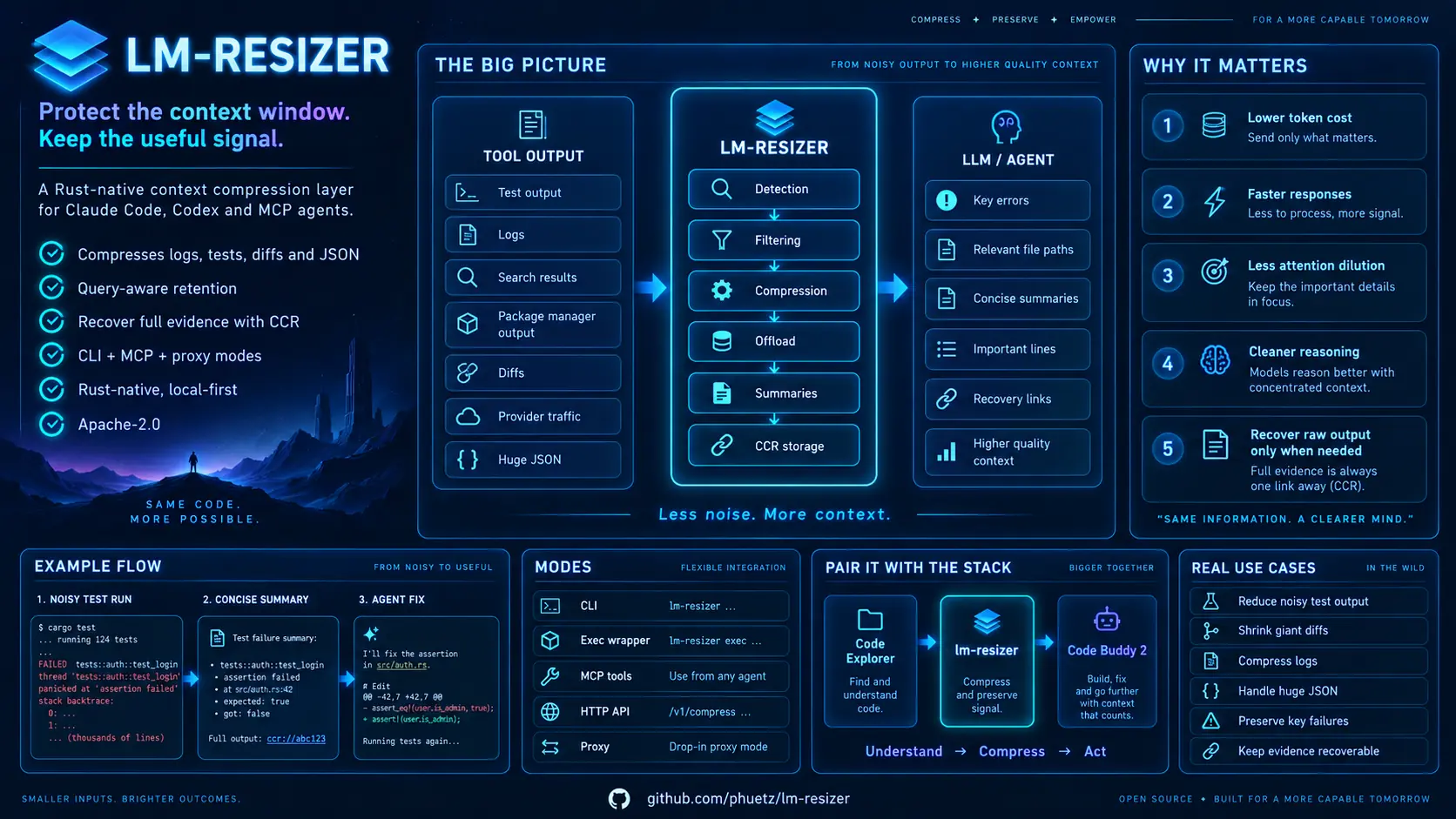
Shorten noisy command output before it reaches your coding agent — and never lose a failure. LM Resizer is a fast, local Rust CLI for developers who drive tests, builds, Git, containers and other tools through an AI coding agent such as Claude Code, Codex, Cursor, Gemini CLI, an MCP client or a custom pipeline. It runs a command, keeps a compact result for the agent, and stores the original for instant recall: the bytes and the order of each stream are exact, while the order between stdout and stderr is guaranteed only in the default mode (see Recover the exact output).
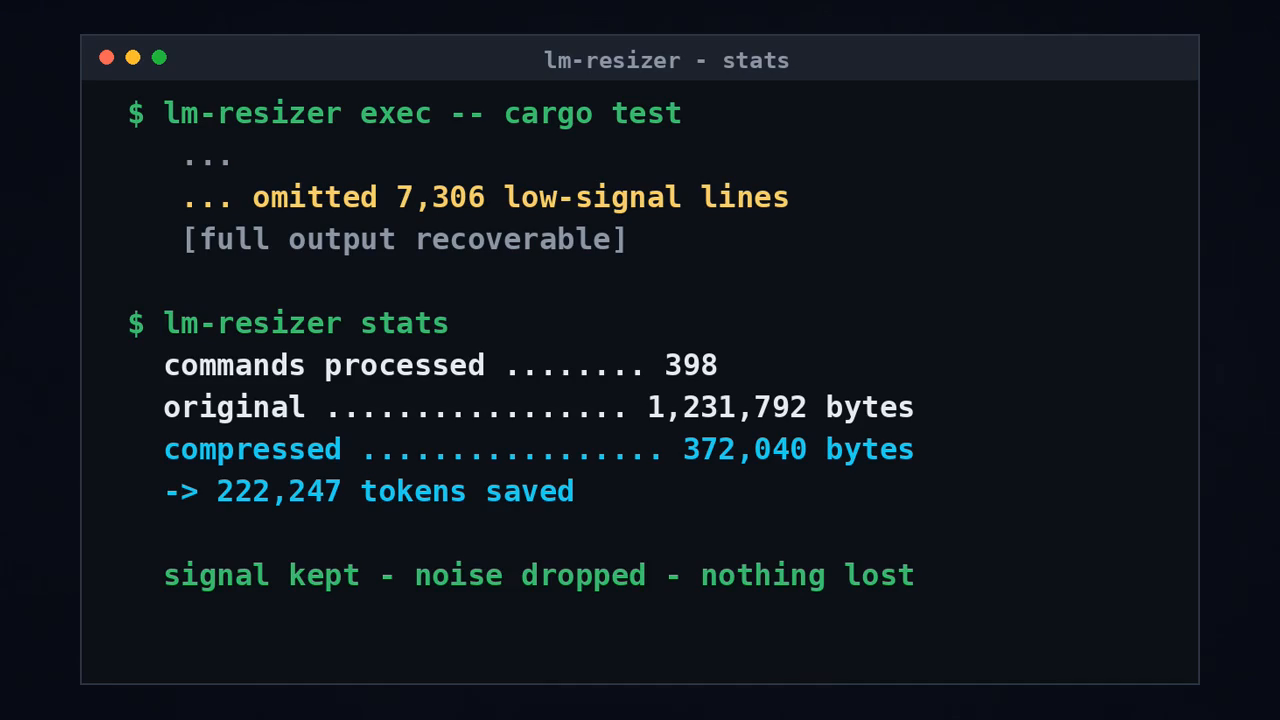
On a benchmark of 61 command captures it saves a mean of 27.61% of tokens (median 4.87%) with the raw recovery included, keeps the producer's exit code in 61/61 cases and starts in about 5 ms (lm-resizer --version; an exec run also launches the wrapped command and takes about 20 ms). Zero telemetry, 100% local, deterministic.
Français · Comparison benchmark
Install
Prebuilt binary for Linux and macOS:
curl -fsSL https://raw.githubusercontent.com/phuetz/lm-resizer/v0.2.6/install.sh -o install.sh && sh install.sh
export PATH="$HOME/.local/bin:$PATH"
lm-resizer --version
Windows PowerShell:
irm https://raw.githubusercontent.com/phuetz/lm-resizer/v0.2.6/install.ps1 | iex
The installer verifies the archive's SHA-256 checksum and binary version before placing lm-resizer in ~/.local/bin by default. Prepared platforms are Linux x86_64, macOS x86_64/arm64 and Windows x86_64.
On Linux and macOS the installer prints the line to add when ~/.local/bin is not on your PATH; to make it permanent in Bash, run echo 'export PATH="$HOME/.local/bin:$PATH"' >> ~/.bashrc (use ~/.zshrc for zsh) and open a new terminal. The Windows installer updates the user PATH. LM_RESIZER_INSTALL_DIR selects another destination. To uninstall a prebuilt binary, remove it from that destination. Windows: TLS fallback, PowerShell 5.1 and byte-exact recovery.
See it work
tool-output filters output that a host already captured. The reduced view keeps the failing test and points to the exact original:
$ lm-resizer tool-output --command 'cargo test' --exit-code 101 --input bench/corpus/cargo_fail.txt
FAILURES (1):
1. ---- parse::reject_empty stdout ----
thread 'parse::reject_empty' panicked at src/parser.rs:42:9:
assertion `left == right` failed: expected=422 observed=200

test result: FAILED. 70 passed; 1 failed; finished in 0.09s
[tee:78bf04f25902] lm-resizer tee read 78bf04f25902
The same command run on the 78-line file reports 792 original tokens and 80 compressed tokens. Four bundled captures, measured on this machine with o200k_base:
Reproduce any row with lm-resizer tool-output --command '<command>' --input <file> --json: the JSON reports original_tokens, compressed_tokens and tokens_saved with token_count_method: "exact". git_log.txt comes back unchanged: the git log view shows every commit, and on this history that saves no token, so the raw text is kept.
Why LM Resizer? (compared with a reference CLI filter and Headroom)
Two other tools are commonly used to shrink command output: a command-output filter (the pinned reference, named in the benchmark) and Headroom. Their own published numbers are reproduced in bench/native/windows-release/delivery.md on the same 61 captures, tokenized with o200k_base, raw recovery included:
LM Resizer's replayed median (4.87%) and mean (27.61%) are both below the reference filter's (15.81% and 32.61%) on this corpus. Since 0.2.6 git log is shortened only in a simple direct call: git [-C dir] log run by exec, with only --decorate, --all, -n N, -N, revisions, ranges or -- paths, and no format.*/log.* key in the Git configuration. For any other option, wrapper, shell, script, recipe runner, pipe or tool-output, the body stays raw; a nonzero exit code may add a [FAIL] header, and a tee reminder may follow the output, where the reference filter still shows only the first commit (five captures that counted 91-97% saved now count 0%). A program without a native view keeps its raw body, except that a whole JSON document or at least twenty lines all prefixed with a log level may be re-encoded or folded. Recipe runners such as make and npm run/npm test keep their raw body too (limits). A test runner that exits with code 0 is returned raw as well: a passing test can print anything, a relayed git log or a security warning, that a summary would hide; a failing run keeps the reduced view. Long patches retain the opening diagnostic window and keep the complete original in tee; compiler diagnostics stay intact, and failing test views keep each failure block (their other losses are measured in the limits). The reference filter returns exit code 0 in 9 of the 61 captures where the producer failed; LM Resizer keeps the producer's code. On one capture LM Resizer returns 251 tokens against the reference filter's 40 because it states the 457 collection errors and lists the first ten failing files, which it omits. Headroom compresses LLM API context semantically and has no dedicated CLI tool filters, so its median saving on this command corpus is 0.00%. Strict view equality is 34/61; the twenty-seven differences and their reasons are listed in the benchmark file, and the benchmark's strict checker exits 1 by design. The numbers are replayed in one step with bench/real/rejouer.sh (isolated Python with tiktoken, comparison executable built from the pinned archive, replay in a fresh directory, summary of medians, recoveries and exit codes; network needed the first time, --sans-headroom skips the Headroom column); the benchmark's Python script alone needs its arguments, see the benchmark.
Try it on your project
exec runs a command, gives the agent the shortened view and keeps the original. The examples below assume the wrapped tools are present: git and a current directory inside a Git repository (outside one, Git itself fails with exit 128 and there is nothing to shorten), and a Rust project with Cargo for cargo test. If a wrapped command is not installed, exec says cannot execute <name>: command not found and exits 127.
Check the install works anywhere, with no repository needed:
On Windows, use lm-resizer exec -- cmd.exe /d /c echo hello for the first example.
lm-resizer --version
lm-resizer exec -- echo hello
lm-resizer tee list
On Windows echo is a built-in of cmd and PowerShell, not a program, so exec cannot launch it: use lm-resizer exec -- cmd /c echo hello.
Then, from a Git repository and from a Rust project:
lm-resizer git log -20
lm-resizer exec --raw-on-failure -- cargo test
lm-resizer gain --history --project
gain can start negative: on a tiny output the view and the recovery line cost more tokens than the original. Real outputs turn the total positive.
For any producer, lm-resizer err|test|summary -- <command> keeps diagnostics or test totals with adjacent context and a failure status header. exec and tool-output apply a dedicated view where one exists; any other program, script, wrapper, shell line or recipe runner is returned raw, and the summary applies only on request (summary). Every output remains recoverable with tee read. gain shows measured command and token totals; gain --json returns the full counters. See the CLI reference.
For scripts, use lm-resizer gain --json.
exec preserves the producer's status (128 + signal on Unix). With --stream or --raw-on-failure, stdout and stderr are captured separately. Before filtering, the text contains stdout, then a [stderr] boundary, then stderr. Some views, including test and search views, remove that boundary, so the final view does not always identify each line’s stream. When both streams are present, a final annotation says that the displayed order is not chronological. JSON streams reports their byte counts; its layout describes the text before filtering, not necessarily the final view.
The diagnostic guarantee
LM Resizer shortens, it does not hide. Command views keep literal numbers, paths, identifiers and commit authors. A test runner that exits with code 0 is returned raw, byte for byte (rule validated on 9 October 2026): a passing test can print anything. A failing run keeps the runner's reduced view, which shows the failures but not every line: cargo test keeps every line outside its known grammar, while pytest and jest still drop lines outside their failure blocks (measured limits). When the command asks to display test output (cargo test -- --nocapture, pytest -s, go test -v…) or the runner has no capture (rspec, minitest, Maven test phases, playwright test), the output is returned raw (limits). If a compression step would omit a failure line, the filtered body is kept and, where the saving allows it, a [tee:<id>] line points to the untouched original. A view that contains a diagnostic can therefore show little or no saving — that is intentional. The internal step names (diagnostic-guard, kept_filtered, diagnostic_reinjection) and the raw_on_failure path are listed in the CLI reference.
lm-resizer expand -i view.txt reconstructs reversible views, including Patch v1 and Patch v2 histories and diffs: shared file headers and identical runs are factored without dropping source or context lines.
Recover the exact output
exec drains output through EOF, without a 10 MiB ceiling. The tee contains the producer bytes only: it never includes the view's [stderr] boundary or capture annotation. By default exec drains one shared pipe, so the tee keeps the producer's write order. In separate-stream modes (--stream, --raw-on-failure), each stream's bytes are exact and in order, but chunks are archived in drain order: the order between stdout and stderr is not guaranteed, and a chunk of one stream can fall inside a long line of the other. A sufficiently reduced view may display [tee:<id>]; read it with lm-resizer tee read <id>; otherwise tee list and the JSON tee_hint field provide recovery without adding tokens to the view.
tee list is ordered by file name, which is a hash of the content, not by date: its first entry is not "the last output". Take the identifier from the view ([tee:<id>]), from the tee_hint field of a --json report, or from the [raw: …] marker, then read it:
lm-resizer tee list
lm-resizer tee read e3b0c44298fc
lm-resizer --version reports lm-resizer 0.2.6. JSON recovery metadata uses a marker such as [raw: e3b0c44298fc]; the archives have a .log extension.
Agent integrations
The CLI also offers compress for files or standard input and tool-output for already captured command output, plus opt-in MCP, HTTP and agent hook integrations. install --client all --scope project also writes Codex user configuration and replaces an existing mcp_servers.lm_resizer table without backup; save it before installation. See the agent integration guide, the release guide and additional agent hooks for those workflows. Every option, command and variable shown by --help is listed in the CLI reference.
Copyable examples from this checkout (Bash):
printf 'hello world\n' | lm-resizer compress
git log -20 '--format=Date: %ad%n%h %s' --date=short | lm-resizer tool-output --command 'git log -20'
compress reads text from stdin; tool-output filters already captured output. Its --command argument describes the command and does not execute it. Small output may stay unchanged.
To configure the four MCP clients (Claude Code, Codex, Cursor and VS Code) from your project root, after backing up any existing Codex configuration:
lm-resizer install --client all --scope project
This writes project files and your account's Codex configuration, including with --scope project. Gemini CLI is not covered by install: use lm-resizer init --client gemini --project-dir . (agent hooks guide).
Hooks and permissions
The agent hooks (lm-resizer init-native-hooks, lm-resizer install-hooks) rewrite a supported Bash command into lm-resizer exec -- <command>. For Claude Code the hook only rewrites: it does not grant permission, so Claude Code asks for approval of the rewritten command like any other (checked on Claude Code 2.1.294). Only Codex requires the hook to answer permissionDecision: allow. For Cursor the hook answers permission: "ask", never allow; Cursor documents ask as not enforced for preToolUse, so its effect there is unverified. The rewritten command no longer matches a permission rule written for the original: a deny rule such as Bash(cargo test) does not stop lm-resizer exec -- cargo test. Add a deny rule for the wrapped form too, for example Bash(*exec -- cargo test*), or do not install the hook. Only a command that a view really reduces is rewritten, and never one that can prompt or never end (git push|pull|fetch, git credential, npm test, npm run server, make run-server, docker run, docker compose exec -T, ssh, sudo, Terraform without -input=false…): exec would hold its prompt or its log until it exits (list). See SECURITY.md.
The hook rewrites a command only when it is one simple command. With cd <dir> && …, a pipe such as | tail, a redirection or &&, it leaves the line raw: nothing is shortened and nothing breaks. Agents often write cd <dir> && cargo test 2>&1 | tail; to benefit from the hook, have them run the bare cargo test from the project directory.
Reproducible token statistics
lm-resizer stats --markdown reports exact text token counts using the existing tiktoken-rs / o200k_base tokenizer (GPT-4o family). exec, tool-output and compress JSON expose original_tokens, compressed_tokens, signed tokens_saved, tokenizer and token_count_method: "exact". Counts include the final recovery markers; a negative saving means the output uses more tokens. This reference encoding is not a claim about Claude, Llama or provider billing.
New execution history records persist both counts. Stats keep existing byte counters and JSON fields, and add measured token totals and measured_commands / unmeasured_commands. Old records lack the text needed for recounting: their estimated_tokens_saved remains an explicitly labelled historical estimate, separate from measured totals. discover, discover-sessions, eval and learn tokenize available original and filtered text; these are prospective filter savings. For JSON compatibility, estimated_tokens_saved in discovery/evaluation is an alias of the exact prospective tokens_saved, not a byte estimate.
Counting method, compatibility and reproduction. The parity benchmark above uses o200k_base.
Native filters and current measurements
The product uses its own Rust and TOML filters. Explicit inspection commands include err, test, summary, json, deps, env, format, outline and dedup. File reads remain literal. For a program without a native view only a whole JSON document (re-encoded as a table or compacted) and runs of at least twenty lines all prefixed with a log level are folded; other output from an unknown program and recipe runners keeps its raw body. A nonzero code may add a [FAIL] header, and a tee reminder may follow the output. Syntax outlines and exact repeated-message folding are opt-in.
Mean saving including tee: 27.61%. Median saving is 4.87%; all 61 raw recoveries and producer exit codes pass, and startup measures about 5 ms for lm-resizer --version and about 20 ms for lm-resizer exec -- echo hello (median of 60 runs, Linux, release build, loaded machine). These corpus medians are not a claim about arbitrary live repositories. Current measurements, exact differences and limitations.
env masks names containing PASSPHRASE (including PASSPHRASE_FILE) and a PASS name component. This deliberately also masks benign names such as PASS_COUNT; filtering is conservative, based on names and credential URL shapes.
Install from source
The CLI requires Rust 1.91 or newer; rust-toolchain.toml pins 1.95.0 with rustfmt and clippy. Use official rustup when the distribution compiler is older.
Install these system prerequisites before Rust:
- Debian 13 / Ubuntu:
curl, HTTPS certificates, Git, a C compiler (cc/gcc), a C++ compiler (c++/g++), libc headers and a linker (binutils, pulled in by GCC). In a terminal with sudo (or as root withoutsudo):
sudo apt-get update
sudo apt-get install -y --no-install-recommends ca-certificates curl git gcc g++ libc6-dev
- macOS: install Xcode Command Line Tools (
xcode-select --install), which provide Git, Clang/Clang++, headers and the SDK. Finish the installation dialog before continuing. - Windows x86_64: install Git for Windows and Visual Studio Build Tools with Desktop development with C++, MSVC C++ x64/x86 tools and the Windows SDK. Keep existing installations if these components are already available.
The build was checked on Linux x86_64 with Rust 1.95.0. Other platforms have not been reverified.
Download the public tagged sources (Bash or PowerShell). lm-resizer keeps its state in ~/lm-resizer, so clone from another directory (for example mkdir -p ~/src && cd ~/src in Bash, or New-Item -ItemType Directory -Force "$HOME\src" | Set-Location in PowerShell) rather than from your home folder:
git clone --branch v0.2.6 https://github.com/phuetz/lm-resizer.git
cd lm-resizer
Run the Rust blocks below from this checkout's root. If you already have a checkout, do not clone it a second time.
Linux/macOS (Bash):
curl --proto '=https' --tlsv1.2 -sSf https://sh.rustup.rs | sh -s -- -y --no-modify-path --profile minimal --default-toolchain 1.95.0
. "$HOME/.cargo/env"
cargo --version
cargo install --quiet --path . --locked --root "$HOME/.local"
export PATH="$HOME/.local/bin:$PATH"
lm-resizer --version
Windows x86_64 (PowerShell):
$rustupInstaller = Join-Path $env:TEMP 'rustup-init.exe'
Invoke-WebRequest -Uri 'https://static.rust-lang.org/rustup/dist/x86_64-pc-windows-msvc/rustup-init.exe' -OutFile $rustupInstaller
& $rustupInstaller -y --no-modify-path --profile minimal --default-toolchain 1.95.0
$env:Path = "$(Join-Path $env:USERPROFILE '.cargo\bin');$env:Path"
cargo --version
$installRoot = Join-Path $env:USERPROFILE '.local'
cargo install --quiet --path . --locked --root "$installRoot"
$env:Path = "$installRoot\bin;$env:Path"
lm-resizer --version
If Rust is missing or too old, the rustup steps at the start of your platform block install the repository's selected toolchain. If rustup is already installed and its bin directory is on PATH, you can skip those steps. --no-modify-path leaves your profile files and permanent PATH intact; subsequent commands set PATH for the current terminal only. When distribution Rust is already installed, rustup may print cannot install while Rust is installed, followed by continuing (because the -y flag is set and the error is ignorable). rustup reports the error as ignorable and continues because of -y: check the exit code and cargo --version after sourcing .cargo/env; it should report 1.95.0. The distribution Rust remains installed. Official Rust installation instructions.
Cargo downloads dependencies into ~/.cargo (%USERPROFILE%\.cargo on Windows) even when a build fails; rustup stores compilers in .rustup. These caches are separate from the .local install prefix. If Cargo is not 1.95.0 in this checkout, check PATH (command -v cargo in Bash, Get-Command cargo in PowerShell), rustup show active-toolchain and any RUSTUP_TOOLCHAIN override. Stop if cargo install fails: the examples and uninstall command below require a successfully installed binary. If ~/.local/bin/lm-resizer already exists (for example after a prebuilt install), Cargo refuses with binary lm-resizer already exists in destination; remove that file or rerun with --force.
To remove a binary installed with Cargo:
cargo uninstall --root "$HOME/.local" lm-resizer
Windows (PowerShell):
cargo uninstall --root "$installRoot" lm-resizer
Uninstall
Undo what you installed, in this order.
- Hooks, per project:
lm-resizer uninstall-hooks --client all --project-dir .
This removes the guidance blocks, the generated helpers and the native hook files of the five clients (Codex, Claude, Gemini, Copilot, Cursor) when they are still exactly as generated, for the current binary or for the binary path written in the file; a hand-edited file is left alone.
- MCP servers, with the same client and scope as
install:
lm-resizer uninstall --client all --scope all --project-dir .
--scope all covers the project and the global configurations (project or global alone also work). This removes only the lm-resizer entry from .mcp.json and .cursor/mcp.json (key mcpServers), from .vscode/mcp.json (key servers) and the [mcp_servers.lm_resizer] table of ~/.codex/config.toml (Codex is global even with project); other servers stay, and a file left empty is deleted.
- Recorded data. Raw-output archives, command history and the CCR database live in the state directory:
~/lm-resizerby default, orXDG_STATE_HOME,LOCALAPPDATAorLM_RESIZER_STATE_DIRwhen set. Delete the archives, then the directory:
lm-resizer tee purge --all
- The binary:
cargo uninstallas shown in "Install from source", or delete~/.local/bin/lm-resizer.
When not to use it
- Do not treat a shortened view as a complete audit trail: inspect the saved original for security, compliance or subtle failures.
- Do not expect savings on every input. Short commands and text with little repetition may stay unchanged.
- Token reductions on command outputs do not guarantee proportional API invoice savings or benchmark task success: real-world agent costs also depend on multi-turn context caching and prompt structure. Neither agent tasks nor billing were tested here.
LM Resizer is Apache-2.0 licensed. Contributing · Security