
pump-sim
Open-source simulator of Companytec fuel concentrators, faithful to the protocol and to SimuladorCBC 2.7.2.
Quickstart
macOS / Linux (Node 22+), no install:
npx pump-sim --profile simulador-2.7.2 --ui
Windows: download pump-sim-win-x64.exe (with its .sha256) from the
latest GitHub release and double-click it;
no Node needed.
From source (to work on the code):
git clone https://github.com/gmartinu/pump-sim && cd pump-sim
npm install && npm run build && npm link
pump-sim --profile simulador-2.7.2 --ui
About
Open-source simulator of Companytec fuel concentrators (CBC01–CBC06, Horustech, Concept). It speaks the protocol like SimuladorCBC 2.7.2 and like the real consoles (DT435/DT432), and is meant for testing any forecourt software. It does not depend on any POS.
- Node 22+, strict TypeScript, no native dependency (Mac, Windows, CI).
- The core (
src/core) knows nothing about protocols. The codecs live insrc/protocols. - Profiles (
src/profiles) are data:simulador-2.7.2,cbc-32,cbc05-dip3,cbc01,horustech-cbc-36,horustech-48,concept-48. - The 2.7.2 bugs are quirks, on by default only in the
simulador-2.7.2profile. - The clock is injectable (
ManualClockin tests), so everything is deterministic.
Not affiliated with or endorsed by Companytec. MIT license (LICENSE).
Current state: Companytec (&…), Identfid (?…) with the 14 identification modes, and native
Horustech >? only for functions 02/06/32 (the ones the 2.7.2 handles). TCP server with the
profile's ports: 2001/1771/857 at the same time, with a pointer per port, on the real consoles;
one port at a time (2001/1771/7002) and a single pointer on simulador-2.7.2.
Profiles
Running
pump-sim --profile simulador-2.7.2                 # listens on 2001 (or --ports 1771 | 7002)
pump-sim --profile horustech-48                    # 2001, 1771 and 857 at the same time
pump-sim --profile cbc-32 --ports 2001,1771 --control 7070 --record trafego.jsonl
pump-sim mcp --control http://127.0.0.1:7070       # stdio MCP server (the API also serves MCP at /mcp)
pump-sim --listar-perfis
(pump-sim = npx pump-sim, or node dist/cli.js from source.) Quick test: printf '(&S)' | nc 127.0.0.1 2001.
CLI logs go to stderr. --relogio-manual stops the clock: time only moves through the
avancar_tempo command, which makes a client's CI deterministic.
Web UI (--ui)
pump-sim --profile simulador-2.7.2 --ui            # simulator on 2001, API + UI on 127.0.0.1:7070, opens a window
pump-sim --profile horustech-48 --ui --sem-abrir   # only prints "UI em http://127.0.0.1:7070/"
pump-sim --ui --lembrar                            # starts from the last profile/port/equipment and keeps saving it
The UI is served by the control API itself (/, /ui/*, same loopback rules) and drives the
simulator only through it: commands over the WS, a 300 ms poll of get_estado_simulador/get_displays
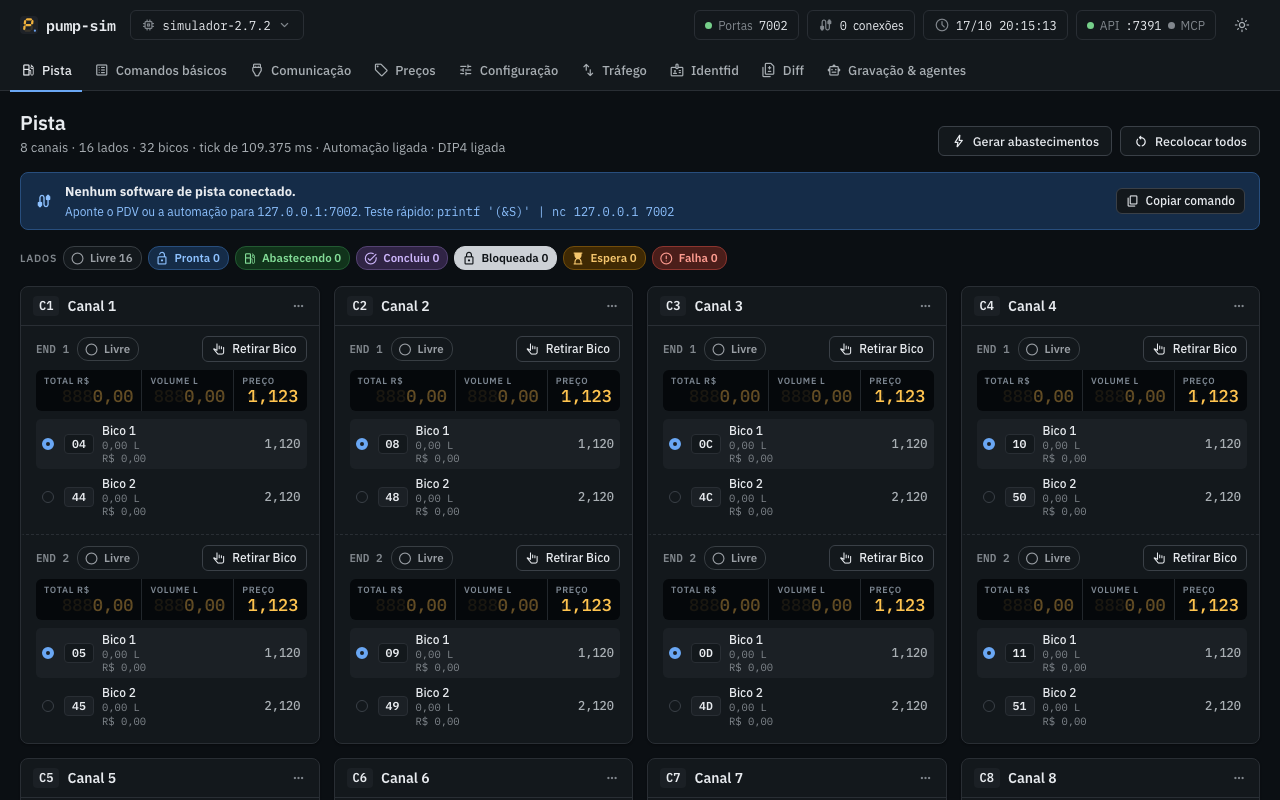
and the live trafego/falha events. Tabs: Pista (the 2.7.2 panels; compact grid for 12-channel
profiles), Comandos básicos, Comunicação, Preços, Configuração, Tráfego (console + fault injection),
Identfid, Diff, Gravação & agentes. No build step: the files in ui/ are plain ES modules. Fonts and icons are bundled in ui/fonts/: the page loads nothing outside loopback.
--gravacoes <pasta> sets where the UI records (default ./gravacoes). The Windows executable
(Node SEA) with no arguments behaves as --ui --lembrar (see below). Details: DECISIONS §19.
Windows executable
One file, pump-sim-win-x64.exe (Node 22.20.0 single executable application with the UI inside):
double-click it and it starts as --ui --lembrar (simulator on 2001, UI on http://127.0.0.1:7070/,
or the first free port up to 7089 when 7070 is taken,
in its own window without the Windows title bar; last configuration in
%APPDATA%\pump-sim\ultima-config.json). The window is a small WebView2 host embedded in the
executable (tools/window-go): the UI's top bar drags it and carries
minimize / maximize / close, it resizes and snaps like any Windows 11 window and remembers its size and
position in %APPDATA%\pump-sim\janela.json. Without the WebView2 Runtime (it ships with Windows 11
and current Windows 10) the UI opens in an Edge app window, then Chrome, then the default browser.
The executable is the double-click app: it is a Windows GUI program, so no console window opens.
Closing its window stops the simulator; with the browser fallback, use ⋮ → Encerrar pump-sim in the top bar
(it asks first, closes the ports and ends the process). Everything
it would print goes to %LOCALAPPDATA%\pump-sim\logs\pump-sim.log (UTF-8, rotated at 5 MB, 3 old files
kept), which the UI shows in Gravação & agentes → Log do executável → Ver logs. A fatal startup
error opens a dialog that names the log file.
On Windows the command line is npx pump-sim (Node 22+), not the executable: run from a terminal,
the executable does not print anything (a GUI program has no console to write to). Arguments still
work (pump-sim-win-x64.exe --profile cbc-32 --ports 2001 starts that configuration, with its output in
the log), and pump-sim-win-x64.exe --help writes the help to the log and opens it in Notepad
(%LOCALAPPDATA%\pump-sim\logs\ajuda.txt). Redirected output (> saida.txt) still receives it.
Build it on any OS with Node 22.20.0 exactly (the SEA blob follows the Node version):
npm run build:sea:win                                   # → build/sea/pump-sim-win-x64.exe
npm run build:sea:win -- --cache <dir> --out <file.exe> # reuse a download folder / pick the output
It bundles dist/cli.js with esbuild into build/sea/pump-sim.cjs, builds the window host with Go
(tools/window-go, so the build also needs Go, version in its go.mod), lists every file of ui/ and the
host (with its sha256) as SEA assets, downloads node-v22.20.0-win-x64.zip from nodejs.org, checks its sha256 against
SHASUMS256.txt (stops on mismatch), removes node.exe's Authenticode signature and injects the blob
with postject, then sets the pump-sim icon (tools/icon/pump-sim.ico) and version info with resedit,
switches the PE subsystem from console to Windows GUI (recomputing the PE checksum, tools/pe.mjs)
and reads the PE back to check them. The bundle also runs on its own: node build/sea/pump-sim.cjs --ui.
The raster icons come from ui/icone.svg; after changing it, run node tools/gen-icons.mjs (needs
Chrome) and commit the outputs.
A local build is not signed. On first run Windows SmartScreen shows "O Windows protegeu o
computador" ("Windows protected your PC"): click "Mais informações" ("More info") → "Executar assim
mesmo" ("Run anyway"). A file downloaded from a browser or chat may also need right-click →
Properties → "Desbloquear" ("Unblock"). Release builds are not code-signed yet either (see Code signing). Windows Firewall may ask about port 2001 (the simulator
listens on 0.0.0.0; the UI and control API stay on loopback): allow private networks for a bench PDV
on another machine, or cancel for same-machine use.
Releases
The npm package pump-sim is released only through the release workflow on a v* tag: CI stages
the version with npm stage publish over npm Trusted Publishing (no long-lived token, stage-only
permission) with a provenance attestation linking it to the commit and workflow run that built it,
and a maintainer approves it, with 2FA, in the Staged Packages tab on npmjs.com before it goes live.
Code signing
Release executables are built by GitHub Actions from this repository only. They are not
code-signed yet: the SignPath Foundation application is pending, so Windows SmartScreen warns on
first run (see above) and each release says so in its notes; verify the download against its
.sha256. Once approved, releases will be signed through SignPath: free code signing provided by
SignPath.io, certificate by SignPath Foundation.
Roles, approval and privacy statement: CODE_SIGNING.md. A new certificate may
still show a SmartScreen warning until it builds reputation.
Control API (--control <port>)
HTTP + WebSocket on 127.0.0.1 (--control-host changes it). No framework (node:http + ws).
Reply: { "ok": true, "resultado": … } or { "ok": false, "erro": "…" } (400 argument,
404 nonexistent nozzle/instance, 409 state does not allow it).
Security: the API has no authentication and some commands write files (start_recording).
That is why it listens only on 127.0.0.1, allows no CORS, refuses (403) a non-loopback
Origin (HTTP and WS) and a non-loopback Host (DNS rebinding), requires
content-type: application/json on POST (415) and only accepts GET /api/comandos/<nome> for
commands of the leitura group (405). Only change --control-host on a trusted network.
The catalog (src/control/catalogo.ts) is the full command inventory (K18–K26 included, DECISIONS §4). Groups:
- leitura (reads; no socket and no pointer changes):
get_status,get_visualizacao,get_abastecimento(layouts a52/a34/a36/a67/dupla/paf1/paf2/a4/lr/lc/h02),list_abastecimentos,get_ponteiros,get_encerrante,get_precos,get_config_bico,get_serie,get_ids_abastecimento,get_relogio,list_cartoes,get_cartao,list_cartoes_desconhecidos,get_lista_negra,list_eventos,get_sensores,get_bombas,get_equipamento,get_estado_simulador,get_log_comunicacao,list_conexoes(K19),get_displays(K25),list_gravacoes,list_roteiros_diff… - protocolo (the effect of the request, without a TCP client):
incrementar_ponteiro,set_ponteiro(K18),set_modo,set_preco,preset,preset_identificado,gravar_cartao,excluir_cartao,limpar_cartoes,lista_negra,set_relogio,configurar_endereco,configurar_bico(K22),configurar_sensor,gravar_encerrante,carregar_config_padrao,enviar_comando_cru,enviar_pela_porta. - controle (physical):
retirar_bico,recolocar_bico,alternar_bico,abastecer,gerar_abastecimentos,limpar_buffer,apresentar_cartao,set_falha_endereco,set_automacao,set_rede_ac,set_bateria,set_dip,set_velocidade,set_relogio_simulado,avancar_tempo,injetar_evento/ciclo_energia(K21),reiniciar_processo(2.7.2 restart, DECISIONS §36),set_quirk,set_modelo/set_firmware(K26). - infra:
injetar_falha,limpar_falhas,desconectar,travar/liberar_travamento,configurar_travamento,set_perfil,abrir_porta/fechar_porta,gravar_inicio/gravar_fim,replay/replay_parar,snapshot_salvar/snapshot_carregar,reset,diff_executar,aguardar_estado,importar_simcnf/importar_log(K20),criar_sim/remover_sim.
bico accepts "04" (BB code in hex), {canal, endereco, posicao} (position 1..4) or
{numero} (lane nozzle). Every command accepts sim_id (default default).
Faults (injetar_falha): sem_resposta, atraso (ms), frame_corrompido/truncado (bytes),
checksum_errado, fragmentar (partes, ms), resposta_dupla, erro (codigo: ?t, ?b…),
desconectar (rst|fin), travamento (modal MessageBox: ms, or without ms until
liberar_travamento; on simulador-2.7.2 the frame that opened it gets no reply and the others
are still served, as in the 2.7.2 modal loop; on real profiles it freezes everything). They match by port and by frame prefix ("&S", "?A", ">?", "*"),
apply vezes times (default 1, or "sempre") and with probabilidade (seeded PRNG). param.aplicar: false keeps the frame from even reaching the simulator.
MCP
The control API serves MCP over streamable HTTP at http://127.0.0.1:<control-port>/mcp, in the
same process (on by default; --sem-mcp-http starts it off, and "Gravação & agentes" in the UI switches
it at runtime and shows the connected clients). The tools are the catalog above. Same rules as the rest
of the API: loopback only, foreign Origin/Host refused, JSON-only POST.
claude mcp add --transport http pump-sim http://127.0.0.1:7070/mcp
{ "mcpServers": { "pump-sim": { "type": "http", "url": "http://127.0.0.1:7070/mcp" } } }
Use the actual control port (the UI's "Copiar config" fills it in, also after a fallback to 7071+), for
Claude Code, Claude Desktop, Cursor and VS Code. pump-sim mcp --control http://127.0.0.1:7070 is the
stdio variant (for clients that only start stdio servers, such as Claude Desktop's config file): each
call becomes a POST /api/comandos/<tool>.
{ "mcpServers": { "pump-sim": { "command": "npx", "args": ["-y", "pump-sim", "mcp", "--control", "http://127.0.0.1:7070"] } } }
Recording and replay
--record arquivo.jsonl (or gravar_inicio) records all raw traffic. One line per event:
{"ts":1792204202055,"porta":0,"conexao":0,"dir":"meta","bytes":"","meta":{"formato":"pump-sim/trafego@1","perfil":"cbc-32"}}
{"ts":1792204202733,"porta":2001,"conexao":1,"dir":"abre","bytes":""}
{"ts":1792204202733,"porta":2001,"conexao":1,"dir":"rx","bytes":"28265329","texto":"(&S)"}
Replay:
pump-sim replay servidor trafego.jsonl [--velocidade 1] [--mapa 2001=3001]   # plays the recorded concentrator
pump-sim replay cliente  trafego.jsonl --alvo 127.0.0.1:2001                  # sends the rx and compares with the tx
The server matches per frame using the recorded profile's framing (meta.enquadramento, or the Q1
of meta.perfil): fluxo on real profiles (reassembles fragments) and leituraUnica on the 2.7.2 (each
read is one command); --enquadramento forces it. It returns the tx that followed the same frame
in the recording, in order; a frame never seen = silence. The client opens one connection per recorded
connection and lists the byte-by-byte divergences (non-zero exit if there are any).
Differential test
pump-sim diff --listar
pump-sim diff --a 127.0.0.1:2001 --controle-a http://127.0.0.1:7071 \
              --b 127.0.0.1:7002 --controle-b http://127.0.0.1:7070 --casos DIFF-05,DIFF-07
pump-sim diff --a 192.0.2.10:2001 --b 127.0.0.1:2001 --casos DIFF-03,DIFF-09 --interativo --json rel.json
The script (src/diff/roteiros.ts) holds cases DIFF-01..20 and DIFF-30,
BANCADA-1710 and the EQUIV-* cases. Each case runs whole on target A and then on B, with new
connections, and every reply is compared byte by byte. Steps:
acao(src/diff/acoes.ts): a click on the 2.7.2 UI (canal,aba,bico_radio,retirar,recolocar,abastecer,dip,velocidade,modelo,automacao,porta,config_padrao,fechar_modais). On a target with a driver (--controle-a, the bench driver) it becomesPOST /acao; on a target with the pump-sim API (--controle-b) it becomes the equivalent commands (the panel button with the driver's semantics: idempotent by caption, waits up to 4 s for "Abastecendo.."/"Aguarda liberação" or the rest captions); with neither,--interativoasks the operator, or the step is skipped and listed.manual: what the driver does not cover (IDF/card through the UI) and pump-sim-only commands (soPumpSim, e.g. holding the modal); against the driver it is skipped with the reason.drenar:(&A)/(&I)until(0)(the(&A)ends on its), the silent(&I)waits 50 ms) at the start of each case (exceptBANCADA-1710, which assumes a freshly opened target), to clear records from earlier rounds.
How long each reply is listened for (docs/DECISIONS.md §25):
a reply ends as soon as its protocol frame is complete (the closing ) of Companytec/Identfid, the
length of a Horustech >! reply); only &R (several groups), a send with two frames and a fragmented
send keep the 150 ms idle tail. A step the bench recorded as silent (silencio, or esperado: null)
waits --timeout-silencio (400 ms) instead of --timeout (1 s), unless it sets its own timeoutMs
or a fechar_modais follows it. Bytes that arrive after a reply was declared complete are reported on
the next step as atrasados, never dropped in silence.
The &S battery byte is masked (it changes every tick on the 2.7.2), and so are the fields only the
clock writes (mascara on a step: record duration and hh:mm, the &R time, and the KK over them);
nothing else is masked. A failing action shows up in the report without stopping the diff.
Cases normalize the state they read (configPadrao, totalizers zeroed with &E, the clock set with
&KW, R$ presets so fueling volumes are the same on both targets), but BANCADA-1710 (the first case)
and the empty-position steps of DIFF-08 need freshly opened targets: restart the 2.7.2 and pump-sim
before a full run. Triage of the first full run: docs/DECISIONS.md §20. DIFF-17 does --diff17-n fuelings in Rápido through the screen
(default 1001, ~2 h). Non-zero exit if there is a divergence.
Long runs survive the process dying midway (host sleep, killed process):
- With
--json rel.json, each case's result is appended torel.json.partial.jsonl(one JSON line per case, fsynced) as soon as the case ends. The finalrel.jsonis still written at the end, as before. --retomar rel.json.partial.jsonlskips the cases already in that file, appends the new ones to it and puts all of them in the final report. A line cut off mid-write is ignored (that case runs again), and a case recorded as skipped for an unavailable port is retried.- If one side cannot connect to a port a case needs (e.g. DIFF-30 on 1771/857 against the 2.7.2, which
only listens on its configured port), the case is marked
pulado: porta indisponível(with the target, address and error inmotivo) and the run goes on. --drenar-antesdrains pending fuelings on target A (thedrenarstep) before the first case; it shows up among the first case's actions.--alvo-a wine: target A is the real 2.7.2 running under Wine, whose flow timer ticks every 100.0 ms (109.375 ms on Windows, 8.6% apart). Only onvazao-livresteps (a volume read after a fueling with no preset), the volume, amount, totalizer and duration fields of&V/&A/&LR/&@replies compare within ±10% (the totalizer by the record's volume, not by its own value); every other byte stays exact and each side's KK must check. Such a step is reported≈ … [igual (tolerância wine): L6 299→305 +2.0%, …]and counts as equal. The default (windows) and the recorded oracle stay byte-exact (docs/DECISIONS.md §26, bound widened in §30).
pump-sim diff --a 192.0.2.10:2001 --controle-a http://192.0.2.10:7071 --b 127.0.0.1:2001 \
              --controle-b http://127.0.0.1:7070 --drenar-antes --json rel.json
# after a crash:
pump-sim diff ... --json rel.json --retomar rel.json.partial.jsonl
Parity with SimuladorCBC 2.7.2
The parity badge is the status of parity.yml, which runs only the
recorded-oracle suite (npx vitest run test/oraculo-2.7.2.test.ts) on every push to main and
every pull request. How it is measured:
- The bench: the real SimuladorCBC 2.7.2 runs on a Windows bench and
pump-sim diffsends the same scripted cases to it (side A) and to pump-sim (side B), comparing every reply frame (Differential test). - The oracle: side A's replies from the latest bench run are stored in
test/fixtures/oracle-2.7.2/(26 cases, 1350 steps) and replayed in CI against pump-sim, with no bench (Recorded oracle). Any difference in a non-stale case turns the badge red. - Not covered: the IDF panel, two nozzles fueling at once on the same side, and the ports of the real consoles (2001/1771/857 at the same time); the other profiles are per the manual, not validated on hardware (Profiles).
Recorded oracle
The replies the real SimuladorCBC 2.7.2 gave on the bench are a regression oracle that runs in CI,
with no bench: test/fixtures/oracle-2.7.2/ holds side A (the 2.7.2) of the latest bench diff run,
one file per case, plus manifest.json (the run's case order, clock start, port, drain).
pump-sim oracle                                   # replay: A = recording, B = pump-sim in process
pump-sim oracle --json rel.json                   # also writes the full report
pump-sim oracle --atualizar-de diff-r9.json --inicio 2026-10-18T09:12:00   # import a new bench run
- Each case file has the case id, the script hash (
roteiroHash: a stable hash of the case's frames, chunking, ports, timeouts, waits, actions,manualcontrol commands, drains, masks,esperadoanddependeDe; notes and operator texts are left out), and per step the frame sent and A's reply in latin1 (null= silence), the modal texts the driver closed before it, andsensivelfor steps whose reply depends on time (relogio: masked clock fields,bateria: the&Sbattery byte,vazao-livre: a volume read after a fueling with no preset). Masks are the script's, never loosened for the oracle. - The replay runs the same diff executor and action layer as the live diff, side B being
simulador-2.7.2in the same process on a manual clock: connections are in memory (same server path as TCP, no timeouts) andaguardaradvances the virtual clock, so the whole run takes well under a second. Cases run in the bench order on one fresh pump-sim per bench run, because they share state like the real run did. - A case whose script hash is not the recorded one is stale: needs bench: not a pass, not a
failure, listed in the report.
test/oraculo-2.7.2.test.tsfails on any difference in a non-stale case and pins the acknowledged stale list, so a script change cannot pass in silence: re-record the case on the bench, or add it to the list with the reason. Steps that differ because of the timer phase between the recording and the manual clock are pinned the same way, with both exact replies (DIFERENCAS_RECONHECIDAS, §26). A case the bench skipped (DIFF-30: the 2.7.2 only listens on its configured port) has no oracle and is listed as skipped. --atualizar-demerges a bench report (pump-sim diff --json) into the fixtures: its cases replace the recordings with the same id, as a new session (the bench only needs to run new or changed cases). Reports now carryroteiroHashper case; for an older report without it, the current script's hash is used when its frames match the recording, and--alterados DIFF-14,…(--motivo) marks cases whose script is known to have changed after the run.--iniciois the wall time the run started (side B's clock),--substituirdrops the older sessions.
Only side-A frames are stored (no B replies, no traffic captures). The bench stays the authority for new or changed cases and for the final confirmation (docs/DECISIONS.md §24).
Development
npm test          # vitest
npm run typecheck
npm run lint
npm run ci        # all three
Use as a library:
import { ManualClock, PumpSim } from 'pump-sim';
const clock = new ManualClock();
const sim = new PumpSim({ perfil: 'cbc-32', clock, configPadrao: true });
sim.pedir('(&S)');
Decisions and open items: docs/DECISIONS.md.
Credits
Built by Gabriel Martinusso with help from Claude, Anthropic's AI assistant.