
Muse Spark Code puts Meta's Muse Spark model to work in your editor as a coding agent: as an extension in VS Code, Cursor, Windsurf, VSCodium and other VS Code-based editors, and through its ACP agent in Zed, JetBrains IDEs, Neovim, Emacs and more (install). A chat panel streams answers, reads and edits your files with reviewable diffs, runs commands behind permission modes, and delegates to subagents you can watch and steer. It also remembers past conversations and takes dictation from your microphone. It runs on your Muse subscription through the Muse Code CLI, or on a Meta Model API key, and never hands the key to the CLI.
Unofficial. Not affiliated with or endorsed by Meta. "Muse Spark" and "Muse Code" are Meta trademarks. You bring your own credentials.
Enjoying Muse Spark Code? A star on GitHub helps other people find it.
The roadmap shows what is in the next release, what is being built, what is planned and what each release shipped.
Contents: What's new · Roadmap · Highlights · Screenshots · Get started · Backends · Subscriptions · Permission modes · Several accounts · Developer options · Rules, skills and memory · Muse Code's own tools · Web fetch · Browser check · Design · The panel · Voice dictation · Paid features · Languages · Limits · Commands · Settings · Requirements · Privacy · Troubleshooting · Reporting a problem · Development
Candidate schedule budgets and consent, and rental cost evidence, use exact decimal USD. Saved reports write money version 2; historical numeric reports retain their original hash verification and migrate when read.
What's new in 0.19.0
- Provider refusals read as the provider's refusal. A wrong key reads as a rejected key and an unknown model as no such model; a quota or spend-cap refusal is never retried, while a bare rate limit still is.
- The conversation keeps the model you chose. After a restart the next message goes out on the model shown, the panel shows the model each request really used, and a message that would run on another model is not sent.
- The chat no longer takes the keyboard from a file you just opened, and a question that arrives while you are elsewhere waits with its badge.
- No time limits of ours on slow machines. Reports wait for a slow
GitHub, Marketplace, Open VSX or npm answer instead of giving up after
5 seconds, and steps that read or end processes through Windows
PowerShell,
taskkillor the process table are no longer killed after 20 seconds. Stop, or a deadline you set, still ends them. - GitHub sign-in and Git without VS Code's Git extension: commit, push and open pull requests from editors that have no Git extension of their own.
- llama.cpp server and LM Studio presets in Models & Agents, and reports that cover more ground without a model call.
- One package per platform: the Marketplace and Open VSX serve your platform's own package, carrying only its native pieces, with a fallback for other systems.
- The browser check runs on Chrome for Testing 156.
- Known issue: in VS Code on Linux the vault can be set up only when your
account can reach the machine's TPM (usually the
tssgroup); the terminal agent uses your desktop keyring.
The full list is in the CHANGELOG.
Earlier in 0.18.2
- The landing screen shows the extension's own mark. The empty chat panel showed the Meta logo beside the product name; it now shows the product's own squiggled "m", blue in dark and light themes and in the theme's text colour in high-contrast themes.
Earlier in 0.18.1
- Your own providers, a ChatGPT plan and Copilot work again. In 0.18.0 a turn on any of them stopped before it was sent, with an internal error. Sorry for the broken release; Meta's own models were not affected.
- Usage from earlier versions is counted again. 0.18.0 left those records out as not exact; nothing was deleted.
- Report a Problem opens again if you had changed a setting with a second dot in its name; it used to answer "That did not work".
/report
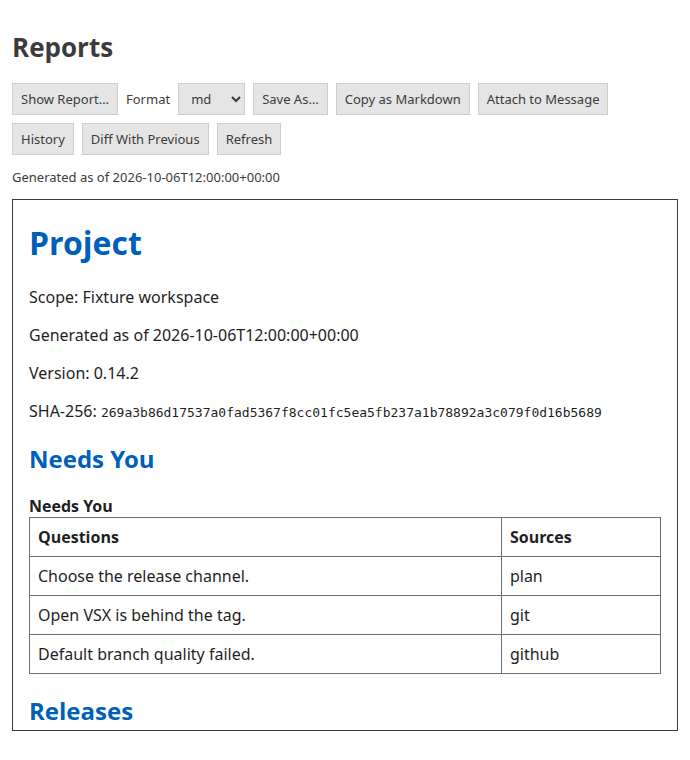
Open the local kind picker with /report, Muse Spark: Show report…, or
Account & usage's Usage Report. A report reads named sources without a
model call or a charge. Needs You comes first; every source names its
availability, freshness and observation time. Missing integrations remain
visible as unavailable.
Each table shows at most ten rows with an omitted-row count; --full retains
all available rows. Next steps follow the plan's declared delivery order and
only become ready when their required milestones are complete. At most three
next steps are shown.
The tab provides Save As…, Copy as Markdown, Attach to Message,
History, Diff With Previous and Refresh. Save as exports Markdown,
HTML, JSON or text through the editor's save dialog. A saved report retains
its original observation time; Refresh collects again. History is scoped to
this workspace and kind. Identical comparisons say No change since the
previous observation. Turning off museSpark.reports.keepHistory stops new
history saves. Existing entries remain readable. A malformed or unfinished writer lease can
block publication; it is preserved because ownership cannot be proved. Manual
repair requires every relevant writer to have stopped. No automatic deletion
is attempted.
museSpark.reports.network is machine-scoped: whenSignedIn (default) reads
GitHub using the editor's existing sign-in, always also reads GitHub without
requiring sign-in, and off forbids network collection. Reports never open a
sign-in prompt.
The terminal requires --network on every collection, and uses gh's own
identity. CI egress remains denied. Cache reads and writes use confined,
owner-only storage, validated decoded data and ETags; interrupted requests
retain honest unavailable or partial status. Store, workflow and release
adapters await approved live captures.
museSpark.reports.agentSources defaults to an empty array. Only agents you
explicitly enable (claudeCode, codex) have their confined local usage files
read. A missing usage capability, ledger, account or future feature produces
an unavailable source; a subscription never implies known token or cost data.
museSpark.reports.planMaxBytes caps the plan file reports read, in bytes.
No limit unless you set one: 0 (the default) reads the whole plan however
large, and a plan past a set value is refused with input-size drift naming
your limit. Machine-scoped. In a terminal or an ACP editor the same bound is
reportsPlanMaxBytes in the agent data folder's settings.json (0, the
default, reads whole).
The shared CLI/ACP engine supplies the same report data to every editor.
Installed native editor tabs are certified by M104; the portable MHP 1.2
report methods are already validated. In a terminal, the command is
muse-spark-code-acp report <kind>; bare report retains the problem-report
command. See the ACP guide.
The estimator also checks the workspace plan without forecasting.
/estimate --check-plan checks every plan row independently of any forecast's
dependency closure and answers empty for a clean plan. Use the flag alone,
with no goal or other flags; it requires plan-format-v1 and a lane table.
The exclusive standalone check is muse-spark-code-acp estimate --check-plan:
exit 0 means a clean plan, 1 means problems or an unavailable check, 2 means
usage.
Orchestrator playbook policy (M116)
The CLI playbook <status|record|settings ...> and ACP
/playbook <status|record|settings ...> read journal records and settings
locally without starting a backend or a model turn. Settings changes need a
reason and record the owner. The reviewer charter ships as the
orchestrator-playbook skill.
Highlights
- Streaming chat with tools you can see. Every read, edit, write and shell command is a row in the transcript: green when done, pulsing while running, red when refused, grey when a stopped turn cut it off. Edit rows show the diff, the path opens the file with the changed lines selected, Click to expand opens VS Code's diff editor, and any output opens in an editor tab with a click.
- Code intelligence from your editor. The agent finds definitions, references, symbols and callers, reads hovers, maps the repository and renames symbols through VS Code's own language services instead of searching text, on both backends (more).
- Permission modes, like Claude Code. Manual, Edit automatically, Plan and
Auto (Bypass behind a setting), switched from the mode button or
Shift+Tab. Gated commands arrive as approval cards with the CLI's own choices; questions from the agent arrive as question cards with radios, checkboxes, tabs and an "Other" answer. /for everything. The palette loads its action registry on first use, with loading, failure and retry available. It holds the actions, the model, effort and thinking, the permission mode and your skills; type a letter after the/and it narrows to the slash commands, as in Claude Code.- Subagents on a map. When Muse Code delegates, or the Model API backend runs the paid subagents you turned on, each agent is a row and an N agents pill opens the Agent map: role, status, tokens, each agent's own transcript, and the controls the backend offers.
- Workflows you can follow. When Muse Code runs a multi-agent workflow, the run is a card that keeps updating after the reply: its agents with their state, time and tokens, and the result it returned. Owner controls wait for a live accepted-command capture.
- Reply and quote with context. A reply's ⋯ menu has Reply to This Output; highlight anything in the chat and right-click for Ask About This or Comment on This. The passage, its author and your intent travel with the message.
- Voice dictation at no cost. Tap or hold the microphone (
Ctrl+D) and speak; the words land at the caret. Windows and macOS use the recogniser built into the operating system; Linux x64/arm64 uses offline English Whisper tiny.en after one consented helper and model download, so no audio goes to a paid service unless you turn on Muse Voice. - Paid extras, only if you ask. On a Model API key: web search with its sources, image files made on request, and Meta's Muse Voice for dictation. Each is available by default on Model API; spending requires paid-use consent, marked paid wherever it is used, and tallied in Account & usage.
- Scheduled prompts under your control. On the Model API backend,
/loopsaves a recurring prompt in this conversation. By default a due prompt waits for you to run and confirm it; unattended v2 delivery is disabled, and the running editor does not request v2 consent or reserve its paid caps. Your key is never spent without your consent. Scheduled turns currently cannot read video or audio: verified upload storage, the captured media codec and production calibration bindings are unavailable (PLAN D85.6, M105). The shared paid accounting refuses bills above an admitted reserve and retains that reserve as uncertain liability. - Two backends, one per conversation. Your Muse subscription through the Muse Code CLI, or a Meta Model API key (pay as you go) with the extension's own tools. The pasted key is never handed to the CLI.
- Set up from the panel. No Muse Code yet? Install Muse Code shows Meta's command and runs it in a terminal; Sign in with your Meta account shows its approval code in the panel.
- Context the way you work.
@mentions with.gitignore-aware fuzzy search, the open file or selection as a chip, images (and, on the Model API backend, PDFs) pasted or dropped, andAlt+Kto mention the editor selection. On either backend the agent can also read the Problems panel. - History that survives the window. Every conversation in the workspace, searchable, resumable with its full transcript, archivable, with fork and rewind on every sent message. The sidebar picks its last conversation back up within ten minutes, and an editor-tab conversation comes back after a window reload.
- Account & usage. On Muse Code, your subscription's current and weekly
windows; this conversation's tokens (and cache hits, on the Model API); and
what has been eating your usage (reminder agents, subagents, long
sessions), from
/usage. - In your language. English and fourteen more of VS Code's display languages, with the model's side kept in English so it behaves the same everywhere.
- Accessible and observable. Checked against WCAG 2.2 AA in every default theme, and a log that records what happened without what you wrote.
- No telemetry, no hosted server of its own. What leaves your machine and where it goes is written down in PRIVACY.md.
Screenshots
M106 development: the Model API client paces tagged background requests from the provider's observed rate-limit headers and 429 answers, with no invented pace of its own. A queued request reports that it is waiting for rate-limit headroom and keeps waiting until Stop; retries follow the provider's Retry-After and its documented guidance. Public status failures expose fixed text and safe status fields. Its service-status read and usage/report presentation ports await the integration bindings listed in the lane R certification.
Rendered from the shipped panel by its own UI harness (npm run readme:shots, one harness scenario per image) against a scripted session,
so they match the build.
What's on out of the box
Explicit false settings stay off. Interactive paid extras can share a daily
limit you set, museSpark.paidDailyBudgetUsd (none by default; machine-scoped,
across windows, workspaces and keys in this extension profile). With no limit,
nothing is checked or written for a paid request. With one, each request's
reported cost joins the local day's total after it ends; nothing is held for a
request in flight, and a sent request with unknown usage counts as cost
unknown, never as its estimate. Unreadable storage refuses paid requests while
a limit is set. When a request's estimate would pass the limit, choose
Raise for Today or Stop Until Tomorrow; both choices are shared on disk.
Stop remains in force even if another window's pending raise finishes later.
Cancelling admission refunds an unsent request; late budget-dialog answers
cannot change today's policy. Switching backends preserves accepted prices
and workspace Allow always grants; explicitly turning a feature off
withdraws them. Packing adds recall only when a request carries packed output,
so enabling unused packing keeps the ordinary request and cache key unchanged.
Hosted-search approvals bind the provider, model and quoted price. A model
change while the question is open asks again. A higher price also asks again;
an equal or lower price can use the workspace's approval for that same model
and provider. Ask again invalidates pending answers and saves; saving one
model cannot restore another model’s approval. The newest Always approval sets
the tariff ceiling across conversations and windows, including a cheaper price.
Parallel conversations keep their own approved requests; child tasks inherit the
parent’s search authorization within its bound and existing budgets. A dispatched
request settles at its original quote. Accounting
keeps exact decimal amounts, and paid displays round upward so a positive
charge is never shown as free. Hosted-search product wiring remains subject
to the verified billing-bound availability described above.
Tab's own daily budget, when the person sets one, is separate and is never charged into this extras ledger.
The optional per-conversation cap still applies independently. ACP and
headless execution retain explicit flags and their hard budget policy.
Muse Code's subscription and its existing explicit key-paid opt-ins are unchanged.
Get started
-
Install Muse Spark Code from the Marketplace (VS Code 1.99 or newer), or from a
.vsixattached to a GitHub Release:code --install-extension muse-spark-code-linux-x64-0.19.0.vsixEach release ships one
.vsixper platform (muse-spark-code-<target>-<version>.vsixforwin32-x64,win32-arm64,darwin-x64,darwin-arm64,linux-x64andlinux-arm64) plus the fallbackmuse-spark-code-<version>.vsix, which carries the Linux helpers and which VS Code serves on platforms without their own package (Alpine and 32-bit ARM Linux servers keep installing the way they always have). Pick the file matching the machine VS Code runs on — in a Remote SSH or Dev Container window, the machine holding the workspace folder.Other editors install it from Open VSX or run the ACP agent from npm; see Install in your editor.
-
Open the Muse Spark view from the activity bar (or press
Ctrl+Shift+Alt+Escon Windows,Cmd+Shift+Escon macOS,Ctrl+Shift+Escon Linux for a conversation in an editor tab). -
If Muse Code is missing, Install Muse Code opens a confirmation dialog showing Meta's exact command for this operating system. The same action is in Account & Usage while you work with a Model API key. Run Installer opens a visible VS Code terminal; the panel checks for the CLI and offers sign-in when it appears. You can also open Meta's installation instructions. If VS Code cannot open the installer terminal, the panel reports that directly and keeps the manual instructions available. Sign in, one of two ways:
- Sign In With Your Meta Account shows an approval code in the panel. Open its sign-in page in your browser and approve the code within ten minutes, before it expires. Cancel Sign-In stops the temporary CLI sign-in process; if the browser approved just before, the panel follows what Muse Code saved. If you deny the code, it expires, or Muse Code cannot save the sign-in, the panel says so; an ending Muse Code has not been seen to send is shown in its own word. Work is billed to your Muse subscription.
- Use a Model API Key takes a key from dev.meta.ai (Meta's current
keys start with
LLM_; older ones look likeLLM|<id>|<secret>), stores it in VS Code's secret storage and runs the Model API backend with the extension's own tools, pay as you go. Account & Usage lets you add or replace that key while Muse Code is signed in; there the key pays only for paid features you turn on. After a CLI install, Account & usage also offers Sign In With Your Meta Account.
Signing out ends the old account's conversations and clears them from the panel; your unsent draft stays. If sign-out cannot finish, see Troubleshooting.
-
Type a message and press
Enter./shows the palette,@mentions a file, the microphone dictates.
VS Code opens the extension's four-step walkthrough on install; Muse Spark: Open Walkthrough brings it back.
What's New after an update
When the extension updates, What's New in Muse Spark Code opens in an
editor tab (it works the same in VS Code's forks and remote windows): each
new release's Highlights, with a Try It button where there is a command
or setting to try, then its notes from the CHANGELOG. Full notes ship for
the newest two releases; when neither has Highlights, the page also carries
the newest earlier Highlights. Older upgrades can follow the page's full
changelog link for all intervening details. It shows once per
update and in one window only, waits until no turn is running and you have
stopped typing, and does not take the keyboard. After a fixes-only patch a
quiet notification offers it instead. A fresh install shows nothing. Muse
Spark: What's New (or What's New in the panel's palette) opens it any
time; museSpark.showWhatsNewOnUpdate or the page's Don't show on
updates box turns it off. In an ACP editor (Zed, Neovim, Emacs and the
others in Muse Spark in other editors) /whatsnew reads the
same release notes as text, with no model turn. The page's words follow your
display language; the release notes are in English.
Each panel is its own conversation, started on the first message with the
standard muse-spark-1.3 model (never a contributor-tier model by default).
The model pill shows the model as soon as the panel opens.
Tab completions
Tab is on by default. Press Alt+\ in a code editor to request ghost
text, then Tab to accept or Esc to dismiss it. The status bar shows
Tab from startup; click it for Tab Menu, languages, multi-line mode,
snooze, Copilot choices and Account & usage. The Command Palette also has
Muse Spark: Turn Tab On, Turn Tab Off, Snooze Tab, Tab Menu and
Tab Languages.
Tab uses your stored Model API Key, on either chat backend; your Muse Code subscription never pays for it. With no key the status says no key and sends nothing. Before the first charge in a window, it asks with the model's rates and your budget: Allow Once covers that window until it closes, Allow Always in This Workspace remembers revocable consent, and Deny snoozes Tab in that window. Closing the question denies it too. The question names the model the request will use, and your answer covers that model at its price only: a request for another model asks again, even under Allow always, and Allow once never reaches another window. An Allow always kept by an earlier version asks a migration question. Only answering Allow always in this workspace saves the model and price; answering Allow once saves nothing and the next window asks again. Accepting another paid feature's price or turning voice off preserves Tab's Allow once. Ask again and Tab's own price acceptance changes end its consent; a changed model or price asks again for its own key. A request whose model, consent or hook configuration changes before it goes out sends nothing; the last check runs immediately before the request is sent.
There is no daily budget unless you set one: nothing is reserved or
locked. When you set museSpark.tabDailyBudgetUsd, that budget applies
across every window on this machine and is reserved before each request.
The status shows today's spend; Account & usage shows requests, tokens,
cached tokens, today's cross-window total, this window's reported cost and
your configured budget (or that no budget is set). Requests
without reported usage retain their worst-case reservation. The next local
day, or a larger budget, permits requests again. At the probe's token counts,
Standard's projected average was $0.00242 per fast request and $0.00706 per
multi-line request; actual usage and cache hits change the cost.
Invoke is the default trigger because the contributor-model probe measured
3.8 seconds median to first text (p95 8.4 seconds); Standard latency is
assumed equal, not measured. museSpark.tabTrigger: automatic opts into
requests after a 350 ms typing pause. At most two requests are open and
20 start per minute. A sent request finishes for accounting even if you
type past it; its answer remains available to the typing-through cache.
All Tab settings are machine-scoped:
Fast mode uses the current file. Multi-line mode adds bounded excerpts of
recent edits and definitions on the cursor's line, ordered by path. Every
file passes the same privacy checks: trusted workspace, inside its folder
including resolved links, private/protected names, git ignores,
.cursorignore, .continueignore, files.exclude and the size limit.
Secrets are redacted before excerpts are cut. Related unsaved buffers use
a conservative UTF-8 size bound. Tab has its own cache and never reads or
changes a chat's history or memory.
Inline Suggest: Accept Next Word (Ctrl+Right, Cmd+Right on macOS) and Inline Suggest: Accept Next Line (assign a key in Keyboard Shortcuts) accept part of a suggestion; typing through serves its rest without another request. Snooze offers 15 minutes, an hour or until this window restarts. Copilot's sign-in state cannot be detected, so an installed active Copilot can cause yielding even when signed out.
Cursor's beforeTabFileRead and afterTabFileEdit hooks run from the project
.muse/spark-hooks.json or your spark-hooks.json beside Muse Code's settings,
when hooks are enabled and the workspace is trusted, on either chat backend.
Imported Cursor groups keep their format and source event; their matchers are
TabRead and TabWrite. Before a file enters a request, each matching guard
must exit 0 with permission: allow; denial, invalid output, a crash, a
1,500 ms timeout or an oversized payload refuses that read. Verdicts are
cached by path and content and cleared when the configuration changes.
Accepted full and inferred partial edits carry real line text and a 1-based
range; typing alone fires nothing. Edit hooks observe asynchronously and
cannot veto an accepted edit. With no configured hook, completion text and
command arguments remain unchanged.
These hooks are local processes you configure, and they see your code as it
is: a beforeTabFileRead hook receives the file's absolute path and its
full, unredacted text, the workspace folders, the Tab model and the
request id, for the current file and for every context file. An
afterTabFileEdit hook receives the path, the accepted text and the line
before and after it (512 characters each at most) and the range. The
extension sends neither payload anywhere else; the command decides what it
does with it. Hook processes get a scrubbed environment and never the Model
API key.
A spark-hooks.json that exists but does not load in full (invalid JSON,
an unreadable or oversized file, or any reported problem, such as an unknown
event name or a beforeTabFileRead matcher that never names TabRead)
stops Tab reading any file, and the status bar says Tab paused: hook file
has errors until you fix it; the Muse Spark log names the problem. Only a
scope with no hook file reads without a guard. Each request is bound to the
trust, Tab settings, files.exclude, ignore files and hook configuration in
force when it starts: if any of them change before it is sent or before its
answer shows, it is dropped. The fake-hook receipts and current release
blockers are in the M94 record and
the hook wiring record.
Backends
museSpark.backend picks: auto (default) uses the CLI when it is installed
and signed in, otherwise the Model API when a key is stored; museCode and
modelApi force one. The palette's Backend row shows which one this
window runs on. The CLI looks for muse through museSpark.museBinaryPath,
then PATH, then the platform's install folder (%LOCALAPPDATA%\Programs\muse
on Windows, ~/.local/bin elsewhere).
Conversations on the Model API backend are saved as they go under VS Code's workspace storage for the extension, so the History dialog lists them after a reload, and a resumed one continues with its transcript and its edit patches while the same Model API key is stored. History, resume, reads and forks are limited to that key's sessions. Replacing the key starts a fresh conversation; older sessions remain on disk for their original key. Sessions saved before ownership was recorded remain on disk but cannot be reopened because their account cannot be proved. The CLI backend keeps its own session store. Replacing its secondary Model API key keeps the Muse Code conversation running. A paid image awaiting its popup or a retry stops if that key changes; the old request cannot use the new key. If the panel itself ever fails to render, it shows the error and a Reload button instead of going blank; Reload brings the conversation back as it was, running turn and waiting cards included.
Sign-out and account replacement clear the panel's transcript, loaded tool
output, agent transcripts and retained file chips before another account
signs in. Unsent draft text stays in the composer. When an installer makes a
signed-in Muse Code CLI available in auto mode, the current Model API
session ends before the next message starts a fresh CLI session.
Other editors
The same two backends run outside VS Code as muse-spark-code-acp, an
agent for editors that speak the Agent Client Protocol (Zed, JetBrains IDEs,
Neovim, Emacs and others), attached to each GitHub Release since 0.10.0 and
published to npm since 0.11.0.
docs/acp.md covers installing it, where it keeps a Model API
key (the operating system's credential store), and the editor's settings.
VS Code forks built on VS Code 1.99 or later install the extension itself,
from Open VSX or a .vsix.
Install in your editor
Get it from the
VS Code Marketplace,
Open VSX,
npm (the ACP agent) or
GitHub Releases
(both the .vsix and the agent's .tgz).
The ACP agent needs Node.js 22 or later. Install it from npm:
npm install -g muse-spark-code-acp
muse-spark-code-acp --version
Or install the .tgz attached to a GitHub Release, replacing <version>
with the release's version:
npm install -g https://github.com/RandyNorthrup/muse-spark-code/releases/download/v<version>/muse-spark-code-acp-<version>.tgz
Zed (this setup was checked in Zed 1.20.2, against a stand-in for Muse
Code, not yet in a real conversation): add this to settings.json, then pick
Muse Spark under External Agents in the Agent Panel's new-thread menu.
{
  "agent_servers": {
    "Muse Spark": {
      "type": "custom",
      "command": "muse-spark-code-acp",
      "args": [],
      "env": {}
    }
  }
}
JetBrains IDEs: in the AI Chat tool window choose Add Custom Agent,
which opens ~/.jetbrains/acp.json, and add the agent under
agent_servers (JetBrains' ACP guide).
This setup follows JetBrains' documentation and has not been tested here yet.
{
  "default_mcp_settings": {},
  "agent_servers": {
    "Muse Spark": {
      "command": "muse-spark-code-acp",
      "args": []
    }
  }
}
Add "--backend", "modelApi" to args in either editor to use the Model
API backend instead of Muse Code.
ChatGPT subscription sign-in (M95b preview): terminal-capable ACP editors offer Continue with ChatGPT, Remove and Check; other editors show the same commands to run by hand:
muse-spark-code-acp providers add chatgpt
muse-spark-code-acp providers status chatgpt
muse-spark-code-acp providers remove chatgpt
Add requires Plus or Pro, prints the plan/credit notice and the browser URL, and saves only eligible models from the account's own catalogue in the user-level providers file. Tokens stay in the OS credential store. Status reads local state without a network request; Remove attempts revocation and clears local sign-in and configuration. If the store is unavailable, sign in from an interactive desktop session with an unlocked store (Linux also needs Secret Service). These commands certify sign-in management; combined M95b model dispatch and editor acceptance still await integration certification.
On Windows, npm installs muse-spark-code-acp as a .cmd launcher,
which some editors cannot start. If the editor says it cannot find or start
the agent, use node as the command and the agent's script as the first
argument, before any others. <npm root -g> is the folder npm root -g
prints, usually %APPDATA%\npm\node_modules. This form works on every
platform (docs/acp.md).
{
  "command": "node",
  "args": [
    "C:\\Users\\<you>\\AppData\\Roaming\\npm\\node_modules\\muse-spark-code-acp\\dist\\acp.js"
  ]
}
docs/ide-compatibility/hosts.md records which editors have been tried. The extension's integration tests pass in VSCodium, Cursor, Devin Desktop (formerly Windsurf), Kiro and Positron. code-server and Eclipse Theia ran it only against a stand-in for Muse Code, by hand and in checks since deleted, so they are not yet tried for real. The agent has run in Zed, Emacs (agent-shell), Neovim (CodeCompanion) and JupyterLab (Jupyter AI) only against that stand-in, so none of them is yet tried for real either.
MCP connector for other agents (M124)
In progress: the local phase. muse-spark-code-acp mcp serves Muse
Spark Code's tools to another agent on your machine over MCP on stdio:
Codex, Claude Code and Gemini CLI can list and read your saved prompts,
preview a prompt share, list schedules and pause one, and generate a
deterministic report, within what you grant. A write (for now, saving a new
prompt) waits for you to approve it on Muse Spark Code's own approval
page in your browser; the other agent's Allow, Auto or Bypass cannot
approve it. Stop never asks. Fleet status, agent outcomes, lanes, teams and
new schedules answer unavailable until their owners expose them. The
hosted connector for ChatGPT and claude.ai is not built.
If the approval page closes on idle, the next save request opens a fresh page. A browser opener failure refuses that request and closes its page; after the opener recovers, a new save request can ask for approval again.
Grant a connection in your own terminal, and control it from there:
muse-spark-code-acp mcp grant --workspace ~/code/my-project
muse-spark-code-acp mcp status
muse-spark-code-acp mcp revoke
muse-spark-code-acp mcp kill
muse-spark-code-acp mcp resume
Then add it to your agent. These client commands follow each vendor's documentation (read 2026-10-09) and have not been run against a real client: they write your global client configuration, which this project's checks never do, and no client is qualified against this server yet.
codex mcp add muse-spark-code -- muse-spark-code-acp mcp
claude mcp add --transport stdio --scope user muse-spark-code -- muse-spark-code-acp mcp
gemini mcp add -s user muse-spark-code muse-spark-code-acp mcp
docs/mcp.md has every tool and its availability, the grant families, the client configuration, the limits and what is recorded.
Subscriptions
Subscription sign-in is being integrated under M95b; installed-editor and live success certification is still pending (record).
The Models & Agents panel keeps the current section visible while another section loads. A pending tab indicates loading after 150 ms. Reloads reserve the section's last measured height; the first visit estimates from the host's rows and can adjust once when the section arrives.
In Models & Agents → Providers, choose Continue With ChatGPT or Use My Copilot Models. The same actions are available in the command palette. Connecting selects the shared in-process harness and the account's first eligible model; the model picker can select another catalogue model.
ChatGPT: OpenAI's sanctioned Subscription Sharing preview accepts eligible Plus and Pro accounts. Free and other ineligible accounts cannot use this flow. The system browser signs in with OpenAI, with a local loopback callback; remote VS Code windows currently require signing in from a local window. Models come from your account's catalogue, rather than a fixed example model. The conversation, tools and tool results spend your ChatGPT plan. Manage usage opens the provider's limits page. A limit reached inside a successful HTTP stream stops the turn and offers usage management. Remove revokes the grant and deletes this product's secret record. The plan notice is remembered for each verified account. Older grants without that identity keep showing it until a verified sign-in or refresh supplies it.
Copilot: available only in VS Code hosts exposing vscode.lm, using the
host's Copilot consent. Select it again after reloading the window. It spends
your Copilot plan or AI credits under GitHub's terms. Models are marked
reduced: token counts are estimates, server reasoning/cache details are
unavailable, and images are refused unless the host adapter has a verified
image capability. Quota and consent errors are explained; confidential
workspaces hide and refuse Copilot. The AI-content note and report link remain
visible with its plan mark. Other editors use ChatGPT through the shared ACP
runtime's existing add/status/remove actions and authentication menu (configure
--backend model-api); Copilot
requires VS Code's Language Model API. JetBrains, Visual Studio, Eclipse,
Zed, Xcode, Neovim, Emacs and Sublime use their own Copilot plugin for
Copilot, and this product's shared ChatGPT/API-key routes where implemented.
The ACP agent has no Copilot token route and reads none of Copilot's credential
storage. A compatible extension host must actually expose vscode.lm;
a VS Code-like interface alone does not provide it.
Plan requests never consume the harness's USD cap or open its paid-use popup.
Account & usage counts each dispatched request, with reported ChatGPT tokens
and estimated Copilot tokens kept separately. Optional paid extras continue
to require their own supported credential and consent; a subscription does
not pay for them. The captured Mistral plan preset now uses the same
origin-bound key transport in VS Code and ACP, shows plan in the picker,
links its plan limits, and counts reported tokens and every dispatched
attempt. Its key is read from each host's credential store immediately
before sending. Configured API-key and local providers share the captured
Responses, Chat Completions, Anthropic, Gemini and Ollama codecs; redirects
are refused and each request pins checked DNS answers. ACP reads the same
user-level providers.json, using its own OS credential store. The terminal
offers providers list, providers add, providers test, providers remove,
providers models <entry> [--add <model>] [--remove <model>]
and auth set|status|clear --provider <id>. Free checks use the shared
transport; keys are entered through stdin and stored with their origin.
A provider key is never refused for how it looks: any non-blank key is
sent to the provider's own free key test, and a refusal shows the
provider's reason.
Headless exec --provider runs through that same client with model-specific
request admission, settlement, and refunds for unsent reservations. Each request
is capped at the model's own output limit; unknown prices refuse.
For a configured Anthropic key: With no --model, exec and ACP use the configured defaultModel;
a missing or unavailable default refuses and lists the configured models.
Ephemeral exec omits durable usage history and records
usageHistory: "omitted_ephemeral"; ordinary runs retain usage history.
Command --help prints only its own usage; help reference prints the catalogue.
muse-spark-code-acp exec --backend modelApi --provider anthropic --model anthropic/claude-opus-5-5 --max-budget-usd 0.10 --max-requests 1 --ephemeral --output json "Reply with the single word: ready"
JSON runs show request progress on stderr and return a redacted partial answer
when stopped, with finalMessageComplete: false and the incurred or uncertain
cost. Structured output still requires validation.
Deep commands have local help, such as developer status --help,
playbook status --help and report usage --help. The full command,
setting and feature catalogue is available through help reference.
installed-editor and live provider certification are still open. MiniMax and Alibaba plan presets await captures, and Hugging Face OAuth awaits application registration.
OpenRouter’s Connect OpenRouter Account opens browser authorization and
keeps the returned key in the host’s draft until Save stores it through
the same origin-bound key path as a pasted key. Local windows require no
copy-paste; remote windows ask for the single-use authorization code in a
password box. Models & Agents and Account & usage read OpenRouter’s key
endpoint to show total, daily, weekly and monthly usage, the limit and
remaining balance. Models & Agents reads on open, after Save and on Refresh;
filtering and sorting use the cached observation. Pending reads are shared.
Missing,
changed or unreadable credentials discard the previous key's amounts.
Cancel, Back, and closing the panel stop pending authorization and
usage requests; a late connection cannot save a key. A discarded created key
is named with its removal page. Terminal Connect asks before replacing a
stored key and cancellation preserves the previous credential. Terminal usage
retains the exact wire decimals. These are
free account reads, with no model request. New setups keep no data retention
(ZDR) routing. A failed read says so instead of displaying zero usage. The ACP agent offers
providers connect openrouter and providers usage <id> through the same
portable flow; see the terminal and remote-editor guide.
Scan this computer probes each local preset's loopback port and model-list path.
Local models retain their scanned context window. The provider wizard and
Models table also accept a positive whole-token Context window for each
model; enter the window actually loaded on the server. Manual values override
scan values and survive rescans and edits. A missing window is refused before
inference. LM Studio's captured /v1/models list has no window, so enter it
manually. The ACP CLI accepts providers add --preset lmstudio --model qwen3-0.6b --context-window 8192; its window applies to all selected models.
ACP reads the same validated per-model modelLimits in user-level
providers.json, including contextTokens and outputTokens (positive whole
counts, output no larger than context). Manual and automatic compaction use
the selected model's saved window.
Provider exports include subscription configuration without credentials. A
confirmed import requires credentials to be entered again, clears credentials
for imported and removed ids, and replaces providers and the validated default
model together. Cancelled or invalid imports leave configuration and keys intact.
The provider wizard's spending limit is the setting for every conversation. Leaving the prefilled value alone keeps the current setting. If you edit it and the setting changes meanwhile, the wizard shows the new current limit and asks you to confirm yours. The provider is saved first; a later limit failure explicitly says the provider was saved and why the limit was not changed. Saved custom providers keep their editable per-model limits, and Back keeps incomplete limits so you can return to Models and finish them. Edit and Change Key preserve the saved connection, routing and default model; changing a limit leaves the default alone. Save writes only changed fields, keeping newer stored values for untouched fields and keys, including changes made while a private-network question is open. A key is replaced only if you enter one in this draft. Save validates everything before writing, then saves the provider, entered key, explicitly chosen default, edited spending limit and requested conversation model in that order. If a later step fails, completed writes stay saved; the panel names what was saved, what failed and what was not applied. Reopen the provider to finish a key/default/model failure. An address change whose key write fails shows the key as missing: the old key remains bound to its old origin and cannot serve the new address. When a provider retains that refused key, reopen Edit, enter and test a replacement, then save it. Confirmed spending-limit retries keep receipts for the provider, key and default already saved, even if the retry fails. If a field you edited also changed elsewhere, Save keeps the form open and offers Reload before you save again. Save disables its buttons while working and ignores repeated submissions. A refused private-network question keeps the form open and asks you to confirm access. If Save finishes but the panel cannot refresh, it says the provider was saved and asks you to reopen the panel. A refresh failure keeps every earlier partial outcome visible. A budget-only partial save with a fresh snapshot can retry; a failed refresh retires that form to prevent retries against stale values. Two editor windows saving the same provider at the same moment can overwrite fields both changed. Cross-window serialization is a planned follow-up.
Questions
The integrated question paths, fake-only checks and the 2026-10-06 live checks through the ACP agent on both backends are recorded in M112's certification; installed-editor checks remain with the release lead. The integrated panel pins agent questions in the attention dock above the composer, after approvals, and keeps only a compact marker in the transcript. After one minute Muse continues work that does not depend on the answer. The card becomes an Open Question. Its compact transcript marker keeps the icon, title and Answer button. Answer reopens the pinned card and focuses its first control, even after deferral; the open-question chip also opens it. A card with focus or a draft stays expanded. Dismiss closes an open question without guessing an answer. Approvals still wait for your decision; MCP forms keep their five-minute expiry and cannot be answered after expiry.
Next Open Question and Previous Open Question cycle through the open cards. In a focused VS Code chat their keys are Ctrl+Alt+J and Ctrl+Alt+Shift+J (Cmd+Option+J and Cmd+Option+Shift+J on macOS). The view badge, tab title and History marker show the count. Native editors use their own bindings: these keys conflict with defaults in JetBrains and Visual Studio.
museSpark.questions.deferAfterSeconds is machine-scoped: no limit unless
you set one (0, the default, waits indefinitely; otherwise 10–3600 seconds,
and 1–9 are read as 10).
A workspace setting cannot change it. Open questions survive a reload and
resume, with at most 20 open per session and two reminders per question.
A late answer is your own message in the current mode and approves nothing.
In the panel it steers a running turn or starts a new one, billed normally.
In ACP, a client with forms gets a form that the agent withdraws at the
deadline. A client without forms gets the text and immediate deferral,
including with a deadline of 0. /questions lists open questions;
/answer <n> <text> answers one by its displayed number. A late form answer
or /answer steers a running prompt, or is kept before your next message
when idle. It is announced as queued until the next prompt sends it. Stop
cancels the backend without waiting for question storage. The agent announces
these commands alongside skills. Configure
its deadline with --questions-defer-after <seconds>; the default and limits
match the setting. The ACP guide explains the details.
Headless exec still declines questions immediately, reports
question_declined, and starts no question clock. Best-of-N, worktree
conversations and the evaluation keep their immediate cancellation or
clarification. Scheduled/unattended prompts defer at once and keep the
question open, even when interactive deferral is disabled.
Several accounts per provider
Accounts keep separate credentials, labels, order, limit groups and thresholds. The terminal manages their metadata and pins a headless run to one account, and an ACP session on the Model API backend lists them. Automatic swapping, pooled runs, placement on other devices and the editor's Accounts and usage pages are not part of this yet; the roadmap tracks them.
The installed CLI, ACP agent and headless runs share one account service over the runtime's providers file and the OS credential store. Meta's Model API entry is built in, so listing, adding, ordering, thresholds and per-account credentials work with no pre-existing file; a corrupt file is reported, never clobbered. Any other provider needs its stored metadata row. Display order never selects a backend credential.
Manage metadata through the agent (credentials only from standard input, never an argument or a file):
muse-spark-code-acp providers accounts list --provider <id>muse-spark-code-acp providers accounts add --provider <id> --account <id> --label <label>muse-spark-code-acp providers accounts thresholds --provider <id> --account <id> --thresholds <JSON>muse-spark-code-acp auth set --provider <id> --account <id>(then paste the key)muse-spark-code-acp exec --account <id> <prompt>pins one run to one account
ACP's /accounts (list, current, thresholds) and the account picker read
the same live metadata on the Model API backend; the Muse Code backend runs
on its subscription with no account picker. Choosing another account stays
refused: moving a session credential needs the pooled owner, so the session
keeps its current account and says so. A pooled headless run stays refused
until that owner lands too. A vendor limit stops only its own account, and
the stop names the blocked account and its reset even with no usage page
bundled.
Developer options
muse-spark-code-acp developer opens the terminal's machine-local Developer
options after typed confirmation; developer status shows its state.
developer --help prints its usage; any other misuse reports the usage with exit 2. Testing mode is badged and audited, expires, and Reset stops and removes only
its recorded profiles. Profile start and cleanup report unavailable until their
resource owner is bound; no successful cleanup is claimed in its absence.
Revoking testing authority closes admission immediately and attempts to stop
recorded profiles before saving. Persistence failures are reported; a durable
revocation audit prevents restoring the previous enabled grant. Removing an
unknown profile reports an error without changing the current grant.
Permission modes
A paid use asks in the paid-use popup in every mode, Bypass included, unless you allowed it always in this workspace; on the Model API backend, Plan refuses paid images and child tasks.
Through 0.11.0 the Modes menu said Auto on Muse Code approves "actions that
pass a safety check". It did not: muse serve has no approval judge (the
CLI's LLM judge runs only in its interactive and exec commands), so Auto
skipped only the commands the CLI classifies as simple, and every script
asked (PLAN.md D69). The menu now says what each mode does on each backend.
The Auto reviewer on Muse Code
In Auto on the Muse Code backend, an approval Muse Code raises for the
running turn that no rule settles may go to a reviewer before it reaches you. The reviewer is the
Model API backend's Auto reviewer (its instructions, its input and its
strict answer), run as one short turn of a hidden side session in the same
muse serve, on your Muse subscription: Plan mode, thinking off, the
conversation's model, in an empty folder of the extension's own, so it reads
none of your workspace files, rules or skills in the captured setup and is never listed in History. CLI-global context is not excluded. It answers ALLOW or ASK
with a reason:
- ALLOW: the approval is answered Allow once (never an "always" choice), for each stage while its subject and user request stay the same. The tool row says "Decided: approved (Auto reviewer)" with the reviewer's reason.
- ASK, an answer it cannot read, no answer within 45 seconds, an error, or a side session still busy: the card asks you as before, with the reviewer's reason on it when there is one.
After three declines or failures in a row, or ten of the last fifty, it
stops until your next message. It is never asked about anything the
extension's own rules answer, a protected write, a paid call, a child
task, a question, an escalated or unknown subject, an approval without
an allow-once choice, or a request in Manual, Edit automatically, Plan or
Bypass, or one replayed to a second panel. Two panels sharing the session
also go straight to cards. One review runs at a time in a
window. The first review in a window says so in a notice. Each review is
one short Muse Code turn: the live check counted four model attempts
(the reply and three of Muse Code's own reminder agents) and about 33,000
input tokens, most of them Muse Code's own instructions. Turn it off with
museSpark.museCodeAutoReviewer.
Plan mode does not disable Muse Code's native tools: the SDK's
SessionConfig only configures mcpServers. Any item other than the
prompt's echo, Muse Code's reminder agents, reasoning or the reply cancels
the review turn, shows the card with the generic failure reason, and
recreates the side session. A command covered
by your always-allow rule could run in the empty folder before the cancel
lands. The verdict text itself is never executed. A changed subject or an
accepted new message or steer invalidates the old verdict. The side session
is also recreated after host exit/restart, closure, timeout or busy fallback,
a model change, and ten reviews. Only a completed reply in a successfully
completed turn can allow an action; the 45-second deadline includes setup.
A Manual approval still needs your answer if you open the conversation in another panel set to Edit automatically. Joining a conversation never approves a card that was already waiting. A Manual panel's new edit approval also stays Manual when an older Edit automatically panel remains open on that conversation. While two panels share a conversation, every approval needs an explicit choice. Edit automatically resumes when it is the only panel holding that session.
"Always allow in this session" on a command allows that exact command line
again, nothing broader; on an MCP tool, that tool; on a web fetch,
that host. On the Model API backend a web fetch asks in Manual, Edit
automatically and Auto, and Plan refuses it; on Muse Code the extension asks
before every fetch, whatever the mode. An MCP tool asks like a
command on the Model API backend; Auto runs one its server marks read-only
without asking, as Muse Code does, and Plan refuses all but those, which ask. The Model API backend's file tools refuse any path
that leaves the workspace, including through a symbolic link or junction
inside it (only read_file may read under a permission profile's
extraRoots). Muse Code refuses such a write while its sandbox runs
("absolute path is outside the workspace"). Without the sandbox
(shellSandbox set to off, or auto for a Windows workspace under your
profile) its file tools can write anywhere your account can, and Muse Code
asks before none of those wri