🏢 Factorial MCP Server
Delegate your time-off management to LLMs. An MCP server that connects AI agents to Factorial, the popular HR management system, enabling employees to handle vacation requests, approvals, and time-off operations through natural language.
🌐 Website: https://ratek-20.github.io/factorial-mcp-server/
📖 Overview
This is an MCP (Model Context Protocol) server for Factorial, the popular HR management system.
It runs on your local machine and exposes tools that AI agents like Claude Code, Gemini CLI, or GitHub Copilot CLI can use to help you manage time-off operations via natural language.
How it works:
- The server communicates with AI clients using the STDIO protocol
- Authorization is handled securely via OAuth2
- You talk to your AI agent, and it handles the interactions with the Factorial system
🎬 Demo
In this demo, an employee uses Gemini CLI to check their available vacation days, request time off, and update the request — all in natural language. They then approve the pending time-off requests from their team through the same conversational interface.

🛠️ Available Tools
The server exposes the following tools to AI agents:
🔐 Authorization
authorize- Initialize OAuth2 authorization flow with Factorial
👤 Employee Information
get_current_employee- Get your employee ID and full nameget_employee- Look up any employee by their full name
🏖️ Time Off Management
get_available_vacation_days- Check remaining vacation days for an employeeget_leave_types- List all available leave types (vacation, sick leave, etc.)request_time_off- Submit a new time-off request- Supports custom date ranges (YYYY-MM-DD format)
- Optional leave type (defaults to vacation)
- Optional half-day specification
read_time_offs- View all time-off requests for an employeeapprove_time_off- Approve a pending time-off request (requires manager permissions)update_time_off- Modify dates or type of an existing requestdelete_time_off- Cancel a time-off request
🚀 Setup
🏢 What Your Company Admin Needs to Do
-
Create and configure an OAuth Application in Factorial:
- As described in the official API documentation, navigate to the OAuth Applications page and configure:
- Name: Something descriptive like
"OAuth app for MCP server authorization" - Redirect URI:
http://127.0.0.1:7000/oauth2-callback - Confidential: ✅ Checked (API requests are server-side, which is secure)
- Scopes/Roles: Select the following:
Api PublicTimeOffEmployees
-
Share credentials with employees:
- Provide the OAuth Application ID and Secret to employees who want to use the server
👨💻 What You (The Employee) Need to Do
Prerequisites
- An AI agent client installed:
- Docker installed
Installation Steps
-
Export your OAuth credentials in the shell that launches your AI client:
export OAUTH2_APPLICATION_ID=<your-actual-id> export OAUTH2_APPLICATION_SECRET=<your-actual-secret> -
Configure the MCP server in your AI client:
{
  "mcpServers": {
    "mcp-factorial": {
      "command": "docker",
      "args": [
        "run",
        "-i",
        "--rm",
        "-p",
        "7000:7000",
        "-v",
        "factorial-mcp-server_cache:/app/data",
        "-e",
        "EXIT_ON_EOF=true",
        "-e",
        "OAUTH2_APPLICATION_ID",
        "-e",
        "OAUTH2_APPLICATION_SECRET",
        "ghcr.io/ratek-20/factorial-mcp-server:latest",
        "--transport",
        "stdio"
      ],
      "timeout": 120000,
      "trust": false,
      "includeTools": [
        "get_available_vacation_days",
        "request_time_off",
        "read_time_offs",
        "approve_time_off",
        "update_time_off",
        "delete_time_off",
        "get_leave_types",
        "get_current_employee",
        "get_employee",
        "authorize"
      ]
    }
  }
}
{ "mcpServers": { "mcp-factorial": { "tools": [ "get_available_vacation_days", "request_time_off", "read_time_offs", "approve_time_off", "update_time_off", "delete_time_off", "get_leave_types", "get_current_employee", "get_employee", "authorize" ], "command": "docker", "args": [ "run", "-i", "--rm", "-p", "7000:7000", "-v", "factorial-mcp-server_cache:/app/data", "-e", "EXIT_ON_EOF=true", "-e", "OAUTH2_APPLICATION_ID", "-e", "OAUTH2_APPLICATION_SECRET", "ghcr.io/ratek-20/factorial-mcp-server:latest", "--transport", "stdio" ] } } }claude mcp add --transport stdio mcp-factorial -- \ docker run -i --rm -p 7000:7000 \ -v factorial-mcp-server_cache:/app/data \ -e EXIT_ON_EOF=true \ -e OAUTH2_APPLICATION_ID \ -e OAUTH2_APPLICATION_SECRET \ ghcr.io/ratek-20/factorial-mcp-server:latest \ --transport stdio⚠️ Important: The syntax and structure may vary between AI clients. Consult your client's documentation for the exact configuration format.
If you keep credentials in a local
.envfile, load it into your shell before starting the AI client:set -a source .env set +a -
Launch your AI client - The MCP server will automatically connect when the client starts.
🔐 Authorization Flow
The first time your AI client attempts to use any of the server's tools, the OAuth2 authorization flow will begin:
- A browser window will open automatically (or you'll receive a URL to open manually)
- Log in with your Factorial employee credentials
- Approve the authorization request
- You're all set!
🏗️ Architecture
🔧 Tool Invocation Flow
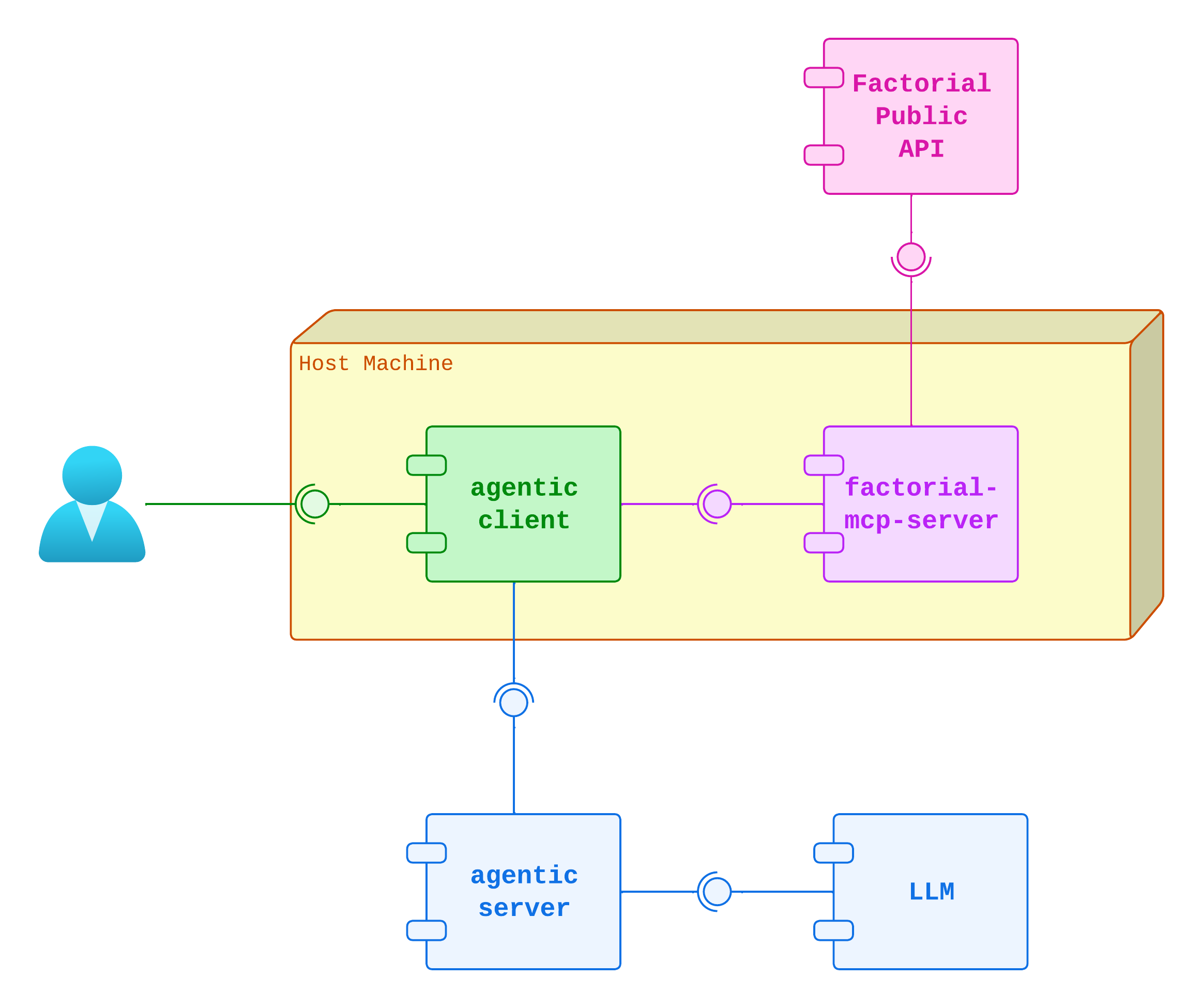
When an AI agent invokes a tool, the server:
- Receives the request via STDIO
- Makes one or more HTTP requests to the Factorial Public API
- Caches GET responses in memory to reduce API calls and improve performance
- Returns the formatted result back to the AI client
Caching Strategy:
- Only
GETrequests that return static content with low probability of change are cached - Cached endpoints include: employee information (
get_employee,get_current_employee) and leave types (get_leave_types) - Time-off requests (
read_time_offs) are NOT cached, as they change frequently with new requests and approvals - Write operations (
POST,PUT,DELETE) always hit the API - Cache is stored in-memory for the lifetime of the server process
🔑 Authorization Architecture
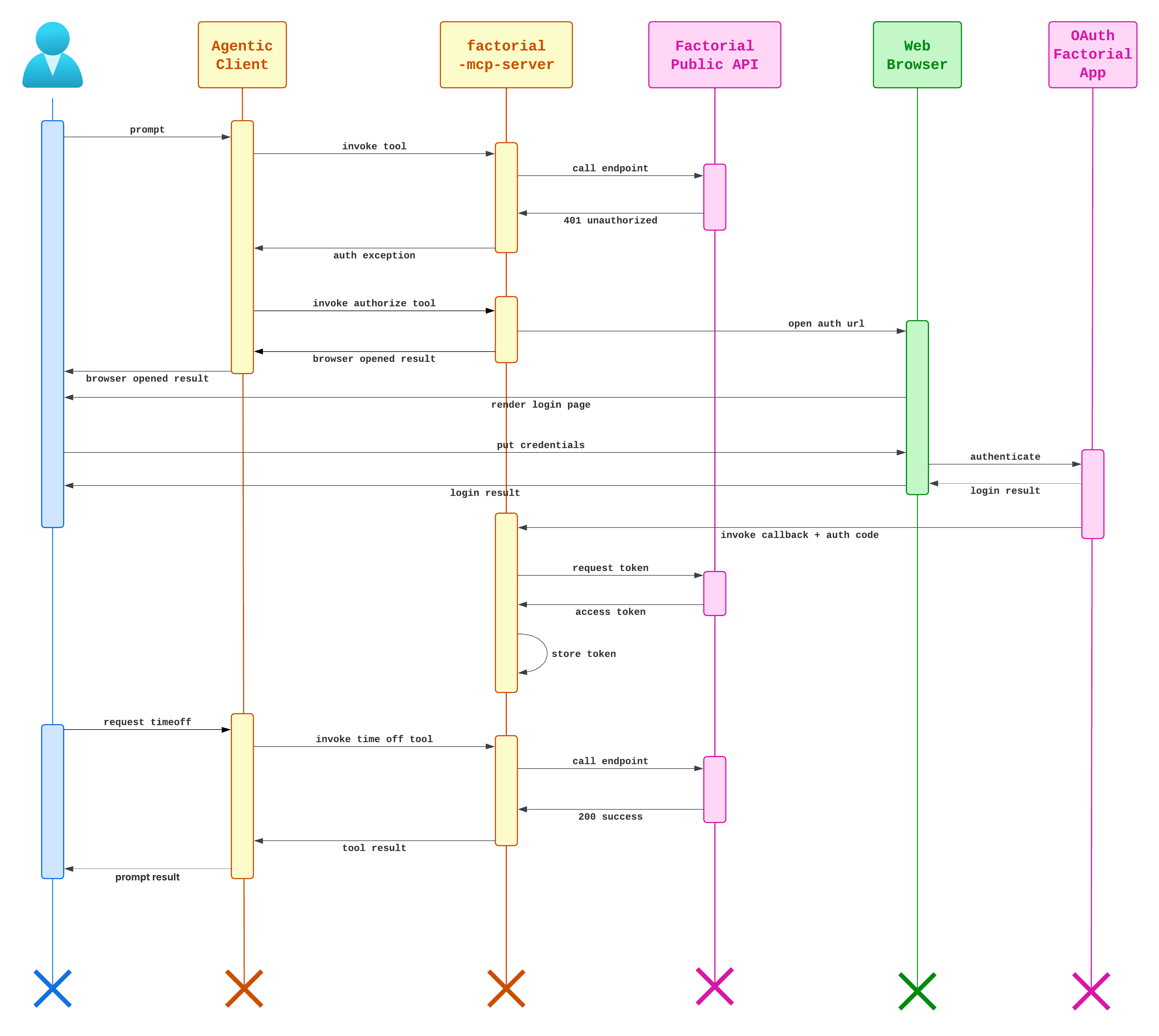
The server exposes port 7000 with a minimal HTTP server that handles OAuth callbacks:
- When authorization is needed, the server generates an OAuth URL
- The user opens this URL in a browser (automatically or manually)
- After successful login, Factorial redirects to
http://127.0.0.1:7000/oauth2-callback?code=... - The server's HTTP endpoint receives the authorization code
- The code is exchanged for an access token via Factorial's OAuth API
- The access token is stored in a Docker named volume for persistence
Token Persistence:
- Tokens are saved to
/app/datainside the container - This directory is mounted to a Docker named volume
- On server restart, the token is loaded from the volume into memory
- No need to re-authorize unless the token is invalid/expired
💻 Technology & Development
Tech Stack
Core:
- Java 25 - Latest LTS Java version
- Spring Boot 3.5.9 - Application framework
- Spring AI 1.1.2 - MCP server implementation
- Spring Web - API client calls to Factorial
Testing:
- JUnit Jupiter 5 - Test framework
- Mockito 5.12.0 - Mocking framework
- Instancio 5.5.1 - Test data generation
- WireMock 3.13.2 - HTTP mocking for integration tests
- Spring Boot Test - Integration testing support
- JaCoCo 0.8.14 - Code coverage reporting
CI/CD:
- GitHub Actions - Automated testing and Docker image publishing
- Docker images are automatically published to
ghcr.io/ratek-20/factorial-mcp-server
🧑💻 Contributing
Contributions are welcome! Whether you want to fix bugs, add features, or improve documentation, feel free to open an issue or submit a pull request.
Local Development
This project uses just as a command runner. Install it, then use these commands:
# Build the Docker image
just build

# Run tests
just test

# Run the server locally (requires OAuth credentials in command)
just run

# Run with remote debugging enabled on port 5005
just debug

# Inspect the server with the MCP Inspector
just inspect

# View logs
just logs

# Clean up
just kill-container
just clear-cache
See the justfile for all available commands.
Development Workflow
- Make your changes in a feature branch
- Write tests for new functionality
- Run tests with
just test - Build locally with
just build - Test manually with
just debugorjust inspect - Submit a pull request
📝 License
This project is licensed under the MIT License - see the LICENSE file for details.
🤝 Support
- Issues: GitHub Issues
- Discussions: GitHub Discussions
🙏 Acknowledgments
- Model Context Protocol - For the MCP specification
- Factorial - For their public API
- Spring AI - For MCP server implementation