
Recallium
Institutional engineering memory for humans and AI agents.
Your code remembers what changed. Recallium remembers why.
- What Recallium is
- Serving memory vs. engineering memory
- How it works
- Install
- Use it from your coding agent
- Projects and workstreams
- Memory across the software lifecycle
- Supported coding agents and IDEs
- Where it helps
- Rules files and Recallium
- Retrieval
- Privacy and data handling
- Pricing
- FAQ
- Self-hosted community edition (formerly MiniMe MCP)
- Migrating from the community edition to Recallium Cloud
- Links
- License
What Recallium is
Recallium is memory for the agents that do software development, such as Claude Code, Codex, Cursor, GitHub Copilot, Devin and Cline, and for the engineers who work beside them. It is served over the Model Context Protocol (MCP), so every coding tool on the team is a client of the same memory.
While an agent designs, decides, builds, debugs and ships, Recallium keeps the record it produces: the decision and the options rejected, the root cause and the fix, the constraint that drove a change, the rules the team follows, and where an effort stands. When a later session, another tool or a teammate's agent touches the same code, Recallium finds what the team already settled and feeds it to the agent before it starts. When one decision replaces another, agents follow the current one.
Teams also call this memory for development agents, developer agents, AI coding assistants or AI software engineering agents. All of those mean the agents that do the development work. Recallium is not a memory API for the end users of the product you ship; it is memory for the team that ships it.
Serving memory vs. engineering memory
Every AI memory pitch sounds the same: your agent never forgets, persistent context, memory for AI. Two different products are sold under one word. Serving memory remembers the person your product talks to. Engineering memory remembers why your software is the way it is.
Serving memory lives in your product's runtime. A support bot remembers a customer's last three orders; a tutoring app remembers a student struggles with fractions. The unit of memory is a person, the job is personalization, the scale is millions of end users, so the bill is metered by requests and tokens. Engineering memory lives in your team's build process. The unit is a decision: what was chosen, what was rejected, the constraint that forced it, and what replaced it later. The readers are the engineers and coding agents building the product, so it is priced per engineer.
That last row is the whole argument. In serving memory a stale fact is an annoyance; in engineering memory a stale fact is an incident. A stale memory is more dangerous than a missing one, which is why Recallium keeps the old decision on record and makes the current one explicit.
Mem0, Supermemory and Zep are serving memory, and good at it; Mem0 and Supermemory also ship Claude Code and Cursor plugins that remember the developer as a user. Letta builds stateful agents whose memory belongs to the agent. None of them is memory for the team: one record read and written by Claude Code on one laptop, Codex on another and Cursor on a third, often in the same afternoon. That is the job Recallium is built for.
Read more: Serving Memory vs. Engineering Memory · Why Recallium · Recallium vs Mem0 · Recallium vs Supermemory · All comparisons.
#engineering-memory #serving-memory #ai-memory #agent-memory #ai-agent-memory #memory-for-coding-agents #memory-for-development-agents #developer-agent-memory #ai-software-engineering-agents #sdlc-memory #institutional-memory #team-memory #mcp #mcp-server #mcp-memory-server #model-context-protocol #claude-code #claude-code-memory #codex #codex-memory #cursor #cursor-memory #github-copilot #copilot-memory #claude-desktop #windsurf #cline #devin #ai-coding-agent #ai-coding-assistant #coding-agents #persistent-memory #context-management #llm-context #cross-session-memory #cross-tool-memory #developer-productivity #self-hosted #developer-tools #minime-mcp
How it works
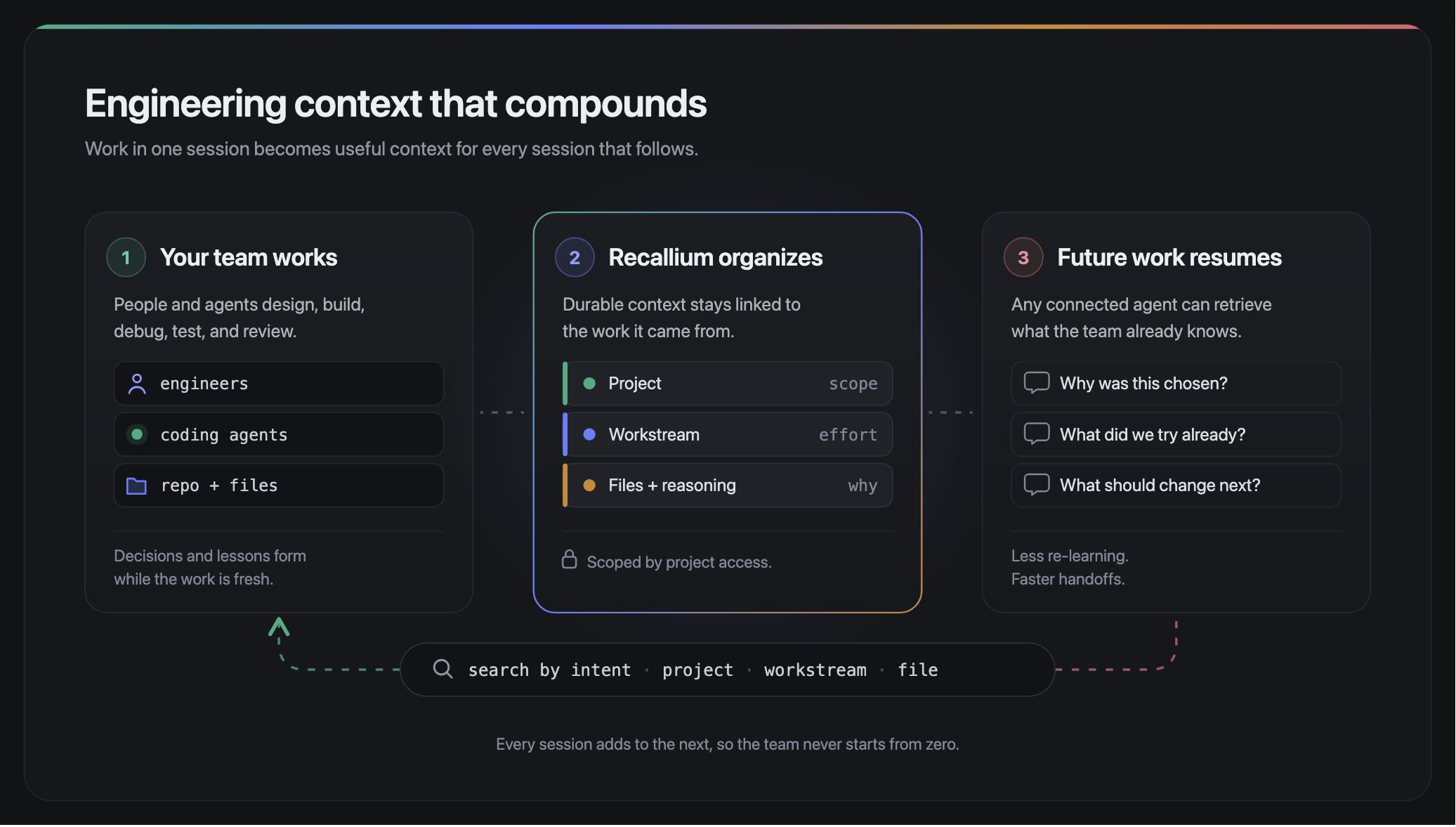
- Your team works. People and agents design, implement, debug, test and review. Decisions and lessons form while the work is fresh.
- Recallium preserves the context. The useful reasoning stays organized by project, workstream and the files it is about, scoped by project access.
- Future work starts informed. Any connected agent retrieves the earlier decisions, warnings and next steps: why was this chosen, what did we try already, what should change next.
You work through normal conversation. Ask your agent to remember a decision, investigate earlier fixes, or leave a continuation point; the integration attaches the context to the right project. Search works by meaning as well as by exact terms and file paths, so you ask the question you need answered instead of remembering a document title.
Read more: How Recallium works · Agents capture on your behalf · Access follows the project.
Install
Recallium Cloud is the managed service. One command connects every coding agent on the machine. It needs Node.js 22 or later; nothing is installed first, every command runs through npx.
npx -y recallium@latest install
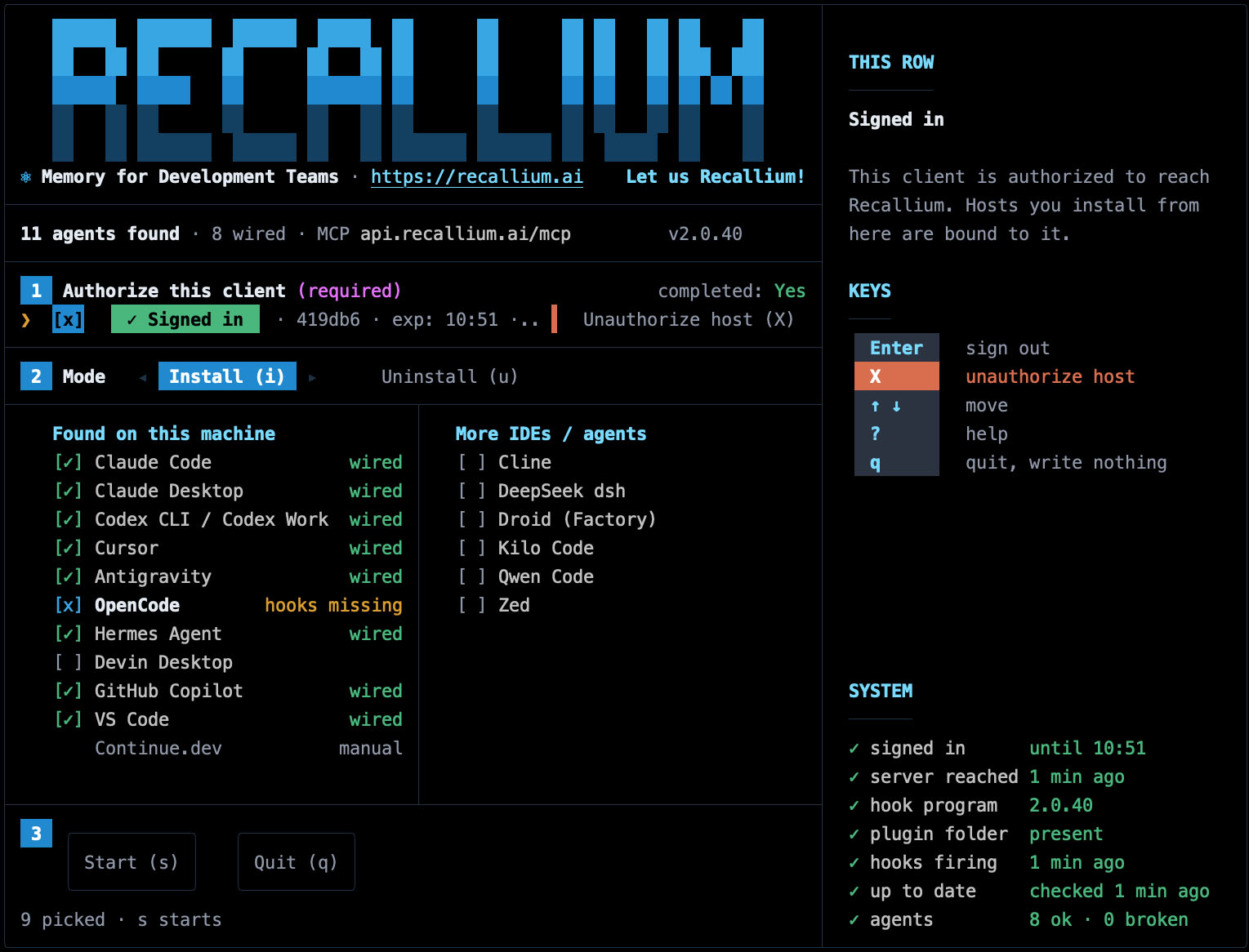
The installer detects the installed agents, signs you in once, shows its plan and writes nothing until you confirm. In every client the MCP server is named recallium, and the project name is derived from the Git repository. Then open a repository in your coding agent and ask, for example: "What decisions and open tasks should I know about before I change the authentication flow?"
Use --dry-run on install or uninstall to preview the affected files first. The installer and uninstaller preserve configuration entries they do not own.
Recallium Cloud is in a closed pilot. Join the waitlist at recallium.ai/waitlist; pilot code holders join at app.recallium.ai/pilot/join.
Read more: Quickstart · CLI reference · Install options · Remove Recallium · Prerequisites and troubleshooting · per-client setup for Claude Code, Codex, Cursor, GitHub Copilot, VS Code and Claude Desktop.
Use it from your coding agent
No command syntax. You talk to your agent in plain language and it calls Recallium on its own; send recallium by itself when you want the project context loaded again.
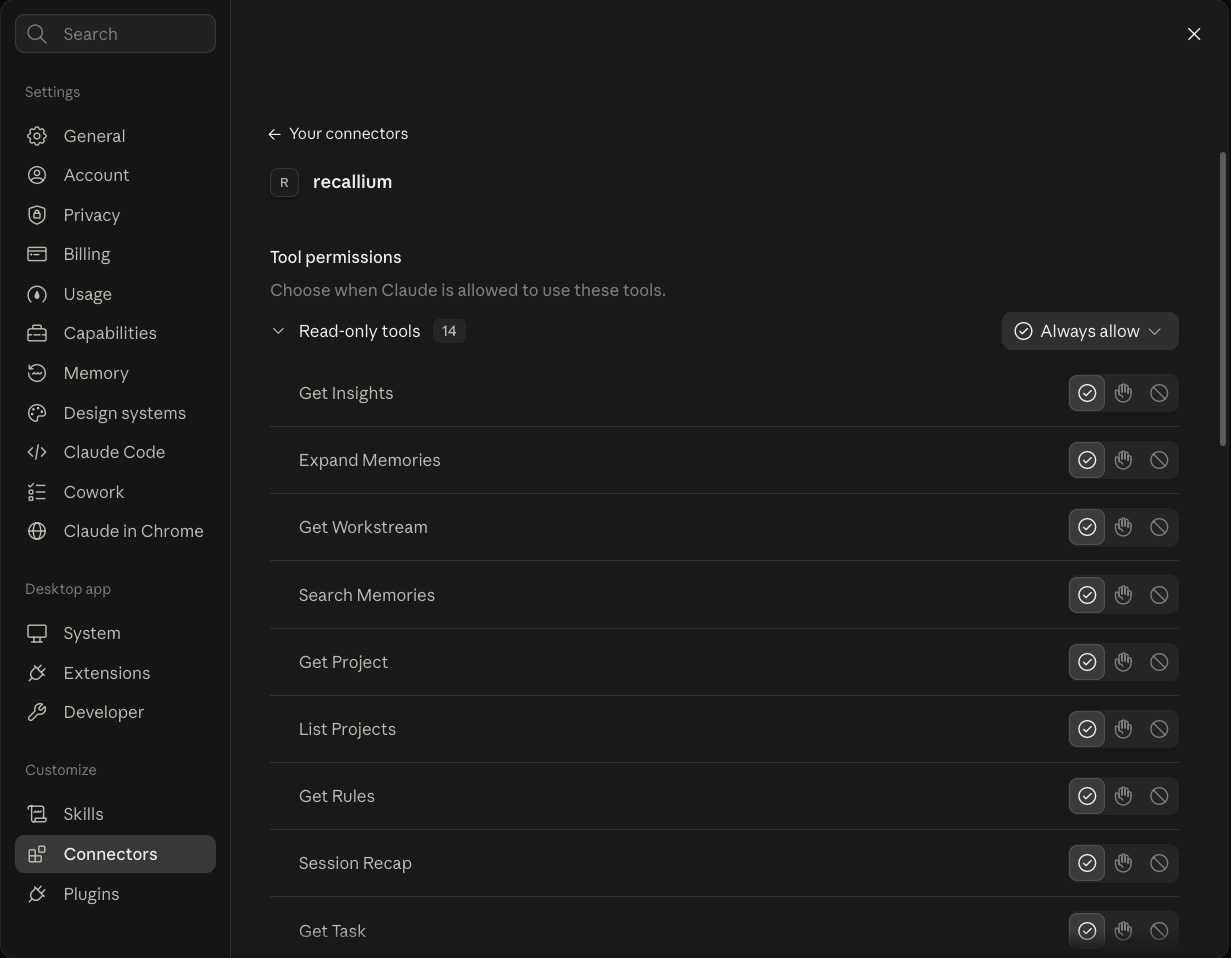 The same capabilities in every client: here, the
recallium connector in Claude Desktop.
Five moments cover most of the habit: when you start a session, when you finish a piece of work, when you are about to edit a file, when you stop for the day, and when you return after a break. Save one decision, root cause, experiment or procedure at a time, with the reason and the files, while it is fresh.
Read more: Prompt cheat sheet · Daily workflow · Check context before editing · Search and recall · Search by file · Power-user workflows · Work across tools and projects · Five rules for effective memory.
Projects and workstreams
A project is the organization and access boundary. It usually maps to a repository; Recallium derives the name from the enclosing Git repository, and a clone can be mapped to an existing project with git config --local recallium.projectName payments-platform. Context from one project does not leak into another the user cannot access. Related projects can be linked as siblings or as parent and child while each keeps its own boundary.
A workstream is a named effort inside a project, such as oauth-migration or checkout-reliability. It groups the decisions, designs, fixes and checkpoints that explain one journey, and moves through planned, active, shipped or abandoned. Another session loads the workstream and sees its constraints, decisions and latest progress together.
Read more: Projects and workstreams · Map a repository to an existing project · When to create a workstream.
Memory across the software lifecycle
On Recallium Cloud, insights across a project surface recurring approaches, recurring bugs with their causes and fixes, technical debt, and how an effort moved over time. Teams, projects and role-based access are managed there too.
Supported coding agents and IDEs
Continue.dev connects by manual setup. Any other MCP client can connect to the same endpoint; 60+ MCP clients are supported.
Read more: Supported clients · Configure Recallium in your IDEs · Configure Recallium for chat apps.
Where it helps
- The incident at 2am. The root cause and the fix from the last time this symptom appeared are the first search result.
- Handing off a half-finished migration. The workstream carries the constraints, the decisions and the working state to whoever picks it up, in whichever tool they use.
- The decision that was already replaced. Agents follow the current decision, not the one in a stale comment.
- Onboarding a new engineer. Their agent starts from what the team knows about the codebase on day one.
- When a senior engineer leaves. What they worked out stays with the project.
- Three tools, one memory. Research in Claude Desktop, build in Cursor, review in Claude Code, with one record across all three.
- Conventions that hold without reminders. Team rules are loaded into every session, so reviewers stop repeating themselves.
- The security review. Every decision has a date, an author, its files and its reasons.
Read more: Use cases · How we build Recallium with Recallium · Research in one tool, build in another · Investigate recurring bugs.
Rules files and Recallium
CLAUDE.md, AGENTS.md, Cursor Rules and Copilot instructions hold standing instructions that one tool loads at the start of a session. They are the right place for those. Recallium holds what the team has learned since: the record agents produce while they work, searched on demand and shared across every tool and teammate. Keep both.
Retrieval
On LongMemEval-S, all 500 questions including abstention, Recallium finds the right memory for 499 (99.8% hit@10) and returns 98.6% of relevant sessions, from 3.8 results per question on average. Answer accuracy is 98.4% with a Claude Opus 5.5 reader and 90.2% with the official GPT-4o reader, under the official GPT-4o judge. Reader, judge, depth and dates are published at recallium.ai/benchmarks. Other vendors' reports use different readers, judges and depths, so they are not a controlled head-to-head ranking.
Privacy and data handling
The client sends two kinds of data to Recallium Cloud. Memory content is sent only when your agent explicitly saves a memory on your behalf. Client telemetry is edit metadata that links memories to the work in a session: file paths, hashes, edit and activity counts, and Git branch and commit provenance. The sensor does not send source file contents. npx -y recallium@latest status shows which server your client uses.
Recallium does not train AI models on customer memories and does not sell customer data. Tenants are isolated by row-level security; data is encrypted in transit and at rest on Google Cloud. Sharing follows the repository: a repository only you connect stays yours. A Data Processing Addendum and an availability policy are published.
Read more: Privacy and data handling · Client telemetry · Security and trust · Privacy policy · DPA.
Pricing
Cloud Free: 500 memories a month until December 2026, nothing to run. Cloud Pro: shared team memory, 5,000 memories a month, priced per engineer. recallium.ai/pricing.
FAQ
What is Recallium?
Institutional engineering memory for humans and AI agents. Decisions, root causes, fixes, constraints and rules captured in one session, in Claude Code, Codex, Cursor, GitHub Copilot or another MCP client, are recalled by every agent and teammate on the project in the next.
How do I add memory to Claude Code, Codex or Cursor?
Run npx -y recallium@latest install. It detects the agents on your machine, signs you in once and connects each one. Per-client guides are in the docs.
How is Recallium different from CLAUDE.md or Cursor Rules?
Rules files are instructions one tool loads at the start of a session. Recallium is the record agents produce while they work, searched on demand and shared across tools and teammates. Most teams keep both.
How is Recallium different from Mem0 or Supermemory?
Mem0 and Supermemory are memory APIs you build into an AI product so it remembers its users; both also ship Claude Code and Cursor plugins. Recallium is memory for the team building the product: it follows how engineering teams work, from design and decisions through debugging and shipping, with workstreams for handoffs, team rules in every session, commits linked to the memories behind them, and teams and role-based access on Recallium Cloud. The long form: Serving Memory vs. Engineering Memory.
What is an MCP memory server?
The Model Context Protocol is an open standard for connecting AI agents to tools and data. Recallium is an MCP server for team memory: one endpoint every connected agent reads and writes.
Can my team see my personal projects?
No. Sharing follows the repository. A repository your team connects on Cloud Pro is shared with the team; a repository only you connect stays yours. On Cloud Free nothing is shared.
Why is context missing when I switch tools?
Most missing-context problems across tools are project-scope mismatches. Use the same project name in every connected agent, or map the clone to the existing project once.
Is there a self-hosted version?
Yes. The community edition in community/ runs on Docker on your own machine or network, free under the Elastic License v2, and continues to be supported. See below.
Is Recallium the same as MiniMe MCP?
Yes. Recallium was called MiniMe MCP (also written MiniMe-MCP) from August 2025 until it was renamed. Existing MiniMe installations are the community edition and continue to be supported.
Self-hosted community edition (formerly MiniMe MCP)
The self-hosted community edition, which shipped as MiniMe MCP until the rename, continues to be supported. It lives in the community/ directory of this repository: a Docker deployment with its installation guide, the Claude Code skill and the Claude Desktop extension. The image is published on Docker Hub. It is free under the Elastic License v2 and runs on your own machine or network, including behind a corporate proxy or air-gapped; see the community README. Report issues for either edition on GitHub Issues.
Recallium Cloud is the managed service and carries the team features above: shared repositories, teams and role-based access, insights, and nothing to run. Moving your memories across takes one export and one import; see Migrating from the community edition to Recallium Cloud.
Migrating from the community edition to Recallium Cloud
Your projects and memories move from a self-hosted instance to Recallium Cloud as one zip file. Nothing is deleted from the self-hosted instance; it keeps running until you stop it.
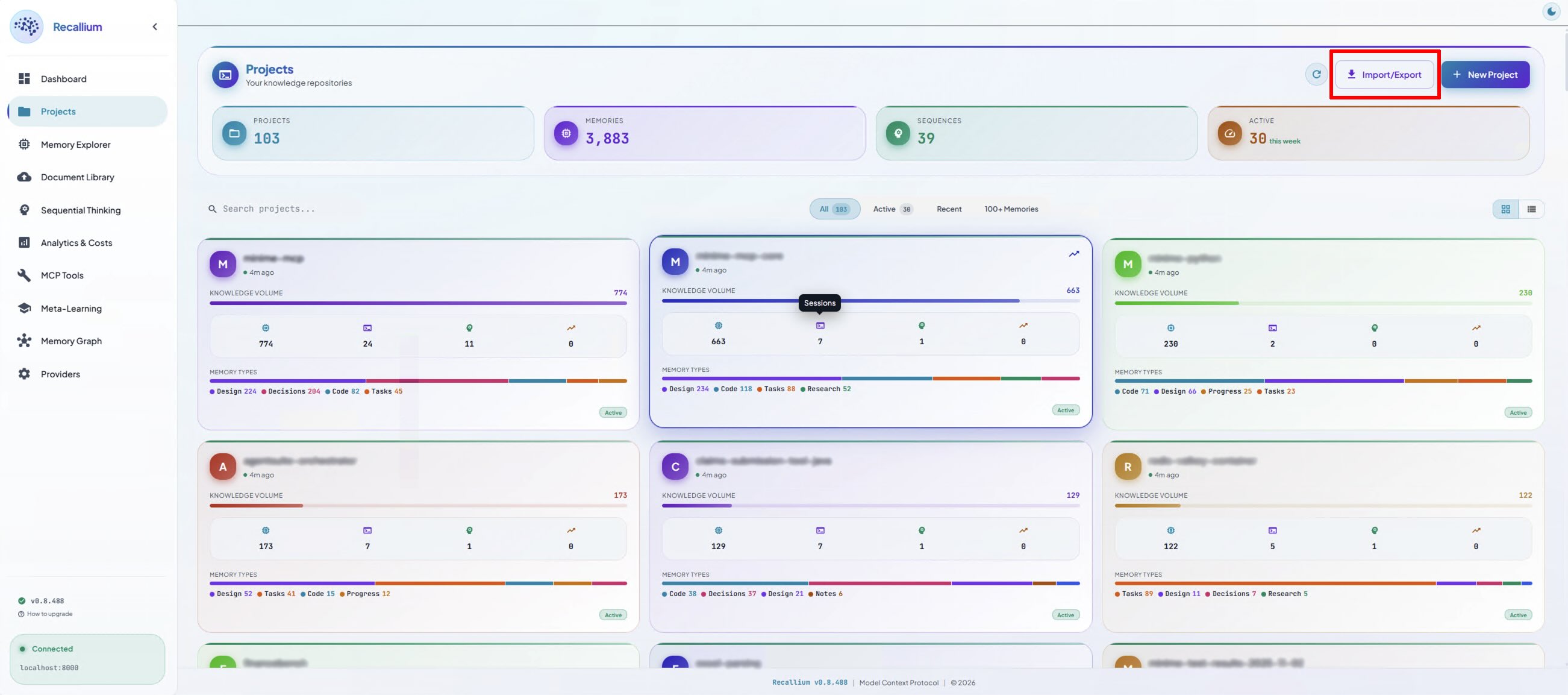
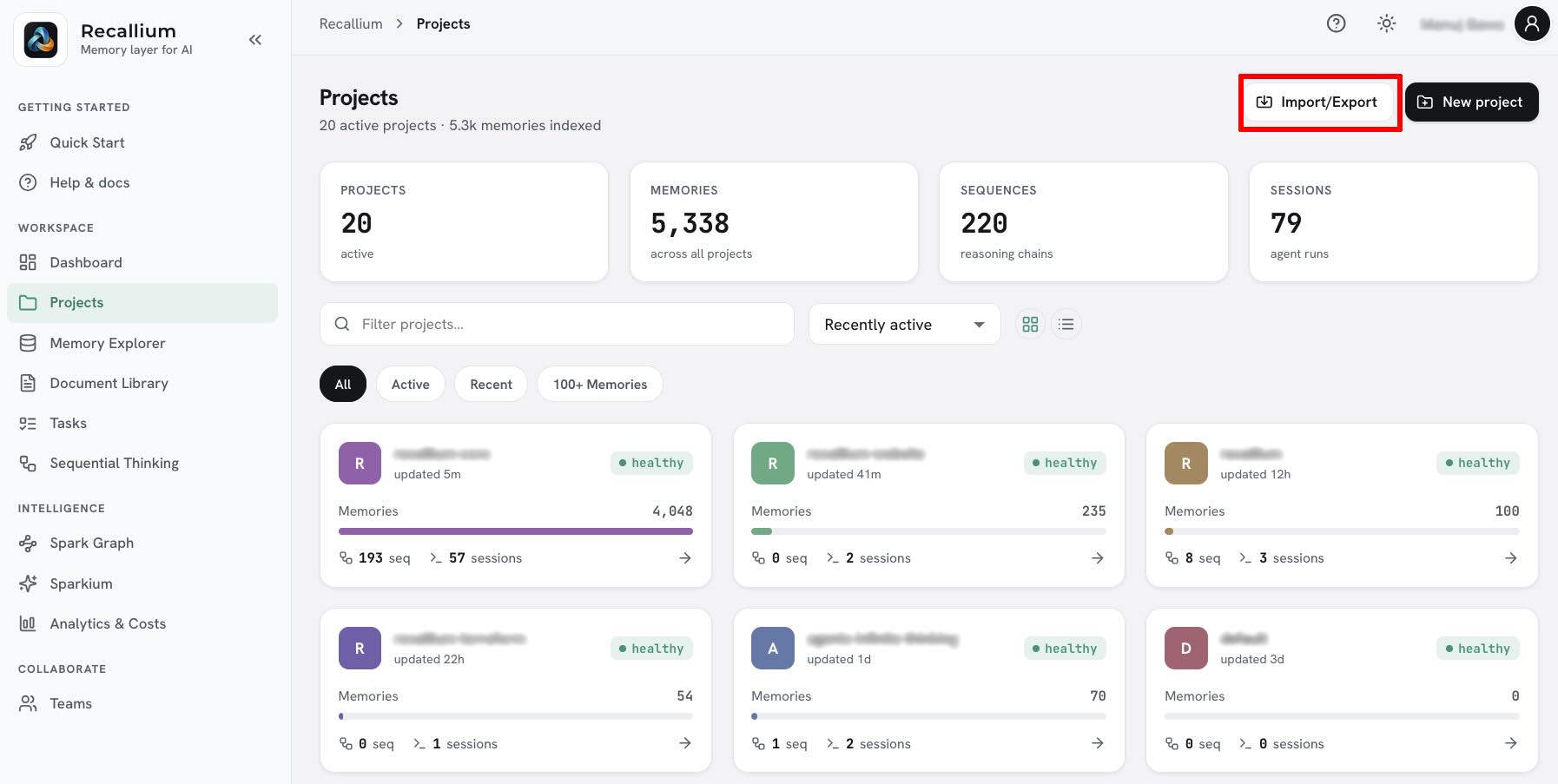
1. Open Import/Export in the community dashboard. In your self-hosted dashboard, go to Projects and click Import/Export at the top right.
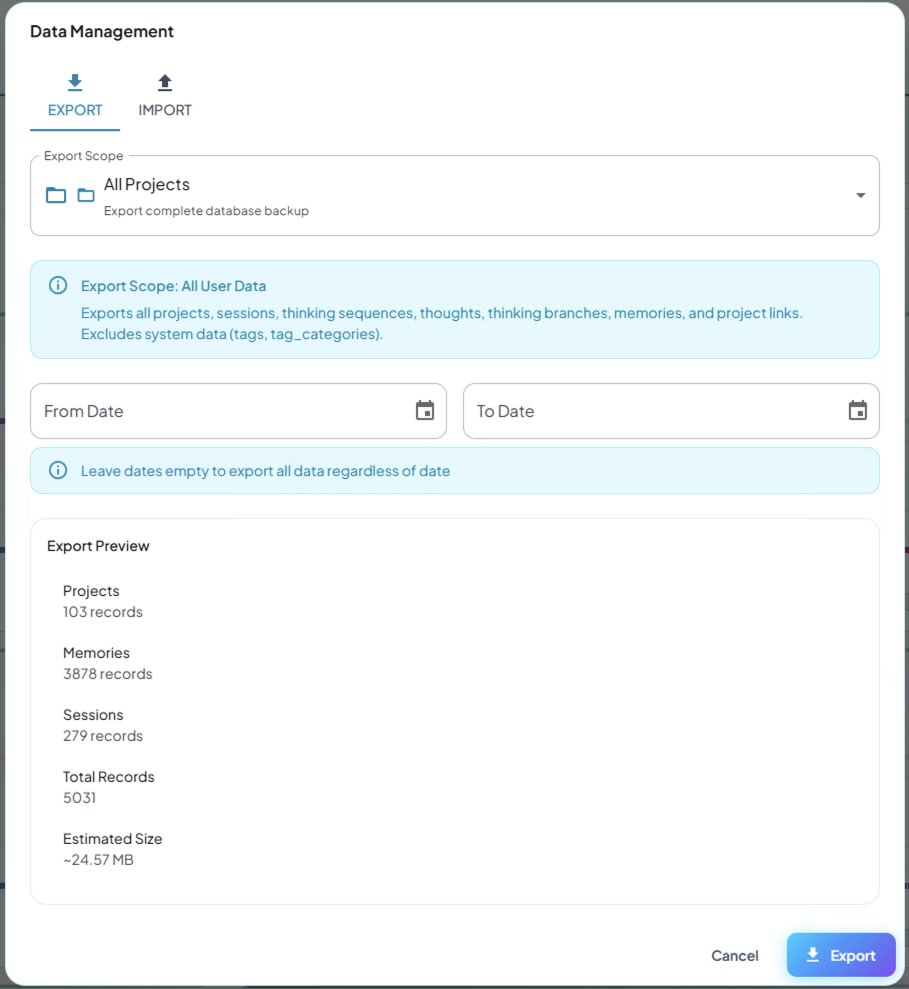
2. Export all projects. On the Export tab, keep the scope at All Projects (a complete backup: projects, sessions, thinking sequences, thoughts, memories and project links) and leave the dates empty to export everything. The preview shows the record counts and size. Click Export and save the zip. The same export is available from the command line with community/install/download-memories.sh, which fetches it from your instance's /api/data/export endpoint.
3. Open Import/Export in Recallium Cloud. Sign in at app.recallium.ai, go to Projects and click Import/Export.
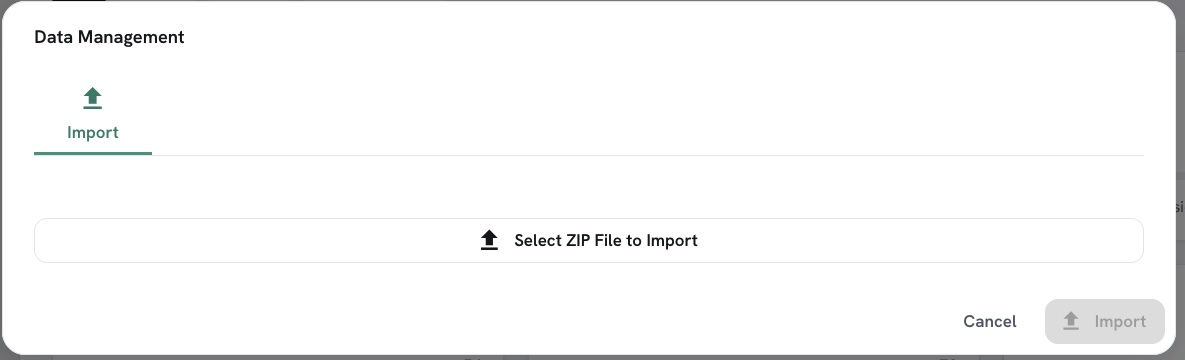
4. Import the zip. On the Import tab, choose Select ZIP File to Import, pick the export from step 2 and click Import. Your projects appear under the same names, so the agents you connect next find them by the Git repository as before.
5. Point your agents at Recallium Cloud. Run npx -y recallium@latest install. It connects the coding agents on the machine to Cloud and signs you in. If a clone's repository name differs from the imported project name, map it once with git config --local recallium.projectName <project-name> (docs). Then remove the self-hosted MCP entry from each client, or leave both connected while you compare.
Questions about a migration: [email protected].
Links
License
The community edition in community/ is licensed under the Elastic License v2: free to use and self-host; you may not offer it as a hosted service to third parties. Recallium Cloud is provided under its terms of service.