
Written in ReScript + React. No backend and no host dependency: you pass the MCP endpoint in when you mount it.
Features
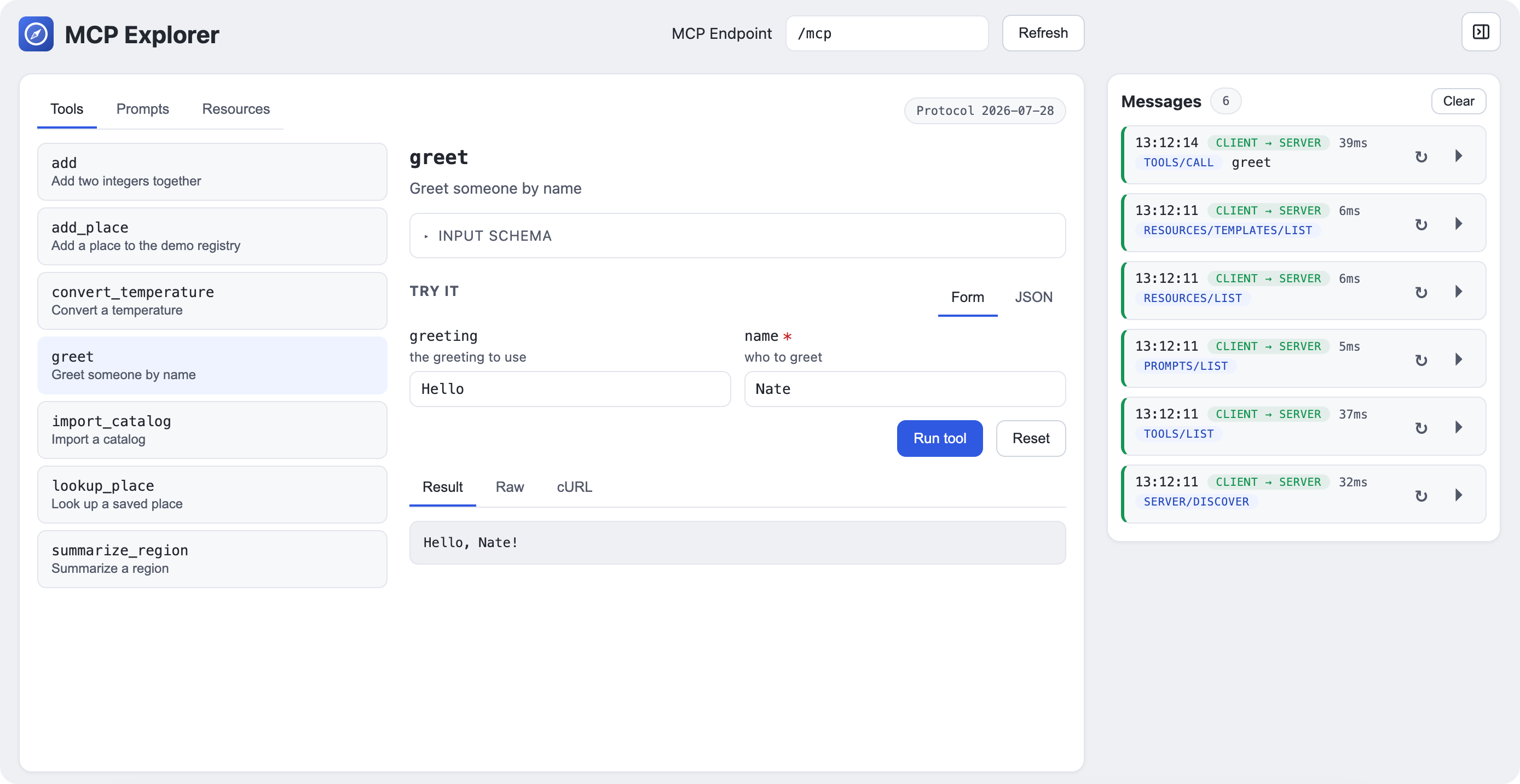
- Explore any MCP server: tools, prompts and resources, including parameterized resource templates. Tabs appear only when the server advertises them.
- Execute tools: a schema-driven "Try it" form with Form/JSON toggle,
Result/Raw/cURLviews, and Reset. Nested objects, maps, arrays, unions and defaults render as real controls, with a subtle type hint (string[],map<string, number>, …) next to each field name; unrecognized shapes fall back to a JSON editor. - Streaming:
text/event-streamnotifications such as progress appear live in a "Stream" log before the final result. - Message log: every request with its wire method, timing, direction and raw payloads. Replay a request or reopen it in the detail pane.
- Protocol: JSON-RPC 2.0, modern
2026-07-28MCP era (no initialize handshake):server/discover, thentools/list,prompts/listandresources/listwhen advertised. - Navigation: master-detail split with browser history, collapsing to a single pane on narrow screens.
Install
npm install @refactorful/mcp-explorer
The package ships the prebuilt bundle. Use it as a React component (React 18+ is a peer dependency):
import "@refactorful/mcp-explorer/styles.css";
import { McpExplorer } from "@refactorful/mcp-explorer";

<McpExplorer endpoint="/mcp" execEnabled />
It accepts endpoint, execEnabled and endpointEditable, plus className
for the wrapper element. TypeScript declarations are included.
Or use the imperative global the component wraps:
import "@refactorful/mcp-explorer/styles.css";
import "@refactorful/mcp-explorer/index.js"; // registers window.McpExplorer

window.McpExplorer({ endpoint: "/mcp", domId: "mcp-explorer" });
Or load the global from a CDN without installing:
<link
  rel="stylesheet"
  href="https://unpkg.com/@refactorful/mcp-explorer/styles.css"
/>
<script src="https://unpkg.com/@refactorful/mcp-explorer"></script>
Self-hosting
Prefer to serve the files yourself? They live in bundle/mcpexplorer/ and are
also included in the npm tarball:
Usage
Load the JS and CSS on any page, drop in an empty container, and mount:
<div id="mcp-explorer"></div>
<link rel="icon" href="/icon.svg" type="image/svg+xml" />
<link rel="stylesheet" href="/docs/mcp/styles.css" />
<script src="/docs/mcp/index.js"></script>
<script>
  const viewer = window.McpExplorer({
    endpoint: "/mcp",          // MCP URL (absolute or same-origin path)
    domId: "mcp-explorer",     // id of the container element
    execEnabled: true,         // optional: on in dev, off in production
    endpointEditable: false,   // optional: lock the endpoint field
  });
  // viewer.unmount();
</script>
It takes a config object and returns an { unmount } handle. Options:
endpoint(aliasurl): the MCP URL to call. Defaults to"/mcp".domId(aliasdom_id): id of an empty container element. Defaults to"mcp-explorer".execEnabled: turns tool execution on or off for this mount. When omitted, the build default applies (on invite dev, off in production). It is fixed for the lifetime of the mount; there is no in-app toggle.endpointEditable: defaults totrue. Set tofalseto pin the viewer to a single server.
window.McpExplorer.mount(config) is the same function, and
window.McpExplorer("some-dom-id") is a shorthand where the string is the
domId.
Standalone page
The bundle's index.html is a complete single-file page: the JS and CSS are
inlined and the page mounts itself, so serving the file is enough. The mount
call it ships with is:
window.McpExplorer({ endpoint: "/mcp", domId: "root" });
Serve the file next to your MCP endpoint (or behind the same proxy) and it just runs.
Requirements
- A browser. The viewer is static files, there is no server-side component.
- The MCP endpoint must be reachable from the page that mounts the viewer:
same origin, behind a proxy, or CORS-enabled. Many MCP hosts reject
cross-origin requests (
OPTIONSreturns405,POSTwith anOriginheader returns403), so serving the viewer alongside the endpoint is the happy path. The dev server proxies/mcpand stripsOriginfor you. - Node.js 20+ to build from source (not needed to use the bundle).
Development
npm install

npm run res:watch   # terminal 1: ReScript compiler in watch mode
npm run dev         # terminal 2: Vite dev server (proxies /mcp)

npm test            # unit + DOM/SSR tests
npm run bundle      # rebuild bundle/mcpexplorer/*
npm run validate:live               # live smoke test against a running server
MCP_ENDPOINT=http://127.0.0.1:8080/mcp npm run validate:live
In dev, the viewer proxies /mcp to http://127.0.0.1:8080 (override with
MCP_DEV_TARGET). Keep the endpoint relative: an absolute URL bypasses the
proxy and fails as a cross-origin request.
Releases
Publishing is version-driven, so you never tag by hand. Bump the version, commit, and push to master:
npm version patch --no-git-tag-version
git add package.json package-lock.json
git commit -m "release 0.1.2"
git push
The Publish workflow derives v<version> from package.json and skips versions
that already have a tag, release, or npm version. Otherwise it runs the tests,
publishes to npm with provenance, and creates a GitHub release with the bundle
zip attached.
Layout
src/                  ReScript app (Main.res = API, Embed.res = React entry, App.res = shell)
src/api/              protocol, codecs, transport, SSE, schema
src/components/       one React component per file
test/                 Vitest unit tests + jsdom/SSR tests
scripts/              copy-bundle, validate-live
bundle/mcpexplorer/   generated build artifacts (rebuilt by npm run bundle)
Notes
- The wire protocol is strongly typed: method/header mismatches are
unrepresentable, decoders return
resultinstead ofundefined, and unknown content-block types degrade gracefully rather than failing a call. - Versions are pinned exactly:
rescript12.3.1,@rescript/react0.15.0, React 19.2.0, Vite 8.3.1, Vitest 5.0.2.
License
MIT. See LICENSE. Copyright (c) 2026 Refactorful (Nathan Ortega).