
🛡️ Copilot Security Instructions
A comprehensive toolkit to guide GitHub Copilot toward secure coding practices. This project includes customizable instructions and security-focused prompts to help development teams identify and mitigate security risks effectively.
Designed for security-conscious teams, this configuration ensures Copilot suggests safer code patterns, avoids common vulnerabilities, and reinforces best practices — all without disrupting your workflow.
🔐 What's Inside
This project offers:
- Secure-by-default guidance for all languages (e.g., input validation, secret handling, safe logging).
- Language-specific secure patterns:
- ☕ Java
- 🟩 Node.js
- 🟦 C#
- 🐍 Python
- "Do Not Suggest" lists to block risky Copilot completions (e.g.,
eval, inline SQL, insecure deserialization). - AI hallucination protections to prevent package spoofing, non-existent APIs, and misinformation risks.
- Mentorship-style tips to help newer engineers build secure coding habits.
- Custom agents & Agent Skills under
agents/andskills/for repeatable AppSec workflows inside Copilot. - An installable GitHub Copilot CLI plugin under
plugins/copilot-securityfor reusable AppSec agents and skills across projects. - An MCP server for seamless integration of these prompts into other projects.
🗂️ Prompt Catalogue
Explore the available prompts and their intended use cases:
These prompt files live under prompts/ in this repo and are intended to be copied into a consuming repository’s .github/prompts/.
Recommended workflow: start with the application-security-orchestrator agent (see agents/application-security-orchestrator.agent.md).
It standardizes intake, then hands off to specialist agents (Analyst/Architect/Engineer) depending on whether you want findings, a threat model, or implemented fixes.
🧑💻 Agents
🧩 Skills
📦 How to Use in a Real Project
Tip for contributors: when adding a file under prompts/, update the Prompt Catalogue table.
Option 1: Leveraging Static Files
This option is best when you want to vendor a fixed set of guidance files directly into a repository instead of installing the reusable CLI plugin.
Copy the components you want from this repository into the matching .github/ locations in your target project:
Notes:
- If you copy a skill directory, copy the entire folder, not just
SKILL.md. Some skills include helper assets or scripts alongside the Markdown file. - The root-level
instructions/folder in this repository is currently empty, so there are no path-specific instruction files to copy right now. - If you only need a subset, copy only the prompts, agents, or skills you plan to use.
-
Copy
copilot-instructions.mdinto your repo under.github/copilot-instructions.md. -
Copy whichever reusable folders and files you want to adopt:
- prompts into
.github/prompts/ - agents into
.github/agents/ - skills into
.github/skills/ - instructions into
.github/instructions/when this repository provides them
- prompts into
-
Open the prompt or agent-enabled workflow you want to run within your IDE.
-
For prompt files, click the
Run Promptbutton at the top-right of the file.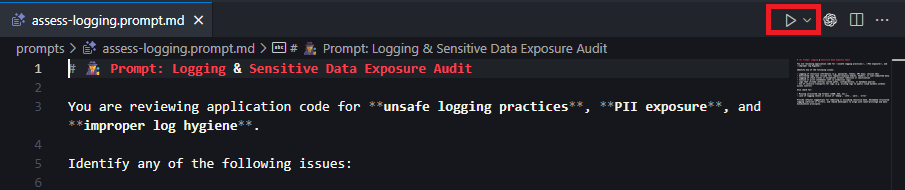
ℹ️ Note: If you don't see the run prompt button; check to make sure the
Chat: Prompt Filesfunctionality is enabled in your settings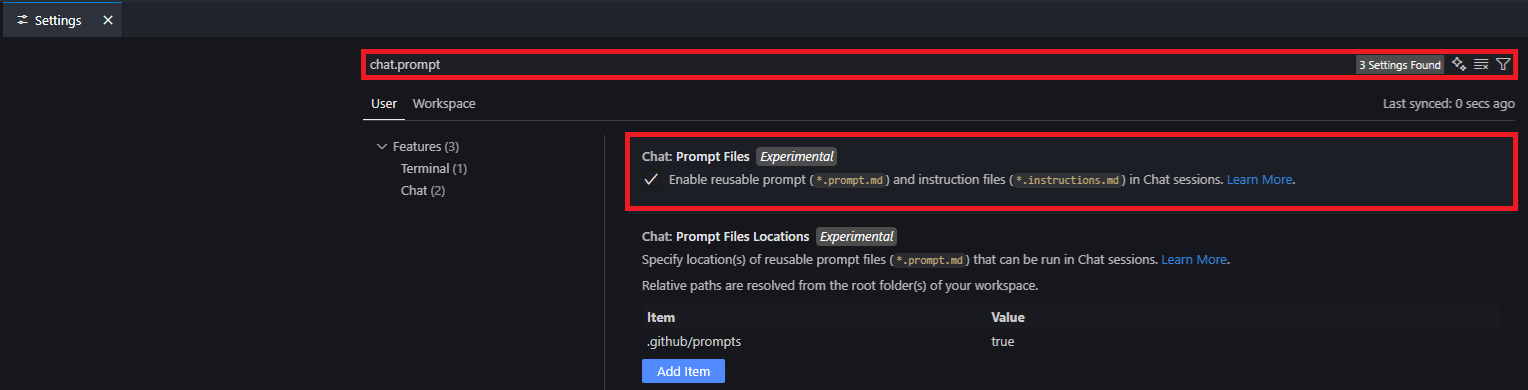
-
For agents and skills, invoke them from Copilot Chat after the files are present in
.github/agents/and.github/skills/.
Option 2: Leveraging the MCP Server
The MCP server simplifies the integration of secure coding prompts into your workflow. Follow these steps:
Run MCP from source
-
Install dependencies
npm install -
Setup environment
cp .env.example .envThe MCP server reads configuration from a
.envfile. Customize the following variables as needed: -
Start the server
npm start
Run MCP in Docker
-
Build docker container
docker build -t copilot-security-mcp . -
Run docker container
docker run -d -p 8080:8080 copilot-security-mcp
Configuring VSCode for MCP
-
Open VSCode and run the
MCP: Open User Configurationcommand. -
Add the following JSON configuration:
{ "servers": { "copilot-instructions-mcp": { "url": "http://localhost:8080/mcp" } } } -
Save the configuration.
-
Navigate to the Extensions menu in VSCode.
-
Locate the
copilot-instructions-mcpserver, click the settings cog, and selectstart server.
Using MCP with GitHub Copilot
-
Open GitHub Copilot Chat.
-
Ask it to run any of the prompts against your repository or specific files.
Example:
Please get and run the secure code review prompt.
Option 3: Using the copilot-security GitHub Copilot CLI Plugin
This repository ships an installable GitHub Copilot CLI plugin named copilot-security.
Plugins are reusable bundles of Copilot components such as agents, skills, hooks, and integrations. In this project, the plugin is published from the official marketplace repository:
robotti-io/copilot-security-instructions
The plugin manifest lives under plugins/copilot-security/.github/plugin/plugin.json, and the marketplace manifest for this repository lives under .github/plugin/marketplace.json.
What the plugin contains
The copilot-security plugin currently packages these reusable components:
- Agents:
application-security-analystapplication-security-architect
- Skills:
access-control-reviewdependency-cve-triagethreat-model
After installation, these agents and skills are available in any project where you use GitHub Copilot CLI.
Install from the official marketplace
GitHub documents CLI plugins here:
https://docs.github.com/en/copilot/concepts/agents/copilot-cli/about-cli-pluginshttps://docs.github.com/en/copilot/how-tos/copilot-cli/customize-copilot/plugins-finding-installing
To register this repository as a plugin marketplace and install the copilot-security plugin:
copilot plugin marketplace add robotti-io/copilot-security-instructions
copilot plugin marketplace list
copilot plugin marketplace browse copilot-security-instructions
copilot plugin install copilot-security@copilot-security-instructions
Notes:
robotti-io/copilot-security-instructionsis the marketplace repository reference you add.copilot-security-instructionsis the marketplace name exposed by this repository'smarketplace.json.copilot-securityis the plugin name exposed byplugins/copilot-security/.github/plugin/plugin.json.
Install directly from the repository
If you do not want to register the marketplace first, you can install the plugin directly from this repository by pointing Copilot CLI at the plugin subdirectory:
copilot plugin install robotti-io/copilot-security-instructions:plugins/copilot-security
This form is required because the plugin manifest is stored in a plugin subdirectory, not at the repository root.
Install from a local checkout
For local development or testing from a cloned copy of this repository:
copilot plugin install ./plugins/copilot-security
Manage the installed plugin
Use the standard Copilot CLI plugin commands:
copilot plugin list
copilot plugin update copilot-security
copilot plugin uninstall copilot-security
copilot plugin marketplace remove copilot-security-instructions
You can also get command help with:
copilot plugin --help
copilot plugin install --help
📚 Languages Supported
- ☕ Java — Spring, Jakarta, JDBC, OWASP Encoder
- 🟩 Node.js — Express,
pg,mongoose,helmet,ajv,zod - 🟦 C# — ASP.NET Core, Razor, ADO.NET, Entity Framework
- 🐍 Python — Flask, Django,
SQLAlchemy,pydantic,Jinja2,bcrypt,cryptography
🛠️ Development
Use these npm scripts to work on the project:
Recommended workflow: Run npm run lint (and npm run lint:fix if needed) before committing or opening a PR.
📣 Feedback & Contributions
This project is community-friendly and designed for continuous improvement.
If you have suggestions, feedback, or language rules to contribute — feel free to open an issue or PR.
Let’s make Copilot safer, one suggestion at a time. 🛠️
Disclaimer
This repository, including all instructions, prompts, agents, examples, and related application content, is provided “AS IS”, without warranties or conditions of any kind, express or implied, including without limitation warranties of merchantability, fitness for a particular purpose, noninfringement, security, accuracy, completeness, or regulatory compliance.
Use of this repository is at your own risk. Robotti and its contributors shall not be liable for any claims, damages, losses, or other liability arising from or related to the use, misuse, or inability to use this repository or any outputs produced from it.