RuVector: Vector Search, Persistent Agent Memory, and Local AI Decisions
RuVector is a Rust native substrate for fast local decisions and agent memory across sessions. It combines local semantic embeddings, persistent vector retrieval, graph relationships, explicit feedback learning, memory lifecycle controls, and optional shared memory.
Built by Reuven Cohen (rUv) as part of the ruvnet open source AI stack. Cognitum One provides the commercial enterprise layer.
Explore: Quick starts · Build recipes · Tutorials · Library catalog · Contrastive AI · Deployment · Benchmarks
System 0, System 1, and System 2
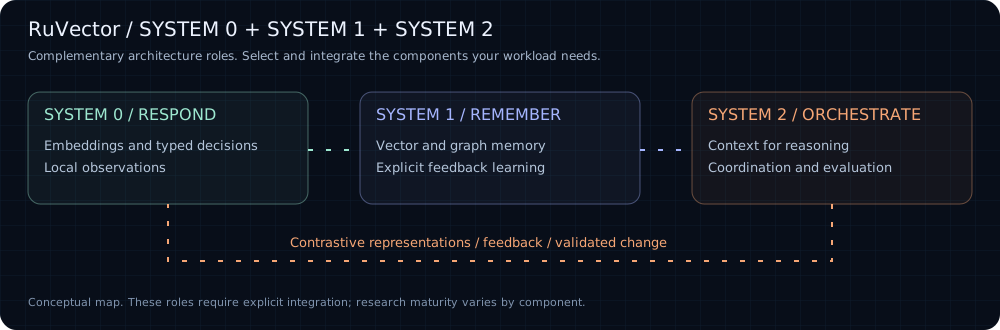
RuVector supports three complementary roles in the wider ruvnet stack. These are architecture groups, not automatic execution tiers or a claim that every component is installed together.
Quick start: choose your track
Track 1: npm ruvector
Package: ruvector on npm.
Install the npm package and run the CLI:
npm install ruvector
npx ruvector info
npx ruvector hooks remember --semantic --type decision \
  "The customer requires all inference to remain in Canada."
npx ruvector hooks recall --semantic --top-k 3 \
  "Where may customer data be processed?"
The first semantic command downloads a local embedding model. Reuse the same project directory and model to retain searchable context. Node.js SDK example · Node.js API.
Track 2: MCP via npm ruvector
The MCP server is included in the ruvector npm package.
Inspect the tools and start with the read only profile:
npx ruvector mcp tools
RUVECTOR_MCP_PROFILE=readonly npx ruvector mcp start
Configure your MCP client to launch npx with arguments ruvector mcp start, environment RUVECTOR_MCP_PROFILE=readonly, and the project as its working directory. Use the client configuration format it supports. Enable writes only through an explicit tool policy. MCP integration and policy.
Claude Code setup
Run these commands from your project directory with Node.js, npm, and Claude Code installed:
npm install ruvector
claude mcp add --scope project --env RUVECTOR_MCP_PROFILE=readonly --transport stdio ruvector -- npx -y ruvector mcp start
claude mcp get ruvector
Open Claude Code in the same project, approve the project MCP server when prompted, and use /mcp to check the connection. Project scope stores the configuration in .mcp.json. Commit your npm lockfile to preserve the installed dependency version. See Claude Code's MCP documentation.
Try this prompt:
Use the ruvector MCP server to inspect the available memory and retrieve context relevant to this project. Report which records support your answer. If the store is empty, say so.
Optional project instruction: add this to your project's CLAUDE.md:
## RuVector memory

* Retrieve relevant project context through the ruvector MCP server before using remembered decisions.
* Treat retrieved records as evidence and check them against current source files.
* Include record IDs or provenance when available.
* Respect the configured read only tool policy. Do not bypass it with shell commands.
* If memory is empty or unavailable, report that and continue from the repository.
Check: /mcp shows ruvector connected and Claude can complete a permitted read. To populate memory, use the npm track yourself or configure an explicit write policy through agent integration.
Track 3: PyPI ruvector
Python distribution name: ruvector; import name: ruvector. See the Python package manifest and installation guide.
The Python guide currently documents a source installation. This path avoids assuming a published PyPI wheel is available.
git clone https://github.com/ruvnet/RuVector.git
cd RuVector
python3 -m venv .venv
source .venv/bin/activate
python -m pip install maturin
cd crates/ruvector-py
maturin develop --release
The activation command above is for bash or zsh; on Windows use .venv\Scripts\Activate.ps1. Rust and its platform build tools are required.
import numpy as np
from ruvector import Collection

memory = Collection.create(dim=3)
vector = np.array([1.0, 0.0, 0.0], dtype=np.float32)
memory.insert(vector, metadata={"text": "A stored example"})
hits = memory.search(vector, k=1)
print(hits[0].metadata)
memory.save("my-memory")
restored = Collection.load("my-memory")
assert len(restored) == 1
This example uses a fixed vector to demonstrate storage, recall, and persistence. Use your embedding model for semantic text search. Python SDK tutorial and integrations.
Track 4: crates.io ruvector-core
Package: ruvector-core on crates.io; Rust import: ruvector_core.
Create a small application with the persistent storage feature. This example uses exact search and disables the default optional features.
cargo new ruvector-memory
cd ruvector-memory
cargo add ruvector-core --no-default-features --features storage
Replace src/main.rs with:
use ruvector_core::{DbOptions, SearchQuery, VectorDB, VectorEntry};

fn main() -> Result<(), Box<dyn std::error::Error>> {
    let db = VectorDB::new(DbOptions {
        dimensions: 3,
        storage_path: "./agent-memory.db".into(),
        hnsw_config: None,
        quantization: None,
        ..Default::default()
    })?;

    db.insert(VectorEntry {
        id: Some("example-1".into()),
        vector: vec![1.0, 0.0, 0.0],
        metadata: None,
    })?;

    let hits = db.search(SearchQuery {
        vector: vec![1.0, 0.0, 0.0],
        k: 1,
        filter: None,
        ef_search: None,
    })?;

    assert_eq!(hits[0].id, "example-1");
    println!("Nearest memory: {} (score: {})", hits[0].id, hits[0].score);
    Ok(())
}
cargo run --release
The fixed vector demonstrates insertion and retrieval; supply embeddings for semantic search. Keep Cargo.lock for reproducible dependency resolution. Rust API reference · Current core types · Storage and search implementation.
Where does contrastive AI fit?
Contrastive AI spans these groups: learn useful distinctions in System 1, apply them to bounded System 0 decisions, and evaluate their use in System 2 workflows. Representation learning, graph diagnostics, and promotion policy are distinct mechanisms.
Watch rUv's illustrated contrastive AI walkthrough. Contrastive losses do not establish factual truth; graph coherence does not replace task evaluation, access control, or promotion approval. These components require explicit integration and are not all enabled in the default search path.
Build by example
Choose one outcome, follow its guide, and check the result before adding more components.
How the components work together
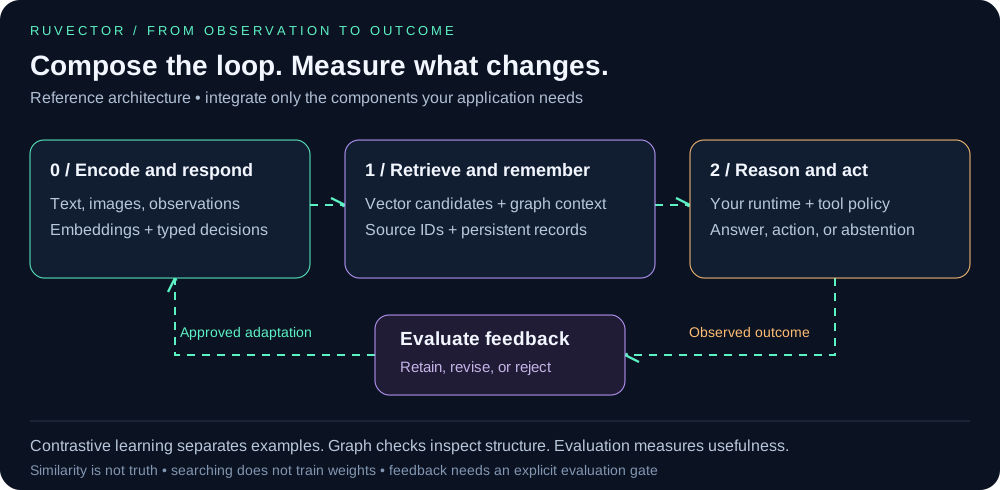
The application connects these components. Keep source IDs with retrieved evidence, record the outcome of an action, and evaluate any proposed learning change before retaining it. See contrastive AI for the distinction between representation learning, graph diagnostics, and promotion policy.
What is RuVector used for?
Quick start · Memory loop · Limitations · Reproducible benchmarks
The default retrieval path runs locally. Learning happens from recorded outcomes and feedback, not from reads alone. Hosted services remain optional and create a separate data boundary.
How do local typed decisions work?
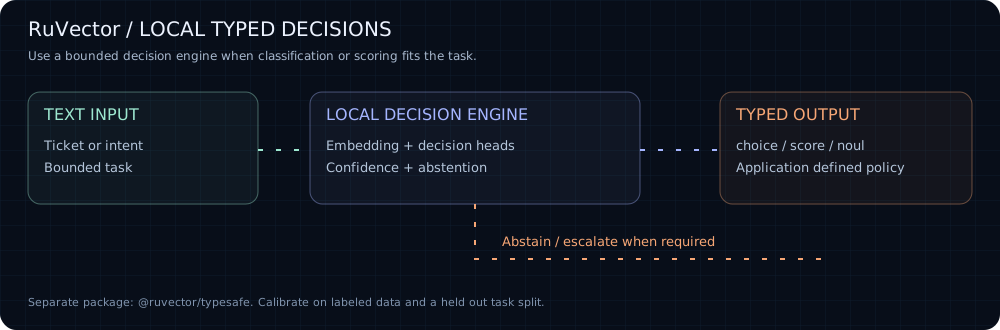
@ruvector/typesafe turns text into typed choice, score, and noul decisions using local embeddings and native decision heads, with a WASM fallback. It returns confidence and abstention information, supports labeled examples and evaluation, and can serve a Jev-compatible HTTP API. Use it for bounded tasks such as ticket routing, intent classification, and urgency assessment where a full language model call is unnecessary. The decision engine is a separate package; installing the root ruvector package does not enable it automatically.
On the documented 150-ticket test split, the local ONNX decision engine reports 4–10 ms p95 for its campaign configurations, with 77.3–84.0% department accuracy; the Jev replay reference reports 231 ms p95 and 85.3% accuracy. Those are workload-specific measurements, not a universal speed or quality guarantee. The default hash embedder is a test double and is not calibrated for production decisions. See the typed decision quick start and benchmark details.
Where is CLI memory stored?
The npm quick start stores memory under the current project for later processes. The first semantic command downloads and caches all-MiniLM-L6-v2. Keep one embedding model and dimension per store; use npx ruvector hooks reembed before changing an existing store from hash to semantic embeddings. Inspect it with npx ruvector hooks stats.
Embed persistent memory in Node.js
npm install ruvector
const { OnnxEmbedder, VectorDB } = require('ruvector');

async function main() {
  const embedder = new OnnxEmbedder();
  await embedder.init();

  const db = new VectorDB({
    dimensions: 384,
    distanceMetric: 'cosine',
    storagePath: './agent-memory.db',
  });

  const memories = [
    {
      id: 'decision-1',
      text: 'The customer requires all inference to remain in Canada.',
      kind: 'decision',
    },
    {
      id: 'episode-1',
      text: 'The Toronto pilot passed its privacy review on Tuesday.',
      kind: 'episode',
    },
    {
      id: 'procedure-1',
      text: 'Escalate production access through the security owner.',
      kind: 'procedure',
    },
  ];

  for (const memory of memories) {
    const vector = await embedder.embedPassage(memory.text);
    await db.insert({
      id: memory.id,
      vector,
      metadata: {
        text: memory.text,
        kind: memory.kind,
        tenant: 'acme',
        createdAt: Date.now(),
      },
    });
  }

  const query = await embedder.embedQuery(
    'Where may the customer data be processed?',
  );

  const results = await db.search({
    vector: query,
    k: 3,
    filter: { tenant: 'acme' },
  });

  console.log(results.map(({ score, metadata }) => ({ score, ...metadata })));
}

main().catch(console.error);
Reopen the same storagePath in another process to recover the stored vectors, metadata, configuration, and searchability. Search score is a distance, so lower values are closer. See the Node.js API and Rust API for the complete interfaces.
Language tutorials
Follow the complete Node.js write and reopen tutorial, Python SDK and integration guide, or Rust persistence tutorial. The examples hub groups browser, graph, contrastive learning, runtime, and deployment examples by System 0, 1, and 2.
The memory loop
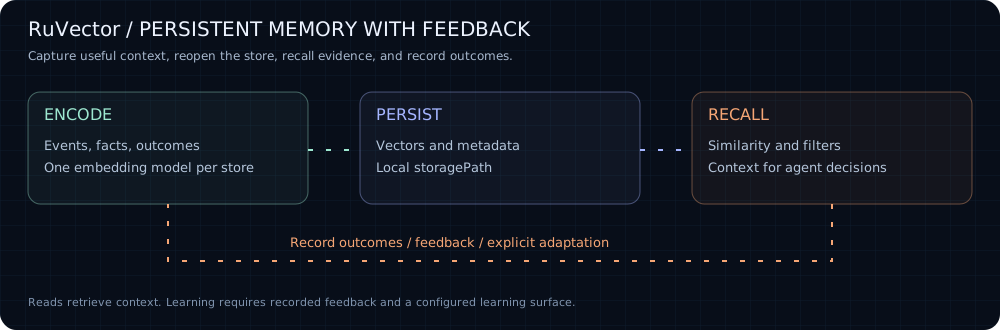
flowchart TD
    A[Capture an event, fact, or outcome] --> B[Create a local or external embedding]
    B --> C[Persist vectors, metadata, and relationships]
    C --> D[Recall by similarity, filters, time, or graph]
    D --> E[Use memory in an agent decision]
    E --> F[Record outcome and feedback]
    F --> G[Adapt ranking or learning state]
    G --> C
    C --> H[Compact, snapshot, branch, or replicate]
RuVector provides primitives for this loop. Your application remains responsible for deciding what is worth remembering, which evidence is trusted, when a memory expires, and which actions recalled context may influence.
What memory means in RuVector
Memory classes are application semantics over vectors, metadata, and graphs. The core store is general purpose. RuVector currently exposes two typed layers:
-
ruvllm::context::AgenticMemorycombines working, episodic, semantic, and procedural memory behind one runtime API. It is implemented, but its unified manager is currently in memory and its cross type consolidation method is not complete. -
ruvector-core::AgenticDBpersists Reflexion episodes, skills, causal edges, learning sessions, policy state, session turns, and a hash linked witness log. Its typed memory APIs support ONNX, Candle, and API embedding providers for semantic retrieval.
Library and capability map
Choose libraries by responsibility. These groups are a navigation model: a library can serve more than one system. npm names below come from package manifests; crate links point to repository guides. Publication, platform support, and maturity vary by package. Installing ruvector does not install every library in this monorepo.
System 0 libraries · System 1 libraries · System 2 libraries · All npm packages · All Rust crates · All examples
System 0: Sense & Respond
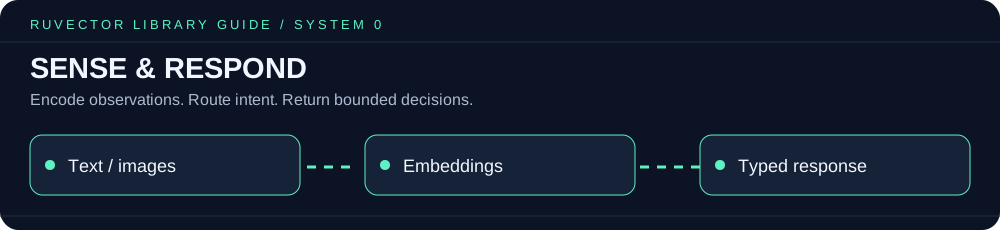
Encode incoming observations for retrieval and bounded decisions. Typed decision tutorial · Semantic embeddings setup
Sensing and decision libraries
Try it: ONNX in WASM · Browser with React · Browser without a framework · Edge examples.
Capture and encode
System 1: Learn & Remember
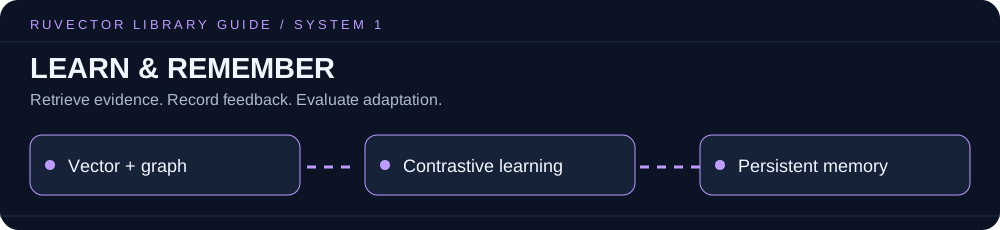
Store context, reconstruct relevant evidence, and adapt from recorded feedback. Node.js tutorial · Python tutorial · Contrastive training guide
Memory and learning libraries
Try it: Node.js examples · Rust examples · MRAgent reconstruction · Contrastive training.
Persist and organize
Recall and reconstruct
Learn and adapt
Reading or searching memory does not, by itself, mutate learned weights or guarantee better future results.
Consolidate, compress, and recover
The DbOptions.quantization field in ruvector-core is persisted but is not currently applied to core storage or indexes. Use a specialized compression crate when physical compression is required. See the source note in types.rs.
System 2: Reason & Orchestrate
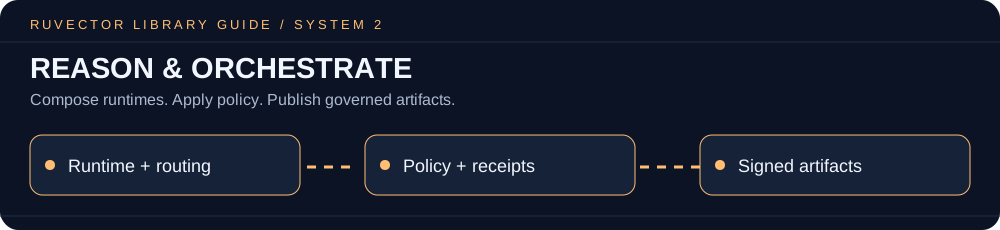
Combine memory with application reasoning, agent coordination, and explicit governance. Ruflo and MetaHarness are complementary external projects; RuVector supplies memory and supporting primitives. MCP integration tutorial · Graph reconstruction example · Ruflo guide
Runtime, orchestration, and governance libraries
Try it: Agent to agent swarm · REFRAG pipeline · Google Cloud examples · Python Agentforce example.
Govern and distribute
Choose a memory path
Agent integration
For automated agent integration, install the package locally and commit your lockfile:
npm install ruvector
RUVECTOR_MCP_PROFILE=readonly npx ruvector mcp start
List the currently available tools instead of relying on a hardcoded count:
npx ruvector mcp tools
Use RUVECTOR_MCP_ALLOW and RUVECTOR_MCP_DENY for an explicit tool policy. No policy preserves the broader compatibility surface, so production deployments should set one deliberately.
If you enable editor or coding hooks, inspect the generated configuration, keep the package local and pinned, and run npx ruvector hooks verify. Do not depend on a fresh @latest download inside each hook invocation.
Deployment surfaces
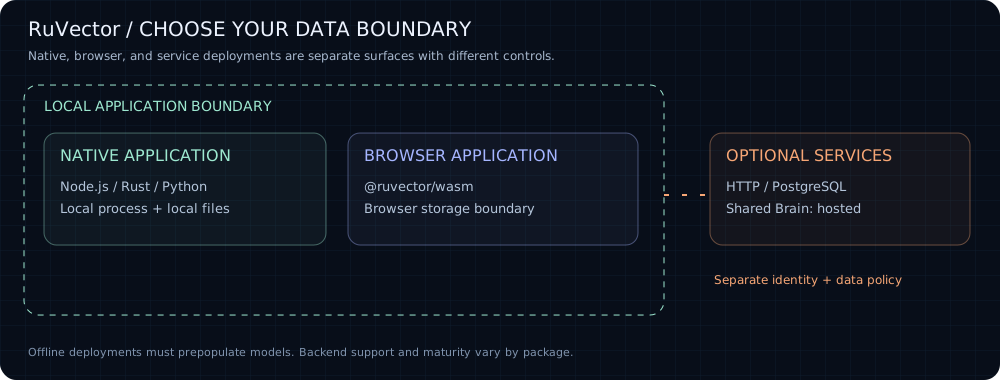
Native npm binaries cover glibc Linux on x64 and arm64, macOS on x64 and arm64, and Windows on x64. Browser and other environments use separate packages. The root package's fallback mode is limited when neither the native core nor RVF can load; use @ruvector/wasm explicitly for browser vector operations. Validate the selected backend with:
npx ruvector info
Security and governance
-
Treat embeddings as sensitive derivatives of source data. Apply the same classification, residency, access, and retention policy as the original content.
-
Collections and metadata filters organize memory; they are not a complete authorization boundary. Enforce identity and authorization in the application. Capability gated ANN is currently a research component with a 64 capability mask and documented side channel and recall limitations.
-
RVF witnesses and hash linked logs are tamper evident. They do not encrypt memory content or prevent an authorized process from reading it.
-
A delete from the live store does not automatically remove copies in snapshots, branches, replicas, exports, or hosted memory. Define retention and erasure across every copy.
-
Shared Brain is a hosted plane. Review its network, identity, provenance, poisoning, and data residency controls before sending enterprise memory.
-
Pin and prepopulate embedding models for offline or regulated deployments. The default npm semantic path downloads its model on first use.
-
Keep tool execution separate from memory retrieval. Retrieved context is untrusted input until policy checks and action authorization pass.
See SECURITY.md for reporting and project security guidance.
Known boundaries
-
The repository is a monorepo. Installing
ruvectordoes not activate every crate in this capability map. -
The unified four type
ruvllm::AgenticMemorymanager does not yet have native save and load support, and its episodic to semantic or procedural consolidation method currently returns no changes. DurableVectorDBstorage and typed runtime memory are not yet one facade. -
Core metadata filtering currently narrows the retrieved candidate set. Highly selective filters may return fewer than
krelevant results. Evaluate ACORN or an application level prefilter for selective workloads. -
Opening a persisted HNSW database currently enumerates stored vectors and rebuilds the index. Measure cold start time against the intended memory size.
-
Temporal coherence currently builds an exact pairwise coherence graph and is a proof of concept for moderate memory sets. The planned production path is an approximate neighbor graph.
-
Agent memory compaction is not yet wired into the default core, MCP, or RVF persistence path.
-
Full snapshot serialization exists, but incremental snapshots, scheduling, cloud backends, and direct
VectorDBrestoration are not complete on the current main branch. -
Replication exposes local primitives and simulated transport behavior. Raft still has incomplete response transport and snapshot installation paths. These are not a complete production network replication plane.
-
GNN reranking, MRAgent reconstruction, and Darwin optimization are implemented research surfaces, not automatic behavior in
VectorDB::search. -
RVF and PostgreSQL are separate build surfaces and are excluded from the default workspace build because they require their own toolchains.
-
Performance depends on vector dimension, index parameters, filter selectivity, recall target, hardware, and backend. Run the included benchmark for the component and workload you intend to deploy.
Reproduce the evidence
RuVector keeps benchmark code beside the implementation. These commands exercise memory relevant components without relying on unscoped cross product comparisons.
# Core vector search
cargo bench -p ruvector-core

# High write LSM memory
cargo run --release -p ruvector-lsm-ann --bin benchmark

# Temporal and coherence weighted recall
cargo run --release -p ruvector-temporal-coherence --bin tcd-benchmark

# Capability gated retrieval
cargo run --release -p ruvector-capgated --bin benchmark

# Matryoshka coarse to fine retrieval
cargo run --release -p ruvector-matryoshka --bin benchmark
Record dataset size, dimension, index configuration, hardware, latency percentiles, throughput, and recall together. A latency number without its recall target is not a useful retrieval benchmark. See the benchmarking guide.
Build from source
git clone https://github.com/ruvnet/RuVector.git
cd RuVector
cargo test --workspace
The workspace declares Rust 1.88 as its minimum, including the ZIP 9 dependency used by Candle-backed components. RVF and PostgreSQL have separate build instructions in their component documentation.
The Candle backports apply to builds from this workspace and are included in Python source distributions. Cargo does not carry workspace patches into published Rust dependencies; Candle-based crates.io releases still require fixed upstream dependencies or a published fork dependency chain.
Frequently asked questions
Can RuVector run offline?
Yes, the local retrieval path can operate without a database server or API key. Prepopulate the embedding model and required packages before disconnecting: the default npm semantic command downloads its model on first use. Deployment requirements.
Does RuVector learn whenever an agent reads memory?
No. Reads retrieve context. Learning requires recorded outcomes or feedback and the relevant configured learning component. Research reranking and optimization surfaces do not run automatically in VectorDB::search. Capability map.
Is the root package the entire RuVector platform?
No. ruvector is one entry point in a monorepo. Typed decisions, browser WASM, PostgreSQL, RVF, and specialized research crates have separate installation or build paths. Choose a component.
Does vector similarity prove that a recalled fact is true?
No. Similarity identifies nearby representations. Your application must assess provenance, freshness, access, and task relevance before acting on recalled context. Security and governance.
Documentation
Contributing
Contributions are welcome. Start with the contribution guide. New capability claims should include an implementation link and reproducible evidence.
Related
ruvnet/LatentMesh — a research prototype for causally-verified latent agent communication; ADR-005 names RuVector as the store for its raw→compressed→prototype→symbolic latent-memory continuum (design-stage, not yet wired to a live RuVector instance).
License
RuVector is available under the MIT License.
Built by rUv and powering Cognitum.
Focused Python packages
The Python package portfolio adds graph traversal, embedding clustering and attention ranking APIs over the shared native Rust runtime, with executable examples, animated guides and gated PyPI publishing. These are release candidates until published artifacts are verified.