
🔒 Security Investigation Automation System
Comprehensive, automated security investigations powered by Microsoft Sentinel, Defender XDR, Graph API, and threat intelligence — with 25 specialized Agent Skills
🎛️ Walkthrough using GitHub Copilot (15 min): See the new Mission Control canvas app in action — Watch on LinkedIn. A guided tour of the launchable skills dashboard: filter investigation skills by domain, search, and one-click launch skills or route an entity to the right investigation.
📺 Walkthrough using VS Code: See this project in action — Watch on YouTube (starts at the Security Investigator demo). Covers the end-to-end workflow: natural language investigations, MCP server integration, KQL query execution, threat intelligence enrichment, and automated report generation.
An investigation automation framework that combines GitHub Copilot, VS Code Agent Skills, and Model Context Protocol (MCP) servers to enable natural language security investigations. Ask questions like "Investigate this user for the last 7 days" or "Is this IP malicious?" and get comprehensive analysis with KQL queries, threat intelligence correlation, and professional reports.
🖥️ Also runs in the GitHub Copilot app (desktop) — ideal for scheduled automations (unattended Threat Pulse / Threat Intel Campaign runs). It uses a worktree-per-session model with a few setup differences from VS Code — see Running in the GitHub Copilot App.
Quick Start (TL;DR)
# 1. Clone and open in VS Code
git clone https://github.com/SCStelz/security-investigator.git
code security-investigator

# 2. Set up Python environment
python -m venv .venv
.venv\Scripts\Activate.ps1          # Windows
# source .venv/bin/activate          # macOS/Linux
pip install --require-hashes -r requirements.lock   # Hash-verified (recommended)
# pip install -r requirements.txt                   # Without hash verification

# 3. Configure environment
copy config.json.template config.json
# Edit config.json → add your Sentinel workspace ID, tenant ID
copy .env.template .env
# Edit .env → add your API tokens (ipinfo, AbuseIPDB, vpnapi, Shodan)

# 4. Configure MCP servers
copy .vscode\mcp.json.template .vscode\mcp.json
# All platform servers are pre-configured — just needs a GitHub PAT on first use
# GitHub Copilot app / CLI instead? Use the user-scope template:
#   copy .copilot\mcp-config.json.template $env:USERPROFILE\.copilot\mcp-config.json
#   (works as-is — see "Running in the GitHub Copilot App" below)

# 5. Open Copilot Chat (Ctrl+Shift+I) in Agent mode and start with:
#    "Run a threat pulse scan"
🚀 Recommended first run: The Threat Pulse skill is the best starting point. It runs a broad-spectrum scan across 9 security domains (incidents, identity, endpoint, exposure, email, UEBA, auth spray, privileged ops, CVEs) and produces prioritized findings with color-coded verdicts (🔴 Escalate / 🟠 Investigate / 🟡 Monitor / ✅ Clear). Each finding includes a drill-down recommendation pointing to a specialized skill — so after the scan, you'll know exactly where to focus and which follow-up command to run.
Other example prompts:
"Investigate [email protected] for the last 7 days"    → user-investigation
"Analyze incident 12345"                              → incident-investigation
"Is this IP malicious? 203.0.113.42"                  → ioc-investigation
"What skills do you have access to?"                  → lists all 25 skills
For detailed workflows and KQL queries: → .github/copilot-instructions.md (universal patterns, skill detection) → .github/skills/ (25 specialized investigation workflows) → queries/ (verified KQL query library)
Architecture Overview
┌────────────────────────────────────────────────────────────────────┐
│                     GitHub Copilot (VS Code)                       │
├────────────────────────────────────────────────────────────────────┤
│                  .github/copilot-instructions.md                   │
│            (Skill detection, universal patterns, routing)          │
├────────────────────────────────────────────────────────────────────┤
│                     .github/skills/*.md                            │
│       (25 specialized workflows with KQL, risk assessment)         │
├────────────────────────────────────────────────────────────────────┤
│                     MCP Servers (Platform)                         │
│  ┌─────────────┐  ┌──────────────┐  ┌───────────────────────────┐  │
│  │ Sentinel    │  │ Graph API    │  │ Sentinel Triage (XDR)     │  │
│  │ Data Lake   │  │ (Identity)   │  │ (Advanced Hunting)        │  │
│  └─────────────┘  └──────────────┘  └───────────────────────────┘  │
│  ┌─────────────┐  ┌──────────────┐  ┌───────────────────────────┐  │
│  │ KQL Search  │  │ Microsoft    │  │ Azure MCP Server          │  │
│  │ (Schema)    │  │ Learn (Docs) │  │ (ARM + Monitor)           │  │
│  └─────────────┘  └──────────────┘  └───────────────────────────┘  │
│  ┌─────────────┐                                                   │
│  │ Sentinel    │                                                   │
│  │ Graph (Rel) │                                                   │
│  └─────────────┘                                                   │
├────────────────────────────────────────────────────────────────────┤
│               MCP Apps (Local Custom Servers)                      │
│  ┌─────────────┐  ┌──────────────┐  ┌───────────────────────────┐  │
│  │ Geomap      │  │ Heatmap      │  │ Incident Comment          │  │
│  │ (Attack Map)│  │ (Patterns)   │  │ (Sentinel Integration)    │  │
│  └─────────────┘  └──────────────┘  └───────────────────────────┘  │
├────────────────────────────────────────────────────────────────────┤
│                      Python Utilities                              │
│ generate_report_from_json.py  │  enrich_ips.py  │  report_generator│
└────────────────────────────────────────────────────────────────────┘
Key Components:
- 25 Agent Skills — Modular investigation workflows for incidents, users, devices, IoCs, authentication, scope drift (SPN/User/Device), MCP monitoring, exposure management, AI agent posture, app registration posture, identity posture, data security analysis, email threat posture, MITRE ATT&CK coverage, ingestion analysis, detection authoring, threat pulse scanning, SVG dashboards, and more
- 6 MCP Server Integrations — Sentinel Data Lake (incl. Exposure Graph tools), Graph API, Defender XDR Triage, KQL Search, Microsoft Learn, Azure MCP Server
- 3 Local MCP Apps — Interactive heatmaps, geographic attack maps, incident commenting
- Python Utilities — HTML report generation with IP enrichment (geolocation, VPN detection, abuse scores, Shodan port/service/CVE intelligence)
🤖 Agent Skills
This system uses VS Code Agent Skills to provide modular, domain-specific investigation workflows. Skills are automatically detected based on keywords in your prompts.
Available Skills (25)
How Skills Work
- You ask Copilot a question (e.g., "Investigate [email protected] for the last 7 days")
- Copilot detects keywords and loads the appropriate skill from
.github/skills/<skill-name>/SKILL.md - The skill provides specialized workflow, KQL queries, and risk assessment criteria
- Universal patterns from
.github/copilot-instructions.mdare inherited automatically
Triggering Skills with Natural Language
You don't need to mention the skill name — keywords are detected automatically:
Follow-ups and Chaining
After running an investigation, ask follow-up questions without re-running the entire workflow:
Is that IP a VPN?
Trace authentication for that suspicious location
Was MFA used for those sign-ins?
Skills can be chained for comprehensive analysis:
1. "Investigate incident 12345" → incident-investigation extracts entities
2. "Now investigate the user from that incident" → user-investigation runs on extracted UPN
3. "Check if that IP is malicious" → ioc-investigation analyzes the suspicious IP
4. "Show me a heatmap of the attack patterns" → heatmap-visualization
Copilot uses existing investigation data from temp/investigation_*.json when available.
Discovering Skills
What investigation skills do you have access to?
Explain the high-level workflow of the user-investigation skill
What data sources does the ioc-investigation skill use?
📖 Reference: GitHub Agent Skills Documentation
Authoring New Skills & Queries from Investigations
Ad-hoc investigations naturally evolve into reusable assets. After completing an investigation, ask Copilot to package the verified queries, schema pitfalls, and analytical logic into a new SKILL.md or query file.
"Based on the investigation we just completed, create a new reusable skill"
"Read this threat intel article: <URL> — extract TTPs and IOCs, then write, test, and tune a queries file for reusable threat hunts"
📁 Project Structure
security-investigator/
├── enrich_ips.py                # Standalone IP enrichment utility
├── config.json                  # Configuration (workspace IDs, mappings)
├── config.json.template         # Config template (committed to Git)
├── .env                         # API tokens (gitignored, auto-loaded by python-dotenv)
├── .env.template                # Token template (committed to Git)
├── requirements.txt             # Python dependencies
├── requirements.lock            # Hash-verified dependency lockfile
├── .vscode/
│   └── mcp.json.template       # VS Code MCP server config template (copy to mcp.json)
├── .copilot/
│   └── mcp-config.json.template # GitHub Copilot app/CLI MCP config template (copy to ~/.copilot/mcp-config.json)
├── .github/
│   ├── copilot-instructions.md  # Skill detection, universal patterns, routing
│   ├── manifests/               # Auto-generated discovery indexes
│   │   ├── discovery-manifest.yaml  # Query file + skill index (domains, MITRE, prompts)
│   │   └── build_manifest.py        # Manifest generator script
│   └── skills/                  # 25 Agent Skills (modular investigation workflows)
│       ├── ai-agent-posture/
│       ├── app-registration-posture/
│       ├── authentication-tracing/
│       ├── ca-policy-investigation/
│       ├── computer-investigation/
│       ├── data-security-analysis/
│       ├── detection-authoring/
│       ├── email-threat-posture/
│       ├── exposure-investigation/
│       ├── geomap-visualization/
│       ├── heatmap-visualization/
│       ├── honeypot-investigation/
│       ├── identity-posture/
│       ├── incident-investigation/
│       ├── ioc-investigation/
│       ├── kql-query-authoring/
│       ├── mcp-usage-monitoring/
│       ├── mitre-coverage-report/
│       ├── scope-drift-detection/
│       │   ├── spn/              # Service principal drift (5 dimensions)
│       │   ├── user/             # User account drift (7+6 dimensions)
│       │   └── device/           # Device process drift (5 dimensions)
│       ├── sentinel-ingestion-report/
│       ├── svg-dashboard/
│       ├── threat-pulse/
│       └── user-investigation/
├── queries/                     # Verified KQL query library (grep-searchable, by data domain)
│   ├── cloud/                  # Cloud app & exposure management queries
│   ├── email/                  # Defender for Office 365 email queries
│   ├── endpoint/               # Defender for Endpoint device queries
│   ├── identity/               # Entra ID / Azure AD identity queries
│   ├── incidents/              # SecurityIncident & SecurityAlert queries
│   └── network/                # Network telemetry queries
├── scripts/                     # Python utilities
│   ├── generate_report_from_json.py  # Report generator (main entry point)
│   ├── report_generator.py           # HTML report builder class
│   ├── investigator.py               # Data models and core types
│   ├── cleanup_old_investigations.py  # Automated cleanup (3+ days old)
│   └── generate_tocs.py              # Auto-generate query file TOCs
├── mcp-apps/                    # Local MCP servers (visualization, automation)
│   ├── sentinel-geomap-server/
│   ├── sentinel-heatmap-server/
│   └── sentinel-incident-comment/
├── docs/                        # Setup guides and reference documentation
├── authoring/                   # Blog drafts, writing guides, and marketing content
├── reports/                     # Generated investigation reports (organized by type)
│   ├── ai-agent-posture/       # AI agent security posture reports
│   ├── app-registration-posture/ # App registration posture reports
│   ├── computer-investigations/ # Device security investigation reports
│   ├── data-security/          # Data security SIT analysis reports
│   ├── email-threat-posture/   # Email threat protection posture reports
│   ├── exposure/               # Exposure management reports
│   ├── honeypot/               # Honeypot executive reports
│   ├── identity-posture/       # Identity security posture reports
│   ├── mcp-usage/              # MCP usage monitoring reports
│   ├── scope-drift/            # Scope drift analysis reports
│   ├── sentinel/               # Sentinel ingestion & cost analysis reports
│   ├── threat-pulse/           # Threat Pulse scan reports
│   └── user-investigations/    # HTML user investigation reports
├── temp/                        # Investigation JSON files (auto-cleaned after 3 days)
└── archive/                     # Legacy code and design docs
Query Library (queries/)
The queries/ folder contains verified, battle-tested KQL query collections organized by detection scenario. These are the Priority 2 lookup source in the KQL Pre-Flight Checklist — Copilot searches them before writing any ad-hoc KQL.
Each file uses a standardized metadata header for efficient grep_search discovery:
# <Title>
**Tables:** <exact KQL table names>
**Keywords:** <searchable terms — attack techniques, scenarios, field names>
**MITRE:** <ATT&CK technique IDs, e.g., T1021.001, TA0008>
**Domains:** <domain tags for manifest indexing, e.g., identity, endpoint, email>
Discovery Manifest (.github/manifests/)
The discovery manifest provides a machine-readable index of all query files and skills, enabling deterministic cross-referencing by domain and MITRE technique. The Threat Pulse skill loads this manifest to match findings to downstream query files and drill-down skills automatically.
discovery-manifest.yaml— Compact index (~500 lines) withtitle,path,domains,mitre, andpromptfields for each query file and skillbuild_manifest.py— Generator script that scansqueries/metadata headers and skill YAML frontmatter to produce the manifest
How it works:
- Query files declare
**Domains:**tags in their metadata header (valid tags:incidents,identity,spn,endpoint,email,admin,cloud,exposure) - Skills declare
threat_pulse_domains:anddrill_down_prompt:in their YAML frontmatter python .github/manifests/build_manifest.pyscans both and emits the manifest- The Threat Pulse skill reads the manifest to match non-✅ findings → relevant query files and skills by domain tag and MITRE technique overlap
Regenerate after creating or renaming query files/skills, or changing Domains:/threat_pulse_domains: values:
python .github/manifests/build_manifest.py
🚀 Setup
Prerequisites
1. Install Dependencies
Verify prerequisites:
python --version   # Requires 3.8+
node --version     # Requires 18+ (needed for KQL Search MCP)
az --version       # Azure CLI (needed for Azure MCP Server, ingestion report skill)
pwsh --version     # Requires 7.0+ (needed for sentinel-ingestion-report skill)
If Node.js is missing: Download or run winget install OpenJS.NodeJS.LTS (Windows) / brew install node (macOS).
If Azure CLI is missing: Install, then az login --tenant <tenant_id> and az account set --subscription <subscription_id>.
If the log-analytics extension is missing: az extension add --name log-analytics (required for sentinel-ingestion-report skill).
Set up Python environment:
python -m venv .venv
.\.venv\Scripts\Activate.ps1
pip install -r requirements.txt
2. Configure Environment
Copy config.json.template to config.json and fill in your workspace details:
{
  "sentinel_workspace_id": "YOUR_WORKSPACE_ID_HERE",
  "tenant_id": "YOUR_TENANT_ID_HERE",
  "subscription_id": "YOUR_SUBSCRIPTION_ID_HERE",
  "azure_mcp": {
    "resource_group": "YOUR_LOG_ANALYTICS_RESOURCE_GROUP",
    "workspace_name": "YOUR_LOG_ANALYTICS_WORKSPACE_NAME",
    "tenant": "YOUR_TENANT_ID_HERE",
    "subscription": "YOUR_SUBSCRIPTION_ID_HERE"
  },
  "output_dir": "reports"
}
API Tokens (.env file)
API tokens for IP enrichment are stored in a .env file (gitignored) rather than config.json for security. Copy the template and add your keys:
copy .env.template .env
# Edit .env with your token values
IPINFO_TOKEN=your_token_here
ABUSEIPDB_TOKEN=your_token_here
VPNAPI_TOKEN=your_token_here
SHODAN_TOKEN=your_token_here
These are auto-loaded by enrich_ips.py via python-dotenv — no manual sourcing needed.
3. Configure MCP Servers
Copy the MCP server template (all platform servers + 3 optional MCP Apps are pre-configured):
copy .vscode/mcp.json.template .vscode/mcp.json
The template includes inline documentation for each server. On first use, VS Code will prompt for:
- Entra ID login — browser-based auth for Sentinel Data Lake, Graph, and Triage servers
- GitHub PAT — for KQL Search MCP (schema intelligence and query discovery). Needs
public_reposcope.
Using the GitHub Copilot app or CLI? Use
.copilot/mcp-config.json.templateinstead — see MCP config for the app.
See MCP Server Setup below for per-server permissions and installation guides.
4. Build MCP Apps (Optional — Visualization Skills)
PowerShell (Windows):
cd mcp-apps/sentinel-geomap-server; npm install; npm run build; cd ../..
cd mcp-apps/sentinel-heatmap-server; npm install; npm run build; cd ../..
cd mcp-apps/sentinel-incident-comment; npm install; npm run build; cd ../..
Bash (macOS/Linux):
cd mcp-apps/sentinel-geomap-server && npm install && npm run build && cd ../..
cd mcp-apps/sentinel-heatmap-server && npm install && npm run build && cd ../..
cd mcp-apps/sentinel-incident-comment && npm install && npm run build && cd ../..
The sentinel-incident-comment MCP App requires an Azure Logic App backend. See mcp-apps/sentinel-incident-comment/README.md for setup. Based on stefanpems/mcp-add-comment-to-sentinel-incident.
🖥️ Running in the GitHub Copilot App (Desktop)
This project also runs great in the GitHub Copilot app (desktop), not just VS Code. The app is especially useful for scheduled automations: its built-in Workflows system runs skills unattended on a schedule — for example the Daily Threat Pulse and Weekly Threat Intel Campaign definitions in automations/. It also runs each task in an isolated git worktree, so you can run multiple investigations in parallel without them colliding.
📥 Download: github.com/features/ai/github-app
Why use the app
- Scheduled automations (Workflows) — run the Threat Pulse scan every morning, or the Threat Intel Campaign weekly, fully unattended. See
automations/for ready-to-import, PII-free workflow definitions. - Parallel, isolated sessions — each session is its own git worktree + branch, so concurrent investigations don't step on each other.
- Background agents — long-running hunts and report generation can run in the background while you keep working.
🎛️ Mission Control (Canvas extension)
The app also supports Canvas extensions — interactive panels that render beside the chat, where both you and the agent act on the same surface. This repo ships one: Mission Control, a launchable dashboard for the whole framework. It self-registers from .github/extensions/skills-canvas/ — no build step, no install.
Just start a session and prompt:
💬 "Start Mission Control"
The panel opens with three tabs:
- 🗂️ Skills — every investigation skill as a launchable card. Filter by domain, search, and one-click launch — with optional fleet-wide scope and inline/markdown report toggles.
- 📋 Queries — all KQL query files, domain-filtered. Open any to read the markdown or hand it to the agent as context for a targeted hunt.
- 📊 Findings — when the agent finishes an investigation it records the result back into the canvas (severity, entities, evidence, and tailored one-click follow-ups). Click a severity pill to filter.
The human launches work; the agent reports back to the same surface — a control plane for investigations, not just a UI.
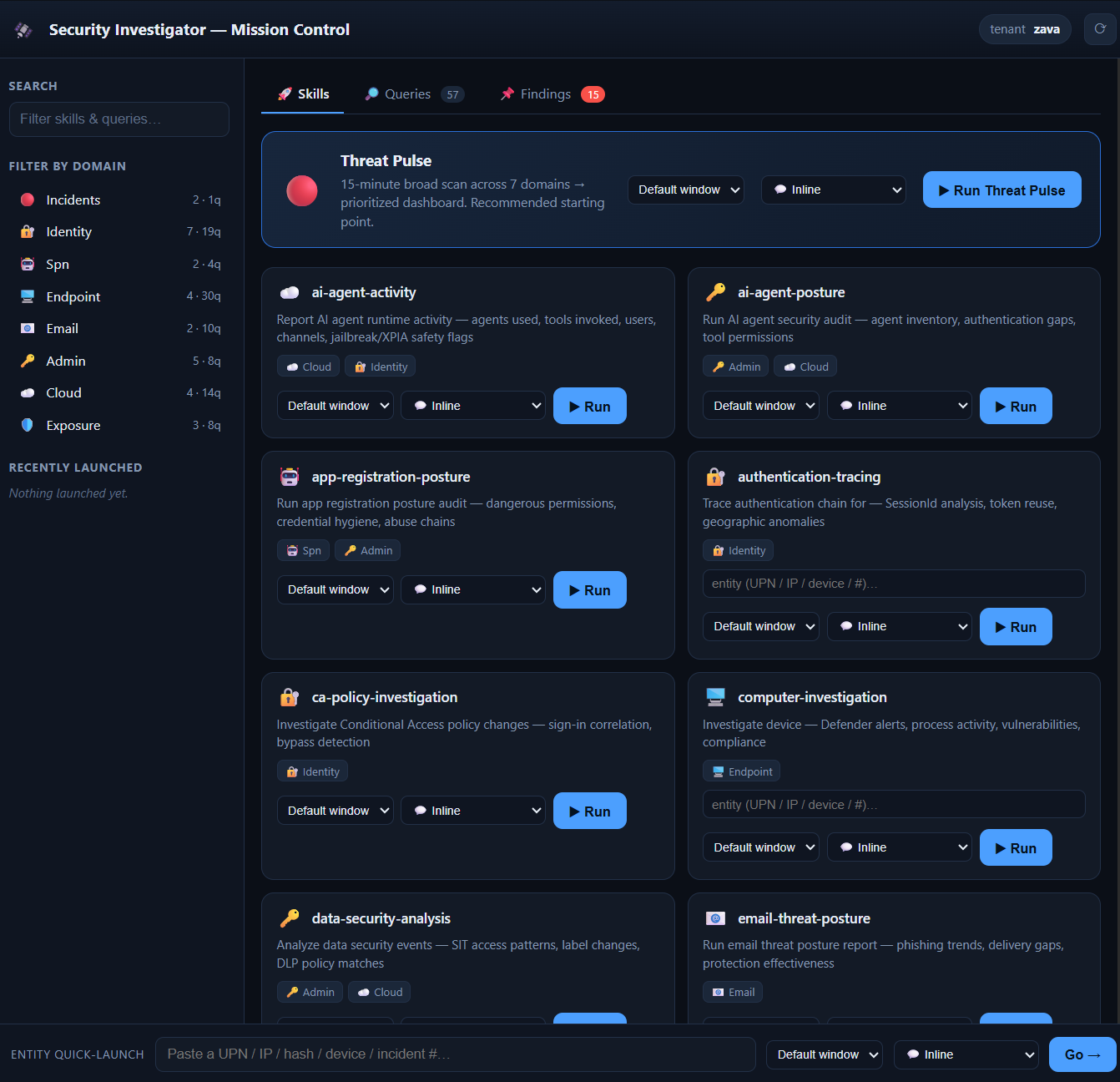
Skills tab — launch any investigation with optional fleet-wide scope and inline/markdown output. The left rail filters skills and queries by domain; the entity quick-launch bar routes a UPN / IP / hash / device / incident to the right investigation.
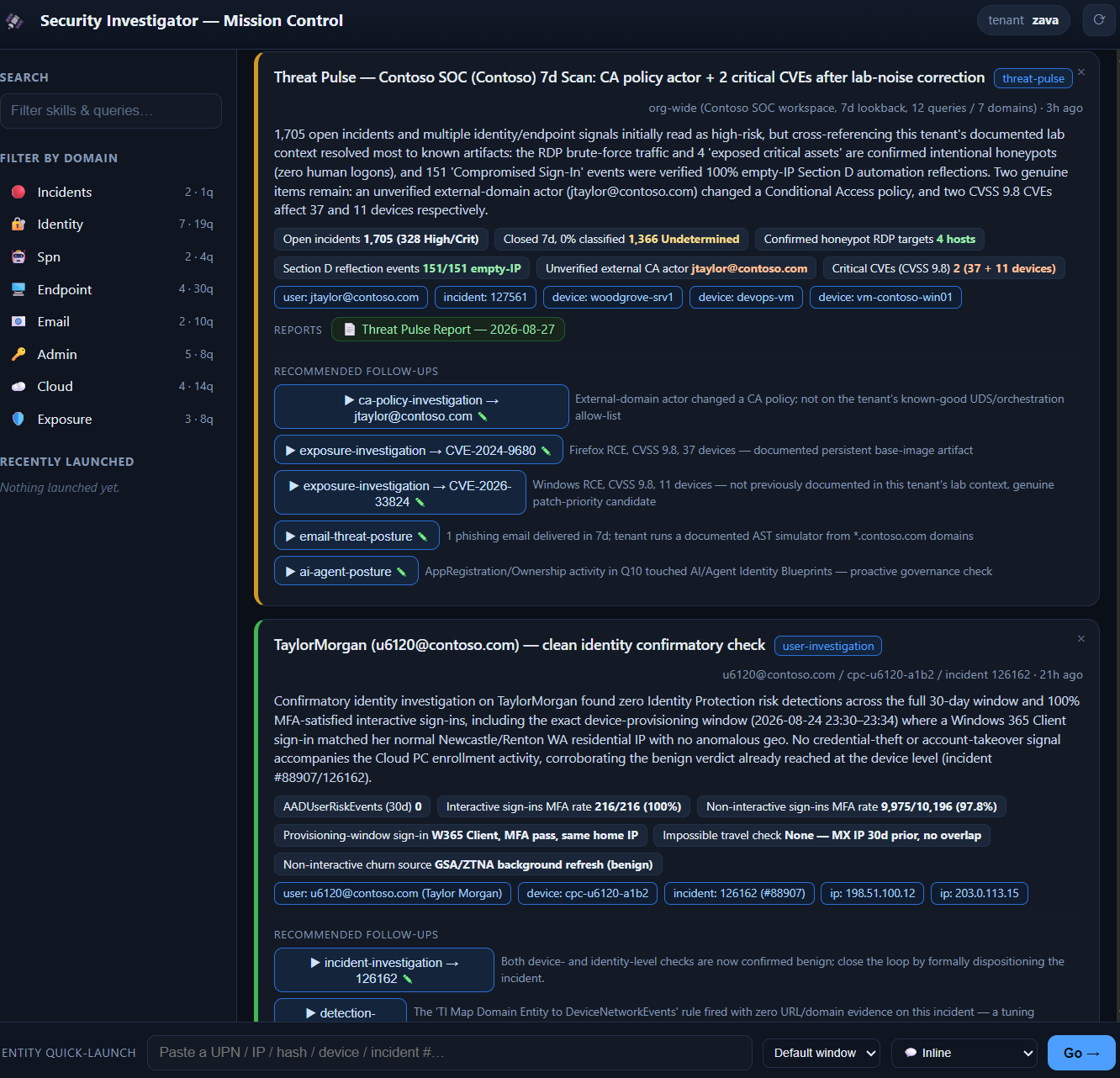
Findings tab — the agent reports each result back to the canvas: summary, evidence chips, linked reports, and tailored one-click follow-ups (e.g. drill into a flagged CVE, user, or incident).
⚠️ Caveats & differences vs VS Code
The app behaves slightly differently from VS Code. The most important difference: each session is a fresh git worktree, and gitignored local files (config.json, .env, MCP config) do not exist in a newly created worktree — they live only in your main checkout. You need a small post-checkout step to copy them into each session, otherwise the first query fails with a missing-config error.
MCP config for the app
The app (and Copilot CLI) reads MCP servers from user scope (~/.copilot/mcp-config.json), not .vscode/mcp.json. The format differs from VS Code: top-level mcpServers key, strict JSON (no comments / inputs block), and no ${workspaceFolder} variable. A ready-to-use template with all platform servers is provided:
# Windows (merge manually if you already have a mcp-config.json)
copy .copilot\mcp-config.json.template $env:USERPROFILE\.copilot\mcp-config.json
# macOS/Linux
cp .copilot/mcp-config.json.template ~/.copilot/mcp-config.json
Then:
- Set a
GITHUB_TOKENenvironment variable (GitHub PAT,public_reposcope) —kql-searchreads it via${env:GITHUB_TOKEN}. - Run
az login --tenant <tenant_id>forazure-mcp-server(usesAzureCliCredential). - Restart the app / CLI and sign in once interactively so OAuth tokens cache for scheduled runs.
Multi-tenant (optional): If your account has access to multiple tenants (e.g., guest/B2B or CSP), pin the Sentinel and Graph servers to a specific tenant by adding a header to sentinel-data-mcp, sentinel-triage-mcp, and Graph-mcp-server:
"headers": {
  "x-mcp-client-tenant-id": "<your-tenant-id>"
}
Without it, sign-in uses your account's home tenant.
Optional MCP Apps (geomap, heatmap, incident-comment) need absolute paths in user scope. After building them, add entries like the following to mcpServers:
"custom-sentinel-geomap": {
  "tools": ["*"],
  "type": "stdio",
  "command": "node",
  "args": ["C:/path/to/security-investigator/mcp-apps/sentinel-geomap-server/dist/main.js", "--stdio"]
}
Use mcp-apps/sentinel-heatmap-server/dist/main.js for the heatmap, and mcp-apps/sentinel-incident-comment/dist/index.js (plus "env": { "SENTINEL_COMMENT_WEBHOOK_URL": "<your Logic App URL>" }) for incident comments.
Post-checkout workflow (persist config into each session)
Because config.json, .env, and .vscode/mcp.json are gitignored, a freshly created worktree won't contain them. Set up a post-checkout git hook that copies them from your main checkout into the new worktree. Example (.git/hooks/post-checkout, marked executable):
#!/usr/bin/env bash
# Copy gitignored local config from the main checkout into a fresh worktree/session.
MAIN="/path/to/your/main/checkout"     # adjust to your primary clone
for f in config.json .env .vscode/mcp.json; do
  if [ ! -f "$f" ] && [ -f "$MAIN/$f" ]; then
    mkdir -p "$(dirname "$f")"
    cp "$MAIN/$f" "$f"
  fi
done
Alternatively, define the same copy logic as a per-session setup command in the app. Either way the goal is identical: every session ends up with a valid
config.json,.env, and MCP config before the first query runs.
For scheduled automations, the workflow prompts in automations/ also include a STEP 1 bootstrap that recreates config.json from known values if it's missing — a belt-and-suspenders guarantee for non-interactive runs (it never commits config.json, which stays gitignored).
🔌 MCP Server Setup
The system uses several Model Context Protocol (MCP) servers. All are pre-configured in .vscode/mcp.json.template — copy it to .vscode/mcp.json to get started (see Step 3 above). For the GitHub Copilot app / CLI, use .copilot/mcp-config.json.template instead (see MCP config for the app). The sections below document permissions, tools, and installation guides for each server.
At a Glance
1. Microsoft Sentinel MCP Server
Tools: query_lake, search_tables, list_sentinel_workspaces
Exposure Graph tools (bundled here): find_blastradius, find_exposure_perimeter, find_walkable_paths, find_connected_nodes, find_nodes, get_graph_context, plus entity analysis (analyze_user_entity, analyze_url_entity, analyze_application_entity). These ship in the Data Lake server with no graph_ prefix.
Permissions:
- Log Analytics Reader (minimum) — query workspace data
- Sentinel Reader (recommended) — full investigation capabilities
- Sentinel Contributor — watchlist management (optional)
2. MCP Server for Microsoft Graph
Tools: microsoft_graph_suggest_queries, microsoft_graph_get, microsoft_graph_list_properties
⚡ One-time tenant provisioning (requires Application Administrator or Cloud Application Administrator role):
# 1. Install the Entra Beta PowerShell module (v1.0.13+)
Install-Module Microsoft.Entra.Beta -Force -AllowClobber

# 2. Authenticate to your tenant
Connect-Entra -Scopes 'Application.ReadWrite.All', 'Directory.Read.All', 'DelegatedPermissionGrant.ReadWrite.All'

# 3. Register the MCP Server and grant permissions to VS Code
Grant-EntraBetaMCPServerPermission -ApplicationName VisualStudioCode
This only needs to be done once per tenant. After provisioning, all users in the tenant can use the Graph MCP server by signing in with their own account.
Permissions (delegated, per-user):
- User.Read.All — user profiles and authentication methods
- UserAuthenticationMethod.Read.All — MFA methods
- Device.Read.All — device compliance and enrollment
- IdentityRiskEvent.Read.All — Identity Protection risk detections
3. Microsoft Sentinel Triage MCP Server
Tools (30+): RunAdvancedHuntingQuery, ListIncidents, GetAlertById, GetDefenderMachine, GetDefenderFileInfo, GetDefenderIpAlerts, ListUserRelatedMachines, GetDefenderMachineVulnerabilities, and more.
Permissions:
- Microsoft Defender for Endpoint API — SecurityReader role minimum
- Advanced Hunting — read access to Defender XDR data
4. KQL Search MCP Server
Option A: VS Code Extension (Recommended)
- Extensions panel → Search "KQL Search MCP" → Install
- Command Palette →
KQL Search MCP: Set GitHub Token
Option B: NPX — already configured in .vscode/mcp.json.template. Just needs a GitHub PAT with public_repo scope (prompted on first use).
Tools (34): Schema intelligence, query validation, GitHub search, ASIM support for 331+ tables.
5. Microsoft Learn MCP Server
One-click: Install in VS Code — or already configured in .vscode/mcp.json.template.
Tools: microsoft_docs_search, microsoft_docs_fetch, microsoft_code_sample_search
No API key required — free, cloud-hosted by Microsoft.
6. Azure MCP Server
Install via VS Code extension: search "Azure MCP Server" in Extensions, or install from the Marketplace. The extension registers as a stdio MCP server automatically.
Tools: monitor_workspace_log_query, monitor_activitylog_list, group_list, subscription_list, and 40+ namespaces covering AI, identity, security, databases, storage, compute, and networking.
Permissions:
- Reader (minimum) — read-only access to Azure resources
- Log Analytics Reader — for
workspace_log_query(KQL against Log Analytics) - Contributor — for write/modify operations (optional)
Configuration: Requires azure_mcp parameters in config.json (tenant, subscription, resource group, workspace name) to avoid cross-tenant auth errors. See Configure Environment.
Verify Setup
Open Copilot Chat (Ctrl+Shift+I) in Agent mode and try these prompts:
If any server fails, check the MCP Servers panel in VS Code (click the {} icon in the bottom status bar) to verify each server shows a green connected status.
⚙️ Configuration Details
API Rate Limits (IP Enrichment)
Token priority: If ipinfo_token is a paid plan, VPN detection is included and vpnapi_token is optional. Shodan uses the full API when a paid key is available; on 403/429 it automatically falls back to the free InternetDB.
IP enrichment happens during report generation (not data collection), so you can re-generate reports without re-querying Sentinel/Graph.
Dependencies
pip install -r requirements.txt
Core packages: requests (HTTP client for enrichment APIs), python-dateutil (date parsing for KQL time ranges).
🔒 Security Considerations
- Confidential Data — Reports contain PII and sensitive security data. Mark as CONFIDENTIAL and follow organizational data classification policies.
- Access Control — Restrict access to authorized SOC personnel. Use Azure RBAC for Sentinel, PIM for Graph API permissions.
- Audit Trail — All investigations are timestamped. JSON files in
temp/preserve snapshots; HTML reports include generation metadata. - Data Retention — Investigations older than 3 days are auto-deleted (configurable). Archive important investigations before cleanup.
- API Token Security — Never commit
config.jsonwith tokens (already in.gitignore). Use environment variables or Azure Key Vault for production. - Investigation JSON Files — Stored in
temp/(not committed to Git). Contain complete data including IP enrichment. Can be re-analyzed without re-querying.
🛠️ Troubleshooting
Verify Connectivity
In Copilot Chat (Agent mode):
"List my Sentinel workspaces"— verifies Sentinel Data Lake MCP"Look up [email protected] in Graph"— verifies Graph MCP"List recent incidents"— verifies Sentinel Triage MCP
In terminal:
python enrich_ips.py 8.8.8.8 # Verifies IP enrichment API tokens
🧠 (Optional) Persistent Tenant Context
GitHub Copilot Chat in VS Code provides agents with a memory tool — a built-in filesystem (/memories/) for persisting notes across conversations. Copilot already uses this internally; you can extend it with tenant-specific context (known infrastructure IPs, validated personnel, false-positive patterns, lab automation signatures) so investigations don't repeatedly mis-classify documented activity as 🔴 critical.
Two memory tiers are relevant:
The memory tool is an internal agent capability — VS Code does not publish a dedicated docs page for it. Closest related concepts are custom instructions and Agent Skills, which serve different purposes (always-applied conventions and specialized workflows, respectively).
This workspace ships with:
- Templates in
notes/memory/examples/— copy and adapt for your tenant (one user-tier example, two repo-tier examples) - Sync script
scripts/sync-repo-memory.ps1— backs up workspace-scoped (repo) memory from VS Code AppData into the workspace folder, surviving VS Code reinstall and workspace rename. Any cloud sync attached to your workspace (OneDrive, Dropbox, iCloud, etc.) then mirrors the backup across machines. Defaults to one-way export (ToBackup); restore mode (FromBackup) requires-Forcebecause it writes into Copilot's trusted memory store. - Setup guide
notes/memory/README.md— full walkthrough, sync usage, security model, and the trigger-rule pattern that makes Copilot actually consult repo memory
Quickstart: Open a template from notes/memory/examples/, then ask Copilot in chat to "create this as a memory file at /memories/..., replacing placeholders with my tenant values." Copilot uses its memory tool to write it directly — no AppData path navigation needed.
🎛️ From Mission Control (Copilot app): The Mission Control canvas surfaces the whole memory loop as one-click actions in its Findings tab — no manual path navigation or prompt-writing:
- ⚙️ Set memory file — names your tenant context-memory file (under
.copilot/memories/repo/) and saves it toconfig.json. The memory features work on first run with a sensible per-tenant default even before you customize it. - 🧠 Use memory — prepends a directive to every investigation you launch, telling the agent to consult the context-memory file — searching it for the task's specific entities rather than reading it in full — and apply its documented ground truth (known-good IPs, automation fingerprints, account classifications, false-positive rules) before rendering a verdict.
- 🧠 Compact to memory — hands the agent a propose-only prompt (via the
context-memory-reviewskill) that distills accumulated findings into candidate ADD / MODIFY / FLAG changes for the memory file, for human approval. Offered again before you clear findings, so evidence is preserved.
Together these close the loop: findings recorded in the canvas → compacted into tenant memory → applied automatically on the next investigation.
⚠️ Memory = trusted input. Anything in
notes/memory/repo/becomes authoritative instructions for Copilot in every future chat (with MCP tool access to Sentinel, Graph, Azure). Review diffs from forks/PRs before restoring, never paste secrets, and if your workspace is cloud-synced, confirm the destination is acceptable for security context. Seenotes/memory/README.mdfor the full threat model.
📄 License
This project is licensed under the MIT License. Use it, fork it, adapt it for your SOC — just keep the copyright notice.
🙏 Acknowledgments
Microsoft Security Platform
- Microsoft Sentinel — SIEM/SOAR platform powering all KQL queries and incident management
- Microsoft Defender XDR — Advanced Hunting, device telemetry, vulnerability management
- Microsoft Graph API — Entra ID identity data, user/group management, role assignments
- Microsoft Entra ID Protection — Risk detections, risky sign-ins, user risk states
MCP Servers
- Sentinel Data Lake MCP — KQL query execution against Sentinel workspace
- Sentinel Triage MCP — Incident triage, Advanced Hunting, Defender entity APIs
- MCP Server for Microsoft Graph — Graph API endpoint discovery and execution
- KQL Search MCP — Schema intelligence, GitHub KQL query discovery, ASIM validation
- Microsoft Learn MCP — Official documentation search and code sample retrieval
Threat Intelligence APIs
- ipinfo.io — IP geolocation, ISP/ASN identification, hosting provider detection
- vpnapi.io — VPN, proxy, Tor exit node, and relay detection
- AbuseIPDB — Community-sourced IP abuse scoring and recent attack reports
- Shodan — Open port enumeration, service/banner detection, CVE identification, infrastructure tagging
Development Tools
- GitHub Copilot — AI coding assistant powering the natural language investigation interface
- VS Code Agent Skills — Modular skill framework for specialized investigation workflows
- Model Context Protocol (MCP) — Open protocol connecting LLMs to external data sources and tools
Special thanks to the Microsoft Security community for sharing KQL queries and detection logic, and to stefanpems for the Sentinel incident commenting MCP pattern.