
Sideboard
Orchestrate a fleet of coding agents on your Mac. Isolated git worktrees. A kanban of the whole fleet. An orchestrator that can drive it. A phone app, CLI, and MCP so you can reach this machine — without a cloud workspace.
Peers often spawn one agent per git worktree. Sideboard isolates the checkout — one workspace per ticket, PR, or named branch — and runs as many agents as that workspace needs. Sibling chats share the files. The remaining job is an orchestration tier: an agent that can reason about those chats, a board where you can see that, and a phone app, CLI, and MCP so you can reach this machine — without moving the repo into someone else’s cloud.
Sideboard started as a local port when Conductor moved that tier into a paid cloud, then added the pieces that still belong on this Mac: MCP orchestration, a global kanban, a phone app, and CLI / MCP so other systems can drive it. Agents are plugs (Claude Code, Codex, OpenCode, Cursor). Compute stays on this machine (corporate VPN, private git, internal APIs). The phone app is remote control, not a rented sandbox.
- A global board for you — status, live output, and fan-out across every thread
- An MCP for the agents — list threads, wait on turns, read diffs, orchestrate the fleet, and present artifacts, schemas, and files in the desktop UI
- A phone app, CLI, and MCP to this Mac — pair the phone from Settings → Remote; register MCP from any harness; script the fleet without the GUI
attach / adopt remain the door back to the native harness — move in and out of Sideboard as you choose.
Run agents in isolated thread/* worktrees from the CLI, desktop, or MCP. The Mac must stay awake for the phone to reach it, and for automations to fire — opt in from Settings → Advanced.
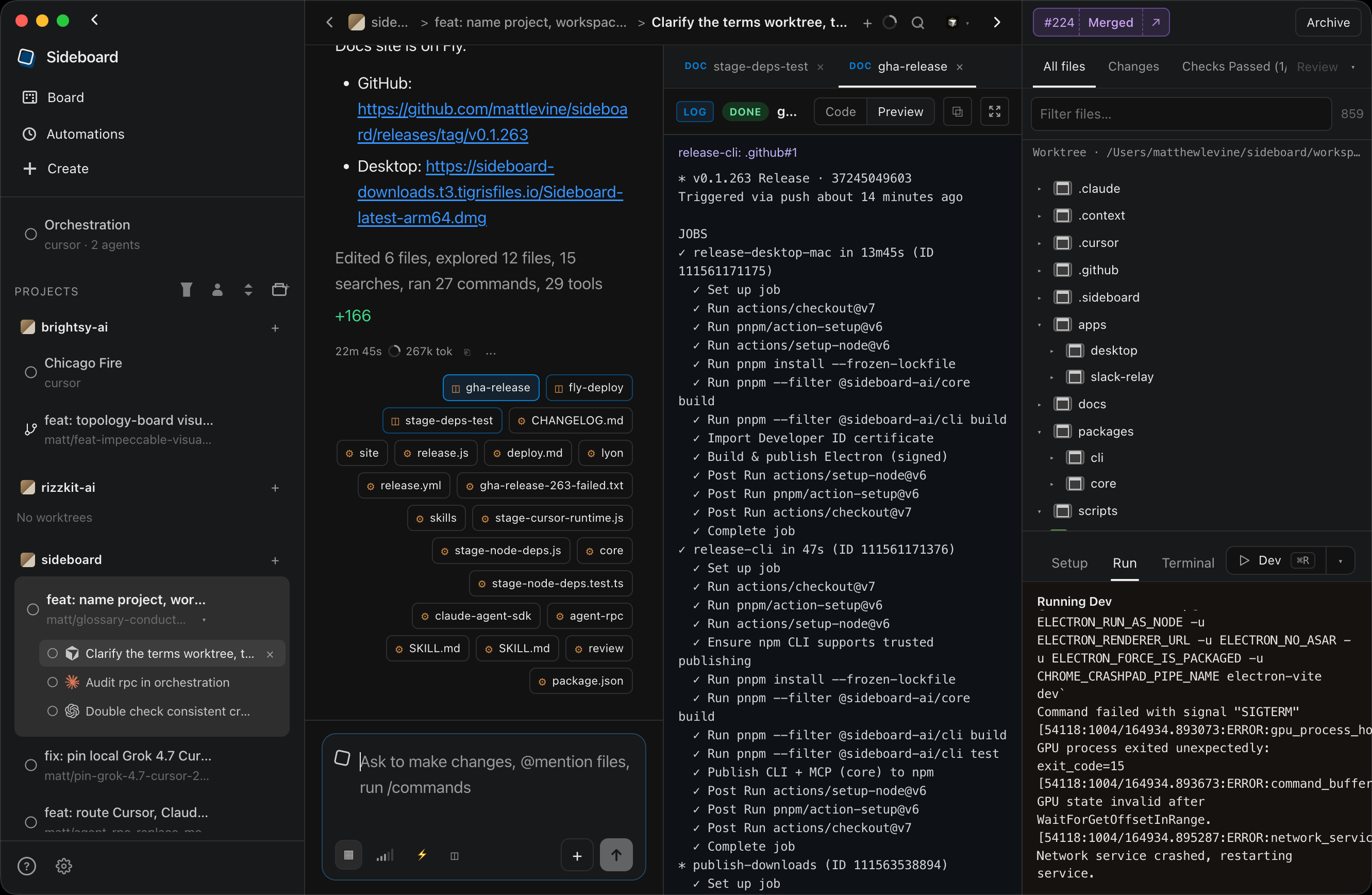
Agents and backends are plugs, not the product. CLI, MCP, and the desktop board work with Claude Code, Codex, OpenCode, and Cursor alone. Schema UI is JSON Schema → table/form, not a CMS shell. The agent can invent a schema for whatever data it needs; wire inline JSON or another datasource later. CLI and MCP also run without the desktop app. The phone app is the remote (pair it).
Who it's for
Fits if you already run several local CLI agents on a Mac — especially one on a corporate VPN — and want an orchestrator you can see, an agent can drive, and a phone app, the CLI, or MCP can reach. Extra fit when the agent produces structured content or HTML that should sit next to the diff.
Use something else if you want a polished local board and will not use CLI/MCP (Conductor free), their paid cloud workspaces (agents that keep running after you close the laptop, off-VPN), a full agent IDE (Orca), an IDE-native Agents window (Cursor 3), Windows/Linux desktop (Emdash, Superset), or cloud agents that do not run on this machine.
Peer-by-peer notes: Compare.
Why it exists
Spawning worktrees is the shared primitive. When Conductor moved fleet orchestration into a paid cloud, Sideboard started as a local port, then kept the rest on this Mac: an orchestrator, a kanban, a phone app, and CLI / MCP so other systems can drive it — on the VPN you already sit on:
Agents write code and invent data shapes (content, configs, feedback, ops rows). Sideboard is where those meet — code in the worktree, data in schema UI — without a CMS product.
A concrete loop: pull or edit page content and media in schema + files tabs, then have the agent write it into a static site in the same worktree (Astro, Next export, Eleventy, plain HTML) — review the data and the generated pages before you land.
Mechanical control (list, send, diff, land) stays on the CLI — zero tokens. Use MCP when an agent needs judgment across threads or needs to open a pane. CLI land and purge stay human-only. Orchestrators may tell a worktree agent to merge (ask_git) only when the user explicitly asked.
Also true, and useful on the way:
- Agent-agnostic — Claude Code, Codex, OpenCode, Cursor (user-installed
@cursor/sdk) - Schema-agnostic / CMS-optional — render any JSON Schema +
schemaUi. CMS is a use case, not the category - Surface-agnostic — CLI (
sideboard/side), Electron desktop, MCP, or native interactive viaattach - Origin-agnostic — create from branch/PR/ticket, adopt any worktree, import Conductor workspaces with chat history
- Local-first / phone-remote — agents stay on this Mac (VPN, private git, internal APIs); the phone app is how you reach them (pair it)
- Portable process skills — recurring guides are Claude Code project skills (
.claude/skills/<name>/SKILL.md). Sideboard/name, Claude Code, andattachall load that path (Process skills)
Docs: www.sideboard.cloud/docs · Settings · Phone · Automations
Marketing site: www.sideboard.cloud · docs (same Fly app as the relay; relay.sideboard.cloud is the phone remote). Desktop downloads: latest Mac build. CLI stays on npm (@sideboard-ai/cli).
Install
CLI (npm)
npm i -g @sideboard-ai/cli
sideboard detect
Desktop
Download the latest Apple Silicon Mac build:
https://sideboard-downloads.t3.tigrisfiles.io/Sideboard-latest-arm64.dmg
The app auto-updates via electron-updater (checks on launch and every 4 hours; shows an in-app + OS notification when a new version is available, then Restart to update when the download finishes — never restarts mid-session silently). New builds also land on that host as latest-mac.yml (existing installs still check GitHub until a later updater cutover).
Releasing
# One-time: copy Brightsy (or your) Developer ID + npm token into apps/desktop/.env
cp apps/desktop/.env.example apps/desktop/.env

# From repo root — bump versions, publish npm + Mac desktop, tag
pnpm release                 # patch → @sideboard-ai/cli + @sideboard-ai/core + desktop
pnpm release minor
pnpm release patch npm       # CLI + MCP only (core ships `sideboard-mcp`)
pnpm release patch mac       # desktop GitHub Release only
pnpm release patch all never # dry-run / local artifacts
Pushing a v* tag to origin is what runs .github/workflows/release.yml (npm OIDC + Mac Electron). There is no Run workflow button. Worktree / chat agents: bump, commit the Release, merge, then retarget vX.Y.Z onto that commit and push the tag — do not pack Electron in the turn. Watch Actions → Release; use /long-running with scripts/watch-gha-run.cjs (do not gh run watch). Local pnpm release patch mac is for a human at a real terminal.
After npm i -g @sideboard-ai/cli, MCP is sideboard mcp (or npx sideboard-mcp).
Agent CLIs
Sideboard shells out to each agent’s CLI. Install the ones you want on your PATH, then authenticate. sideboard detect reports what’s available.
Claude Code
npm install -g @anthropic-ai/claude-code
claude          # complete login on first run
Docs: code.claude.com/docs/en/install
Codex
npm install -g @openai/codex
codex           # complete login / auth on first run
Docs: github.com/openai/codex
OpenCode
# Recommended (macOS / Linux)
curl -fsSL https://opencode.ai/install | bash

# Or via npm (package name is opencode-ai, not opencode)
npm install -g opencode-ai@latest
opencode auth login
Docs: opencode.ai/docs
Cursor
Local Cursor agents via the official SDK (same approach Conductor uses — not a CLI spawn). Sideboard does not ship @cursor/sdk; install or update it from Settings → Agents → Cursor → Install (or npm i -g @cursor/sdk).
Then set the key in the desktop app under Settings → Agents → Cursor (also appears under Settings → Environment as CURSOR_API_KEY), or in your shell:
export CURSOR_API_KEY="cursor_..."   # https://cursor.com/dashboard/integrations
sideboard detect                     # cursor should show authenticated
Shell env wins if both are set. Docs: cursor.com/docs/sdk/typescript
Verify everything Sideboard can see:
sideboard detect
Quick start
The loop that matches why Sideboard exists: board → send → inspect → attach when you want the native CLI → land when ready.
sideboard detect
sideboard new --from branch:main --agent claude
sideboard ls
sideboard send <thread> "add a README note"
sideboard diff <thread>
sideboard attach <thread>        # drop into the native CLI, same session
sideboard land <thread>          # interactive y/N; no --yes in v1
sideboard adopt --from-conductor # import Conductor workspaces + history
Aliases: side → sideboard.
For the global board, live orchestration, and the code + data desktop layout, run the app.
Desktop — union of agent code and data
A worktree chat is repo + worktree + CMS in one view:
Agents open structure tabs via MCP (or you reopen them from message chips). Tabs stick per chat until you close them.
Token counts always show on message chips, the thread Σ total, and worktree hover spend. Settings → Advanced → Show cost (when available) (off by default) also shows provider-reported USD when the agent CLI reports it (Claude, Cursor, OpenCode, Brightsy). Codex streams tokens only — no USD. Claude chats also show remaining Claude Code plan usage (5-hour, weekly, and per-model windows when the login has them) next to the context ring. Hover the meter for used/remaining bars, reset time, and extra usage. Global / orchestration chats show the same account-level meter.
Schema → form (not “a CMS product”)
present_schema takes JSON Schema + optional schemaUi and renders a filterable table and/or form. The agent can create the schema for whatever it needs — articles, feedback, config, checklists, research rows — then hand you a UI to fill or correct it. That might back a CMS, feed a static website build in the worktree, or be a one-off shape for the turn. A markdown table in chat is enough to read the data; use this tool when you need to filter, edit, or persist rows (including after a markdown table, if you ask for an editable one).
Same chrome for every backend:
- Typed fields from the schema; TipTap rich text + markdown via
schemaUi - Relationships (has-one / has-many) with in-pane navigation
- Draft / publish only when the resource declares content states — otherwise save-only
- Media fields jump to a Files tab in select mode, then return to the form
Artifacts & file manager
present_artifact— HTML / SVG / markdown / React, ortype=log(append-only stream; sameartifact_id, new lines only)present_files— browse / upload / pick (memorydemo, or optional Brightsy storage). Drag from Finder or from Sideboard’s worktree file list. Multiple Files tabs can sit beside multiple schema tabs.
New datasources implement list/get/save (and optional publish). They do not fork the column UI.
MCP — agents that can see the fleet
Install the CLI (ships the stdio server), then register it with your MCP client:
npm i -g @sideboard-ai/cli
sideboard mcp          # same as: npx sideboard-mcp
Sideboard desktop auto-injects this MCP into Claude / Cursor / Codex / OpenCode turns (orchestration and worktree). The packaged Mac app also merges a sideboard entry into ~/.cursor/mcp.json (and ~/.claude.json if it already exists) so Cursor IDE / Claude Code see the same fleet and store as Sideboard.app (SIDEBOARD_APP_DATA → ~/Library/Application Support/sideboard). Use the steps below when you want to register MCP yourself — Claude Code in a project, Cursor IDE Agent, Codex CLI, etc.
Pin SIDEBOARD_APP_DATA if a sideboard binary on PATH should still hit this Mac’s Sideboard store.
Connect Claude Code
# All projects (user scope)
claude mcp add --scope user sideboard -- sideboard mcp

# Or one project only (omit --scope, or use --scope project)
claude mcp add sideboard -- sideboard mcp
Confirm with /mcp inside a Claude session, or claude mcp list.
A Claude worktree turn also loads MCP servers from plugins that are enabled for that checkout (enabledPlugins in ~/.claude/settings.json, then the project’s .claude/settings.json, then .claude/settings.local.json). A server already in ~/.claude.json wins on the same name. Orchestration turns stay on the injected Sideboard server. Plugin UIs render in the MCP App frame on the desktop and the phone.
Connect Cursor
Add a project or global MCP entry (Cursor → Settings → MCP, or .cursor/mcp.json):
{
  "mcpServers": {
    "sideboard": {
      "command": "sideboard",
      "args": ["mcp"],
      "env": {
        "SIDEBOARD_APP_DATA": "/Users/you/Library/Application Support/sideboard"
      }
    }
  }
}
Prefer npx -y sideboard-mcp for command / args if sideboard is not on Cursor’s PATH. Packaged Sideboard.app writes the absolute node + extraResources path here on launch (merge, does not clobber other servers).
Connect Codex
Add to ~/.codex/config.toml (or pass equivalent -c overrides):
[mcp_servers.sideboard]
command = "sideboard"
args = ["mcp"]

[mcp_servers.sideboard.env]
SIDEBOARD_APP_DATA = "/Users/you/Library/Application Support/sideboard"
Sideboard does not rewrite ~/.codex/config.toml; add the block above (or equivalent -c overrides) so Codex CLI shares the packaged store.
Connect OpenCode
Add to ~/.config/opencode/opencode.jsonc (or a project opencode.jsonc) under mcp, or merge via OPENCODE_CONFIG_CONTENT:
{
  "mcp": {
    "sideboard": {
      "type": "local",
      "command": ["sideboard", "mcp"],
      "enabled": true
    }
  }
}
What agents get
Once connected, agents get tools to:
- Discover —
list_board(worktree Kanban: New → Draft → Review → Merged;create_workspaceadds a workspace),list_projects(path + GitHub slug),list_branches/list_prs(queue=reviewfor the unclaimedeng-reviewinbox — PRs for assigned ticket work; a team likeengineering-teamis not a claim; alsostate,label,reviewer=me/unassigned/ login) /list_issues(Linear, AbleTime MCP, or GitHub;updatedSincefor “any updates since yesterday?”),list_chats - Linear tickets —
linear_list_teams,linear_list_projects,linear_search_issues/list_issues(query,assignee=me/unassigned/all/ user,updatedSincefor inbox updates + comments,limitdefault 40 max 250; raiselimitor tightenquerywhentruncated; rows include the project),linear_get_issue(includes project; default SmartCrusher-style crush on redundant comments / huge pasted bodies; small unique tickets pass through;include=fullfor the uncompressed vendor payload),linear_download_attachment(Account auth →.context/attachments/; do not dump bytes into the tool result),linear_create_issue,linear_update_issue(title, state, assignee, priority, cycle, labels, project, parent, relations),linear_comment(Settings → Issues OAuth; reconnect if you connected before write access). Linear / AbleTime mutation tools register only when that account is connected. - AbleTime tickets —
abletime_orientation,abletime_list_projects,abletime_list_tasks/abletime_search_tasks(updatedSincefor inbox updates when the hosted payload includes timestamps; rows include the project),abletime_get_task(includes project),abletime_download_attachment(Account auth →.context/attachments/),abletime_update_task(title, state, labels, project, parent, relations),abletime_create_task,abletime_ensure_task(Settings → Issues personal access token → hosted MCP). When AbleTime is the preferred issue source, starting work without a ticket auto-creates one to track against. - Workspaces —
add_project/remove_project - Worktree chats —
create_workspace→send_to_chat→wait_for_turn/get_turn_result(from a Sideboard orchestration chat, omitparentChatId— MCP binds the child to that chat; do not invent uuids). A ticket, PR, or named branch has one checkout —create_workspacereturns it (alreadyStarted) andchatsfor every agent on it, instead of a second checkout. Add another agent withfork_chat.; default-branch create still opens a new isolated worktree.wait_for_turnreturns within ~45s withstillRunning,taskState(submitted / working / input-required / completed / failed / canceled), and liveprogresswhile the child is still working — call it again; do not assume a hang.fork_workspace/fork_chat(optional agent; Auto model unless pinned vialist_models;fork_chatalso forks Global orchestration chats);stop_chatforce-stops (kills in-flight turn and clears the prompt queue);send_to_chatsteers (Settings → Follow-up, default interrupt now) and accepts optionalforce_stopto clear the inbox first;archive_chat,restore_chat - Present structure (desktop) —
present_artifact(HTML/SVG/MD),present_schema(JSON Schema → table/form; agent can invent the schema),present_files(file manager); tabs beside chat, git repo stays on the far right - Ask the user —
ask_user(composer multiple-choice when work is blocked on a concrete choice — not greetings or “what next?” menus). Agents explain options in chat first; Sideboard shows the picker and mirrors questions in the transcript. On a worktree child,ask_useralso wakes the parent Global chat (notify_orchestrator,input-required) so the coordinator does not have to poll. Worktree agents can callnotify_orchestratorthemselves when blocked without a picker. - Automations —
list_schedules/create_schedule/update_schedule/delete_schedule/run_schedule(orchestration and worktree).threadId=selfcontinues this chat; omitthreadIdto start a new Global chat when due. Jobs fire only while Sideboard.app is running. The desktop lists them in the sidebar after Board. Creating or enabling a future job turns on Settings → Advanced → Caffeinate while automations are enabled. Orchestration chats can alsoset_caffeinate. - Setup / run —
run_setup(also runs automatically on new worktrees),list_run_scripts,run_dev_script,stop_dev_script,get_run_log - Inspect / review / PRs —
get_diff;get_pr_checks(snapshot);request_review(opens a Review chat tab on a worktree thread). The review stays in chat so you can read it and type next steps before the PR or ticket author is notified — no immediate Post/Keep picker.ask_git(commit & push, draft PR, ready for review, resolve conflicts, merge — same prompts as the desktop git buttons). If a goal is given (Greptile 5/5, CI green), the worktree agent watch-fix-pushes until it lands. Merge only when the user explicitly asked. - Keep the Mac awake —
set_caffeinatefrom an orchestration chat (released when that chat closes). Independent Advanced toggles: while agents are running, while the phone remote is connected, and while automations are enabled.
Ready-for-review land (confirm_land) and purge_chat stay human-only. Coordinators commit, push, and open PRs by asking the worktree agent. They merge only when the user explicitly asked.
Settings
Desktop Settings opens on Agents. Connections are owned by Sideboard, not per-agent MCP.
Ask the orchestrator find me some work to list matching tickets (list_issues) and review PRs (list_prs queue=review) from that profile. Find me work and start it lists, then creates the worktrees. Same split for reviews. The orchestrator stays contextually aware of that profile in every chat.
Git
Settings → Git. Git hosts are listed like agents. Each registered project still uses its own origin. GitHub is how this Mac authenticates github.com. Cursor is the Origin CLI for origin.cursor.com. Entire is the Entire CLI for entire.io. Branch prefix applies to every host.
GitHub
- Auto (recommended) — HTTPS in the agent process using this Mac’s
ghlogin - gh CLI auth — rewrite
[email protected]remotes to HTTPS; git/gh use a Sideboard credential file - SSH — keep SSH remotes (batch-mode; fails instead of prompting Keychain)
- Personal access token — store a PAT on this Mac (not in the agent environment)
If git/gh fail with auth errors, run gh auth login on this Mac or set a PAT here. Agents should not wait for a Keychain dialog.
Cursor. Open Settings → Git → Cursor and sign in with origin auth login, then Configure git (origin auth setup-git) so pushes to origin.cursor.com authenticate. Worktree agents on a Cursor origin are told to use origin pr, not gh. Origin has pull requests and labels, not an issue tracker. Tickets for a Cursor repo come from Linear or AbleTime.
Entire. Open Settings → Git → Entire and sign in with entire login. That login is what git uses for entire:// remotes. Work on an Entire origin is a Trail (entire trail create), not a GitHub pull request. Entire does not use GitHub Issues. Linear or AbleTime still apply when that source is selected.
Linear
Settings → Issues → Linear → Connect via browser. Sideboard stores the OAuth token on this Mac and uses it for Create-from / Link issue and MCP ticket tools (linear_create_issue, linear_update_issue, linear_comment). A personal API key still works if you paste one.
OAuth requests read,write. Linear’s OAuth app page has no scopes checklist — Sideboard sets them in LINEAR_OAUTH_SCOPES. If you connected when Sideboard was read-only, Disconnect and Connect via browser so Linear re-consents.
Desktop Connect uses Chromium networking so corporate VPNs/proxies that break Node fetch (Error invoking remote method 'startLinearOAuth': fetch failed) still reach api.linear.app. CLI sideboard linear login still uses Node fetch — set HTTPS_PROXY or connect off-VPN.
AbleTime
Settings → Issues → AbleTime → Connect via browser. Sideboard uses AbleTime’s MCP OAuth (PKCE + Client ID Metadata Document at https://www.sideboard.cloud/oauth/abletime-client.json). An admin must enable Agent access (MCP). You can still paste a personal access token (apt_…) or an organization API key (atk_…). Hosted MCP accepts apt_… only; browser OAuth tokens and org keys use the public REST API.
AbleTime requires an HTTPS redirect, so the browser returns to https://www.sideboard.cloud/oauth/abletime/callback (same host as the CIMD). That page opens the desktop listener at http://127.0.0.1:19849/callback. Override the client metadata URL with SIDEBOARD_ABLETIME_OAUTH_CLIENT_ID (the document’s client_id must match that URL exactly).
Set Issue source to AbleTime. Create-from / Home list AbleTime tasks. Starting a thread from the default branch (no ticket) auto-creates an AbleTime task and attaches it. Orchestration tools: abletime_orientation, abletime_ensure_task, abletime_create_task, and the list/search/get variants.
sideboard linear login
sideboard linear disconnect
Callback URL for the Sideboard Linear OAuth app: http://127.0.0.1:19848/callback. Override the client with SIDEBOARD_LINEAR_CLIENT_ID (secret optional — the desktop uses PKCE). You will not see that baked app under your Linear API → OAuth applications — it lives on Sideboard’s Linear workspace. Authorized copies show under workspace Settings → Applications after you connect.
Phone
The Sideboard phone app is the remote surface for the same local orchestrator. Pair it from Settings → Remote. Messages go to a Global chat on this Mac. Agents, worktrees, and repos stay here.
┌────────────────┐     hosted relay      ┌──────────────────┐
│ Phone app      │ ─────────────────────► │ Sideboard Mac    │
│ composer       │     (WSS /remote)      │                  │
└────────────────┘ ◄──── replies ─────────└────────┬─────────┘
                                                   │
                                                   ▼
                                          Global orchestrator → worktrees
What stays on this Mac. Agents, worktrees, repos, and secrets. What leaves: a routing token so the relay can find this Mac. Message text is encrypted between the phone and this Mac; the relay forwards ciphertext. The default relay is relay.sideboard.cloud. The relay does not host worktrees. Run your own with docs/self-hosted-relay.md — that service is the relay only, not the website.
The phone reaches this Mac while Sideboard.app is open, or while sideboard serve owns the host after you quit the window. It cannot reach a sleeping Mac. Enable Settings → Advanced → Caffeinate while the phone remote is connected, or set_caffeinate from an orchestration chat when you step away.
sideboard serve          # automations + phone relay; exits if the app is already the host
sideboard serve --lan    # also print ws://<lan-ip>:<port>/remote for the phone's Relay field
A chat waiting on a permission, an ask, or a reported block shows Needs you and the reason on the phone list. The workspace mark turns amber when nothing in that workspace is still running.
Pair
- Open Sideboard on the Mac. Settings → Remote should show Relay connected. Set Relay if this Mac should use a relay you run. Sign in with GitHub, Cursor, or Entire. Name this Mac if you want.
- Show pairing code. A QR code appears under it.
- In the phone app, set Relay to the same address, then scan that code. Paste the line under the code if you can’t scan. The next messages open a Global chat titled Phone.
A phone can pair with more than one Mac. Name each one in Settings → Remote (Work, Personal). The phone lists those desktops and you choose which one to open. Pairing again adds another Mac. Messages go only to the desktop you picked.
Send stop to cancel the in-progress turn. When the coordinator calls ask_user, the phone shows the options.
Settings → Remote → Relay is the address both this Mac and the phone use (wss://host/remote). Leave it blank for Sideboard’s relay. A saved URL wins over SIDEBOARD_REMOTE_RELAY_URL (that variable applies only when the field is empty; default wss://relay.sideboard.cloud/remote). Steps to deploy the relay: docs/self-hosted-relay.md.
The phone project is apps/mobile. The Run menu’s Mobile entry starts Metro and opens the iOS Simulator when that app is installed. If Simulator.app is missing, Metro stays up and Expo Go opens on a simulator that is already booted. Pair from Settings → Remote.
More detail: docs/remote-integrations.md.
Connectors
Settings → Connectors. Optional tokens for project services. Agents use official CLIs with those tokens injected into the worktree. PostHog is posthog_api; that key stays in the vault and is not copied onto the agent. Not vendor MCPs.
Tokens stay in the Mac vault. Disconnect from the same panel. If vercel, supabase, or sentry-cli is missing, Install CLI runs npm i -g (opens Terminal if npm needs sudo). Sideboard does not auto-install on Connect. Agents write CLI/HTTP dumps to .context/cli/ (local scratch; not composer drops in .context/attachments/) and read a slice — never raw --json / --expand into the tool result. The phone remote is Settings → Remote, not here.
Automations
Local jobs that send a prompt to an existing chat (Global or worktree), or start a new Global chat. Sideboard.app or sideboard serve must be the host on this Mac; a sleeping machine skips until wake. Creating or enabling a future job turns on Settings → Advanced → Caffeinate while automations are enabled (you can turn it off anytime). Orchestration chats can also call set_caffeinate.
Automations in the desktop sidebar (after Board), MCP (list_schedules / create_schedule / run_schedule — orchestration and worktree agents), or:
sideboard schedule ls
sideboard schedule add --prompt "Triage open PRs" --every 1h --thread <id>
sideboard schedule add --prompt "Morning standup" --cron "0 9 * * *" --tz America/Los_Angeles
sideboard schedule add --prompt "One-shot reminder" --at 2026-08-21T18:00:00-07:00
sideboard schedule run <id>
Omit --thread to open a new orchestration chat when the job fires (recurring jobs open a new chat each run and archive it when that run finishes; History keeps the latest run). Pass --thread self from an agent turn (or threadId=self in MCP) to continue that chat. If the target chat is missing or archived when the job fires, Sideboard starts a new Global chat (recurring jobs then continue that chat).
Also: Brightsy
Optional hosted chat and one schema/files backend. Skip this if you use Claude, Codex, OpenCode, or Cursor. Remote control of this Mac is the phone app (Settings → Remote), not Brightsy.
npm install -g @brightsy/cli
brightsy login
Then Settings → Agents → Brightsy to connect a team. That unlocks hosted chat in the agent picker (no local file edits) and datasource=brightsy for present_schema / present_files. Inline schema and memory files work with no Brightsy account.
sideboard brightsy teams / connect-team wrap the same team list. Worktree agents get Brightsy MCP only when you ask, or when Settings → Advanced → Inject Brightsy MCP is on.
Monorepo
packages/core     # orchestrator, agents, git, MCP, store
packages/cli      # commander CLI (bins: sideboard, side)
apps/desktop      # Electron (electron-vite + React) — global board UI
pnpm install
pnpm --filter @sideboard-ai/core build
pnpm --filter @sideboard-ai/cli build
pnpm --filter @sideboard-ai/desktop dev
Worktrees & repo config
Worktrees live outside the repo (Conductor-style):
~/sideboard/workspaces/<repo-slug>/<soccer-team>/
New workspaces pick an unused famous soccer team (e.g. liverpool, ajax) for the worktree directory and a matching placeholder branch — same idea as Conductor’s city nicknames. On the first agent turn, Sideboard asks the agent to rename the branch to match the task; the sidebar then shows the PR title (if any) or that branch name. Create-from-ticket with an empty message (or sideboard new --from ticket:… without a prompt) starts that first turn as Resolve this issue. Orchestration children still wait for send_to_chat.
Cowboy mode skips the extra worktree: the chat runs in the registered project folder, which must already be on the default branch. Enable Settings → Advanced → Cowboy mode (off by default), then pick Cowboy from New chat → ⋯. CLI --cowboy and MCP create_workspace cowboy=true also require that setting. Land is commit+push to that branch (no PR). Archiving the chat does not delete the project folder.
Override per repo in .sideboard/settings.toml:
[worktrees]
# root = "~/sideboard/workspaces/my-repo"

[worktree]
# Symlink a gitignored directory from the primary checkout. Skipped unless it
# exists there and is gitignored. The per-worktree package cache stays the default.
shared_directories = ["node_modules"]

[scripts]
setup = "pnpm install"

[scripts.run.dev]
command = "PORT=${SIDEBOARD_PORT:-${CONDUCTOR_PORT:-3000}} pnpm --filter web dev"
default = true

[scripts.run.mobile]
command = "pnpm --filter mobile start -- --port ${SIDEBOARD_PORT}"
Each [scripts.run.*] script gets its own port range. Starting or restarting one does not take another’s ports, so desktop and mobile (or any pair) can stay up together. The Run menu lists every script; ⌘R only toggles the default.
For Electron / electron-vite apps, add preview = "window" on that run script. Sideboard still allocates SIDEBOARD_PORT for the Vite renderer, but agents are told the native window is the app — http://localhost:<port> is HMR only (a browser tab will not have preload/IPC). If preview is omitted, Sideboard infers window from electron / electron-vite in the command or the filtered package.
Sideboard prefers .sideboard/settings.toml and falls back to .conductor/settings.toml when present (so existing Conductor-configured repos keep working). Dev scripts get both SIDEBOARD_PORT and CONDUCTOR_PORT.
New worktrees run setup automatically (create / fork / stack layer) in the background — it does not block the chat. If [scripts] setup is missing, Sideboard uses .cursor/worktrees.json setup-worktree, then a conventional script/setup, bin/setup, or scripts/setup(.sh) when one of those files exists.
Review guidelines
If the repo already has .claude/skills/review/SKILL.md, Review and Customize guidelines… use that file. Otherwise Sideboard copies .sideboard/review.md into the worktree’s .context/review.md (or seeds that file from the stock template). It does not create a review skill. Workspace-local chat scratch (plans, drops) lives under .context/attachments/ — same idea as Conductor’s .context vs committed .sideboard/ / .claude/ config.
Process skills
When the same shape of work will happen again, write a Claude Code project skill at .claude/skills/<name>/SKILL.md and commit it. Sideboard’s composer /name expander, Claude Code, and attach all load that path — so the guide works outside Sideboard. Do not put new skills in .sideboard/skills (Sideboard still scans it; other agents do not). Point Codex/OpenCode at the file from AGENTS.md. Optional: symlink .cursor/skills/<name> to the Claude skill.
- One-offs should not create a skill. The first run is still a loop; corrections become sentences in the guide.
- Same miss twice → edit the skill (or
.claude/skills/review/SKILL.mdwhen that review skill exists, else.context/review.md) and rerun. Do not patch three threads and leave the process unchanged. - After merge to the default branch, new worktrees inherit the file. Existing siblings need an update from that branch.
This repo’s method skill is .claude/skills/graph-engineering/SKILL.md (/graph-engineering): judge first, state on disk, grow the rulebook, blind review, fix the process not the instances. A Cursor symlink lives at .cursor/skills/graph-engineering. Type /graph-engineering in the Sideboard composer to attach it.
/long-running is a Sideboard product skill — every worktree agent gets the detach-and-wait playbook (and the helper ships with the app). A committed .claude/skills/long-running in a repo still wins if you want to customize it.
Older threads that already point at a repo-local path keep working; new threads always use the home-dir (or configured) root.
Safety (v1)
- Landing on the default branch is blocked, except cowboy chats (project folder on
main/ default; land is commit+push) - Dirty worktrees require an explicit land confirm (auto-commit then push/PR)
- Fork PRs are not landed in v1
- No
--yesonland
License
Apache-2.0 — see LICENSE. Contributions welcome under CONTRIBUTING.md.