
simframe
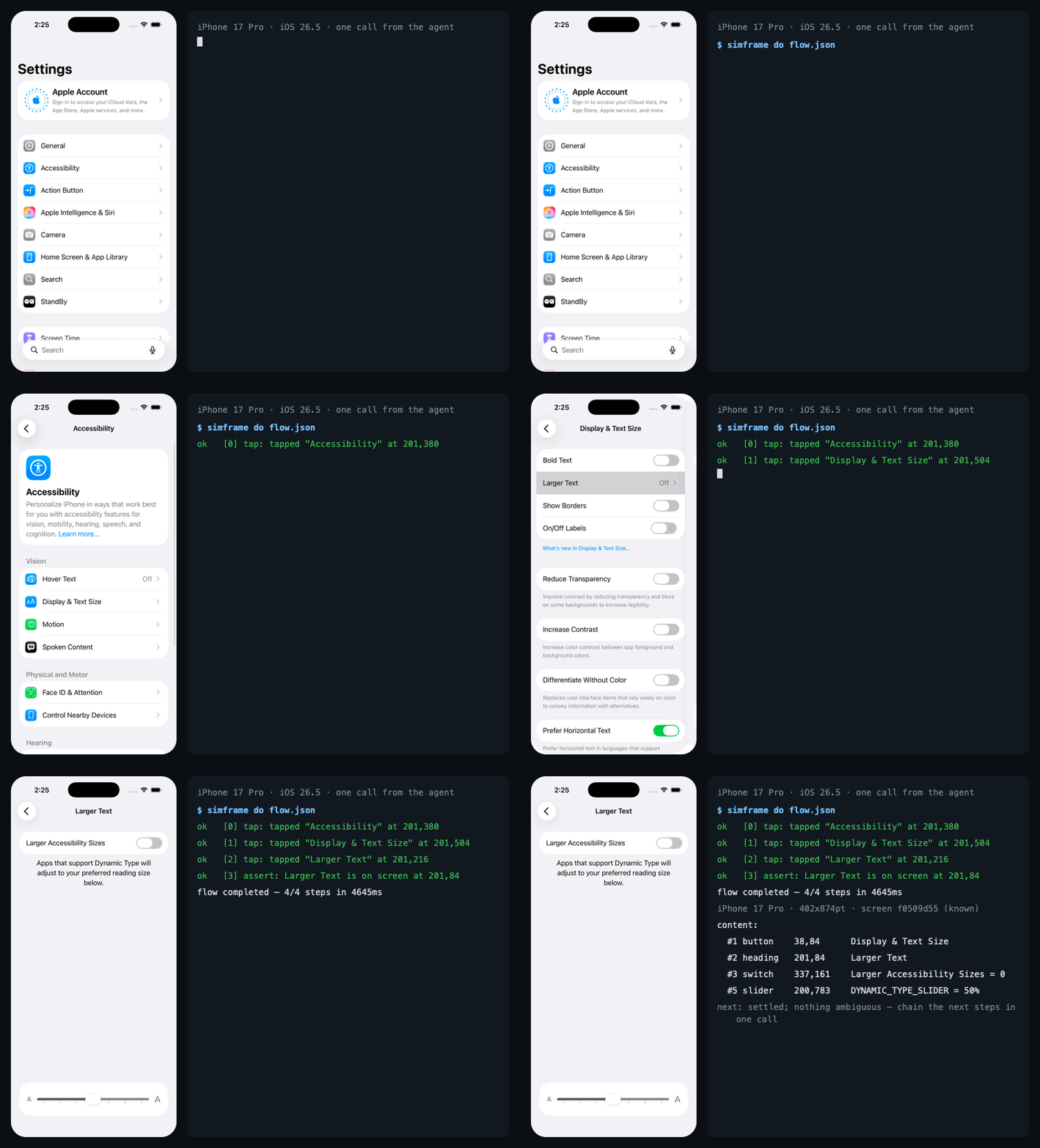
Eyes, hands and memory for a coding agent driving the iOS Simulator or an Android emulator. The agent reads the screen as text with tap points, runs a whole flow in one call, and remembers screens it has seen — so it stops paying a screenshot, a model round trip and a re-read for every single step.
The same app session for a fraction of the tokens. On a real React Native field app, agents did two jobs end to end, submitting for real: create a service request, and add an asset. Measured per run, 2026-10-03:
Same model, with and without simframe: 2.5× fewer tokens and 3.5× fewer
calls. The Sonnet driver did everything the no-simframe run did, with 2.3×
fewer tokens, half the calls and a handful of images where it took 112. It is one run per setup, so
read it as a measured example, not a rate; the full write-up, including what it
does not show, is in docs/BENCHMARKS.md.
It is not near human speed yet, and that is measured too. A person who
knows the app did the same two jobs in about 1.5 minutes (medians of five
runs: 39 s and 49 s). The agents took 13–16 minutes, 9–10× slower, because
they read and verify every step and each model turn costs seconds. Fewer turns
per flow, and flows replayed from memory, are what the roadmap is about.
Install in ten seconds
You need a Mac with Xcode (you have one if you have a simulator) and Node 18+. Nothing else — no idb, no Appium, no Python.
Claude Code — as a plugin, which brings the MCP server and the skill that teaches the protocol in one install:
claude plugin marketplace add lvlrSajjad/simframe
claude plugin install simframe@simframe
or the MCP server alone:
claude mcp add --scope user simframe -- npx -y simframe mcp
The plugin also ships a driver agent (simframe:simframe-driver): your
main session hands it a goal, it drives on Sonnet with only simframe's tools,
and it returns a short report. Limited to simframe, even a small model uses it;
with every tool on offer, Haiku never did. The driver needs the plugin
install above. It is wired to the plugin's own tool names, so a server added
with claude mcp add alone does not get it.
Pick one, not both: two installs mean two servers driving the same device. If
you added it with claude mcp add before, claude mcp remove simframe first.
Claude Desktop — Settings → Developer → Edit Config, then add:
{
  "mcpServers": {
    "simframe": { "command": "npx", "args": ["-y", "simframe", "mcp"] }
  }
}
Cursor —  or add the same
simframe block to ~/.cursor/mcp.json.
Codex, Windsurf, Zed, VS Code, anything else that speaks MCP — the same
JSON block, wherever that client keeps its mcpServers.
Then boot a simulator and ask the agent for something: "open my app and tap through the signup flow", "is the list on the Orders tab loading?", "why does the Save button do nothing?". The first call builds a small Swift daemon from source — about 15 seconds, once.
The CLI is the same thing without an agent in the loop, and the cheapest way to check the install:
npm install -g simframe
simframe doctor          # every layer, and which engine carries it
simframe ui              # the current screen as a numbered text map
If more than one simulator is booted, name the one you mean with
--device=<udid> or export SIMFRAME_DEVICE=<udid>; simframe refuses to guess,
because the command that would act on the wrong one is a tap.
What it changes
An agent driving a simulator is slow for three reasons, and only the first is
obvious. Every look is a wait (simctl io screenshot costs ~130 ms, paid on
every glance). Every step is a model round trip. And nothing is remembered, so
the same screen is re-read and re-reasoned about each time it appears. There
is a fourth that is pure waste: an image is the most expensive way to ask what
is on screen, and it still does not say what is tappable.
Measured on an iPhone 17 Pro simulator, iOS 26.5, Apple Silicon, against a real
production app; the full tables with N, median and p95 are in
docs/BENCHMARKS.md.
This is what the agent gets back instead of a picture:
iPhone 17 Pro · 402x874pt · screen a1b2c3d4 "Inbox" (known, 3 known exits)
last action: [2] tap — ok: matches the outcome seen 5x before
nav-bar:
  #1 button    24,64      Back
  #2 text      201,64     Inbox
content:
  #3 cell      201,140    Weekly digest
  #4 field     201,196    Search = weekly ~ weekly|
  #5 switch    201,252    Notifications = 1
tab-bar:
  #6 text      62,835     Inbox
  #7 text      201,835    Settings
next: settled; nothing ambiguous — chain the next steps in one sim_do without looking again.
Region, type, label, contents, a tap point, and a number the next call can use
as a selector. = value is what the accessibility tree says the control
contains; ~ value is what OCR read off the pixels. Where they disagree, that
is the point.
The tools
Three ways to name a control, anywhere one is named: "Save" (resolved by
intent — verbs, typos, synonyms, icon-only controls by their common name),
#3 (the number the map gave it, valid for that screen only), or @120,400
(raw points, last resort). A label that matches the destructive vocabulary —
Delete, Pay, Send, Sign out — is never substituted for or guessed at.
A Claude Code skill ships in the package and teaches the CLI path, which is cheaper still: a few lines of output instead of a tool result, and no MCP schema in context until a tool is used.
Android
The second backend drives an Android emulator with the same commands, the same
screen map and the same memory. Frames arrive at ~41 ms through the emulator
console; tap, swipe, text, keys and the clipboard work; simframe devices
lists emulators next to simulators. What Android does not have is an
accessibility tree, so its screens are read by OCR and CV alone — and
simframe doctor says so rather than pretending. Details, costs and the
reasoning are in the guide.
How it works, briefly
One Swift daemon per device reads the simulator's framebuffer straight off its
IOSurface when the display reports damage, runs Apple's Vision OCR on the same
surface, reads the accessibility tree host-side, and sends taps as real
down/move/up sequences over the HID channel — no PNG, no file, no spawned
process. Frames land in ~/.simframe/<udid>/, input goes over a 0600 Unix
socket, and the MCP server and CLI are thin clients over both.
Screen memory keys a merged element map by a structural fingerprint, so a
screen seen before is a file read. A transition graph records which action led
from which screen to which, so sim_goto plans a route and a saved flow
replays with no model in the loop.
Every layer degrades rather than fails, and never quietly: simframe doctor
reports each one and --strict turns any downgrade into a non-zero exit. The
private frameworks the daemon links are documented, with evidence, in
docs/PRIVATE_API.md.
Read on
Almost everything here was decided by a measurement rather than an argument, and several measurements reversed a decision that had already shipped. Two headline results: a warm transition graph removes about 27% of an agent's model round trips, and a one-line threshold on a number the daemon already computes beat every local model tried as a step supervisor — 95% against 77–91%, at zero latency.
Limitations
- Simulators and emulators only; nothing here can reach a physical device.
- The daemon links private frameworks. They survived the iOS 26 transition,
but an Xcode upgrade can move a symbol;
doctornames the broken layer and--engine=screenshotstill works. - Android has no accessibility tree, so screen identity there rests on OCR geometry alone: thinner and noisier than iOS.
- Hardware buttons: only
home. The other codes are unverified and a wrong one can crash the device, so they return an error rather than a guess. - The confirm vocabulary (
OK,Save,Done…) is English. - It speeds up confirming a fix, not locating one. A bug in a stale closure is not visible in any frame.
The full list, with the measurements behind each item, is in the guide.
Releasing
npm version is the only way to bump a version — its hook keeps server.json
in step — and git push --follow-tags runs a workflow that publishes to npm
and the official MCP Registry with no secrets. Why it is built that way, and
the release that once vanished for a week, is in
the guide.
License
MIT