arazzo-cli
Execute multi-step API workflows from a YAML spec — no code generation, no glue scripts.
arazzo-cli is a standalone executor for Arazzo, the OpenAPI Initiative's spec for describing sequences of API calls as declarative workflows. Define your steps, parameters, success criteria, and control flow in YAML, then run them directly from the command line or step through them in VS Code.
Why?
Testing a sequence of API calls today means writing imperative scripts, maintaining collections, or building custom test harnesses. The Arazzo spec (part of the OpenAPI ecosystem) lets you describe these sequences declaratively — but without a runtime, the spec is just documentation.
arazzo-cli makes Arazzo specs executable: validate them, run them, trace them, and debug them interactively.
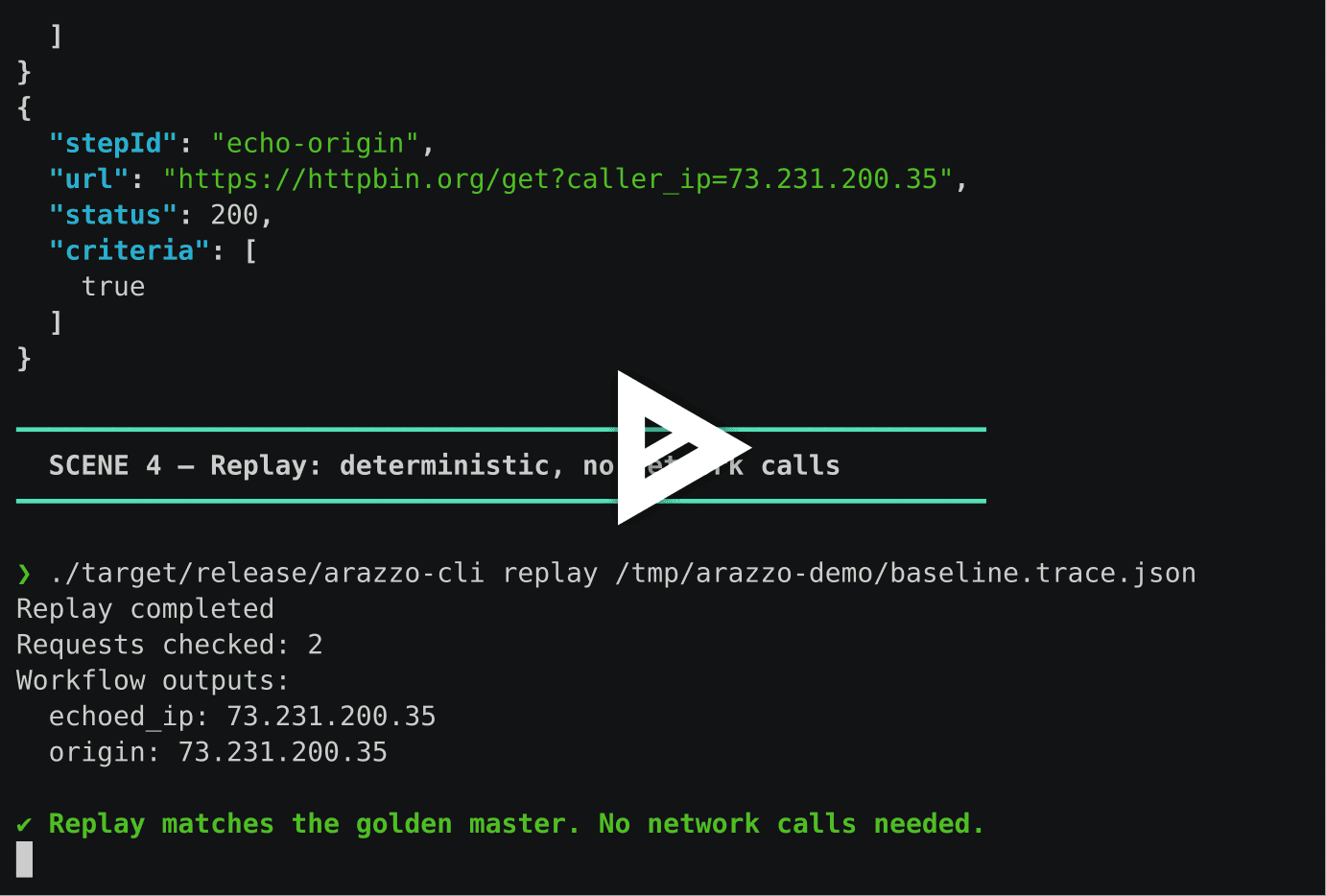
Demo
Quick Start
git clone https://github.com/strefethen/arazzo-cli.git
cd arazzo-cli
cargo run -p arazzo-cli -- validate examples/httpbin-get.arazzo.yaml
cargo run -p arazzo-cli -- run examples/httpbin-get.arazzo.yaml get-origin
Or install it:
cargo install --path ./crates/arazzo-cli --locked
arazzo-cli validate examples/httpbin-get.arazzo.yaml
arazzo-cli run examples/httpbin-get.arazzo.yaml get-origin
Features
Operation targets use standard Arazzo syntax: an operationId, or a source-description expression with a JSON Pointer in operationPath. Both resolve the method, path, and server from a bound OpenAPI document; see Specification Conformance: Extensions and Gaps for remaining limits.
Contents
- CLI Commands
- Examples
- Execution Traces
- Deterministic Replay
- VS Code Debugger
- Expression Language
- How It Works
- Parallel Execution
- Success Criteria
- Control Flow
- Input Validation
- Sub-Workflows
- Generating Workflows
- MCP Server
- Safety and Correctness
- Programmatic API
- Repository Layout
- Building from Source
- Acknowledgments
- Contributing
CLI Commands
arazzo-cli run <spec> <workflow-id>        Execute a workflow
arazzo-cli replay <trace.json>             Replay a trace.v1 artifact with injected responses
arazzo-cli validate <spec>                 Parse and validate a spec
arazzo-cli list <spec>                     List workflows in a spec
arazzo-cli steps <spec> <workflow-id>      List steps within a workflow
arazzo-cli catalog <dir>                   Discover specs across a directory tree
arazzo-cli show <workflow-id> --dir <dir>  Display workflow details (inputs, outputs, steps)
arazzo-cli generate --spec <openapi>       Generate Arazzo workflows from an OpenAPI spec
arazzo-cli schema [command]                Print JSON Schema for a command's --json output
arazzo-cli serve [specs...] [--dir <dir>]  Start an MCP server for AI agent integration
Global flags:
--json— structured JSON output (all commands exceptgenerate, which writes YAML only and rejects it)--verbose— step-by-step execution details
run flags:
--input key=value— workflow input (repeatable)--input-json key=<json>— JSON-typed input (repeatable)--header Name=value— HTTP header applied to all requests (repeatable)--step <step-id>— execute a single step (auto-resolves upstream dependencies)--no-deps— skip dependency resolution when using--step(isolated execution)--strict-inputs— make input validation errors fatal (missing required fields, type mismatches, property enum assertions)--http-timeout <duration>— per-request timeout (default30s)--execution-timeout <duration>— overall workflow deadline (default5m)--max-response-size <bytes>— response body size limit (default10485760= 10 MiB)--parallel— execute independent steps concurrently--dry-run— resolve requests without sending--openapi <path>— operationId source spec (repeatable)--expr-diagnostics <off|warn|error>— expression warning level (defaultoff)--trace <path>— write a trace.v1 execution artifact--export-run <path>— write a versioned JSON run artifact with declared outputs and step history--trace-max-body-bytes <n>— max body size in trace (default2048)
replay flags:
<trace.json>— trace.v1 file to replay--spec <path>— overriderun.specPathrecorded in the trace--workflow-id <id>— overriderun.workflowIdrecorded in the trace--execution-timeout <duration>— replay timeout (default5m)--openapi <path>— operationId source spec (repeatable)
generate flags:
--spec <path>— path to an OpenAPI 3.0.x spec (YAML or JSON; required; 3.1 and 3.2 are rejected)--scenario <name>— generation scenario (defaultcrud)-o/--output <path>— write generated YAML to file instead of stdout
serve flags:
[specs...]— Arazzo spec files to load (positional, repeatable)--dir <path>— directory containing.arazzo.yamlfiles to discover and load
Examples
Runnable specs live in examples/. See
examples/README.md for the catalog: what each spec
demonstrates, its workflow IDs, and a dry-run command per scenario.
Try them:
# Validate
arazzo-cli validate examples/httpbin-auth.arazzo.yaml

# Run with inputs
arazzo-cli run examples/httpbin-get.arazzo.yaml status-check --input code=200

# Dry-run (no network calls)
arazzo-cli run examples/httpbin-get.arazzo.yaml status-check --dry-run --input code=429

# Verbose output with step details
arazzo-cli run examples/httpbin-parallel.arazzo.yaml independent-steps --parallel --verbose

# Run a single step (auto-resolves its dependencies)
arazzo-cli run examples/httpbin-data-flow.arazzo.yaml chained-outputs --step echo-origin

# Generate CRUD workflows from an OpenAPI spec
arazzo-cli generate --spec petstore.yaml -o petstore-crud.arazzo.yaml

# Write a trace file
arazzo-cli run examples/httpbin-get.arazzo.yaml status-check --input code=429 --trace ./trace.json

# Write a JSON run artifact alongside ordinary stdout
arazzo-cli run examples/httpbin-get.arazzo.yaml status-check --input code=200 --export-run ./run.json

# Replay a trace offline
arazzo-cli replay ./trace.json
The run.v1 export keeps typed declared outputs, ordered attempts, HTTP status and body-size metadata, and UTC production timestamps. It also writes completed attempts after a runtime failure. See the run export contract or run arazzo-cli schema export-run for the schema.
Execution Traces
run --trace <path> writes a trace.v1 JSON artifact capturing every step's request, response, criteria evaluation, and routing decision.
Trace writing redacts values whose names or text match its common sensitive-value patterns. This is best-effort; secrets that do not match those patterns may remain in a trace:
- Headers:
Authorization,Cookie,X-API-Key - URL query params:
token,password,session - JSON body fields with sensitive keys, and matching secret patterns in non-JSON response bodies
{
  "schemaVersion": "trace.v1",
  "tool": { "name": "arazzo", "version": "0.1.0" },
  "run": {
    "workflowId": "status-check",
    "status": "success",
    "durationMs": 12
  },
  "steps": [
    {
      "seq": 1,
      "workflowId": "status-check",
      "stepId": "check-status",
      "decision": { "path": "next" }
    }
  ]
}
Schema reference: docs/trace-schema-v1.md | docs/schemas/trace-v1.schema.json
Deterministic Replay
The replay command re-executes a workflow using the recorded responses from a trace file instead of making live HTTP requests. This enables offline testing, regression detection, and CI validation without network access.
# Record a trace
arazzo-cli run spec.yaml my-workflow --trace ./trace.json

# Replay it later — no network calls
arazzo-cli replay ./trace.json
How It Works
Replay operates at the HTTP transport layer. The engine resolves expressions, evaluates criteria, and routes control flow exactly as it would during a live run — but instead of sending HTTP requests, it serves the recorded responses from the trace file.
Before injecting each recorded response, the engine compares the replayed request against the original:
If any field differs, the engine reports a RUNTIME_REPLAY_REQUEST_MISMATCH error with the specific drift. This catches regressions where spec or expression changes silently alter what gets sent to the API.
Use Cases
- CI regression tests — record a golden trace, replay it on every push to verify that expression resolution and request construction haven't changed
- Offline development — work on workflow logic without access to the target API
- Spec refactoring — rename steps, restructure parameters, and verify the same requests are produced
- Review artifacts — trace files are plain JSON, easy to diff and inspect in code review
Overrides
Replay supports overriding the spec path and workflow ID stored in the trace:
arazzo-cli replay ./trace.json --spec ./updated-spec.yaml --workflow-id new-workflow
This is useful when replaying a trace against a modified spec to detect drift.
VS Code Debugger
Install Arazzo Debug from the Visual Studio Marketplace to debug workflows in VS Code.
The project includes a full Debug Adapter Protocol (DAP) implementation with a VS Code extension for interactive workflow debugging.
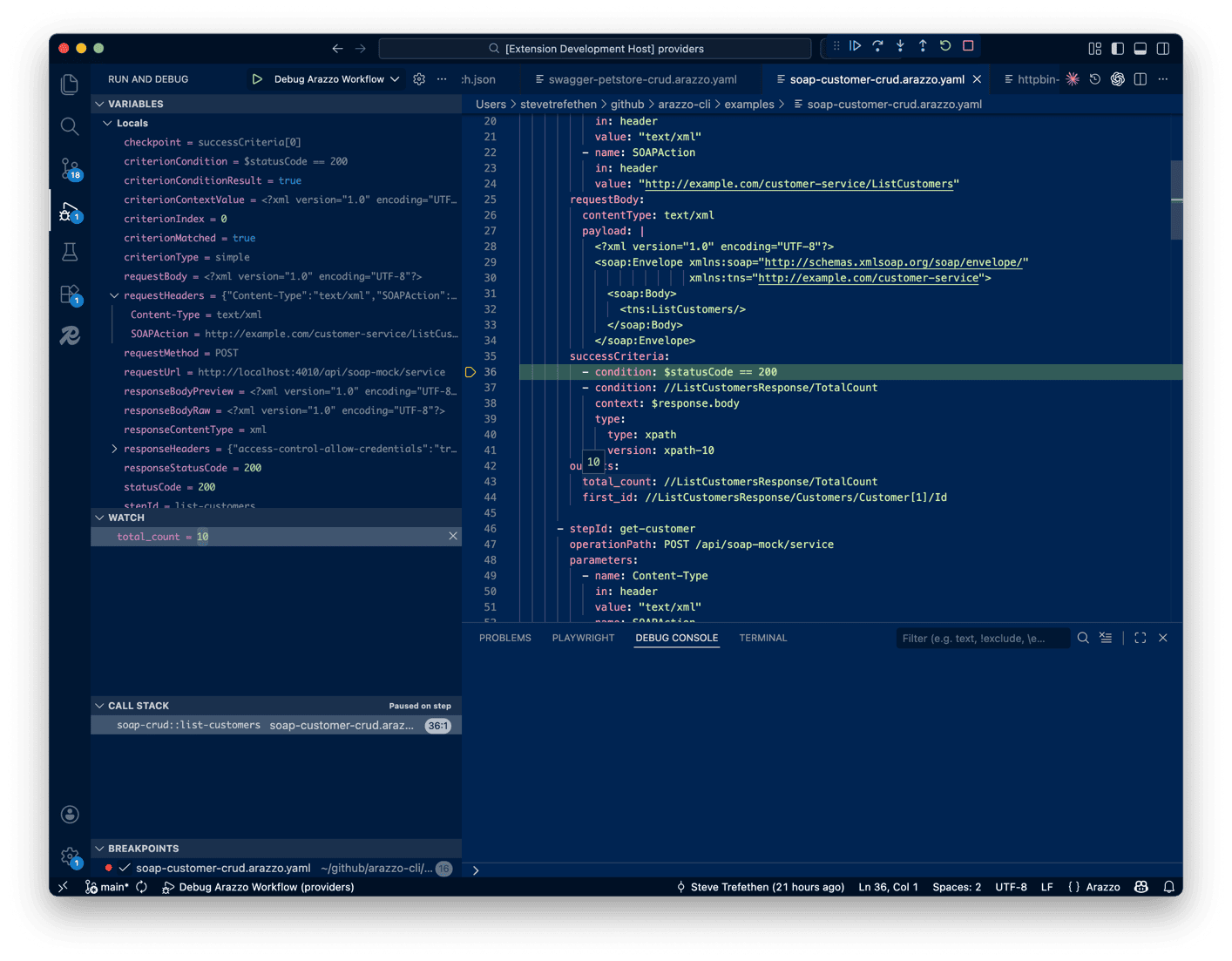
Capabilities: breakpoints on steps/criteria/actions, conditional breakpoints, Step Over / Step In / Step Out / Continue / Pause, variable inspection (Locals, Request, Response, Inputs, Steps scopes), watch expressions, call stack with sub-workflow depth tracking.
Setup
- Build the debug adapter and extension:
cargo build --release -p arazzo-debug-adapter cd vscode-arazzo-debug && npm install && npm run build && node scripts/copy-binary.js - In VS Code, press F5 to launch the Extension Development Host
- Create
.vscode/launch.jsonin the new window:
{
  "version": "0.2.0",
  "configurations": [
    {
      "type": "arazzo",
      "request": "launch",
      "name": "Debug Workflow",
      "spec": "${workspaceFolder}/examples/httpbin-get.arazzo.yaml",
      "workflowId": "get-origin",
      "stopOnEntry": true
    }
  ]
}
- Open the Arazzo YAML file, set breakpoints on step lines, and press F5
Launch Configuration
Breakpoints
Set breakpoints on any meaningful line in a YAML spec. The debugger maps source lines to internal checkpoints:
- Step lines (
- stepId: fetch-data) — pause before execution - Success criteria (
- condition: $statusCode == 200) — pause at evaluation - onSuccess / onFailure actions — pause at dispatch
- Output lines (
title: //item[1]/title) — pause at extraction
Conditional breakpoints are supported — right-click a breakpoint and add an expression:
$statusCode == 429
$steps.fetch-auth.outputs.token != null
Stepping
Variable Inspection
When paused, the Variables panel shows:
- Locals —
workflowId,stepId,checkpoint - Request —
method,url,headers,body - Response —
statusCode,contentType,headers,bodyPreview - Inputs — workflow input parameters
- Steps — completed step outputs as a nested tree
Watch Expressions
Add expressions to the Watch panel or hover in the editor:
$inputs.name— workflow input$steps.fetch-data.outputs.token— step output$statusCode— HTTP status code$response.header.Content-Type— response header$response.body#/data/origin— JSON body pointer//item[1]/title— XPath query
Debugger Architecture
Three-thread coordinator design prevents deadlocks during slow HTTP requests:
stdin ──> [Reader Thread] ──cmd_tx──> [Coordinator] ──> stdout
                                           ^
          [Engine Monitor] ──event_tx──────┘
                |
          [Runtime Engine]
Neither channel blocks the other. A slow HTTP request does not prevent processing VS Code commands (pause, disconnect, etc.).
Expression Language
Action name fields are literal strings; component reuse uses reference and replaces the whole action.
Authoring body and payload references: Use the bare $request.body, $response.body, or $message.payload for the whole value, or append a # JSON Pointer for a member. For nested { "a": { "b": 1 } }, use $response.body#/a/b; for a literal property named a.b, use $response.body#/a.b. Escape ~ as ~0 and / as ~1 in each token: { "a~b/c": 1 } uses $response.body#/a~0b~1c.
Starting with v0.8.0, required-expression fields such as outputs and Selector/Criterion contexts reject standalone $response.body.status with invalidExpression and pointer guidance. Use $response.body#/status when selection is intended. Literal-capable Parameter/payload fields preserve ordinary unbraced text such as $USD or $response.body.status as literal strings; {$response.body#/status} embeds a selection in text. Only {$ opens an embedded expression; other braces are literal. This is separate from simple conditions: $response.body.status == 'active' and $response.body.items[0].id == 7 use valid property/index operators. Filters and wildcards require a Selector Object or typed criterion where that field permits one; they have no general pointer replacement.
Not implemented:
$response.query.<name>and$response.path.<name>are listed by the specification but not resolved by arazzo-cli — they evaluate tonull. Only$response.header.<name>and$response.body...are supported on$response.$message.header.<name>and$message.payload...are modeled in the expression evaluator but nothing in the runtime populates them for a real request — arazzo-cli does not execute asynchronous/message-style transports. Against an actual HTTP response, both evaluate tonull, not the response's own header/body (use$response.*for that).
String interpolation: {$expr} embeds any expression in a string value (e.g., "Bearer {$steps.auth.outputs.token}")
Multi-source routing: qualify an operation ID with its source description, or use a canonical operationPath pointing into that source's document. Resolution stays within the named source even when another document has the same operation ID or path. Static steps and show output preserves the authored target without guessing a method before the document is resolved.
Condition operators: ==, !=, >, <, >=, <=, !, &&, ||, grouping (), property access ., and zero-based array indexing []. contains, matches, and in are rejected; see Simple conditions.
Typed JSONPath (RFC 9535): type: jsonpath success criteria, Selector Objects, and targetSelectorType: jsonpath payload replacement targets all run on one RFC 9535 query engine. That is the full query language: child and descendant segments ($.items[0].name, $..sku), wildcards ($.items[*].id, $.*), array slices ($.items[0:2]), negative indices, unions, filter expressions ($.items[[email protected] > 10 && @.active]) with existence tests and comparisons, and the standard function extensions length(), count(), value(), match() and search() — the latter two taking a literal pattern or a pattern drawn from the queried document ($.items[?search(@.description, @.tag)]).
A criterion is decided by nodelist cardinality alone: one or more selected nodes pass, zero nodes fail. A single node holding false, 0, "" or null therefore passes, and a null or undefined context fails. Selector reads normalize the same nodelist to null (zero matches, with a warning), the selected value (one match), or an array in query order (many matches, repeated occurrences kept). A replacement target applies only when it resolves to exactly one location.
JSONPath versions, limits, and what is not claimed: JSONPath Criterion and Selector expressions execute under RFC 9535 semantics when the version is omitted or rfc9535; any other declared JSONPath version and any syntactically invalid expression are rejected before evaluation (a criterion fails with an error, a selector resolves null with one warning). A rejected replacement target or value leaves the body unchanged with a warning. In particular draft-goessner-dispatch-jsonpath-00 is a permanent capability limit: the draft has expired, arazzo-cli will not implement it, and there is no compatibility engine, silent alias, or fallback. Unlike the XPath version rejection above, validate carries no JSONPath version advisory — a Goessner declaration validates as document metadata (§5.8.12.1 allows the token) and is rejected only at run time.
Four conservative admission budgets are applied before the parser or the evaluator runs: at most 16,384 UTF-8 bytes per query, at most 128 combined occurrences of the raw bytes . [ ( ! & | in a query (counted in quoted and escaped literals too), at most 8 levels of […] nesting in a query (counted outside string literals; sibling brackets such as $.a[0][1] add no depth), and at most 128 nested containers in the queried context. Exceeding one names the resource and the limit. match() and search() delegate to an I-Regexp matcher and inherit its own pattern, repetition, nesting, and compiled-matcher limits; an invalid pattern yields logical false, while a resource or backend failure invalidates the whole query — even under negation — rather than quietly reading as false. These are explicit resource budgets, not a universal CPU, heap, or result-size quota for every query, and arazzo-cli does not claim 100% RFC 9535 Compliance Test Suite conformance. The engine is serde_json_path 0.7.2 with one eight-line recursive numeric-equality repair vendored under vendor/serde_json_path_core, which records the provenance, the checksum, and the criterion for dropping the patch.
This typed surface is distinct from JSON Pointer body access and simple-condition property/index operators — see JSONPath under Success Criteria.
Arazzo 1.1 Selector Objects
Step/workflow outputs, parameter values, request-body values, and replacement values accept structured Selector Objects in addition to existing literal and runtime-expression forms:
outputs:
  enabledIds:
    context: $response.body
    selector: $.items[?(@.enabled == true)].id
    type:
      type: jsonpath
      version: rfc9535
type may be the string jsonpath, jsonpointer, or xpath, or an object with an explicit version. Supported schema combinations are JSONPath rfc9535 / draft-goessner-dispatch-jsonpath-00, JSON Pointer rfc6901, and XPath xpath-10 / xpath-20 / xpath-30 / xpath-31. What a document may declare and what this runtime executes are different questions, and both version families answer it the same way: an unexecutable version validates as document metadata and is rejected before evaluation.
Runtime JSONPath execution accepts an omitted version or version: rfc9535; draft-goessner-dispatch-jsonpath-00 is rejected permanently — see Typed JSONPath (RFC 9535). Runtime XPath execution requires an explicit version: xpath-10: every other declared version — and the bare type: xpath string form, whose omitted version the specification defaults to xpath-31 — is rejected the same way. A rejected criterion fails its step with an error; a rejected selector resolves to null with one warning; a rejected replacement leaves the body unchanged with one warning. For XPath, validate flags each such declaration ahead of execution with a warning naming the rejected version and the xpath-10 remedy, and --strict promotes it to an error; there is no equivalent JSONPath version advisory, so a Goessner declaration passes validate cleanly and is rejected only at run time.
All selector callers use the same selection engine — RFC 9535 for jsonpath. Zero matches resolve to null, one match resolves to the value, and multiple matches resolve to an array in query/document order. Invalid syntax, unsupported runtime versions, admission-limit rejections, and zero matches produce trace or dry-run warnings; only the last of those is a legitimate selection, and a JSONPath failure is never written into a request body as null. A mapping is treated as a Selector Object only when it satisfies the complete context + selector + type contract, so ordinary literal mappings retain their existing recursive expression behavior.
For XPath outputs, use a Selector Object with an explicit version (type: {type: xpath, version: xpath-10}). Starting with v0.8.0, bare //xpath/expression output strings are rejected as invalid runtime expressions; put the XPath in the Selector Object's selector field and supply its context.
Specification Conformance: Extensions and Gaps
arazzo-cli supports Arazzo Specification v1.1.0 documents with known conformance gaps. The conformance manifest records current coverage and gaps; the conformance audit records the supporting findings.
operationPath identifies a source document and an operation within it, using a runtime expression plus a JSON Pointer. The runtime resolves that pointer against the bound document and uses the operation's method, path, and effective server. Operations without an operationId are supported. The generator prefers a source-qualified operation ID when representable and otherwise emits a canonical pointer; duplicate IDs are rejected.
Bare paths, absolute request URLs, source/path shortcuts, and method prefixes are rejected. sourceDescriptions[].url always identifies a document; an unmatched URL is an error, never a request base. Provided OpenAPI documents must bind to a declared source before their operations can be used. A bare operation ID is permitted with a single eligible source; multiple sources require qualification.
Specification features not implemented:
-
$response.query.<name>and$response.path.<name>— listed by the specification's Runtime Expressions grammar; arazzo-cli resolves only$response.header.<name>and$response.body..., so both evaluate tonullrather than the request-matched query/path value. -
$message.header.<name>and$message.payload...— modeled in the expression evaluator, but no code path in the runtime populates a message context for a real request (arazzo-cli does not execute asynchronous/message-style transports), so both evaluate tonullagainst a real response rather than erroring or falling back to$response.*. -
Operation pointers through referenced path items, callbacks, webhooks, or other locations without a directly routable path context. Relative server URLs and missing document-level absolute servers also remain unsupported; both ID and pointer routes report these limits explicitly.
-
Fetching a remote document from
sourceDescriptions[].urlover the network. The runtime uses local or provided documents. Identity-based referencing (§9.6) binds a provided document without fetching its URL. Vendor a local copy, give it a$selfmatching the url, and hand it over:{ "$self": "https://example.com/v1/openapi/spec.json", "openapi": "3.1.0", "...": "..." }arazzo-cli run spec.arazzo.yaml my-workflow --openapi ./vendored.openapi.jsonThe
$selfis what binds it, and the request resolves against that document's ownservers.--openapialone is not enough for an absolute url: a provided document with no$selfanswers only to the path it was read from, which binds a relative url. A URL that matches no document is rejected.
How It Works
arazzo-cli is a pure interpreter — it reads your Arazzo YAML spec, resolves every expression at runtime, executes real HTTP requests, and routes control flow based on the results. There is no code generation step and no intermediate representation.
Execution Pipeline
YAML spec ──> Parse & Validate ──> Build Engine ──> Execute Steps ──> Collect Results
                                       │
                           ┌───────────┼───────────────┐
                           │           │               │
                      Resolve      Send HTTP      Evaluate
                    expressions    request(s)     criteria
                           │           │               │
                           └───────────┼───────────────┘
                                       │
                                 Route control flow
                              (next / goto / retry / end)
For each step, the engine:
- Resolves parameters and request body — evaluates literals, runtime expressions, interpolation, and typed Selector Objects through one value-selection path
- Sends the HTTP request — through a rate-limited client with configurable timeout
- Evaluates success criteria — checks conditions like
$statusCode == 200, regex patterns, XPath queries, or JSONPath filters against the response - Extracts outputs — pulls values through runtime expressions or typed JSONPath/JSON Pointer/XPath selectors into the step's output map for downstream steps to consume
- Routes control flow — matches
onSuccessoronFailureaction criteria to decide: advance to the next step, jump to another step (goto), retry with a delay, or end the workflow
The engine streams events as it runs. CLI output, traces, verbose logging, and the VS Code debugger all consume the same event stream — there is no special path for any consumer.
.env File Support
On startup, arazzo-cli (and arazzo-mcp) loads a .env file from the current directory (if one exists) into the process environment. The file supplies defaults: a variable already set in the environment, even to an empty string, keeps its value. To use the file's value instead, unset the variable before running.
Loaded values reach everything that reads the process environment, including the HTTP client's proxy resolution: HTTP_PROXY, HTTPS_PROXY, ALL_PROXY, and NO_PROXY in a .env beside a spec apply to every outbound request in the run unless the shell already sets them.
Each load is reported on stderr: one line with how many names were set, how many were kept from the environment, and how many lines were ignored, plus a warning: naming the line number and reason for each ignored line (no =, an empty name, a NUL byte, or an unreadable line). Names and values are never printed. With no .env, nothing is printed.
The $env.VAR_NAME expression namespace that used to expose those values inside workflow text was removed in 0.4.0. It was an arazzo-cli extension the Arazzo specification does not define, and it handed workflow text read access to the entire process environment. $env.* now resolves like any other unknown namespace — null, with a warning — and the variable's value never appears in diagnostics. To get a secret or environment-specific value into a workflow, declare a workflow input and pass it at invocation:
# In your Arazzo spec
parameters:
  - name: Authorization
    in: header
    value: "Bearer {$inputs.apiKey}"
arazzo-cli run workflow.arazzo.yaml my-workflow -i apiKey="$API_KEY"
Inputs keep secrets out of spec files, are declared per workflow rather than ambient, and are portable to other Arazzo tools.
Parallel Execution
When you pass --parallel, the engine analyzes step dependencies and executes independent steps concurrently.
How the DAG Scheduler Works
The scheduler uses a variant of Kahn's algorithm for topological sorting:
- Scan expressions — for each step, find all
$steps.<id>.outputs.*references to identify upstream dependencies - Build a directed acyclic graph (DAG) — if step B references
$steps.A.outputs.token, add an edge A → B - Compute execution levels — Level 0 contains all steps with no dependencies. Level N+1 contains steps whose dependencies are all satisfied by levels 0..N
- Execute level by level — within each level, steps run concurrently via async tasks. The engine waits for all steps in a level to complete before starting the next level
- Detect cycles — if any steps remain with unresolvable dependencies, the engine reports a
RUNTIME_DEPENDENCY_CYCLEerror
Level 0:  [fetch-token]  [fetch-config]     ← run concurrently
              │                │
Level 1:  [create-user] ──────┘              ← waits for both
              │
Level 2:  [verify-user]                     ← sequential
Determinism guarantee: even with concurrent execution, event sequence numbers are assigned per-level in stable step order, so identical inputs always produce identical traces.
Retries and sequential fallback
A retry failure action re-runs only the step that failed, so it works in parallel mode. The step retries inside its own slot of the level, after its retryAfter delay, while its siblings keep running. The level still completes before the next one starts, and the trace lists each step's attempts together, in attempt order.
If a retry criterion reads another step's outputs ($steps.<id>.outputs in its condition or context), the scheduler puts that step in an earlier level, as it does for a parameter. The criterion then sees the same outputs it would in sequential mode.
With --parallel, a workflow still runs its steps one at a time when:
- a step declares an
onSuccessaction, or agotoorendonFailureaction, or the workflow declares one insuccessActionsorfailureActions. These move execution away from dependency order. - a
retryfailure action names astepIdorworkflowId, which runs another step or workflow before the retry. - a step calls another workflow. The called workflow can still run its own steps in parallel.
--stepselects a single step.
--verbose prints the workflow, the step, and the reason:
Parallel mode: workflow "checkout" runs sequentially because step "pay" has an onFailure action of type "goto", which redirects control flow
--trace records the same entries under run.sequentialFallbacks.
Success Criteria
Each step can define success criteria — conditions that must pass for the step to be considered successful. The engine supports four criterion types:
Simple (default)
Simple conditions (the default when type is omitted) combine runtime expressions with boolean, null, number and single-quoted string literals:
successCriteria:
  - condition: $statusCode == 200
  - condition: $response.body.status == 'active'
  - condition: $response.body.items[0].id == 7
Use ==, !=, >, <, >=, <=, !, &&, ||, grouping (), property access ., and zero-based array indexing []. contains, matches, and in are rejected. Escape an apostrophe inside a string by doubling it ('It''s'); double quotes are not condition-string delimiters. Comparisons do not chain. Boolean values decide the condition directly; null or missing is false, while a bare number, string, array or object is an evaluation error. Compare those values explicitly.
Property/index access on a missing value stays missing; access on a present wrong type, including explicit null, is an error. Conditions parse completely before evaluation and then short-circuit left to right. A syntax or evaluation error makes the owning condition false; its diagnostic is available in the detailed evaluation result. Ordinary Step failure routing or a later eligible Action can still run.
Numbers use the existing i64/u64/finite-f64 storage. Plain integer literals and numeric strings without a fraction or exponent must fit [-2^63, 2^64-1]; excess does not fall back to floating point. Fraction/exponent conversion rejects overflow and nonzero underflow to zero. Integers compare exactly as represented, including against represented floats without rounding the integer; float comparisons use no epsilon, and signed zero compares equal. JSON/YAML loader rounding remains unchanged. Decimal values can coincide after rounding (0.10000000000000001 == 0.1 is true), so this is not an end-to-end decimal-exactness guarantee and says nothing about typed JSONPath/XPath precision.
For all six comparisons, exactly one number and one string triggers numeric conversion: the string must fully match JSON-number syntax without surrounding whitespace, and invalid spelling/range fails evaluation. '200' == 200 is true; ' 200 ' == 200 and '01' == 1 are errors. Two strings remain Unicode-lowercase text: '10' < '2' is true and '01' == '1' is false. This deliberately adopts only part of the specification's numeric-string SHOULD to keep text ordering independent of its contents.
Equality and inequality are complements whenever comparison succeeds: value != null agrees with !(value == null). Null and missing compare equal; any non-null value compares unequal to them. null == null is true and null != null is false. Test for present non-null data with $response.body.data != null; false, 0, empty strings and empty containers all pass that test. Ordering with exactly one null or missing operand remains false. The local clarification draft records this unresolved ambiguity. These bounded semantics do not establish full Arazzo 1.1 compliance.
Regex
Pattern matching against a context value:
successCriteria:
  - condition: "^2[0-9]{2}$"
    context: $statusCode
    type: regex
Compiled regexes are cached for performance — repeated evaluation of the same pattern across steps or retries avoids recompilation (100–500x speedup).
XPath
XPath 1.0 queries for XML/SOAP responses:
successCriteria:
  - condition: //customer/id
    context: $response.body
    type:
      type: xpath
      version: xpath-10
XPath criteria, Selector Objects, and payload replacements evaluate only with an explicit version: xpath-10. Every other §5.8.12.1 version token — and the omitted form, which the specification defaults to xpath-31 — is rejected before evaluation, because this runtime implements XPath 1.0 and nothing else: a criterion fails with an error, a selector yields null with one warning, and a replacement leaves the body unchanged with one warning.
Unprefixed XPath name tests match on local names, so //customer/id matches <ns:customer><ns:id> without namespace qualification — the response body is never rewritten. Prefixed expressions (//ns:customer) resolve against the document's root-scope namespace declarations, so two prefixes bound to different URIs are distinguishable; a prefix not declared on the document element falls back to matching the prefix text literally. A document that uses an entirely undeclared prefix is rejected as invalid XML.
JSONPath
type: jsonpath criteria are RFC 9535 queries decided by nodelist cardinality — one or more selected nodes pass, zero fail:
successCriteria:
  - condition: $.users[?search(@.email, @.domainPattern)].name
    context: $response.body
    type:
      type: jsonpath
      version: rfc9535
The grammar, the version rule, the admission budgets, and the regex-function behavior are documented once under Typed JSONPath (RFC 9535); the same engine serves Selector Objects and payload replacement targets.
Migrating legacy filtered traversal
To require at least one admin user with a name property, use a typed JSONPath criterion. Its selected nodelist must contain one or more nodes, preserving the intended existence check without converting a filter to a pointer:
successCriteria:
  - condition: $.users[[email protected] == "admin"].name
    context: $response.body
    type:
      type: jsonpath
      version: rfc9535
Starting with v0.8.0, standalone runtime expressions reject legacy wildcards, array length (.#), and bracket/dot filters. Simple-condition property de-reference (.) and zero-based array indexing ([0]) remain separate valid condition operators. A filter can select zero, one, or many values; choose a typed criterion for existence, or a Selector Object for value selection, checking the destination field and intended cardinality. A JSON Pointer selects one known location and cannot substitute for a wildcard or filter.
The two surfaces do not share syntax. Every GJSON form is rejected on a typed JSONPath criterion, Selector Object, or replacement target with an invalid JSONPath syntax diagnostic. In literal-capable fields, an unbraced legacy expression can remain literal text; migrate those fields explicitly rather than relying on validation to identify every intended selection.
Control Flow
After evaluating a step's success criteria, the engine routes control flow through onSuccess and onFailure action lists. Each action has optional guard criteria — the first action whose criteria all pass is selected.
Action Types
Example: Retry with Fallback
onFailure:
  - name: retry-on-429
    type: retry
    retryAfter: 2
    retryLimit: 3
    criteria:
      - condition: $statusCode == 429
  - name: fail-hard
    type: end
This retries on 429 Too Many Requests up to 3 times with a 2-second delay, then fails on any other error. An omitted retryLimit performs one retry; explicit limits are exact, and bounded execution uses the declared effective retry budgets with 10 levels of sub-workflow nesting to prevent runaway execution.
Goto with Criteria Guards
onSuccess:
  - name: handle-created
    type: goto
    stepId: verify-created
    criteria:
      - condition: $statusCode == 201
  - name: handle-existing
    type: goto
    stepId: update-existing
    criteria:
      - condition: $statusCode == 200
Actions are evaluated in order — the first match wins. An action with no criteria acts as a catch-all.
Input Validation
Workflow inputs are validated before execution begins:
- Default injection — missing inputs are populated from schema defaults
- Required check — required inputs that are missing or null produce an error
- Type check — values are validated against their declared JSON Schema type (string, integer, boolean, number)
- Top-level property enum check — present values, including injected defaults, must match a declared top-level property
enummember - Undeclared input warning — inputs not defined in the workflow schema are flagged
By default, validation issues are reported as warnings and execution continues. With --strict-inputs, all validation errors are fatal:
# Warns about missing 'name' input but continues
arazzo-cli run spec.yaml my-workflow

# Fails immediately if 'name' is missing
arazzo-cli run spec.yaml my-workflow --strict-inputs
Sub-Workflows
A step can invoke another workflow defined in the same spec by setting workflowId instead of an HTTP operation:
workflows:
  - workflowId: parent
    steps:
      - stepId: authenticate
        workflowId: auth-flow
        parameters:
          - name: username
            value: $inputs.user
      - stepId: use-token
        operationId: $sourceDescriptions.api.protected
        parameters:
          - name: Authorization
            in: header
            value: "Bearer {$steps.authenticate.outputs.token}"
The child workflow executes with its own input context, and its outputs are available to the parent as $steps.<stepId>.outputs.<name>. Sub-workflows can nest up to 10 levels deep. Circular calls are prevented by depth tracking.
Generating Workflows
The generate command scaffolds Arazzo workflows from OpenAPI 3.0.x specs. OpenAPI 3.1 and 3.2 are rejected with an error explaining that generation currently supports 3.0.x:
arazzo-cli generate --spec petstore.yaml -o petstore-crud.arazzo.yaml
The crud scenario (currently the only supported scenario) analyzes your OpenAPI spec and produces:
- A workflow per resource with Create → Read → Update → Delete steps
- Chained outputs (the
idfrom Create feeds into subsequent steps) - Realistic request bodies derived from schema examples and property types
- Authentication detection (bearer, basic, API key) applied to all steps
- Source descriptions pointing back to the original OpenAPI spec
- Standard source-qualified operation IDs or JSON Pointer targets for operations without a representable ID
The openapiv3 model used by generation targets OpenAPI 3.0.x; documents declaring 3.1 or 3.2 are refused before parsing.
This gives you a runnable starting point that you can customize — add assertions, error handling, conditional logic, or compose into larger workflows.
MCP Server
arazzo-cli includes a built-in Model Context Protocol (MCP) server that exposes Arazzo workflows as tools for AI agents. Any MCP-compatible client — Claude Desktop, Cursor, or custom agents — can discover and execute your workflows.
Starting the server
# Standalone binary
arazzo-mcp examples/httpbin-get.arazzo.yaml

# Or via the CLI subcommand
arazzo-cli serve examples/httpbin-get.arazzo.yaml

# Load all specs from a directory
arazzo-cli serve --dir examples/
The server communicates over stdio using Content-Length framed JSON-RPC 2.0 (the same transport as LSP and DAP). Newline-delimited JSON framing is also supported for simpler integrations.
Security
By default, file-accepting tools (validate_spec, generate_workflow, describe_openapi) can read any path the process has access to. Use --allowed-dir to restrict file access:
arazzo-cli serve --allowed-dir /home/user/specs examples/*.arazzo.yaml
The flag is repeatable — pass it multiple times to allow several directories.
Available tools
Workflow execution
Authoring assistance
Claude Desktop configuration
Add to your claude_desktop_config.json:
{
  "mcpServers": {
    "arazzo": {
      "command": "arazzo-mcp",
      "args": ["path/to/your/workflows.arazzo.yaml"]
    }
  }
}
Example: executing a workflow
An AI agent discovers and executes a workflow:
- Agent calls
list_workflows→ seesget-originworkflow - Agent calls
describe_workflow(workflow_id: "get-origin")→ learns it takes no inputs, outputsoriginandurl - Agent calls
run_workflow(workflow_id: "get-origin")→ gets{"kind":"success","outputs":{"origin":"1.2.3.4","url":"https://httpbin.org/get"}}
The agent never constructs raw HTTP requests — all multi-step orchestration, expression evaluation, retry logic, and error handling is managed by the Arazzo spec.
Example: generating a workflow from an OpenAPI spec
An AI agent creates a new Arazzo workflow from scratch:
- Agent calls
describe_openapi(file_path: "petstore.openapi.yaml")→ sees 5 endpoints,Pet/PetInputschemas,ApiKeyAuth - Agent calls
generate_workflow(file_path: "petstore.openapi.yaml")→ gets a complete Arazzo YAML with chained CRUD steps and realistic payloads - Agent calls
generate_example(schema: {"type":"object","properties":{"name":{"type":"string"},"email":{"type":"string","format":"email"}}})→ gets{"name":"Jane Doe","email":"[email protected]"}
Safety and Correctness
arazzo-cli is designed to be reliable and predictable:
- No unsafe code —
#![forbid(unsafe_code)]is enforced across the entire workspace. All concurrency uses safe abstractions (Arc,Mutex,tokio::sync,CancellationToken) - No
.unwrap()or.expect()— Clippy'sunwrap_usedlint is set todeny. All error paths are handled explicitly - Deterministic traces — identical inputs always produce identical event sequences, even under parallel execution. Sequence numbers are assigned by level and step order, not by thread timing
- Bounded execution — declared effective retry budgets, 10 sub-workflow nesting levels, configurable per-request and overall timeouts, and a 10 MiB default response-body cap prevent runaway workflows
- Automatic redaction — trace files redact 18 sensitive key patterns (
authorization,token,password,secret,cookie,api-key, etc.) by default - Rate limiting — a built-in token-bucket rate limiter (10 requests/sec, burst of 20) prevents accidental API abuse
Programmatic API
The arazzo-runtime crate exposes a Rust API for embedding the engine in other tools. The engine uses an async streaming architecture — execution produces a channel of events that consumers can process in real-time.
EngineBuilder
use arazzo_runtime::{EngineBuilder, EngineEvent};

let engine = EngineBuilder::new(spec)
    .client_config(config)          // Custom HTTP settings
    .parallel(true)                 // DAG-based parallel execution
    .dry_run(false)                 // Actually send requests
    .trace(true)                    // Record trace events
    .strict_inputs(true)            // Fatal input validation
    .max_response_bytes(5_000_000)  // 5 MiB response limit
    .observer(my_observer)          // Rich event callbacks
    .build()?;

let handle = engine.execute("my-workflow", inputs);

// Collect all events and await the final result
let result = handle.collect().await;
for event in &result.events {
    match event {
        EngineEvent::Observer(obs) => { /* fine-grained lifecycle events */ }
        EngineEvent::TraceStep(step) => { /* per-step trace records */ }
        _ => {}
    }
}
let outputs = result.outputs?; // BTreeMap<String, Value>
ExecutionObserver
Implement the ExecutionObserver trait to receive fine-grained lifecycle events without polling:
use arazzo_runtime::{ExecutionObserver, ObserverEvent};

struct MyObserver;

impl ExecutionObserver for MyObserver {
    fn on_event(&self, event: &ObserverEvent) {
        match event {
            ObserverEvent::StepStarted { workflow_id, step_id, .. } => { }
            ObserverEvent::RequestPrepared { method, url, .. } => { }
            ObserverEvent::CriterionEvaluated { condition, passed, .. } => { }
            ObserverEvent::StepCompleted { duration, outputs, .. } => { }
            ObserverEvent::WorkflowCompleted { duration, outputs, .. } => { }
            _ => {}
        }
    }
}
Observer events include: StepStarted, RequestPrepared, RequestSent, CriterionEvaluated, RetryScheduled, StepCompleted, SubWorkflowStarted, and WorkflowCompleted.
Observers receive events in the order they appear in the execution's event stream, in every mode. Under parallel execution, each step's first StepStarted arrives when its level starts. Everything else the level's steps emit, including RequestPrepared, RequestSent, and CriterionEvaluated, arrives in step order once the level finishes.
The internal API types (EngineEvent, ExecutionHandle, RuntimeError, TraceStepRecord, etc.) are versioned as api_v1 with a documented stability contract — backward-compatible additions are allowed, but type shape changes require a version bump.
Repository Layout
crates/
  arazzo-spec              Arazzo domain model types
  arazzo-validate          YAML parser + structural validation
  arazzo-expr              Expression parser/evaluator
  arazzo-runtime           Execution engine + debug controller
  arazzo-cli               CLI binary
  arazzo-mcp               MCP server (Model Context Protocol) for AI agents
  arazzo-debug-adapter     DAP server (Debug Adapter Protocol)
vscode-arazzo-debug/       VS Code debugger extension (TypeScript)
examples/                  Runnable workflow specs (see examples/README.md)
testdata/                  Test fixtures
docs/schemas/              JSON Schemas for --json output formats
Building from Source
Prerequisites: rustup. The repository pins Rust 1.98.1 for development and
release builds via rust-toolchain.toml; the minimum supported Rust version
(MSRV) for source builds remains 1.88.
git clone https://github.com/strefethen/arazzo-cli.git
cd arazzo-cli
cargo build --workspace --locked
cargo test --workspace --locked
Quality gates (run by CI on every push):
cargo fmt --all -- --check
cargo clippy --workspace --all-targets --all-features --locked -- -D warnings
cargo test --workspace --locked
CI also runs cargo audit, locked MSRV verification (Rust 1.88), and locked
Rust 1.98.1 cross-platform builds (Linux, macOS, Windows).
Rust 1.88 is a supported compatibility boundary, not the compiler used to cut releases. Any future MSRV increase should be intentional, tested, and called out in the release notes.
Contributing
Issues, bug reports, and feature requests are welcome.
This is a personal, single-maintainer project. Outside PRs are welcome as illustrations of a bug or proposed fix, but won't be merged directly. I'll independently decide whether and how to address submissions. See CONTRIBUTING.md for details before spending time on a change.
Acknowledgments
Built with these open-source crates:
- clap — CLI argument parsing
- reqwest — HTTP client
- tokio — async runtime
- serde / serde_json — serialization
- serde_yml — YAML parsing
- yaml-rust2 — YAML event parsing with source positions (debug adapter)
- openapiv3 — OpenAPI 3.0.x spec model used by generation
- uppsala — XPath evaluation
- schemars — JSON Schema generation
- regex — regular expressions
- url — URL parsing and manipulation