
See it in action
Why researchers trust it
- 📚 It cites your own sources. Knowledge answers are anchored in your indexed library, with document- and page-level citations — not the model's guesses. Your library grounds the answer; it doesn't fence it in. Metis still brings in recent literature, guidelines and wider knowledge where they matter, and tells you which is which — so anything worth citing that you don't have yet becomes a paper you can add.
- 🔗 It connects everything you know. Every paper, meeting transcript, idea, note, journal entry and task is linked to the rest of your work. The grant you write today surfaces a method paper from last year and a meeting note from March — you never go looking; Metis brings it to you.
- 🧠 It routes to the right expert. Ask in plain language, and Metis hands the work to the right one of 30+ specialist skills — Librarian, Methods Coach, Writing Partner, Meeting Memory, Epidemiologist, Course Builder, and more.
- 🔁 It improves itself. After every task it logs what worked and what fell short; each week it drafts improvements to its own behaviour and waits for your approval. Most MCP servers are static — Metis gets sharper the longer you use it.
- 🚫 It refuses to invent. Ask about something that isn't in your library and Metis tells you so, instead of fabricating a plausible-sounding answer. (An automated test covers the retrieval half of this: that an in-corpus question returns the right document with its page, and that an out-of-corpus one scores markedly weaker. Whether the model then says so in words is not yet asserted by a test.)
- 🔒 It stays on your machine. Local embeddings, local database, local files. Your papers, patient-adjacent data, and unpublished work never leave your computer.
🎥 See it in action above — the dashboard, a tour of the tabs, the silent layer into Claude Desktop, and Metis improving its own work.
Easiest way to try it: install Claude Desktop and run the 3-step setup — a demo workspace is pre-loaded, so you start with something to explore instead of a blank screen.
Who is this for?
🔬 I'm a researcher
No programming background needed. Install in minutes, start working immediately. Everything Metis does is explained in plain language.
⚙️ I'm a developer
Open-source, extensible, well-architected. Build domain packs, add agents, extend the MCP server, or deploy for your institution.
What is Metis?
Metis is a research companion built on top of Claude that keeps your data on your own machine. It gives every AI conversation a persistent memory of your domain, your papers, your projects, and your working history. It routes your requests to the right specialist, does the work, records the result, and returns a plain answer — without requiring you to prompt or configure anything.
The app runs on your machine and your data stays there — your documents, notes, embeddings and memory never leave it. The reasoning is powered by Claude, so the text you choose to send for analysis goes to the Anthropic API; everything else is local. (See Data Protection for exactly what leaves your machine, and when.)
The short version: imagine an AI that already knew your field and your literature, connected every paper, meeting, idea and note you've captured, sent each request to the right specialist — and got sharper about your work, and about itself, the longer you used it. That's Metis.
How it works
Metis is not a separate app you log into. It's a small service that runs quietly in the background and connects Claude to your research — your papers, your memory, your projects.
- A background service (the "MCP server") starts with your computer. It's the bridge between Claude and your files — you never interact with it directly.
- You talk to Metis through Claude, two ways:
- Claude Desktop (easiest): open it and pick a Metis prompt (e.g. Metis, Metis Doctor) from the prompt menu — or just ask.
- Claude Code (terminal): type
/metisfollowed by your request.
- You ask in plain language. Metis works out which of its 33 specialists should handle it, does the work using your library and memory, and answers — citing sources.
That's it. There's nothing to learn before you start; the dashboard is optional visibility on top of all this.
Design Philosophy
Every AI conversation starts from zero. You spend ten minutes re-explaining your context, and when the session ends, it's gone. Generic AI tools are powerful but stateless — they know everything about the world and nothing about you.
Metis is built on one idea: the AI should know you. And it should keep getting better — on its own.
Not just your name — your domain, your literature, your projects, your preferred working style, your open questions, your meeting notes from last month, and the paper you added to your library yesterday. The longer you use Metis, the better every response gets. Not because the AI changes — because Metis knows you better.
You don't need to follow developments in AI. Metis does that for you. Every week, Metis reviews its own performance across all your sessions, identifies where it could have done better, drafts improvements to its own behaviour, and waits for your approval before applying them. As better methods and models become available, those improvements are folded in the same way — always proposed for your approval, never applied behind your back. As a researcher, you focus on your research. Metis handles keeping itself sharp.
The core mechanism is cross-pollination. Every time you capture an idea, add a paper, record a meeting, or complete a task, Metis connects it to everything else in your research universe. A paper you indexed a year ago surfaces when you're writing a grant today. A meeting note from March links to the idea you captured this morning. An open question from six months ago connects to a new paper that just came out. These connections happen automatically, in the background, without you having to search for them. This is what makes Metis a research companion rather than a search tool — it thinks across your entire body of work so you don't have to hold it all in your head.
This is genuinely new ground. The individual components — local language models, retrieval-augmented generation, agent routing, vector search — all exist independently. What Metis presents is a coherent integration of all of them, purpose-built for the specific demands of research work: long timelines, sensitive data, deep literature, and knowledge that accumulates over years. A system that grows with you, and surfaces connections for you — rather than starting from zero every session. To our knowledge, nothing quite like this exists as a unified, locally-running, researcher-facing system.
Three levels — choose your entry point
Where things stand today: The MCP server, 34 agents, and the 9-tab dashboard are fully operational and used daily. The one-click installer and the pre-loaded domain knowledge layer are still being refined. This is a working system — not vaporware — but it is also not finished. If something breaks, please open an issue. That feedback shapes what gets built next.
For Researchers
No programming background needed. Everything below is point-and-click or copy-paste.
How Metis is powered — you choose (you won't burn API tokens just by using it)
Metis runs two ways, and you pick:
- On your Claude subscription — no API key, no per-token bills. This is the everyday path: you talk to Metis through Claude Desktop or Claude Code, and the dashboard's "✦ Update with Claude" / brainstorm buttons open Claude Desktop on your subscription. Most people use Metis entirely this way.
- With an Anthropic API key — only needed for things that run while you're not there: the scheduled morning scan and automated brief generation. Pay-per-token, typically a few cents a day.
- With a local model (Ollama) — optional, for fully-offline helper tasks (e.g. the data assistant).
The installer asks for an API key so automation can run, but you can skip it and use Metis on your subscription alone. Nothing in the interactive experience requires the API.
Install
Windows (most people)
- Run it. Windows may say the app is from an unknown publisher (the installer is not code-signed yet): click More info → Run anyway. No administrator rights, no Python and no WSL needed — setup fetches what it needs.
- Answer a few questions — your name, role, what you work on and what you want to follow in the news. Choose Full (assistant + dashboard) or AI only. You can load a fictional sample workspace to explore first and remove it later with one click.
- Open Claude Desktop with the Metis — Open AI shortcut and say hello.
Setup installs Claude Desktop if you do not have it, connects Metis to it — and to
Claude Code, VS Code and Cursor if you have them — and offers to restart it if it
was open. The Metis shortcut opens the dashboard,
with a tour at
/tour.
You need: Windows 10 (1809) or later, an internet connection during setup, and a Claude account for Claude Desktop. An Anthropic API key is optional — see below.
Linux (macOS should work the same way, but has not been tested yet)
git clone https://github.com/SVerITG/Metis.git
bash Metis/system/mcp-server/setup-mcp.sh
The script asks two questions (Full or AI only, sample workspace) and does the rest: it fetches its own Python, connects Metis to Claude Desktop and Claude Code, and on a Linux desktop adds Metis to the app menu.
After installation
Is everything working? An install doctor checks everything Metis needs every
day — your computer, Metis's own programs, each AI app it is connected to (and that
Metis starts from it), the dashboard and its morning scans, the background tasks
and your data — and repairs what it can. The full list is
system/install/essentials.json. The result is on
the dashboard's Metis tab, with Run health check and Check and repair
buttons; in Claude, say "check that everything works".
A morning briefing every working day: ask Metis to set it up. Claude Desktop runs it as a scheduled task on your Claude subscription (paid plans), so no API key is needed; the computer must be on with Claude Desktop open at that time.
API key (optional, paid separately): Claude Desktop and Claude Code use your
Claude account, and that is all Metis needs. A key from
console.anthropic.com only adds background features
such as the automatic morning brief; add it on the dashboard when you want them.
It is stored on your computer, in system/.env.
Updating: on Windows, say "update Metis" in Claude Desktop (from 1.3 on), or
download the newest MetisSetup.exe and run it — your answers, files and database
are kept. On Linux: git pull in the Metis
folder, then bash system/mcp-server/setup-mcp.sh --update.
MCP client configuration
The installer registers Metis with Claude Desktop and Claude Code automatically — you normally don't need to edit any config by hand. The blocks below are for reference (and for MCP directories): they show how the metis-rc server is wired in.
Metis is not a one-line
npx/uvxserver. Run the installer first — it builds the local virtual environment, initialises the database, and generates the launch script (run.sh) the configs below point to.
Step 0 — install (builds the venv + DB, generates run.sh):
bash system/mcp-server/setup-mcp.sh
Claude Code (any OS) — done for you by the installer, or add it manually:
claude mcp add metis-rc ~/.local/share/metis-mcp/run.sh
Claude Desktop — macOS — in ~/Library/Application Support/Claude/claude_desktop_config.json:
{
  "mcpServers": {
    "metis-rc": {
      "command": "bash",
      "args": ["/Users/<you>/.local/share/metis-mcp/run.sh"]
    }
  }
}
Claude Desktop — Linux (native) — in ~/.config/Claude/claude_desktop_config.json:
{
  "mcpServers": {
    "metis-rc": {
      "command": "bash",
      "args": ["/home/<you>/.local/share/metis-mcp/run.sh"]
    }
  }
}
Claude Desktop — Windows + WSL — in %APPDATA%\Claude\claude_desktop_config.json:
{
  "mcpServers": {
    "metis-rc": {
      "command": "wsl",
      "args": ["-e", "/home/<you>/.local/share/metis-mcp/run.sh"]
    }
  }
}
Replace
<you>with your username. The generatedrun.shresolvesMETIS_RC_ROOTfrom a marker file at runtime — no hardcoded paths. No API key is required to run the server itself.
What you get on day one
Key Workflows
Morning
Wake up
  └─ Metis scanned overnight
       ├─ New papers on your configured research topics
       ├─ Surveillance alerts and field news
       ├─ Tasks due today, overdue items
       └─ Suggested daily focus based on your open projects
           └─ Open dashboard → read morning brief → start work
Literature
New paper (PDF / DOI / Zotero / Mendeley import)
  └─ Librarian indexes it
       ├─ Added to knowledge graph
       ├─ Cross-pollinated with existing papers, past ideas, meeting notes
       └─ Available for cited semantic search immediately
           └─ Ask: "What do my papers say about X?"
                └─ Answered with inline citations from your own library
Meetings
Meeting ends
  ├─ Paste transcript (Teams / Zoom / any audio file)
  └─ Meeting Memory agent processes it
       ├─ Structured notes with context
       ├─ Action items: who does what, by when
       ├─ Cross-references to your projects and open questions
       └─ Follow-up tasks auto-added to Work tab
Ideas and writing
Idea surfaces
  └─ Ctrl+K → capture instantly (i: idea · n: note · t: task · q: question)
       └─ Metis cross-pollinates immediately
            └─ Related papers + past ideas surfaced automatically
                 └─ Writing Partner → draft · Librarian → sources · Methods Coach → check argument
Teaching and courses
Course topic defined
  └─ Course Builder
       ├─ Generates lessons, slides, assessments, question banks
       ├─ Flags new papers relevant to your course automatically
       ├─ Gap analysis against current literature
       └─ Spaced repetition for your own knowledge maintenance
The Dashboard
The 9-tab dashboard runs on your own machine at http://127.0.0.1:8080 — no hosted service, no third-party account, and your papers, notes and database stay on your disk. The thinking happens through Claude, so you bring your own Claude subscription or an API key (see How Metis is powered).
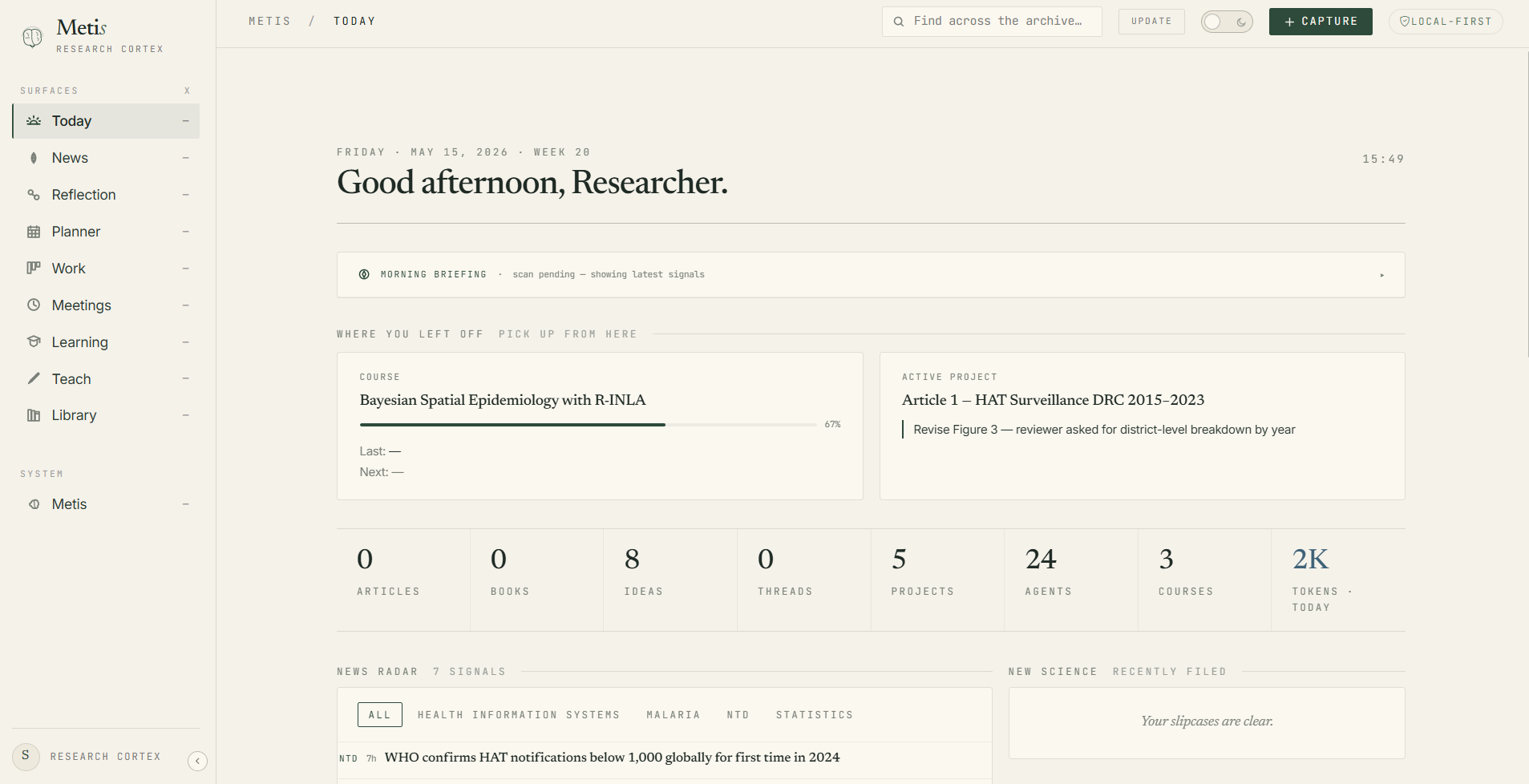
The Today tab — morning briefing, active project, progress, news radar, and quick stats. Everything personalised to your research domain.
How Metis Knows You
When you first install Metis, a setup wizard walks you through your profile:
research domain · specific interests · active projects · working style · tools you use · data sensitivity level
This creates your identity card — a living profile that every agent reads before responding to you. It grows over time. Every session adds context. Every idea you capture tells Metis what you're thinking about.
A question asked after six months of use gets a meaningfully better answer than the same question on day one — not because the AI changed, but because Metis knows you better.
Data Protection
Researchers handle sensitive data. Most AI tools don't take that seriously.
Patient data, embargoed results, unpublished findings — these should never leave your machine. Metis was designed with this in mind from the start.
What leaves your machine (and when):
Everything else — your documents, voice recordings, PDF text, meeting notes, patient-adjacent data — stays on disk.
Security layers:
The recommended pattern for sensitive data: send code, not data.
The strongest protection isn't a scanner — it's never putting the raw data in a prompt at all. Metis is built for this. Ask it for an analysis script (R or Python); you run it on your own machine against your real data; and only the derived outputs — variable names, value counts, summary tables, model coefficients, a data dictionary — come back to Metis. Claude reasons over the shape of your data, never the records.
Your real dataset (patient rows)         ── stays on your machine, never sent ──┐
        │ you run Metis's R/Python script locally                               │
        ▼                                                                       │
Derived metadata (column names, unique values, Table 1, model summary) ── safe to share ──► Metis
        │                                                                       │
        ▼                                                                       │
Metis builds the dashboard / writes the methods / interprets the model ◄────────┘
This is exactly how the dashboards and analyses in our own work were built: the raw surveillance data never left the machine, yet Metis could profile it, name every variable, list unique values, and generate a full dashboard.
Just run /safe-analysis (Claude Code or Claude Desktop) and Metis walks you through it end-to-end — it proposes the local script, tells you exactly which metadata to paste back, and never asks for raw rows. Two backstops sit underneath: the pre-tool hook peeks at a data file's header locally and asks before any individual-level data is read into the conversation, and the Data Guardian (PII scan + 4-level classification at pipeline entry) catches sensitive content that slips into a prompt anyway. With the pattern above, neither usually has to fire.
How Metis Stays Current — So You Don't Have To
AI is moving fast. New models, new capabilities, new research tools appear every month. Most researchers don't have time to follow it. Metis is designed to handle this for you.
After every agent run, Metis logs a reflexion — what went well, what fell short, what context was missing. Every week it aggregates these into themes. Every week it drafts behaviour improvements with a clear rationale. You review the proposals in the Metis tab — one click to approve, reject, or edit — and the approved changes are written to disk.
This means Metis gets better at working with you specifically, week after week. It also means that as new AI developments become available and get integrated into Metis, you receive the improvements without having to do anything. Your job is your research. Metis's job is to stay sharp.
The self-improvement loop in detail:
- After every agent run — reflexion logged: what went well, what could improve, what was missing
- Weekly — themes extracted across all sessions; patterns identified
- Proposal drafted — a concrete proposed change to agent behaviour, with reasoning
- You review in the Metis tab — approve, reject, or edit before anything applies
- Applied with backup — the update is written with a timestamped rollback point
No change to Metis's behaviour ever happens without your explicit approval. The system proposes; you decide.
For Developers
This section assumes familiarity with Python, Git, and the command line.
Architecture
flowchart LR
    U([Researcher])
    subgraph Harness["AI Harness (Claude Code / Desktop)"]
        METIS[Metis\nrouter agent]
        AGENTS[Specialist agents\n34 agents]
        WATCHERS{{Watchers\nData Guardian · Cybersecurity}}
    end
    subgraph Platform
        MCP[MCP Server\n278 tools\nFastMCP]
        DASH[Dashboard\nFastAPI + HTMX]
        DB[(SQLite\nWAL mode)]
    end
    subgraph Memory
        EPIS[Episodic]
        SEM[Semantic\nvector search]
        REFLEX[Reflexion log]
    end
    Skills[/CLI Skills\n/metis · /metis-morning · …/]

    U -->|asks| METIS
    U -->|clicks| DASH
    METIS -->|routes to| AGENTS
    AGENTS -->|uses| MCP
    MCP --- DB
    DASH --- DB
    WATCHERS -.guards.-> AGENTS
    AGENTS -->|writes| REFLEX
    REFLEX -->|proposes edits to| AGENTS
    MCP --- Memory
    Skills --> METIS

    style WATCHERS fill:#fff4e6,stroke:#9a7b3c
    style REFLEX fill:#eef4f1,stroke:#2d4a3a,stroke-dasharray:3 3
Stack
Memory — 5 layers
Knowledge Layer & Grounded Answers (RAG)
When you ask a knowledge-intensive question, Metis retrieves relevant passages from your indexed document library before the specialist agent answers. The agent grounds its response in what it can read from your library — not only what it was trained to recall.
You ask Methods Coach:
"Which variance estimator should I use for my Poisson MLM with overdispersion?"

Metis retrieves before routing:
  → Leyland (2020) Multilevel Modelling for Public Health, p.142 — score 0.87
  → Bates lme4 vignette, p.28 — score 0.71

Methods Coach answers grounded in those passages, citing both sources.
Build your field's knowledge layer. On first setup, the wizard's research-background questionnaire briefs the Background Maker, which harvests, scrubs, and indexes your discipline's literature into the local RAG store — so every agent answers from your corpus, cited. Grow it anytime with /background build <topic>.
Pre-loaded knowledge layers (this edition):
Security Layers (detail)
pre-tool-use.mjs— 13 injection patterns, domain allowlist, path restrictions (every tool call)guardrails.py— injection probe on all external content (papers, web, transcripts)safety.py— 11 PII checks, 4-level classification, sensitive data refused at pipeline entryconstitution.md— 14 machine-readable rules for deep and chained agent runsred-lines.md— 5 non-overridable rules enforced at code level
Token Efficiency
- Model routing — Haiku for triage/summaries, Sonnet for most work, Opus only for deep reasoning; most daily usage never touches Opus
- Surgical context assembly — each agent gets only the context relevant to its task, not full history
- Max-turns guardrail — stops at 20 turns, prompts
/clear - Session handoff — under 3 KB state capture at session end; no re-paying for context already established
- Token pulse widget — real-time usage visible in the dashboard
Cross-AI Support
Installation Options
Option 1 — Single command (Linux, macOS, WSL)
bash <(curl -fsSL https://raw.githubusercontent.com/SVerITG/Metis/main/system/mcp-server/setup-mcp.sh)
Detects Ubuntu 20/22/24, Debian, macOS Homebrew. Creates venv, installs all dependencies, registers with Claude Code and Claude Desktop. Idempotent — safe to re-run.
# Profile overrides (skip the interactive menu):
METIS_PROFILE=light    bash <(curl -fsSL ...)   # MCP server only (~5 min)
METIS_PROFILE=standard bash <(curl -fsSL ...)   # MCP + dashboard (~15 min)
METIS_PROFILE=full     bash <(curl -fsSL ...)   # Standard + scheduler (~25 min)
Option 2 — Clone and install (any platform)
git clone https://github.com/SVerITG/Metis.git
cd Metis/system/mcp-server
bash setup-mcp.sh
Option 3 — Manual
git clone https://github.com/SVerITG/Metis.git
cd Metis/system/mcp-server
python3 -m venv .venv && source .venv/bin/activate
pip install -e "."

export METIS_RC_ROOT="$(pwd)/../.."
export ANTHROPIC_API_KEY="sk-ant-..."

python -m metis_mcp.server          # MCP server
cd ../app-py && bash run.sh         # Dashboard → http://127.0.0.1:8080
Option 4 — Docker (platform test matrix)
# Full platform test — Ubuntu 24/22 + Debian in parallel
docker compose -f system/install/docker/docker-compose.test.yml up --build

# Production stack
docker compose -f system/install/docker/docker-compose.yml up -d
Register with Claude Code
~/.claude/settings.json:
{
  "mcpServers": {
    "metis-rc": {
      "command": "/home/<username>/.local/share/metis-mcp/run.sh"
    }
  }
}
Register with Claude Desktop (Windows + WSL)
%APPDATA%\Claude\claude_desktop_config.json:
{
  "mcpServers": {
    "metis-rc": {
      "command": "wsl.exe",
      "args": ["-e", "bash", "/home/<username>/.local/share/metis-mcp/run.sh"]
    }
  }
}
Configuration
Dependencies
Editions and Roadmap
Metis is one piece of software. Everything field-specific arrives as a background pack — an index over sources, distributed as vectors and a manifest, never as the source documents themselves.
What's in each domain edition: pre-configured journals + RSS feeds · specialist agents · domain ontology · curated background knowledge library
Want to build a domain pack? Fork
Metis, add your field's knowledge library, agents, and RSS feeds, and open a PR.
Course Packages
Standalone course packages you can drop into any Metis installation:
Open an issue with label course-package to pilot or contribute.
Development Status
Contributing
Metis is designed to grow beyond one domain and one researcher. Contributions are welcome — especially from researchers who use it and know what's missing.
See CONTRIBUTING.md for detailed guidelines.
Most Wanted
Domain packs — the most impactful contribution. A domain pack adds: key journals + RSS feeds · specialist agents · a domain ontology · a curated background library
Other high-impact contributions:
- Translations — the wizard and skill files are English-only; translations into French, Dutch, Spanish, German would open Metis to many more researchers
- Installer testing — Windows
.exeand PowerShell on managed machines, corporate environments, and varied hardware; reports of what works and what breaks are valuable - New agents and skills — specialist agents for use cases not yet covered
- Security verification — independent review of the data-stays-local guarantees (what's kept on the machine vs. sent to the Claude API), PII detection, hook behaviour, and constitution enforcement; if you find a gap, open a private issue
- Multi-AI support — better Gemini and local model (Ollama) support, especially for offline research environments
- Bug reports and UX feedback — if something doesn't work for your workflow, say so
Changelog
Metis is under active development — see the latest below. (Recent: a month spent on the gap between rendered and working — 172 controls that drew correctly and did nothing, a search that had never worked, a panel that spent money every time it was opened, and a test harness that reported the opposite of the truth.)
September 2026
A month spent almost entirely on the gap between rendered and working. Every item below looked fine on screen.
August 2026
July 2026
Late June 2026
Post-v1.0 — June 2026
Post-v1.0 — May 2026
v1.0 — May 2026
First stable release. See system/config/release-notes-v1.0.md for full details.
Earlier development (Phases 0–9b)
License
AGPL-3.0 for the codebase — use, modify, and fork freely, but any version you run as a service or distribute must also be open-source under AGPL-3.0.
CC-BY-SA 4.0 for course content and learning materials.