Hippius Memory
Team memory for coding agents that your security team will actually approve.
Encrypted on your machine, stored in your Hippius bucket, every change cryptographically provable — so a lesson learned once is never learned twice.
[!TIP] Using a coding agent? Point it at FOR-AGENTS.md. That file is the installer: it puts the binary on your PATH, writes config, wires the client you are in, and provisions your project. You should not have to do the steps below by hand.
git clone https://github.com/thenervelab/hippius-mem
cd hippius-mem && sh scripts/install.sh
(needs the four team values from your founder — or an invite bundle; see Install. No bucket yet? sh scripts/install.sh --solo.)
AI coding agents start every session from zero. They forget the decision you made last week, the gotcha that cost you an afternoon, the convention the team agreed on — and each teammate's agent rediscovers all of it independently.
Hippius Memory fixes that. It is an MCP server that gives your agents one shared, long-term memory — built so that adopting it is a security non-event:
- Encrypted on your machine. Notes are sealed with XChaCha20-Poly1305 in-process, before they leave it; the storage gateway only ever sees ciphertext.
- Stored in your bucket. One team-owned bucket on the Hippius S3 gateway — decentralized storage, no vendor database, no third-party memory service holding your notes.
- Every change provable. Each mutation is a signed, hash-chained op with a Merkle inclusion proof anyone can verify — no need to trust the server, or us.
An agent recalls what is relevant before it acts and remembers what is worth keeping after it learns — automatically, because installing it wires in the hooks that enforce the loop.
Pricing. The hippius-mem binary itself is free — Apache-2.0, no per-seat fee:
install a prebuilt from GitHub Releases
or build from source. What you pay for is what you already pay for: your team's
Hippius storage subscription, since the bucket your memory lives in is a Hippius
bucket — hippius-mem adds no seat, account, or subscription of its own. There is
no free tier; to try it without a bucket, use the local trial vault
(--solo, below).
Install
You need four team values before you run the installer: the team namespace, the
bucket, the shared team key (team_key_hex), and your S3 sub-token
(access_key_id + secret) — the founder mints and hands those out. The namespace is
the note-key prefix and must byte-match your teammates' exactly (same case, no stray
spaces), or your notes silently land in a separate partition. Joining an existing team?
Skip the typing entirely: have your founder send a one-paste invite bundle
(hippius-mem invite) and run sh scripts/install.sh --bundle <file> — the bundle
carries the exact namespace. See the runbooks in docs/TEAMS.md and the
field-by-field Configuration.
git clone https://github.com/thenervelab/hippius-mem
cd hippius-mem && sh scripts/install.sh
Or, without a full clone:
curl -fsSL https://raw.githubusercontent.com/thenervelab/hippius-mem/main/scripts/install.sh | sh
The script reads secrets from /dev/tty, not the pipe, so it still prompts safely.
--update and --from-source need a local clone; download the script to a file first
if you need those flags on the curl path.
The script is idempotent. In order it:
- Obtains the binary. Tries a prebuilt from this repo's
GitHub Releases
for your OS/arch, verifies the sha256, and installs it to
~/.local/bin(or$HIPPIUS_MEM_BIN_DIR). No Rust toolchain is required on that path. It builds from this checkout whenever no artifact exists, curl or a sha256 tool is missing, or you pass--from-source(cargo install --path hippius-mem --features embeddings,dashboard,http-mcp --locked; rustup is bootstrapped only whencargois missing). The ~130 MB embedding model downloads on first serve. Intel macOS prebuilts are lexical-only — see Retrieval honesty. Cutting a release is documented in docs/RELEASING.md. - Writes config (first run only) at
${XDG_CONFIG_HOME:-$HOME/.config}/hippius-mem/hippius-mem.toml(mode0600), prompting forteam,bucket,access_key_id,secret,team_key_hexand minting this machine's uniqueauthor_seed_hex. - Wires agents:
hippius-mem install(Claude Code plus every local MCP client whose config directory already exists) and, when you run it inside a project repo,hippius-mem init. - Validates with
hippius-mem doctor --offline.
Then enable the hooks in each project you work in. The installer provisions only the repo it was run in (and skips this vendor clone), so the recall/remember hooks — the headline enforcement — are absent everywhere else until you turn them on. In every other project, once:
cd <your project> && hippius-mem init
The installer's final "Done" block prints this reminder too, along with a PATH line
if the binary directory isn't on your PATH yet — and the server itself nudges at
session start when it boots in an un-provisioned repo (setting auto_init = true
makes boot provision it automatically). Joining instead of founding?
sh scripts/install.sh --bundle <file> installs, joins from the founder's invite
bundle, wires Claude Code, and validates with doctor --offline in one flow — run a
full hippius-mem doctor once afterwards to live-probe the minted credentials.
Updating, adding a second team, the full flag list, and the auto_init fine print
are in docs/REFERENCE.md § Install details;
config-file resolution — the usual source of a first-run bucket is required but empty error — is under
docs/REFERENCE.md § Configuration.
Solo trial (no team bucket yet). No bucket? sh scripts/install.sh --solo installs
the binary, wires Claude Code, and hands off to hippius-mem quickstart — a local-only
trial vault, with no team prompts. When you have a Hippius bucket,
hippius-mem upgrade --bucket <name> --access-key-id <id> copies it up (the S3 secret is
prompted, never passed on argv). (Already have the binary on PATH? hippius-mem quickstart alone does the same thing.)
Wire other agents
hippius-mem install requires --agent or --all-detected. A bare
install prompts on a TTY and otherwise refuses — it will not silently
rewrite every local client's config. scripts/install.sh passes
--all-detected.
To name a subset, or to re-run after installing another client:
hippius-mem install --all-detected          # Claude + whatever is already installed
hippius-mem install --agent grok            # Grok Build only
hippius-mem install --agent claude          # Claude Code only
hippius-mem install --agent hermes          # Hermes memory provider
Detection is directory presence, never PATH: install will not create
~/.codex on a machine that has never run Codex. After wiring, reopen
the agent (Grok: /mcps then refresh) so it picks up the new server. Hermes:
hermes config set memory.provider hippius-mem if another provider was already
active.
The full capability matrix (hooks vs honor-system, matchers, Grok Bot) is in docs/AGENTS-SUPPORT.md.
Manual install (no installer) and exactly what init / install write are in
docs/REFERENCE.md § Install details.
How it works
Two habits make shared memory actually work — and hippius-mem makes them automatic:
- Recall before acting. Before your agent edits code, it searches team memory for anything relevant — a past decision, a known gotcha — so it does not repeat a mistake or contradict a decision someone already made.
- Remember after learning. When a session turns up something durable, the agent saves it as a one-line-summarized note the whole team can find later.
A worked example of the loop — recall surfacing a teammate's gotcha, the agent
avoiding it, and the new wrinkle being remembered — is in
docs/TEAMS.md § Using it day to day.
hippius-mem init installs Claude Code hooks that enforce the loop: the first file
edit of a session is blocked until the agent has recalled, and a prompt at the end nudges
it to remember anything worth keeping. There is nothing for a human to remember to do.
Under the hood, notes live in one bucket your team owns on the Hippius S3 gateway,
encrypted before they leave the machine; recall returns short pointers so an agent
pulls only what it needs into its context window; and every change is a signed,
independently verifiable event. The Architecture and
Security docs have the cryptographic detail.
Features
Dashboard
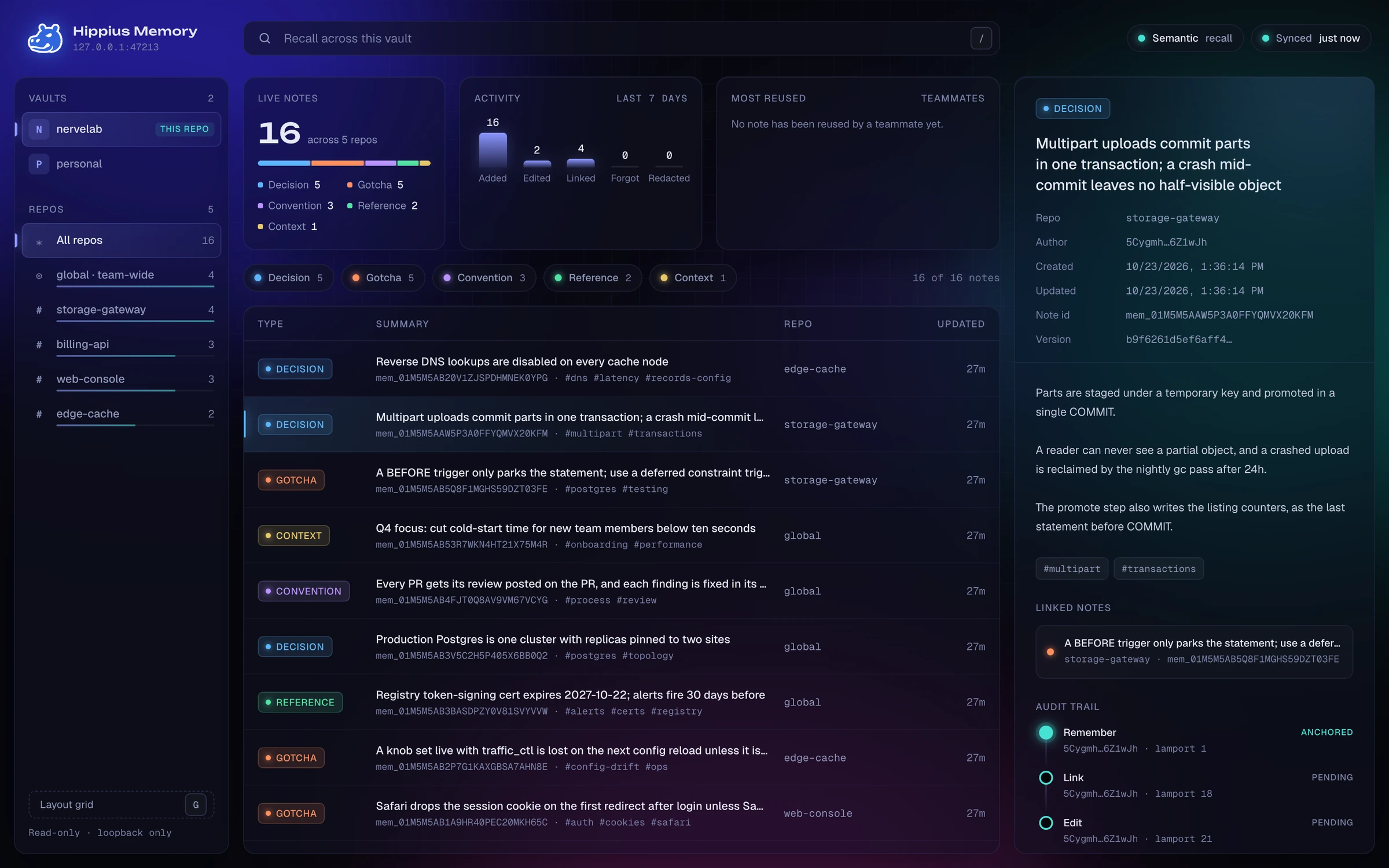
hippius-mem dashboard opens a read-only view of your team memory in the browser:
every vault and repo, search, activity, and each note's signed audit trail. It runs on
127.0.0.1 only and is bundled by the installer. See
Dashboard.
Retrieval honesty
Whether recall matches a paraphrase depends on the binary you installed, not on a
config flag: a --features embeddings build (what scripts/install.sh and the
recommended cargo install produce) compiles in a local bge-small-en-v1.5 model, so
paraphrases match and no note text leaves the machine — while a lean build, such as the
Intel macOS prebuilt (hippius-mem-lean, for which ONNX Runtime ships no
library), ranks by keyword overlap only, so a reworded situation can miss its note
(pass --from-source there for semantic recall). The measured gap, the ranking rules, and the per-target table
are the canonical reference in
docs/SECURITY.md § Retrieval honesty.
Documentation
License
Apache License 2.0. Report vulnerabilities privately via GitHub Security Advisories.