
Trend Vision One MCP Server
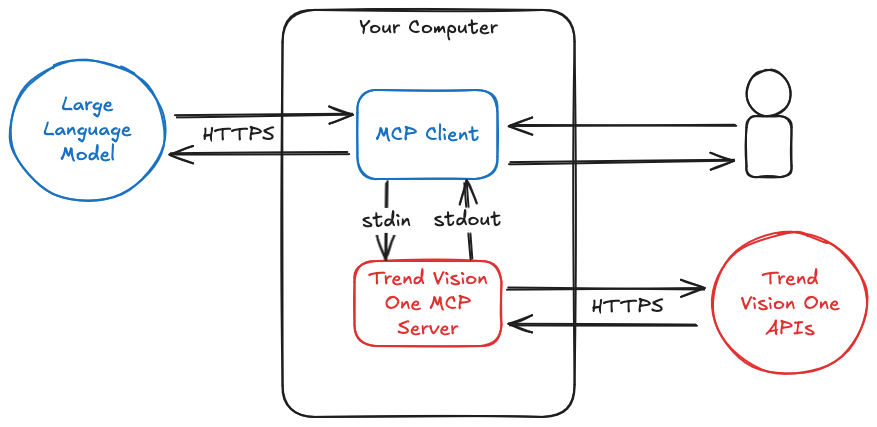
The Trend Vision One Model Context Protocol (MCP) Server enables natural language interaction between your favourite AI tooling and the Trend Vision One web APIs.
This allows users to harness the power of Large Language Models (LLM) to interpret and respond to security events.
Example Use Cases
- Automating the retrieval and interpretation of security alerts from various Trend Vision One such tools as Workbench, Cloud Risk Management, and File Security.
- Allowing LLMs to gather information about security events and generate meaningful recommendations.
- Automating workflows to enhance the configuration of Trend Vision One services.
- Interacting with Trend Vision One web APIs without having to learn yet another company's APIs.
Security
- Your Trend Vision One API keys should be configured with minimial permissions.
- By default the MCP server runs in read-only mode. Be careful when running the server with
readonly=falseas it may have irreversible consequences. - Data retrieved using the MCP server is processed by the LLM configured in your AI tooling. It is your responsibility to ensure that this LLM is approved by your company for processing sensitive data.
- This MCP server is only intended to be used with local integrations and command-line tools via the Standard Input/Output transport. You should never expose this tool to the network.
Getting Started
Prerequisites
- You must have a Trend Vision One account and API key.
- You must have credits allocated for the services you wish to interact with.
- Have Docker installed.
- Have the latest version of Visual Studio Code installed.
Use With VSCode + GitHub Copilot
Open the following link in your browser to automatically install the server configuration in Visual Studio Code.
vscode:mcp/install?%7B%22name%22%3A%22trend-vision-one-mcp%22%2C%22inputs%22%3A%5B%7B%22type%22%3A%22promptString%22%2C%22id%22%3A%22trend-vision-one-api-key%22%2C%22description%22%3A%22Trend%20Vision%20One%20API%20Key%22%2C%22password%22%3Atrue%7D%2C%7B%22type%22%3A%22promptString%22%2C%22id%22%3A%22trend-vision-one-region%22%2C%22description%22%3A%22Trend%20Vision%20One%20Region%22%7D%5D%2C%22command%22%3A%22docker%22%2C%22args%22%3A%5B%22run%22%2C%22-i%22%2C%22--rm%22%2C%22-e%22%2C%22TREND_VISION_ONE_API_KEY%22%2C%22ghcr.io%2Ftrendmicro%2Fvision-one-mcp-server%22%2C%22-region%22%2C%22%24%7Binput%3Atrend-vision-one-region%7D%22%2C%22-readonly%3Dtrue%22%5D%2C%22env%22%3A%7B%22TREND_VISION_ONE_API_KEY%22%3A%22%24%7Binput%3Atrend-vision-one-api-key%7D%22%7D%7D
When prompted, enter your Vision One API Key and your Vision One region.
Alternatively, copy the following into your settings.json.
{
    "mcp": {
        "inputs": [
            {
                "type": "promptString",
                "id": "trend-vision-one-api-key",
                "description": "Trend Vision One API Key",
                "password": true
            },
            {
                "type": "promptString",
                "id": "trend-vision-one-region",
                "description": "Trend Vision One Region"
            }
        ],
        "servers": {
            "trend-vision-one-mcp": {
                "command": "docker",
                "args": [
                    "run",
                    "-i",
                    "--rm",
                    "-e",
                    "TREND_VISION_ONE_API_KEY",
                    "ghcr.io/trendmicro/vision-one-mcp-server",
                    "-region",
                    "${input:trend-vision-one-region}",
                    "-readonly=true"
                ],
                "env": {
                    "TREND_VISION_ONE_API_KEY": "${input:trend-vision-one-api-key}"
                }
            }
        }
    },
}
GitHub Copilot Chat defaults to Ask mode, which can only suggest changes and cannot call MCP tools. Use the mode dropdown in the Copilot Chat panel to switch to Agent mode so Copilot can invoke this server's tools.
Server Options
Available Toolsets
Each -toolsets value below corresponds to a domain in the Tools section. Example: -toolsets crem,workbench,eiqs enables only Cyber Risk & Exposure Management, Workbench (including OAT), and Endpoint Inventory.
Tools
Identity and Access Management (IAM)
Workbench
Cyber Risk & Exposure Management (CREM)
Cloud Account Management (CAM)
Email Security
Container Security
Endpoint Security
AI Security
Cloud Risk Management
Threat Intelligence
Audit Logs
Business Information
Case Management
Data Pipelines (Datalake)
Detection Model Management
Endpoint Inventory (EIQS)
File Security
Health Check
Response Management
Sandbox Analysis
Search
Security Awareness
Security Playbooks
Tag Management
Architecture
Examples
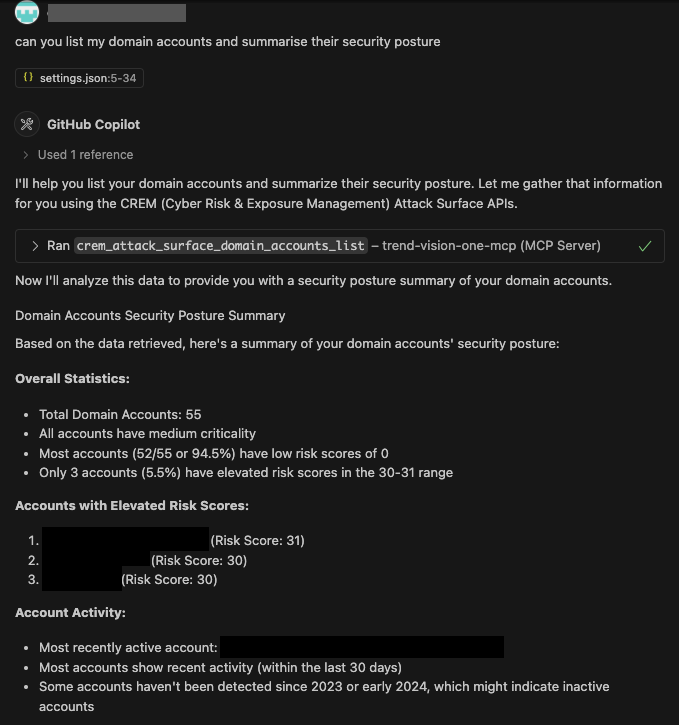
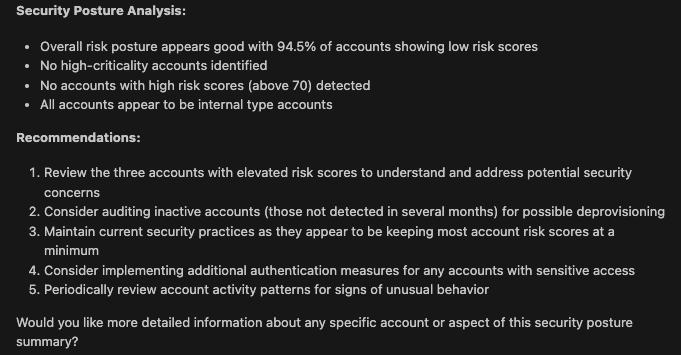
Domain Account Analysis
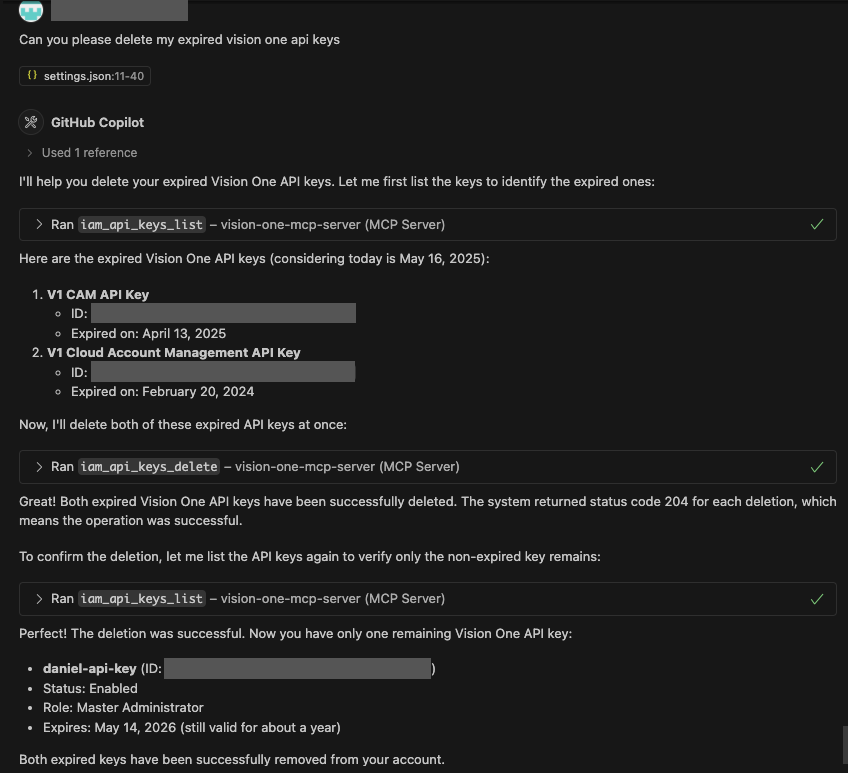
Deleting Expired Trend Vision One API Keys
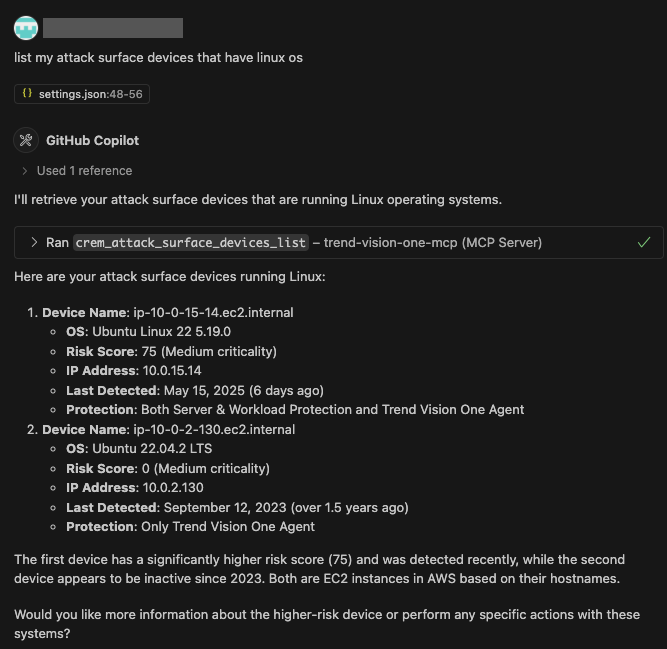
Filtering Attack Surface Devices
Change Log
See releases.
Contibuting
Please see the contributing guide.
Code of Conduct
This project adopts the Go Code of Conduct.