⌂ Agent Hangar
One home for every AI agent your company builds, whatever tool built it.
People create agents where they already work: Claude, ChatGPT, Cursor, VS Code, Codex, OpenCode. Agent Hangar brings them all to one place, runs each one in its own container, and makes them usable from any platform, over OpenAI-compatible, MCP, A2A and ACP, and inside your own app over AG-UI. Everyone can find them, talk to them, and combine them into new agents.
Interactive demo · Desktop app · Example · Install · Features · How it works · Website · Docs · Roadmap · Português
https://github.com/user-attachments/assets/62836990-f66c-4c94-950b-4632cf9fc160
2 min 45 s, with captions: what Agent Hangar is, how to install it, build, test and ship agents, use them over every protocol (inside your app too), put Digital employees to work, and keep cost and governance under control. MP4 version
New in v0.53: the Hangar desktop app
https://github.com/user-attachments/assets/7643a837-c450-41e7-98a4-665d93907db8
1 min 39 s, with captions: what the Hangar desktop app adds, how to install and connect it, the member's workspace, a session on a company token model and the admin's view. Recorded on a development instance; people and companies are fictional. MP4 version · Read more
Part 1 (0:00–3:53): install in one command, register the company and the model, create the agent from the tool you already use: chat agents, harness agents (Claude Code, Codex) for complex problems, and agents from other frameworks over AG-UI.
https://github.com/user-attachments/assets/7bf76ac8-2302-4822-9dc3-ddc10a5e0348
Part 2 (3:53–6:25): test in stage and ship with approval, put the agent inside your app over AG-UI, hire a Digital employee, and work through the issues board, with the approval showing up in Slack, Teams or on your app's screen.
https://github.com/user-attachments/assets/c6ea0048-01c6-45df-a612-62af4e4a2851
Part 3 (6:25–8:34): connect tools and skills, pick the right model and effort, and keep cost and audit under control.
https://github.com/user-attachments/assets/28cfa80f-33b1-49c5-be48-13cc33ada18d
Status: alpha (v0.53). It works end to end and is covered by tests, but APIs may still change. Run it inside your network until you have read docs/security.md.
Why Agent Hangar
Today every AI tool keeps its own agents. A GPT lives in ChatGPT, a Claude project stays in Claude, a Cursor rule stays in Cursor. Nobody else in the company finds them, they can't be reused anywhere else, and no one knows what they cost or who approved them. Agent Hangar fixes that:
- Build anywhere, keep in one place. Ask Claude, ChatGPT, Cursor, VS Code, Codex or OpenCode for an agent. The tool builds it through the hangar's MCP server, and the agent lands in a single company catalog, versioned and owned by someone.
- Platform-agnostic. An agent built in Claude can be used in ChatGPT, Cursor, VS Code, LibreChat, Open WebUI, Slack-style bots, scripts or another agent. Each agent is a standard endpoint (OpenAI-compatible, MCP, A2A, ACP, AG-UI), not a feature locked inside one vendor.
- Everyone can find and talk to them. The catalog shows every agent, what it does and who owns it. People try agents in the portal's playground, request access, and plug them into their own tools in one click. Access follows teams, roles and approvals.
- Agents combine into new agents. Put existing agents together as a team: a coordinator delegates to specialists (a researcher, an analyst, a writer), each keeping its own instructions, tools and model. The result is a new agent with a different role, reusing work that already exists.
- Reuse before you build. Before creating an agent, the hangar searches the catalog (semantically, across languages) for agents, skills and MCPs that already do part of the job. It builds the new agent from those pieces and asks only for the skills that are missing. The pieces are read-only: nothing in them ever changes. docs/composer.md
- Safe to run in a company.
- Every change is a new version, tested in stage before it reaches production.
- Secrets stay encrypted, and the platform is self-hosted (Docker or Kubernetes).
- Usage, cost and budgets are tracked per agent and team, with an audit log and SSO.
- Agents that remember and work alone. Long-term memory per agent and per team, schedules for recurring work, and coding agents that edit projects in VS Code.
- On every desktop, too. The Hangar desktop app, inspired by Claude Desktop, runs Claude Code sessions on each person's computer and signs in to the hangar with the company account: company-paid models without keys on laptops, and each person's agents, decisions and inbox, live.
In short: your agents stop belonging to a tool and start belonging to your company.
How it compares
How Agent Hangar compares with CrewAI AMP, LangSmith Deployment, Dify, AWS Bedrock AgentCore and Microsoft Foundry with Agent 365, as of October 3, 2026. "Not found" means the documentation consulted does not describe the feature; it does not prove the feature is missing. Where each one is ahead, the model options and the sources: docs/comparison.md.
From a request in Claude to a working agent
A real run on a local install. Ana is a regular user: she maintains the Comercial (sales) team and is not an admin. She connected Claude to the hangar's MCP server with her personal token.
1. She asks.
"Sou a Ana, do time Comercial. Crie no Agent Hangar um agente chamado “Assistente Comercial” para o nosso time acompanhar clientes (…). Use a conexão openrouter-deepseek, dê memória compartilhada com o time, inclua testes, publique em produção e agende para todo dia útil às 8h um resumo dos clientes com os próximos passos."
(It translates to: create a sales assistant that tracks clients, give it team memory, add tests, publish it, and schedule a daily summary with next steps for weekdays at 8am.)
2. Claude builds it through the hangar's MCP tools. The hangar's instructions tell the model which steps to take and in what order. Ana's permissions apply to every call.
| Her Início page in the portal | Team memory, with dated facts |
|---|---|
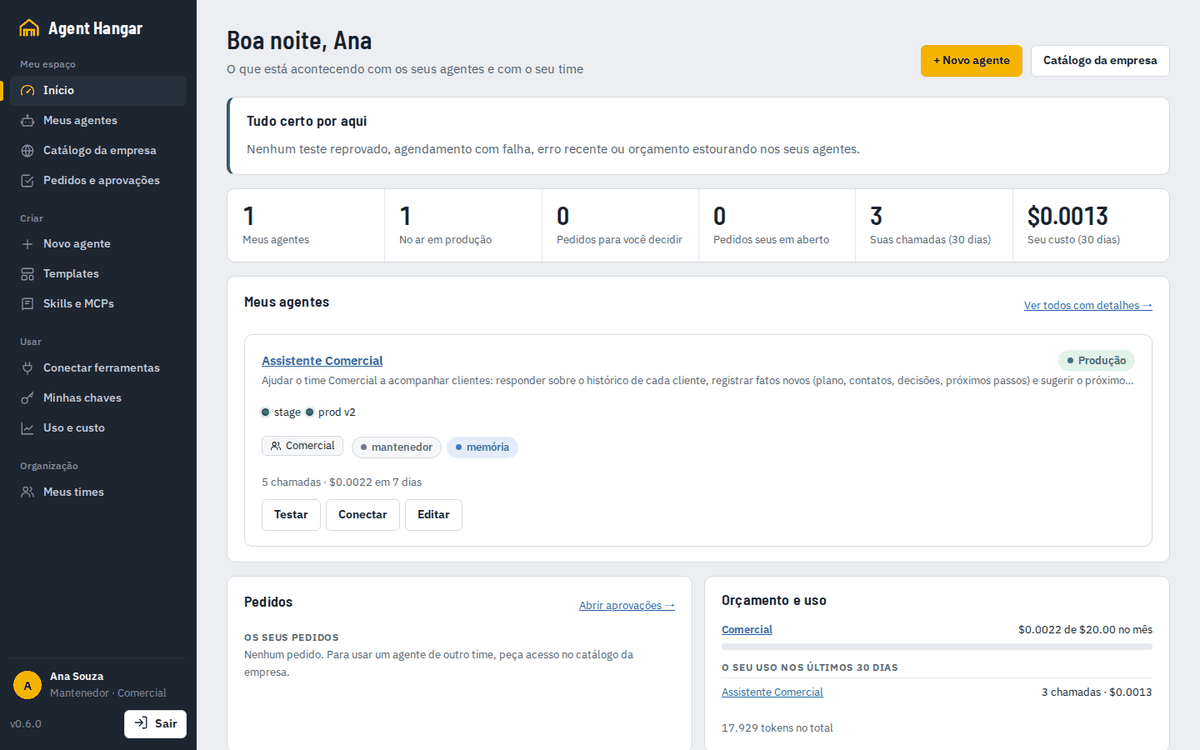 | 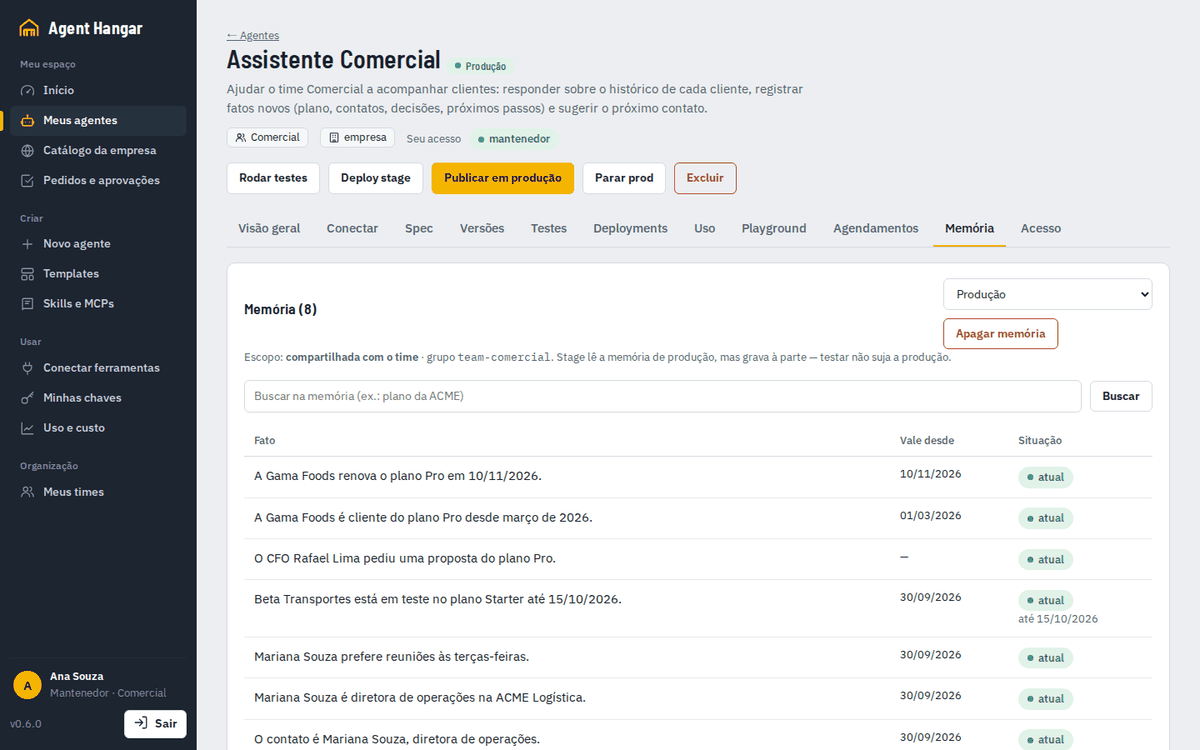 |
4. The result. In a new conversation, "Which clients need contact this week, and why?" is answered from memory. At 8am on weekdays, the scheduled run sends the summary on its own:
1. Beta Transportes: most urgent. Starter trial ends on 15/10/2026; the CFO Rafael Lima asked for a Pro proposal. Next step: contact Rafael Lima (CFO) this week, before 15/10, to present the Pro proposal and convert the trial. 2. Gama Foods. Pro since March/2026, renews on 10/11/2026; complained about support response times. Next step: reach out within two weeks to fix the support issue before the renewal (…)
| The Playground answer | The scheduled daily summary (the final result) |
|---|---|
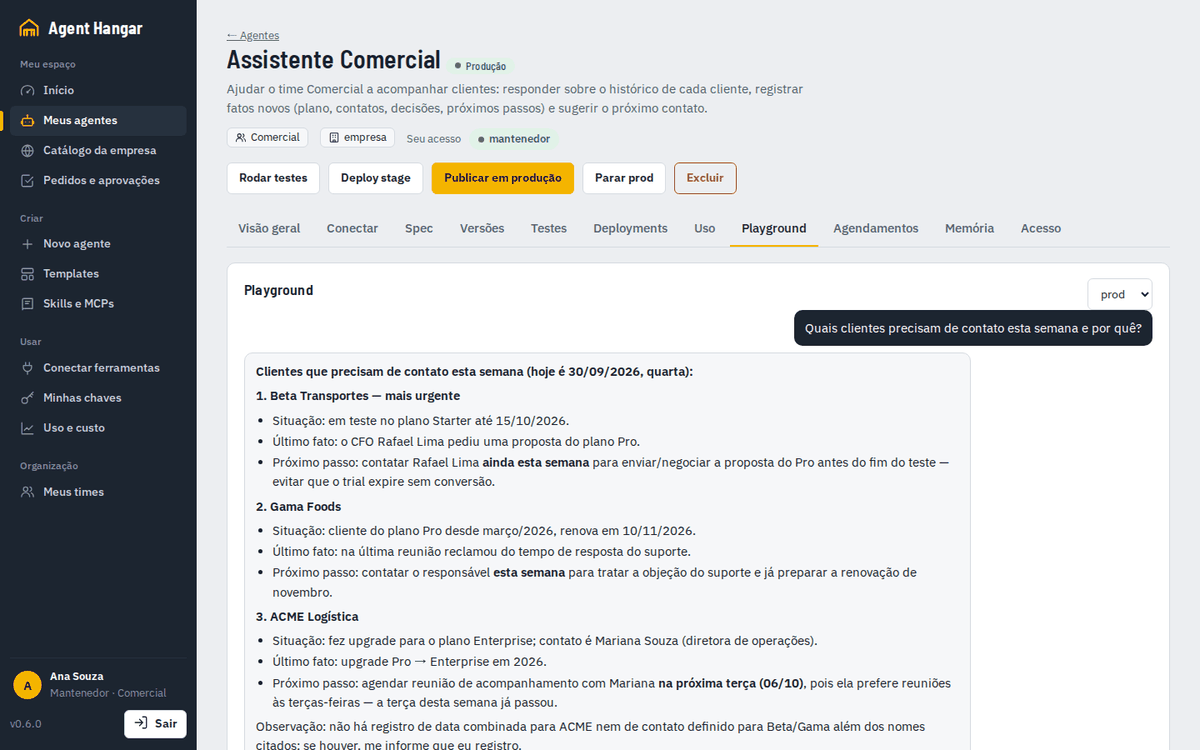 | 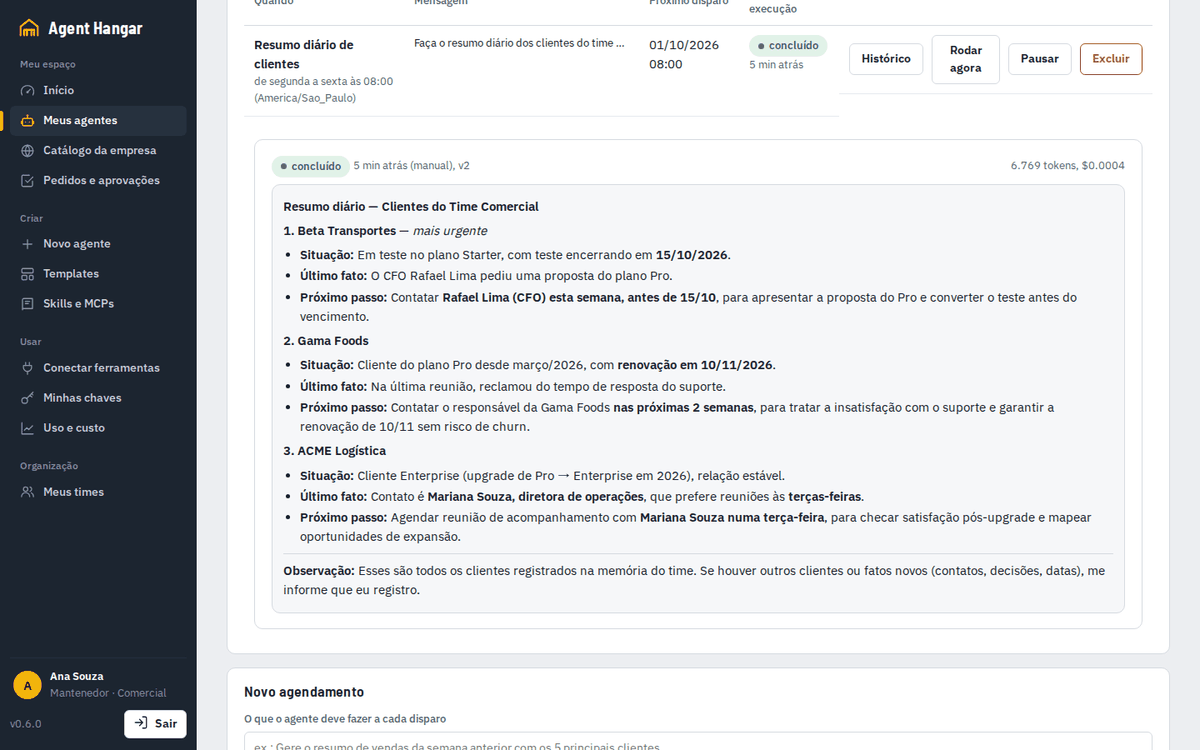 |
The run was recorded with Claude as the MCP client, with Ana's personal token. The agent's own model is DeepSeek via OpenRouter. The scripts that reproduce it are in scripts/demo/portal-tour.
Installation
A guided installer asks a few questions and does the rest: it writes .env, starts the stack, registers and tests
your LLM, creates the admin and generates the configuration of your AI tools. Full guide:
docs/install.md.
1. Requirements. Docker (Desktop or Engine) with Compose 2.20+, and Python 3.10+ to run the installer. Intel/AMD and ARM64 (Apple Silicon, Graviton) are both supported.
2. Run the installer.
git clone https://github.com/valteresj2/agent-hangar && cd agent-hangar
./scripts/install.sh                                              # Linux, macOS, WSL
# Windows: powershell -ExecutionPolicy Bypass -File scripts\install.ps1
3. Answer seven questions (each has a sensible default):
4. Open it. Go to the address shown at the end (e.g. http://localhost:8090) and sign in. Your AI tools'
configuration is in .hangar/clients/ (start with its README.md). Then ask the tool: "create an agent that…".
5. Check it. hangar doctor checks Docker, the central, each LLM (with a real call), memory, the public address
and TLS, sign-in, MCP and the VS Code extension, and tells you how to fix anything that fails.
To install without questions (automation, VM images), use ./scripts/install.sh --answers setup.yaml, with
setup.example.yaml as the model. To change an answer or upgrade, git pull and run
hangar setup again: previous answers are the defaults and secrets are kept.
On a cloud VM (AWS, Azure, Google Cloud)
One VM with Docker runs the same stack: create an Ubuntu 24.04 VM with SSH open only to you, install Docker Engine, run the installer and pick a tunnel for HTTPS (no inbound ports). Step-by-step commands for EC2, Azure Virtual Machines and Compute Engine, each linked to the provider's documentation: docs/cloud-vm.md.
On Kubernetes (GKE, AKS, EKS)
The same installer deploys the Helm chart (charts/agent-hangar); agents become Deployments and harness runs become
Jobs, isolated by NetworkPolicies. Full guide: docs/kubernetes.md.
- Requirements:
kubectlpointing at the cluster, Helm 3.12+, Python 3.10+. - Run
./scripts/install.sh --target kubernetes(orhangar setup --target kubernetes). - Answer: cloud (
gke·aks·eks·local, which picks the preset), namespace, image registry (or your mirror), access (Ingress with TLS · Cloudflare Tunnel · port-forward), Postgres (in the cluster or managed: Cloud SQL, Azure Database, RDS), then the same admin/LLM/memory/sign-in/tools questions. - Check:
hangar doctor --namespace agent-hangar.
For high availability, run 2+ central replicas with a managed Postgres: rolling updates without downtime, and
shared state in the database. To create everything (cluster, managed Postgres, cloud identity, ingress) in one
terraform apply, use deploy/terraform for GKE, AKS or EKS.
Plain Helm works too: helm upgrade --install agent-hangar charts/agent-hangar -n agent-hangar --create-namespace -f charts/agent-hangar/values-gke.yaml -f my-values.yaml.
./scripts/setup.sh              # Windows: powershell -File scripts/setup.ps1 (writes .env with random secrets)
docker compose up -d --build    # hangar + Postgres + agent runtime + mock harness
Open http://localhost:8090, sign in with the ADMIN_TOKEN from .env, add an LLM under Provedores de LLM and
connect your AI client with a personal token from Minhas chaves:
claude mcp add --transport http agent-hangar http://localhost:8090/mcp --header "Authorization: Bearer <key>"
Other clients are covered in docs/clients.md.
Two web apps
Everyone signs in on the same page and lands in the right app. Every API call still checks permissions. See docs/access.md.
Both apps are available in English and Portuguese. The first visit follows the browser's language, and the PT · EN switch (sidebar footer and sign-in page) changes it; the choice is kept in that browser. What people and agents wrote (agent names and descriptions, conversations, test outputs, audit details) is shown as written. Messages generated by the server (API errors, the MCP instructions, the composer's recommendation) are still in Portuguese.
The Hangar desktop app
Hangar is a desktop app for running and steering Claude Code sessions, inspired by Claude Desktop:
- chat with streaming and tool cards;
- sessions and projects;
- a terminal, git changes, files, a browser and artifacts side by side.
Claude Code ships inside the app. On its own, it works with the person's Claude subscription. Connected to Agent Hangar, it becomes the company's desktop client. What the connection adds
- Company sign-in, no keys on laptops. People sign in with their company account (OAuth, with the SSO the hangar already uses). The app registers the computer, and admins see every device and can revoke it in one click.
- Company models or your own subscription, per session. Admins sync the token models of an LLM connection, and
people pick them in the composer next to their Claude subscription. Calls go through the hangar's LLM proxy:
- the provider key never leaves the vault;
- budgets and the code policy apply;
- usage and cost land on the person's team, without logging any content.
- The workspace on the desktop. Início, Meus agentes, Decisões and the inbox use the same data as the portal, with live updates.
- A standard rollout. A Windows policy (
PlatformUrl,Mode) points every computer at the company's hangar. WithMode=required, the app runs no sessions until the computer is connected.
Install
- Download the app from the Hangar releases:
- Windows: installer or portable
.exe; - macOS:
.dmg; - Linux: AppImage or
.deb.
- Windows: installer or portable
- The builds are not code-signed yet:
- on Windows, SmartScreen warns about the app: choose More info → Run anyway;
- on macOS, right-click the app in Applications and choose Open.
The app's interface is in Portuguese for now.
Connect it to the hangar
- Admin: share the hangar's address, shown in Console → App Hangar. To offer company models, open an Anthropic-protocol connection in LLM Providers and choose Sync token models with Hangar desktop.
- Each person: in the app, open Configurações → Plataforma, paste the address and choose Conectar à plataforma. The browser opens the hangar: sign in and authorize the app.
- Ready. The sidebar shows Agent Hangar (Início, Meus agentes, Decisões, Caixa de entrada), and the model
picker lists the company's token models.
Full guide: docs/desktop-app.md. A reverse proxy in front of the hangar needs buffering off on
/api/app/events.
Features
Build where people already work. The hangar is an MCP server, so Claude, ChatGPT, Codex or OpenCode are the
builder. They choose between a chat agent, a coding harness or a multi-agent team from the objective. You can also
start from a template or the UI, and edit a live agent later: edit_agent makes a new version, tests it in stage
and publishes it only when you say so. Claude.ai and ChatGPT on the web connect by pasting only the /mcp URL: the
person signs in and authorizes (OAuth), with no key to copy. Each agent gets a character avatar that fits its role
(the AI that builds it picks one), and the owner can swap it on the agent's page.
Nothing reaches production untested.
- Every change creates an immutable version.
- Promotion is blocked unless that exact version passed its stage tests: protocol smoke tests,
expect_contains/regexand LLM-as-judge rubrics. - Teams can require a second maintainer's approval (four eyes).
- Rollback is one call.
One container per agent, one per job.
- Chat agents run in hardened containers: read-only file system, all capabilities dropped, memory/CPU/PID limits.
- Coding harnesses (Claude Code, Codex, Hermes, DeepSeek Harness) run in a fresh container per call, which
returns the result and the
git diff. The Codex, Hermes and DeepSeek images are published. The Claude Code image is built locally from this repository, because Claude Code's license does not allow redistributing it; the installer does it for you. See docs/harnesses.md.
Coding agents in VS Code. With the Agent Hangar extension, the agents you can use appear in VS Code's chat model picker. In Agent mode they read, edit and test your project with the editor's own tools, on your machine and with your approval, while the hangar supplies their instructions, skills, MCPs and memory. Sign-in is one click through the portal. Cline, Roo Code and Continue work too. See docs/clients.md.
Every protocol. Each agent answers on /v1/chat/completions (OpenAI-compatible, with streaming), A2A
(Agent Card + message/send), ACP, MCP and AG-UI. All of it sits behind one authenticated gateway with
per-channel metrics. The Connect tab gives a revocable key per tool and the config to paste.
Agents inside your own app (AG-UI). Put any agent in your product with CopilotKit or any AG-UI client. The answer streams token by token, with the model's reasoning, each tool call and its result. The agent can call your app's tools and change the state on screen (JSON Patch). A Digital employee keeps its authority: an action that needs approval pauses the run with an interrupt, and the decision stays with the person the authority names. See docs/clients.md.
Agents from any framework (remote agents). An agent built with LangGraph, Google ADK, Mastra, Microsoft Agent Framework or AWS Strands is governed by the hangar without moving its code: add its AG-UI address to the spec. It gets a version, stage tests before production, budget, metering and audit, and becomes reachable over OpenAI, A2A, ACP, MCP and AG-UI. Credentials come only from the vault. See docs/clients.md.
The right effort for every model. Each agent has an execution profile: reasoning effort, output limit, parallel tools and prompt cache, sent in each provider's dialect and to each harness's flags. The effort starts from the agent's role, the hangar measures cost and accuracy per model and effort, and a comparison in stage suggests a cheaper or a stronger level with the numbers. Nothing changes on its own.
- Long conversations don't overflow. Past the context budget, large tool results leave the conversation (the agent reads them back on demand) and the old history becomes a summary, so facts from the start survive.
- A cheaper model for simple requests. With
light_model, short requests go to a cheaper model on the same connection; hard ones, and the light model's failures, go to the agent's model. Each call is billed at its own price.
See docs/execution.md.
Issues, for people and agents. A kanban board (board, list, table, timeline) where an issue assigned to a Digital employee becomes work under its authority and budget: it comments as it goes and hands the result over for review. Each person sees their own issues; the console is the company's read-only view. Issues are never deleted. See docs/issues.md.
Tools for agents.
- Connectors, in the layout of ChatGPT's catalog: remote MCP servers (with OAuth), local servers over stdio in
an isolated container, or a
mcpServersJSON imported from Claude Desktop or Cursor. Each tool is approved one by one, and a tool that is new or changes stays blocked until an admin approves it (docs/connectors.md). - The GitHub MCP Registry (github.com/mcp) adds hundreds more servers to the catalog, each with the simplest way in: one click with OAuth or with no login, a token, an account address, or a pinned npm/PyPI package (docs/connectors.md).
- 230+ prebuilt MCP servers from Docker's official catalog, each in an isolated container (docs/mcp-catalog.md).
- Remote MCPs with OAuth, such as Activepieces with 280+ business apps, Notion or Linear. They are connected once, and the tokens are kept and refreshed by the hangar (docs/remote-mcp.md).
- Skills in the style of Claude's Skills: upload a
SKILL.mdor a package, with a security check that blocks secrets and flags instruction overrides; Skill Studio keeps versions and test cases. - Plugins connect any system with a declarative manifest: tools, a team credential and action types for the authority, reviewed by four eyes (docs/plugins.md).
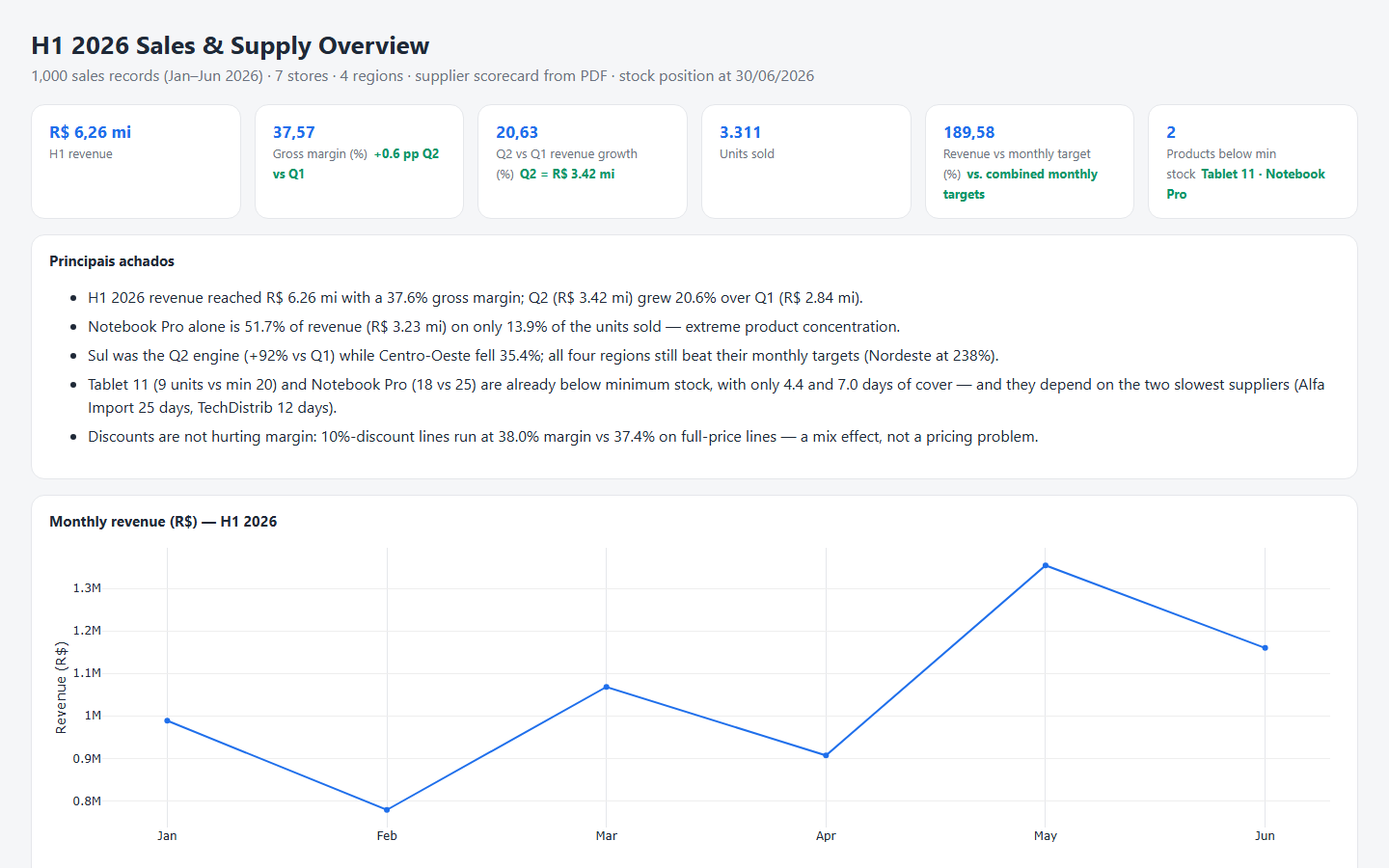
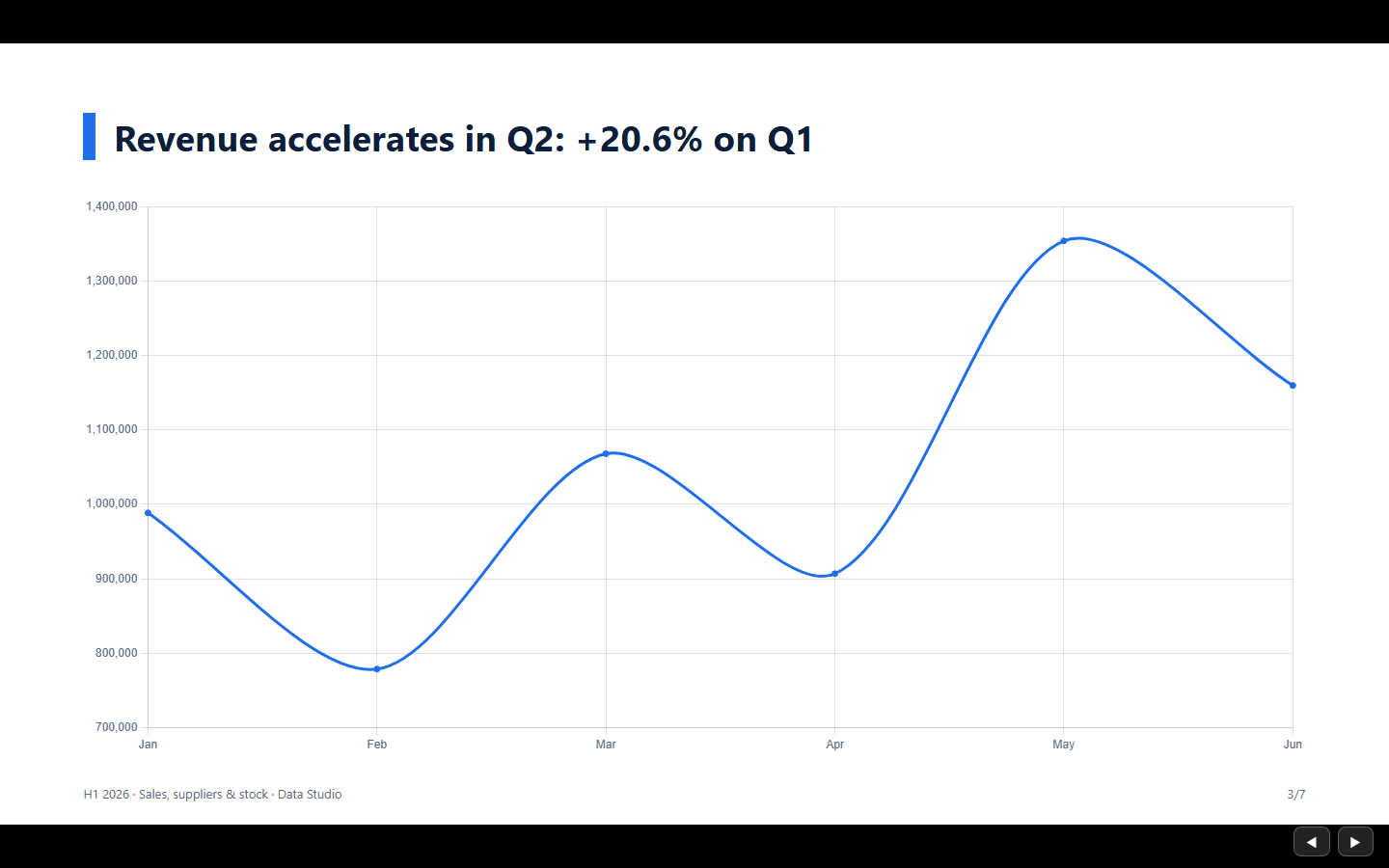
- Data Studio: Python and DuckDB analysis that produces dashboards and decks.
A guide for every agent. Each agent has a Guide tab for the people who will use it.
- A flow diagram built from the spec: request, the agent, the skills, tools, memory and specialists it uses, and what it delivers.
- A fact sheet with real example requests (the test cases that passed) and where to call it.
- A Markdown text: what it is, what it does, what it does not do, how to use it and its limits.
The AI tool that built the agent writes the text. If a version reaches production without one, the agent's LLM writes a draft, marked for review until a maintainer approves it. See docs/guide.md.
Digital employees (agent as employee, with a human in the loop). Hire an agent for a job instead of only calling it. It has a job profile, a human manager and an authority level; it takes tasks and works on them in the background.
- Hiring in self mode: your AI tool asks you for whatever is missing over MCP (
plan_employee→hire_employee) and creates nothing until the job is complete. - Probation, then admission: it first does real tasks in stage; the manager reads the results and admits it to production.
- Authority enforced by the platform, not the prompt: before every tool call the runtime asks the central. Each action type (read, send outside, money, delete…) is done on its own, done with a notice, approved by one or two people, or never done, and a company floor always applies.
- Human in the loop: the task pauses on the exact action (tool and arguments) and the manager approves, edits, rejects or instructs. Unanswered requests go to a backup and then expire without the action being done.
- A second opinion from another vendor: an authority rule can have a model from another vendor review the action before it runs; when they disagree, a person decides (review).
- Loops that only bother you with findings: each run declares whether it found something, and quiet runs are counted apart instead of piling up in your inbox (loops).
- Where to manage it: owners and managers have their own space in the portal (Digital employees, Decisions); admins have the workforce view, the action catalog and the company floor in the console. Daily reports can go to Slack or Teams, whichever your company uses.
- Day-to-day work on its own:
- routines from a cron;
- tasks from other systems through an inbound webhook, without duplicates;
- goals measured against targets in a weekly report;
- suggestions learned from the manager's decisions: loosen what is always approved, and turn repeated corrections into lessons.
Long-term memory. Add memory: {scope: agent | team | org} and the agent remembers customers, decisions and
preferences across conversations (docs/memory.md).
- By default the memory is a temporal knowledge graph (Graphiti on Neo4j Community or FalkorDB). A fact that changes is kept as history, not overwritten.
- Mem0 on PostgreSQL with pgvector is a lighter, experimental option with no graph database: much faster and cheaper to write, without the dated history of a changed fact.
- The hangar decides which memory each agent reads and writes, and stage never pollutes production.
- Embeddings are computed locally.
Schedules. Agents run on their own, on a cron or at a date and time. Results go to history and, optionally, to a Slack or Teams webhook.
Teams and governance.
- Sign-in with Google, Microsoft Entra ID, GitHub or OAuth2, plus local accounts, and SCIM provisioning.
- Company registration on the admin's first access, with the company's e-mail domains and an optional rule that only corporate e-mails join, for every way in (invites, SSO, SCIM).
- Maintainer, developer and consumer roles; a company catalog with access requests.
- Budgets per company, team, agent or project, by day or month, with a warning and a hard stop.
- Data governance: classification, DLP, retention and data subject requests (docs/analyst.md).
- A secrets vault (
secret://), scoped API keys, an audit log, GitOps (hangar apply -f agents.yaml) and a JSON Schema for the spec. One installation can serve several isolated companies.
Bring your own LLM gateway. The hangar never hosts a model. Agents call your LiteLLM, OpenRouter or provider through connections: URL, model and key, encrypted at rest. Connections can differ per environment and track cost in US$.
How it works
flowchart LR
  subgraph People
    B[Claude · ChatGPT · Codex · OpenCode]:::c
    U[User portal /app · admin console /ui]:::c
    T[LibreChat · Open WebUI · Slack · SDKs]:::c
  end
  B -- "MCP /mcp (personal or admin key)" --> H
  U -- "session (SSO or local)" --> H
  T -- "/gw/<slug> OpenAI · A2A · ACP · MCP · AG-UI" --> H
  subgraph Hangar[Agent Hangar]
    H[API · gateway · registry<br/>versions · tests · approvals · audit · usage/cost · schedules]
    DB[(Postgres)]
    M[memory service<br/>Graphiti or Mem0]
    G[(Neo4j / FalkorDB / pgvector)]
    H --- DB
    H -- "groups chosen by the hangar" --> M --- G
  end
  H --> P[docker-socket-proxy]
  P --> A1[agent container<br/>stage / prod]
  P --> J[ephemeral job container<br/>claude-code · codex · hermes · dsh]
  A1 -- "memory, sub-agents, OAuth MCPs<br/>via /internal (per-agent token)" --> H
  A1 & J --> L[(Your LLM gateway / provider)]
  H -- "AG-UI" --> R[remote agent<br/>LangGraph · ADK · Mastra…]
  classDef c fill:#eef2ff,stroke:#4f46e5
Templates
Apply one with hangar templates apply doc-qa --connection my-litellm, or from Templates in the UI. Templates
are plain YAML in templates/, and they are the easiest way to contribute.
Use a shipped agent
hangar keys create librechat --scope invoke --agent doc-qa     # a key that can only call this agent

curl http://localhost:8090/gw/doc-qa/v1/chat/completions \
  -H "Authorization: Bearer ah_..." -H "Content-Type: application/json" \
  -d '{"model":"doc-qa","messages":[{"role":"user","content":"What is the hotel limit?"}]}'
Use /gw-stage/<slug>/… for the stage version. Send X-Channel: slack (or any name) for per-channel metrics.
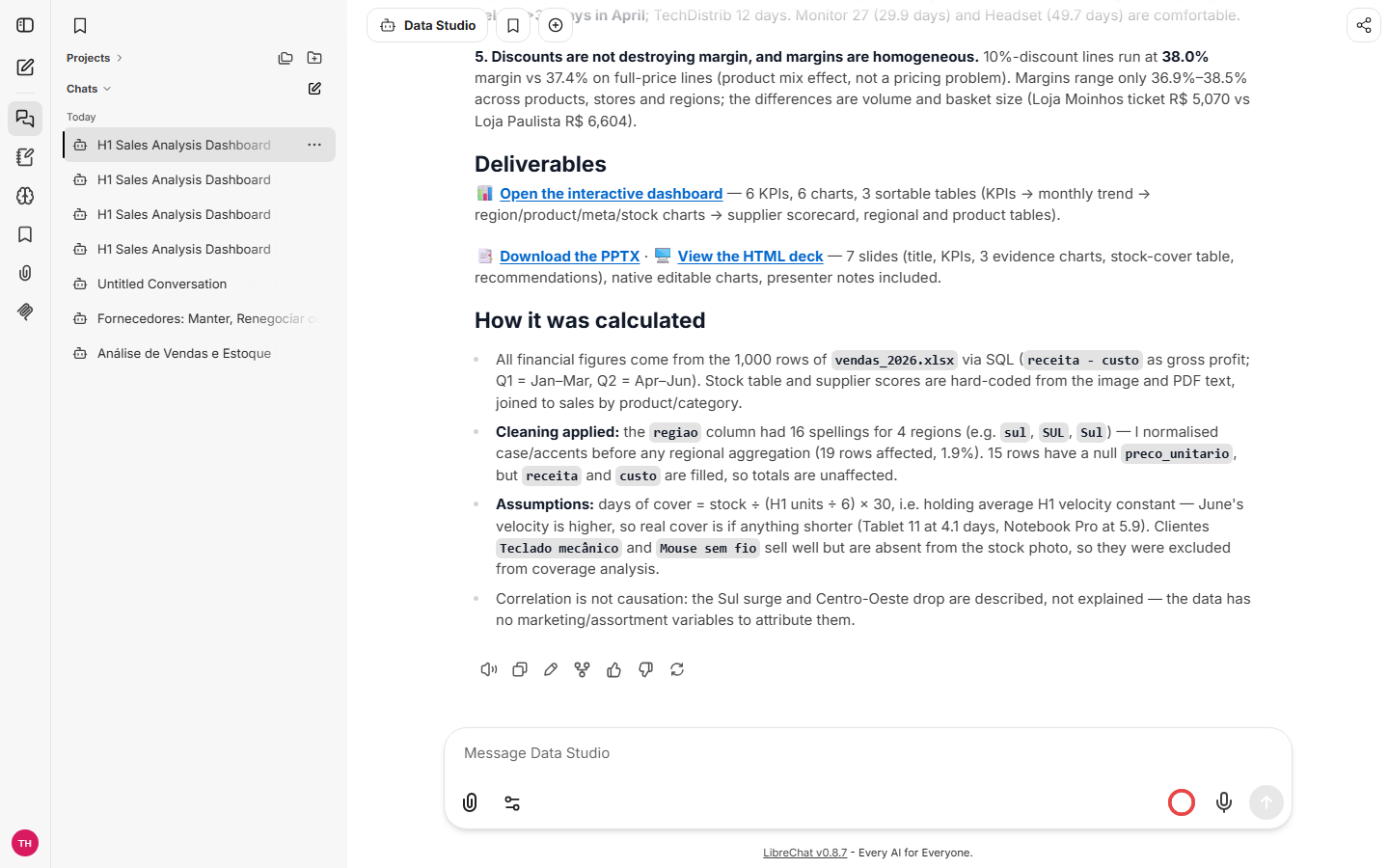
Data Studio + LibreChat
An agent as the engine behind a chat UI. LibreChat talks to the data-studio agent
through the gateway, and each conversation gets its own workspace and Python kernel in the
Data Studio MCP server. See integrations/librechat.
| Answer in LibreChat | Generated dashboard | Generated deck (PPTX + HTML) |
|---|---|---|
 |  |  |
CLI and GitOps
pip install ./cli
hangar login http://localhost:8090 --token <key>
hangar apply -f examples/agents.yaml --ship
hangar jobs run code-fixer "Add input validation to parse_date()" --follow
Documentation
Browse it at valteresj2.github.io/agent-hangar/docs, with search
and light and dark modes, next to the Hangar AI Labs website. The site is
built from docs/ on every change.
Project status and roadmap
Agent Hangar is in alpha: it works end to end, every release runs a full end-to-end suite (the API, real clicks in the console and the portal, the phone layout and the English text) and a clean-machine install, and APIs may still change. Recent releases:
Earlier releases built the base: the registry with the stage gate (v0.1), teams and SSO (v0.3), memory (v0.6), the portal (v0.7), coding agents in VS Code (v0.8), the installer and Kubernetes (v0.10), observability and signed images (v0.12), Digital employees (v0.16–v0.24), several companies per installation (v0.25), the analyst's day to day (v0.26) and the governed desktop (v0.27). Everything is in the CHANGELOG; what comes next is in ROADMAP.md.
Contributing
Issues and PRs are welcome. Templates, harness adapters and docs are great first contributions. Read CONTRIBUTING.md. Report security issues through SECURITY.md.