
YATS — Yet Another Token Saver — indexes your codebase into a knowledge graph. Your AI agent queries the graph instead of reading files one by one. Same answers, 37–73% fewer tokens — on real repos, with a benchmark you can reproduce on your own code.
The problem: you're paying your AI to read
Every time your agent needs to understand your code, it re-does the same brute-force ritual: grep for keywords, open file after file, guess how things connect. Not once — every session, every question, for every developer, every day.
That's not intelligence. That's a token bonfire. And it's the single biggest line item on your AI coding bill.
The cost isn't just "tokens". It's:
- 💸 Budget — your AI coding spend is 2–3× higher than it needs to be
- 🐢 Time — every "how does this work?" starts from zero and re-reads the same context
- 🎯 Quality — context windows are finite; agents see a fragment of your code and guess the rest
100,000 tokens to answer "how does auth work here?"
15 files read
0 understanding of relationships
YATS gives your agent a map, not a pile of paper
We parse your entire codebase into a knowledge graph: every function, class, interface, and the relationships between them. When your agent needs an answer, it queries the graph — and reads the 5 relevant symbols, not 15 files.
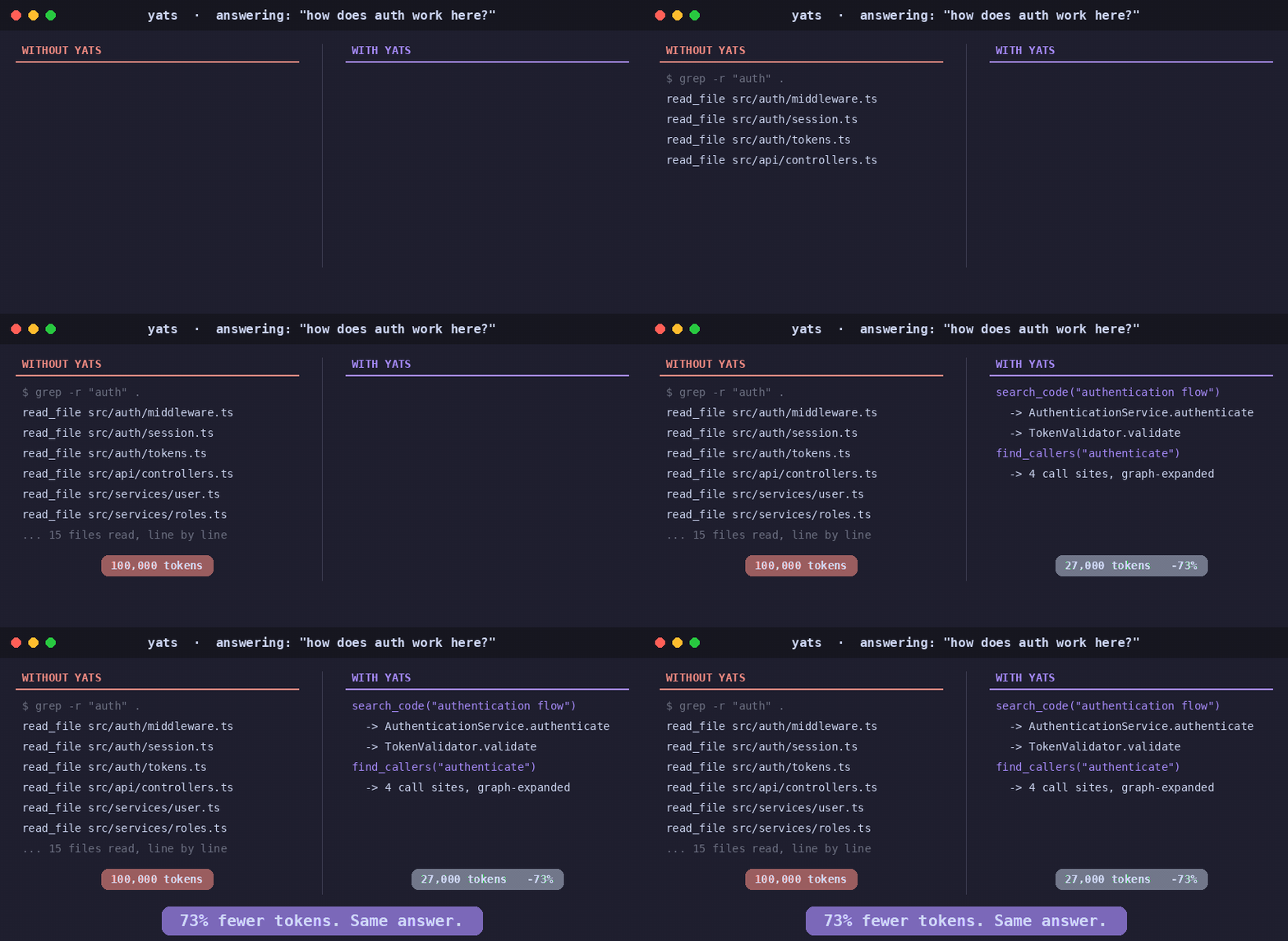
The best part: you don't index manually. When your agent searches a directory that isn't indexed yet, YATS hands it the exact yats index command — the agent runs it once (one tool call), and from then on every query hits the graph. If yats watch is running, even re-indexing takes care of itself.
You can index manually via
yats index ~/my-project. But your agent handles it.
Quick Start
npx yats-toolkit
The wizard asks which embedding provider to use (Ollama local + free, or OpenAI/Azure OpenAI/Mistral/Voyage), which directories to pre-index, and writes your MCP config automatically.
That's it. No other dependencies. YATS pulls a Docker image with Neo4j, Qdrant, and the MCP server — everything runs in containers. No Python, no Java, no .NET SDK to install. Just Docker.
Works with the agents you already use
👉 Run yats connect from your repo — it installs your agent's config in one command without overwriting existing files (see connect/ for details). Each agent gets custom instructions that teach it to call search_code before grep, and to expand the graph instead of guessing relationships.
💰 What's your AI coding bill this month?
Most of the tokens your agent spends aren't writing code — they're re-reading it. YATS cuts the reading, not the thinking. On real repos, that's 37–73% fewer tokens on code-understanding tasks (see benchmarks below).
Illustrative math — a 40-dev team spending €2,000/month on AI coding tools:
TL;DR for your boss (copy-paste into the email asking for budget):
"Every time our AI coding tools need to understand our codebase, they read files one by one and burn tokens doing it. YATS indexes our code into a knowledge graph so agents query the graph instead — cutting token spend 37–73% on code tasks, measured by a benchmark we can reproduce on our own repos. It runs locally or with our own API keys, costs €150–600/year per team (free under 25 devs), and works with the agents we already use: Cursor, Claude, Copilot, Codex, and Gemini."
Don't trust us. Reproduce it yourself.
Every benchmark we publish comes with the full tooling to replicate it — same questions, same repos, same methodology. No cherry-picking. No black boxes.
And it works on your own code too. Unlike benchmarks that only test popular open-source repos (which LLMs might already know from training), YATS lets you measure savings on your private projects — the code your agent actually works with every day.
yats benchmark
- Pick your agent — Cursor, Claude, Copilot, Codex, or Gemini
- Pick a language and repo — or point it at your own project
- The wizard indexes it automatically
- Your agent answers the same questions twice — with and without YATS
- You get a side-by-side comparison: tokens, credits, cost
Where your agent's keys come from — yats benchmark runs your agent, which uses your credentials with its provider. The benchmark loads ~/.yats/.env (written by yats setup, which pre-fills the agent key names) and any .env in the current directory or repo root; shell env vars take precedence.
Our results (that you can verify)
Same questions. Same repos. Fresh sessions. Every token counted.
Run yats benchmark and get your own row in this table.
→ Full benchmark suite and raw data
🔒 Your keys, or none at all — and nothing leaves your machine
Indexing generates embeddings. You choose who runs that computation.
Everything — Neo4j, Qdrant, the indexer, the MCP server — runs in your own infrastructure, in Docker. Your code never leaves your machine. That's the version of "AI tooling" your security team will actually sign off on.
Your codebase, understood
Not grep. Not regex. Actual parsers that understand your code like an IDE does.
TypeScript → Compiler API (full AST)
C#         → Roslyn (.NET 8 bridge)
Python     → LibCST + Jedi
PHP        → nikic/php-parser
Go         → Native bridge
Everything → Tree-sitter fallback
Rust, Java, Kotlin, Ruby — more to come.
Your agent, supercharged
Instead of reading 15 files, your agent calls:
All 20 tools
Stays in sync while you work
YATS doesn't index once and go stale. When you or your agent edits a file, the index updates in seconds.
Architecture
flowchart LR
    A[Your repository] --> B[YATS indexer<br/>parse · analyze · embed]
    B --> C[(Neo4j<br/>knowledge graph)]
    B --> D[(Qdrant<br/>vector store)]
    C --> E[MCP server<br/>20 tools]
    D --> E
    E --> F[AI agent<br/>Claude · Cursor · Copilot · Codex · Gemini]
- Graph: Neo4j 5 (symbols, calls, imports, inheritance — full relationship graph)
- Vectors: Qdrant (768d embeddings for semantic search)
- Embeddings: Ollama (local), OpenAI, Azure OpenAI, Mistral, or Voyage AI (custom endpoints supported)
- Protocol: MCP JSON-RPC (stdio, HTTP+SSE, Streamable HTTP)
- Deployment: Single
docker compose up— Neo4j + Qdrant + Ollama + YATS server
Simple pricing — one price per team
Not per seat. One flat annual fee for your entire organization. Same product, same features at every tier.
Annual subscription with auto-renewal. Cancel anytime. · Full license terms
Requirements
- Docker with Compose plugin
- ~2GB disk (or ~3GB with Ollama local embeddings)
- Internet connection for first pull (fully local after that with Ollama)
CLI reference
Per-repo config — drop a .yats/config.json in the repo root (all keys optional):
{
  "indexDocs": false,
  "docExtensions": [".md"],
  "docPatterns": ["docs/", "README.md"],
  "ignoredDirs": ["sandbox"],
  "skipExtensions": [".snap"]
}
ignoredDirs/skipExtensions add to the machine's config, docExtensions
replaces it, docPatterns whitelists which doc files are sent (prefix match),
and indexDocs: false skips all docs for the repo. A malformed config stops
the run with instructions to fix it (or --no-config to bypass).
yats setup                        # One-time setup wizard
yats setup --provider openai --api-key sk-... --yes  # Non-interactive
yats index <path> [--skip-docs]  # Index a repository (--no-config: ignore .yats/config.json)
yats search <query>               # Search indexed code
yats list                         # List indexed repositories
yats summary <repo>               # Show symbol/relationship counts
yats clear <repo>                 # Delete indexed data by name
yats remove <path>                # Delete indexed data by path
yats status                       # Check what's indexed and running
yats stop                         # Stop all services
yats start                        # Start services (after stop)
yats update                       # Update CLI to latest version
yats update-base                  # Update Docker images
yats connect [agent]              # Show agent setup config
yats connect --install <agent>    # Auto-place config files
yats bridge                       # MCP stdio ↔ HTTP proxy (for CLI-only agents)
yats benchmark                    # AI agent token comparison
yats watch <path> [--live] [--no-config]  # Sync index with git commits
Links
- npm: yats-toolkit
- Website: fvinciarelli.github.io/yats.ai
- Architecture: ARCHITECTURE.md
- License: LICENSE
- Contact: [email protected]