
智管-Vibe Assistant
One workspace for memory, Skills, and MCP.
✨ Highlights · 🧠 Memory Center · ⚙️ Install · 🚀 Quick Start · ❓ FAQ
简体中文 | English
💖 Sponsors
Thanks to 88API for sponsoring this project! 88API is a one-stop multi-model API platform operated by a Hong Kong company, built for developers, creators, and AI app users. It exposes a unified interface to text, image, voice, and video models — covering AI programming, smart translation, content creation, dubbing, image generation, and video generation in common workflows. You can add and switch providers directly inside Vibe Assistant, with international payment methods, invoices, and enterprise-grade reliability. Sign up via this link to get an exclusive bonus credit!
✨ Highlights
Vibe Assistant is a local Tauri 2 + React 19 + Rust desktop workspace focused on:
- Memory management: capture and search conversations, maintain working memory and a long-term Profile, and inject context into connected clients.
- Skill management: browse, publish, and deploy skills, review local differences, and reuse equipment profiles.
- MCP management: manage services and client configurations, discover tools, and inspect calls and errors.
- Supporting tools: token usage, ports, networking, environment variables, backups, and cloud memory sync; Chinese/English and light/dark themes.
Process launching, embedded terminals and Web UIs, collaboration tasks, and proxy publishing have been removed. Existing clients such as Claude and Codex still use their memory, Skill, and MCP integrations. Saved memories, configurations, and historical output files are preserved.
📑 Table of Contents
- Memory Center
- Skill management
- MCP Server Center
- System Toolkit
- Install
- Quick Start
- Model configuration
- Data Storage
- Telemetry and hooks
- FAQ
- Contributing
- License
🔌 MCP Server Center
A single catalog for MCP servers on your machine — manage them once, distribute everywhere.
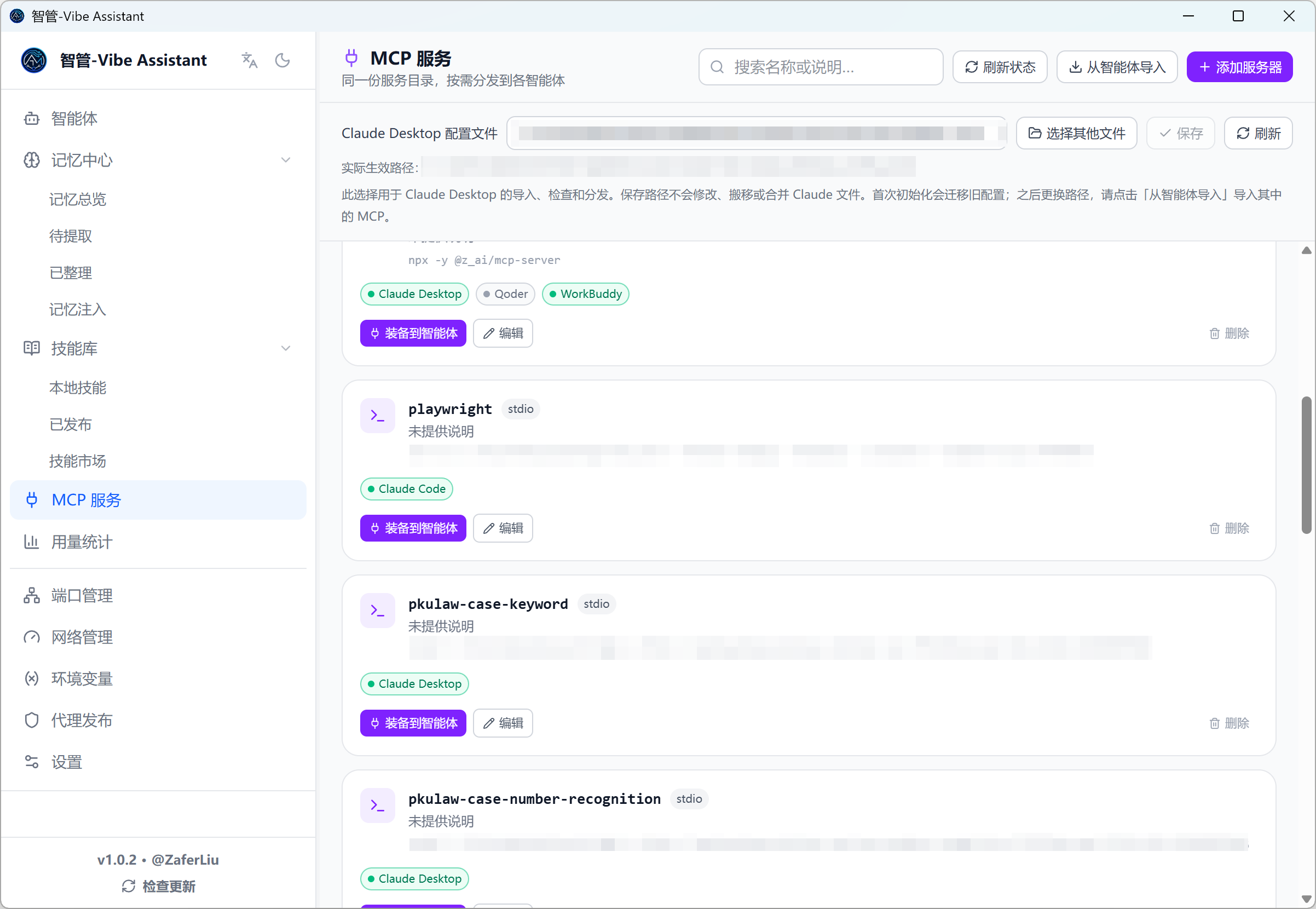
Local server management
- Local scan: auto-detects npm-global MCP packages
- Smart parsing: paste any text (docs, install instructions) and AI extracts the config
- Manual entry: stdio / SSE configurations
Catalog & distribution
- Keep frequently used MCP servers as catalog entries
- One-click install into Claude Code, Claude Desktop, Codex CLI, Codex Desktop, Qoder, WorkBuddy, MiniMax Code, Kimi, ZCode, and more
- Import from Agents' existing configs; per-host install status shown live (installed / config drift)
🧰 System Toolkit
Port Manager
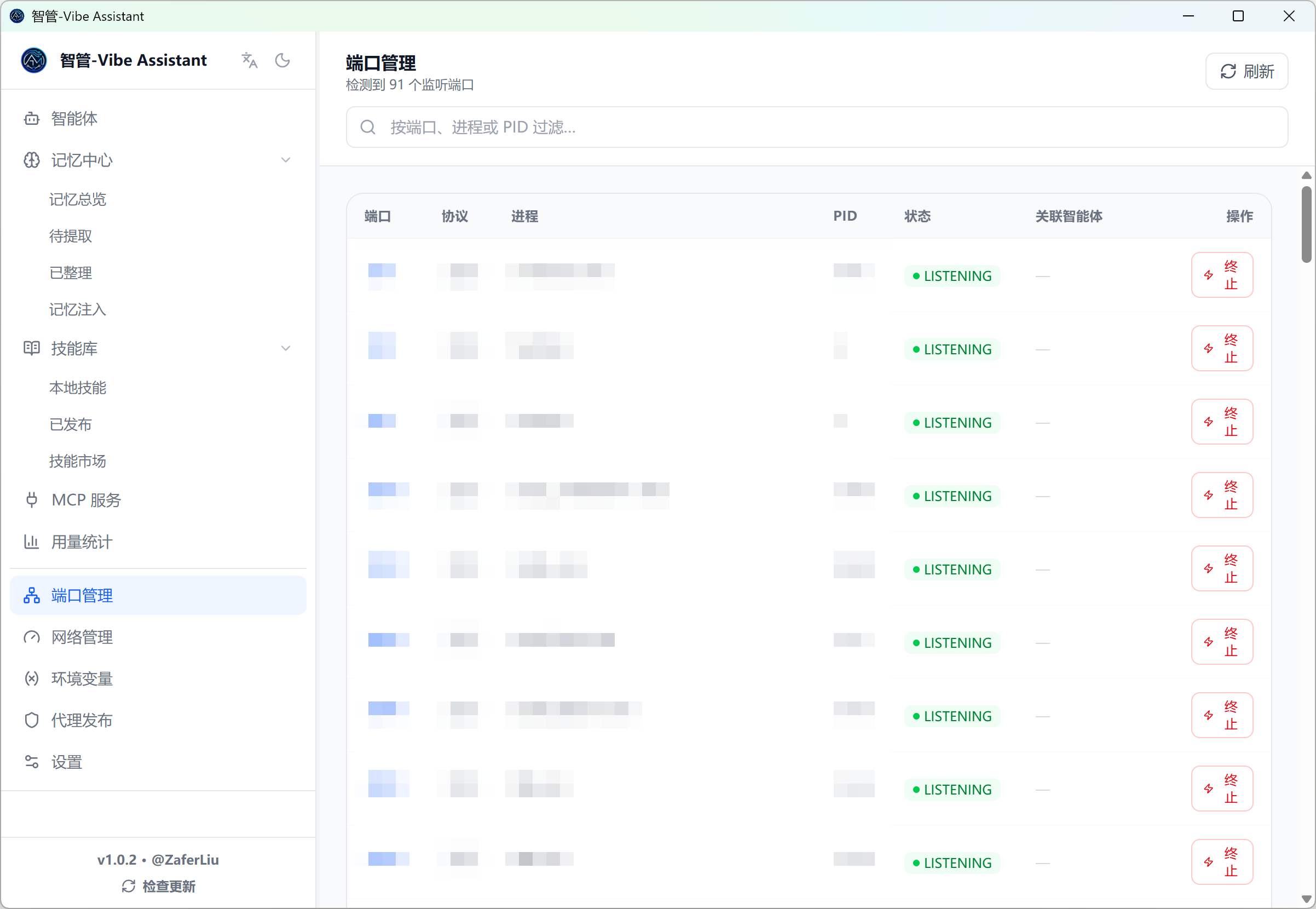
- Every listening port with protocol, PID, and process name
- Kill the process occupying a port in one click — the fastest way to diagnose "port already in use" startup failures
Network Manager
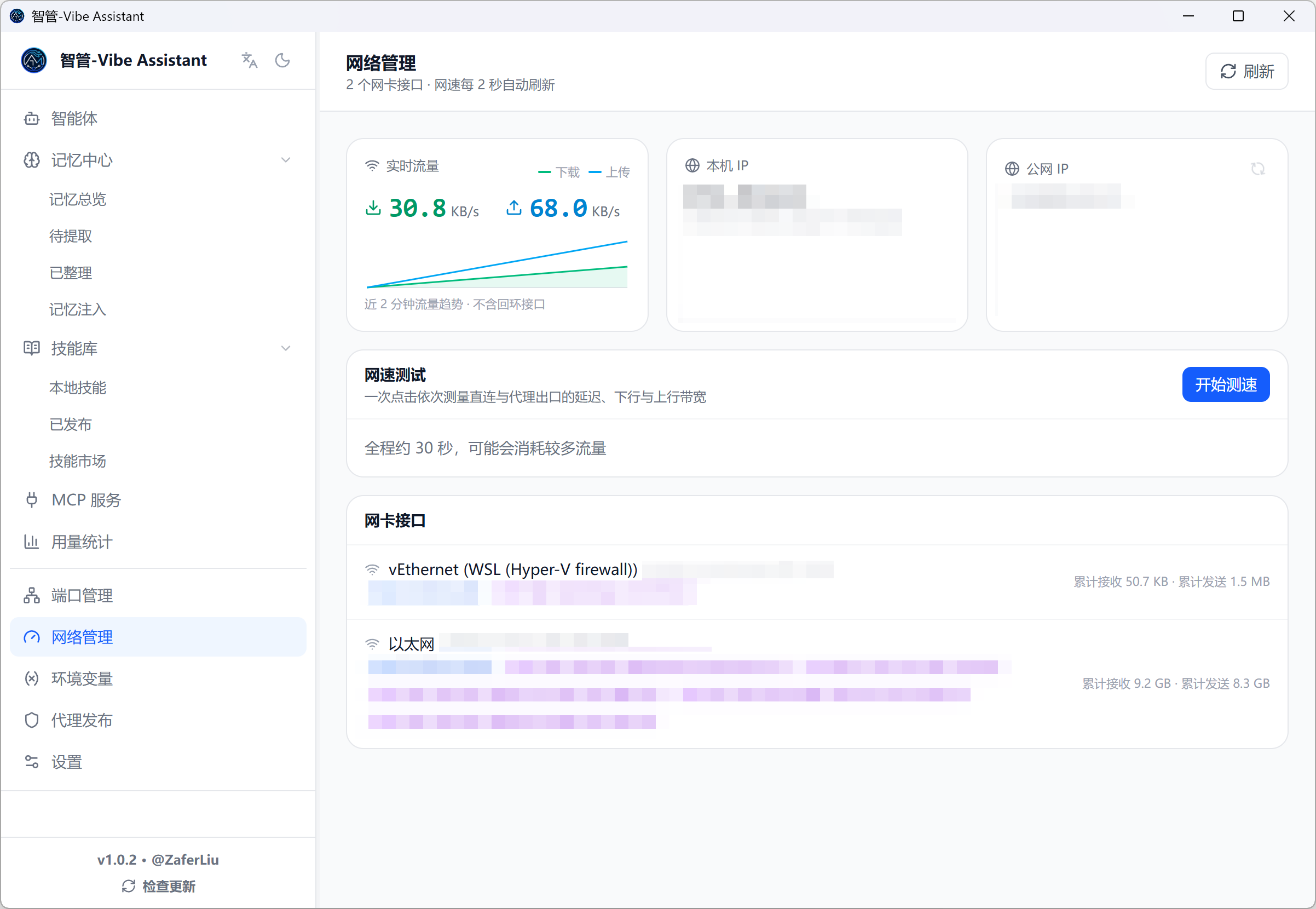
- Live throughput per network interface, with a rolling download/upload chart
- Interface list with IPv4 / IPv6 addresses, MAC, and MTU
- Public IP for both direct and proxy egress (detects your proxy automatically)
- Bandwidth speed test — latency, download, and upload over both direct and proxy paths
Environment Variables
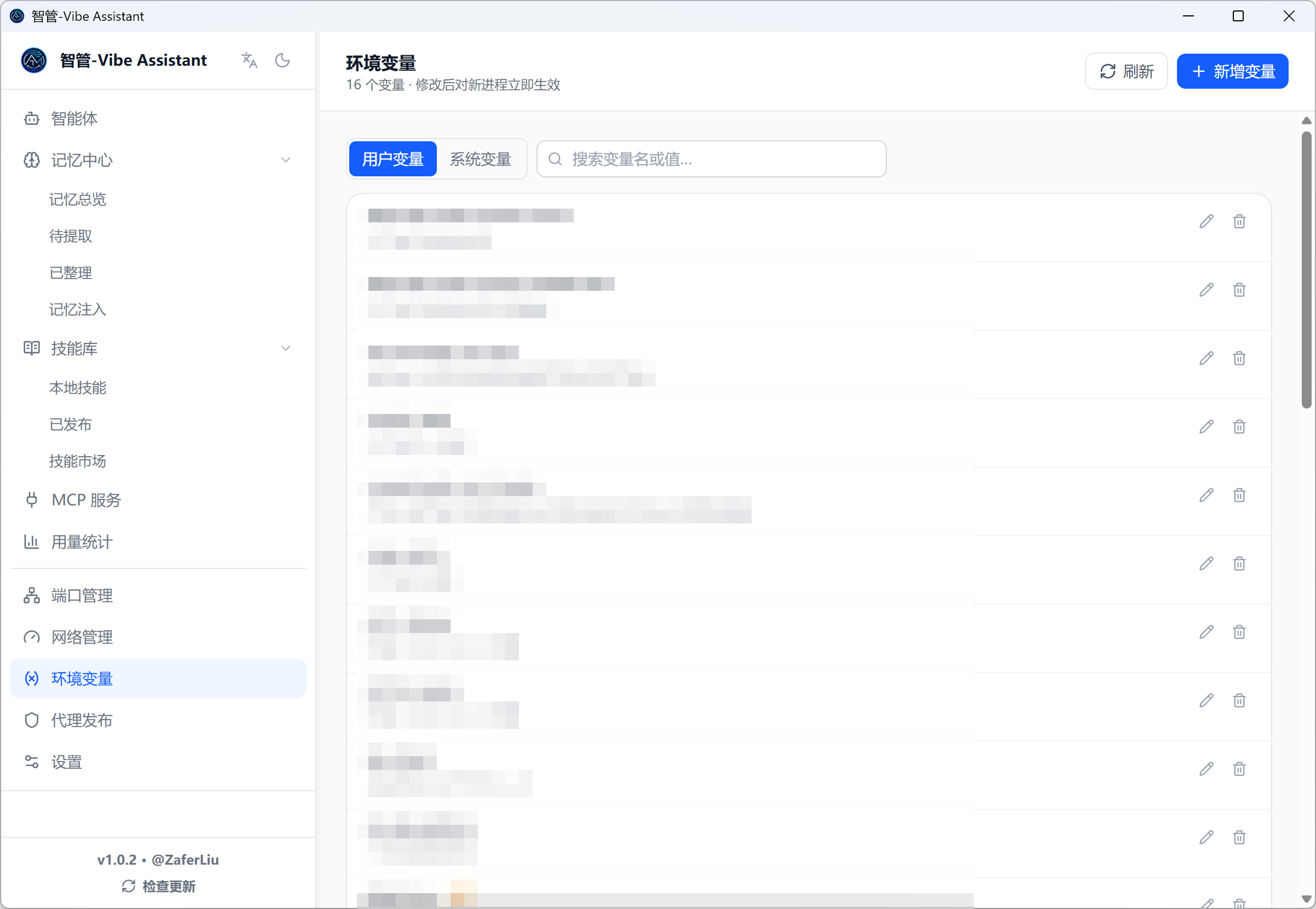
The equivalent of Windows' "Edit environment variables" dialog, without opening the registry editor:
- User and system scopes in separate tabs (system changes need an administrator-run app)
- PATH-style variables are edited one entry per line — add, remove, and reorder paths visually instead of fighting a semicolon blob
- Values containing
%REFERENCES%are stored asREG_EXPAND_SZwith an expanded-value preview - Changes are broadcast (
WM_SETTINGCHANGE) so newly started processes pick them up immediately - Critical variables (PATH, PATHEXT, WINDIR, …) are protected from accidental deletion
🧬 Memory Center — One Brain for All Agents
Every coding Agent you use remembers your preferences, decisions, and current work — and every other Agent benefits from it.
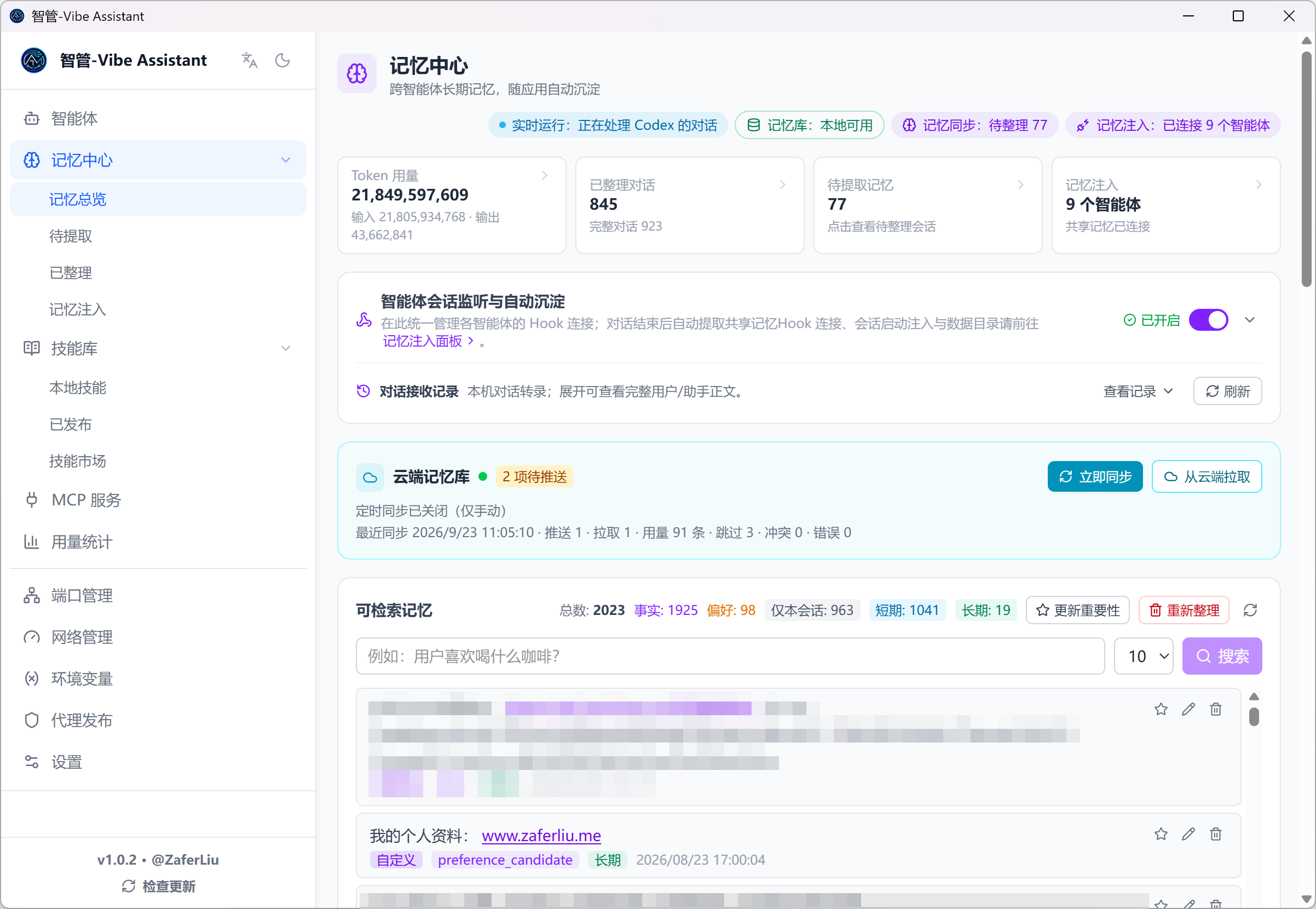
The L0–L3 memory model
📥 Automatic capture (Agents → memory)
- Supports Codex, Claude Code, Qoder, WorkBuddy, MiniMax Code, Kimi, GitHub Copilot, ZCode, and DeepSeek Harness — via hooks (the first four) or local transcript scanning (all nine; DeepSeek Harness zstd-compressed sessions are decoded in place). DeepSeek Harness also gets hook-equivalent automatic injection through its cordis pre-step plugin
- Sessions land in a local SQLite ledger first, extraction runs async — nothing is lost when offline or before a model is configured; failed sessions can be re-run manually
- Pending Memories and Organized Conversations panels show full conversations, extraction progress, and failure reasons
- L1 cleaning & dedup ("dreaming"): local BGE semantic candidates + LLM arbitration, with rollback checkpoints
- Import from a folder: point the app at any transcript folder and extract memories from it directly
🔎 Search, ranking & the memory engine
- Semantic search across all L1 memories (hybrid semantic + keyword) right in the Memory Center
- Importance ranking: every memory gets a score with its evidence (supporting sessions, Agents, recall count); pin what matters
- Memory engine: the optional local semantic sidecar (status visible in the Memory Center) can be started / stopped on demand
- Inline edit / delete of any memory, plus manually added entries
- Reset-all-for-re-extraction when you want a clean rebuild of L1
⏱️ Scheduled L2/L3 refresh
The published L2 working memory and L3 Profile no longer depend on clicking buttons:
- Checks every 30 minutes while the app runs; rebuilds L2 when new memories arrived and the configured interval (default 7 days) elapsed
- Rebuilds and auto-publishes L3 when L2 changed and its interval (default 30 days) elapsed
- Intervals and the on/off switch live in Settings → Scheduled memory refresh; changes apply immediately
- Every background run is logged on the Memory Injection page; manual consolidation still works anytime
💉 Memory injection (memory → Agents, dual channel)
One-click setup: install / uninstall the shared-memory MCP into Claude Code, Claude Desktop, Codex CLI, Codex Desktop, Qoder, WorkBuddy, MiniMax Code, Kimi, ZCode, DeepSeek Harness, and manage capture/injection hooks for the four hook-capable Agents (Claude Code, Codex, Qoder, WorkBuddy). Per-device data directory overrides are supported.
✍️ Custom memories
Hand-written entries under the working-memory or long-term cards — only you can edit or delete them, automatic cleaning never touches them, and they are always injected.
📚 Shared Skill library & marketplace
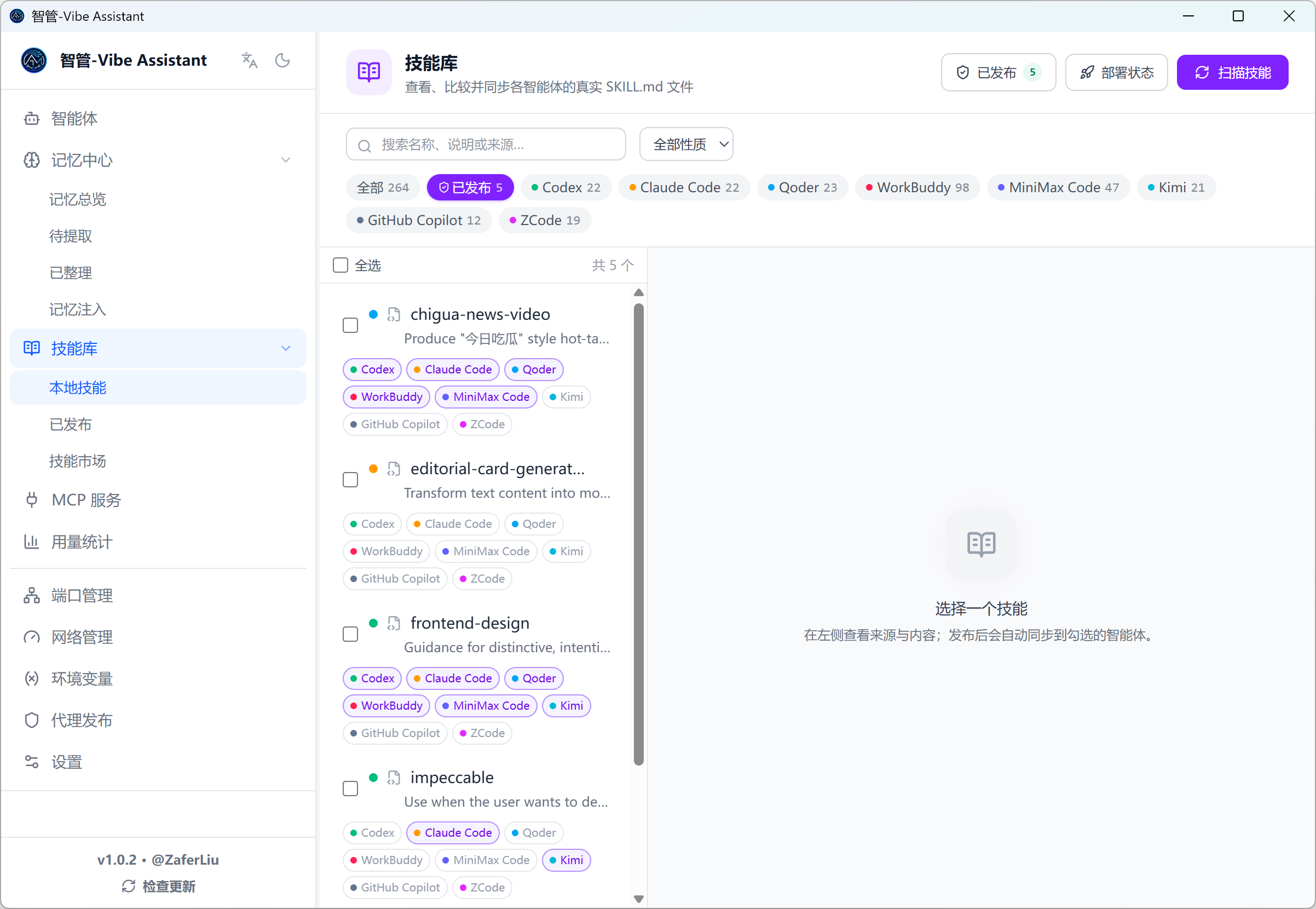
- Skill library: scans each Agent's
SKILL.mdfiles into a shared library; content-hash previews of adds / updates / conflicts before you confirm a sync; "publish + equip" in one step, with bulk operations, per-Agent version drift detection, one-click rollback of the latest publish, and "adopt local" to take an Agent's local edit as the new shared version - Marketplace: browse and install curated skills from the official OpenAI and Anthropic skill repositories — downloads are size-bounded, every relative path validated, and downloaded scripts are never executed
📊 Token usage analytics
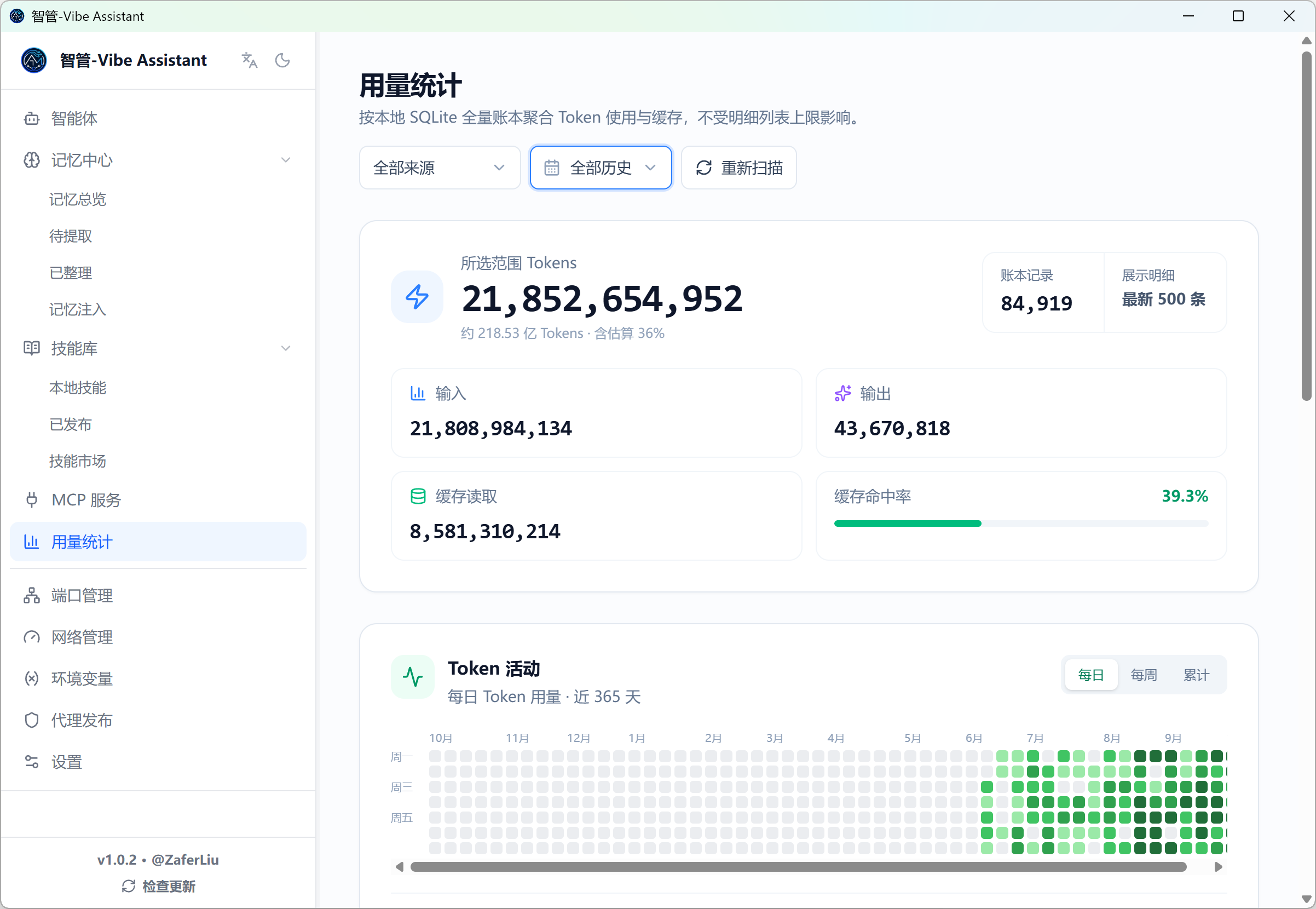
Aggregates real input / output / cache usage from local transcripts across Agents — coverage includes Codex, Claude Code, Qoder, WorkBuddy, MiniMax Code, Kimi, GitHub Copilot, Gemini CLI, OpenCode, OpenClaw, and more — aligned with how providers bill:
- Summary dashboard plus per-session usage records and live session activity
- Injection dashboard: per-source session/prompt injection counts, fingerprint-gate hit rate, and estimated token cost
☁️ Cloud Memory Vault (optional)
Sync published L2/L3 documents and custom memories across machines — one brain everywhere:
- AES-256-GCM end-to-end encryption: keys derived from your sync password, never stored; the server only ever sees ciphertext
- CAS conflict detection, incremental pulls, tombstone deletions; local SQLite stays authoritative, offline sync failures never block injection
- Single-file self-hostable server, open source in
vault/— Docker / Railway / Orange Pi + Tailscale
⚙️ Install
Download a prebuilt package (recommended)
Grab the latest from Releases:
Build from source
Prerequisites: Node.js ≥ 18, Rust stable, and the Tauri prerequisites (VS C++ Build Tools on Windows).
git clone https://github.com/Zafer-Liu/Vibe_Assistant.git
cd Vibe_Assistant

# install dependencies
npm install
cd frontend && npm install && cd ..

# development
npm run dev

# production build
npm run build
Bundles land in src-tauri/target/release/bundle/.
On Windows, npm run dev sets the Cargo build directory to Medium integrity so executables do not inherit a sandbox checkout's Low label and fail to write AppData with a SQLite read-only error. This preflight only adjusts build output, preserving database and checkout permissions.
🚀 Quick Start
- Read the Memory, Skill, and MCP introduction on first launch, or reopen it from Settings. Memory Center is the default page.
- Add a project detail or preference manually. For automatic extraction, configure and verify a memory model in Settings, then check capture and injection.
- Read a local Skill and publish it to selected clients. Review deployment and differences in Published.
- Import or add an MCP service, check its command or URL, select clients, and inspect tools and call records.
No CLI import or process launch is required.
🤖 LLM Configuration
MCP parsing and memory extraction need an LLM. Add one under Settings → LLM and memory extraction:
Hit Test Connection — green means good.
Built-in presets: DeepSeek (deepseek-chat), OpenAI (gpt-4o-mini), or any custom OpenAI-compatible endpoint. Keys are encrypted at rest (AES-256-GCM, machine-bound).
Local models (Ollama): the settings page has a built-in Ollama module — connect, list pulled models with size / quantization, and promote one to a custom provider or the memory-extraction model in one click.
📁 Data Storage Paths
The Settings page offers one-click export / import of a full config backup for migration and disaster recovery.
🔌 Telemetry & External Access (experimental)
The memory pipeline uses local SQLite as its event ledger: hook events are persisted first and extracted asynchronously, so an offline model never loses captured sessions.
- Codex, Claude Code, Qoder: per-Agent hooks install/uninstall from the Memory Center; port and auth follow the external-trigger settings
- WorkBuddy: never writes to its Claude Code config (no double capture); can submit aggregated session / usage data via the standard telemetry endpoint
- Token accounting: Codex, Claude, and WorkBuddy read real usage from local transcripts; sources without complete provider usage show clearly-marked local estimates. Stray hook events are audit-only and never double-counted; adapters can overwrite estimates with real final numbers via
session_usage
Standard endpoint: POST http://127.0.0.1:<hook-port>/telemetry/events/{codex|workbuddy|claude|qoder}
{
  "session_id": "stable-session-id",
  "event": "session_usage",
  "cwd": "D:/Github-repo/example",
  "usage": { "input_tokens": 120, "output_tokens": 48, "cached_tokens": 60 },
  "usage_scope": "session"
}
input_tokens must be the session's full input total; cached_tokens is display-only detail (do not add it into totals). Re-submissions for the same source + session_id overwrite instead of accumulate.
🗺️ What's New
Current version
v1.1.0
v1.1.0
- ✅ Cloud vault sync — WebDAV / S3-compatible storage join the built-in vault server for encrypted memory sync
- ✅ 88API built-in provider — sponsor entry bundled, model lists fetched automatically, no manual entry for new models
- ✅ Cancellable memory extraction — pending extractions can be cancelled in the Pending Memories panel; failed sessions can still re-run
- ✅ Light theme by default — fresh installs start in light mode; dark mode remains available in settings
- ✅ Feature-focus slimming — process launcher, embedded terminal / Web UI, collaboration tasks, and agent publishing retired; memory, settings, and historical artifacts are fully preserved
v1.0.x
- ✅ Project renamed to Vibe Assistant (智管-Vibe Assistant) — display name, prompts, docs, and window title; protocol identifiers and data paths unchanged, so existing hooks, MCP installs, and local data keep working
- ✅ Environment Variables manager — user/system scopes, PATH edited one entry per line,
REG_EXPAND_SZpreviews, protected critical variables - ✅ Scheduled L2/L3 memory refresh — configurable intervals (default L2 7 days / L3 30 days), model calls only when new memories exist, L3 auto-publish
- ✅ Network Manager — live per-interface throughput, public-IP (direct + proxy egress) and dual-path bandwidth speed tests
- ✅ Skill Marketplace — install curated skills from official OpenAI / Anthropic repositories into the shared Skill library
- ✅ Workflow feature removed — the visual workflow builder, task board, and run history were retired to keep the app focused (see release notes for history)
- ✅ L1 extraction hardening — truncated-JSON salvage, contract-drift tolerance, and model-output excerpts in error messages for diagnosable failures
❓ FAQ
Check in order:
- Memory extraction needs an LLM: confirm at least one provider passes Test Connection in Settings → LLM and memory extraction (or an Ollama model is attached)
- Open Memory Center → Pending Memories — is the session queued? What is the failure reason? (Failures quote the model's raw output for diagnosis.)
- Confirm the Agent's capture hook is installed, or its transcript directory is configured correctly
- Failed sessions can be re-run from the panel
L3 uses a draft → publish gate: a draft must be published before it is injected. Published profiles can be edited directly — changes apply immediately. If retrieval via MCP returns stale content, confirm the host's shared-memory MCP is connected.
On schedule, without any clicks: every 30 minutes the app checks whether new memories arrived and whether the configured interval (default L2 7 days, L3 30 days) elapsed. Adjust or disable under Settings → Scheduled memory refresh. Every run is logged on the Memory Injection page.
Local SQLite is always authoritative; a unreachable vault never blocks injection. On conflict the app asks which side to keep. The server only stores AES-256-GCM ciphertext and cannot read or alter content.
Click More info → Run anyway — the installer is not Microsoft code-signed.
xattr -d com.apple.quarantine /Applications/智管-Vibe\ Assistant.app
Or right-click the app → Open → Open again.
The dev server uses port 1420. Find and kill the holder:
netstat -ano | findstr :1420
taskkill /PID <PID> /F
A renamed install changes the executable path recorded in Agents' MCP configs. Open Memory Center → Memory Injection and reconnect the affected hosts once — after that, regular in-place updates keep working.
🤝 Contributing
PRs and issues are welcome:
- Fork the repository
- Create a feature branch (
git checkout -b feature/amazing-feature) - Commit (
git commit -m 'feat: add amazing feature') - Push (
git push origin feature/amazing-feature) - Open a Pull Request
Bugs and ideas: Issues. For a dev setup see Build from source.
📄 License
⭐ The Goal
Keep useful context, reusable skills, and connected tools in one workspace.