ZOPS
A server ops panel that AI agents can actually operate. One Rust binary, one SQLite file, no external services — a desktop-like control panel for a single Linux box, plus a built-in MCP server and skill pack so Codex, Workbuddy or any MCP-capable agent can watch and fix that box under your rules.
Website: https://ops.zenceglow.com · Source: https://github.com/zenceglow/zops
Install
On the server, as root:
curl -fsSL https://cdn.zenceglow.com/app/ops/install.sh | bash
Six short prompts, every one with a default — pressing Enter all the way through gives you a working panel:
It downloads the binary, writes a systemd unit, starts the service, creates the admin account and prints the panel URL, credentials and MCP endpoint.
Same command upgrades. The installer keeps your port, domain, data directory
and accounts, backs up the database, then swaps the binary. The panel can also
upgrade itself — new versions pop a dialog with an Update now button that
downloads, verifies (size → ELF magic → actually runs --version), swaps
atomically, keeps a .bak, and restarts the service.
Non-interactive installs read the same values from the environment:
OPS_LANG=en OPS_PORT=5200 OPS_DOMAIN=ops.example.com \
OPS_USER=admin OPS_PASSWORD=secret bash install.sh
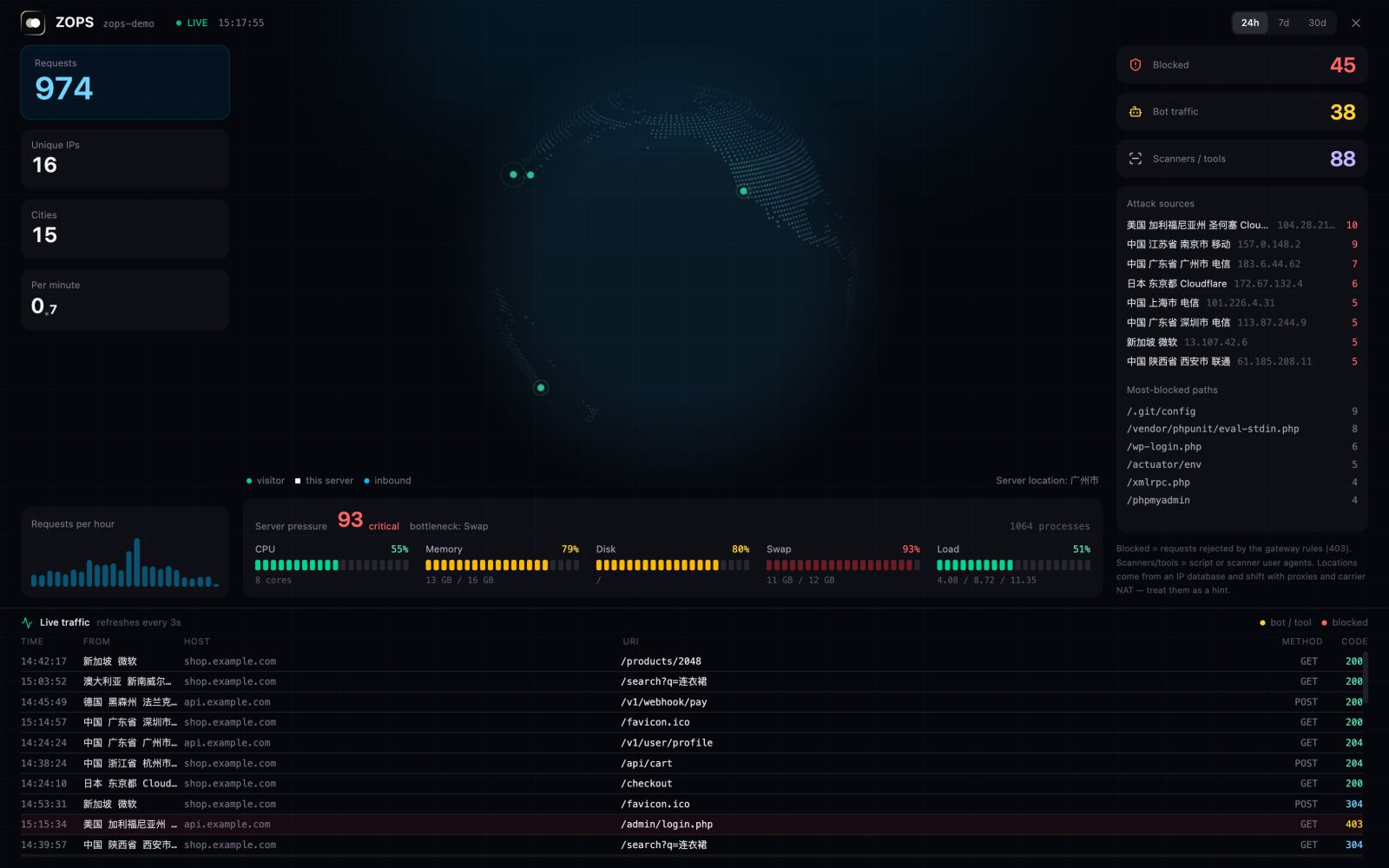
Access analytics, fed by the Caddy access log: requests, cities, bots and scanners, blocked probes, and a live traffic feed.
What you get
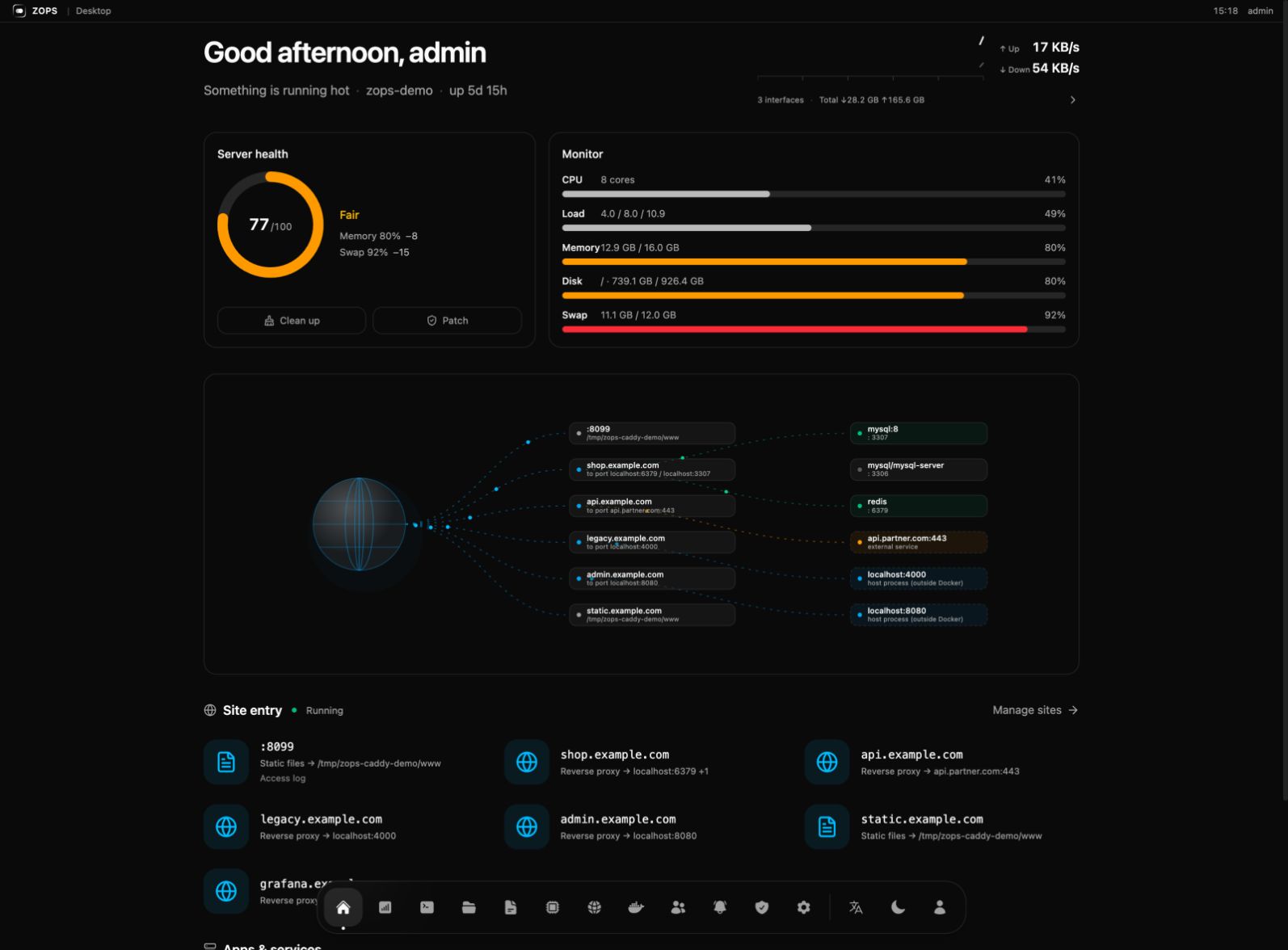 Desktop — greeting, health score, live pressure, and a request-path map that draws every domain to the container serving it | 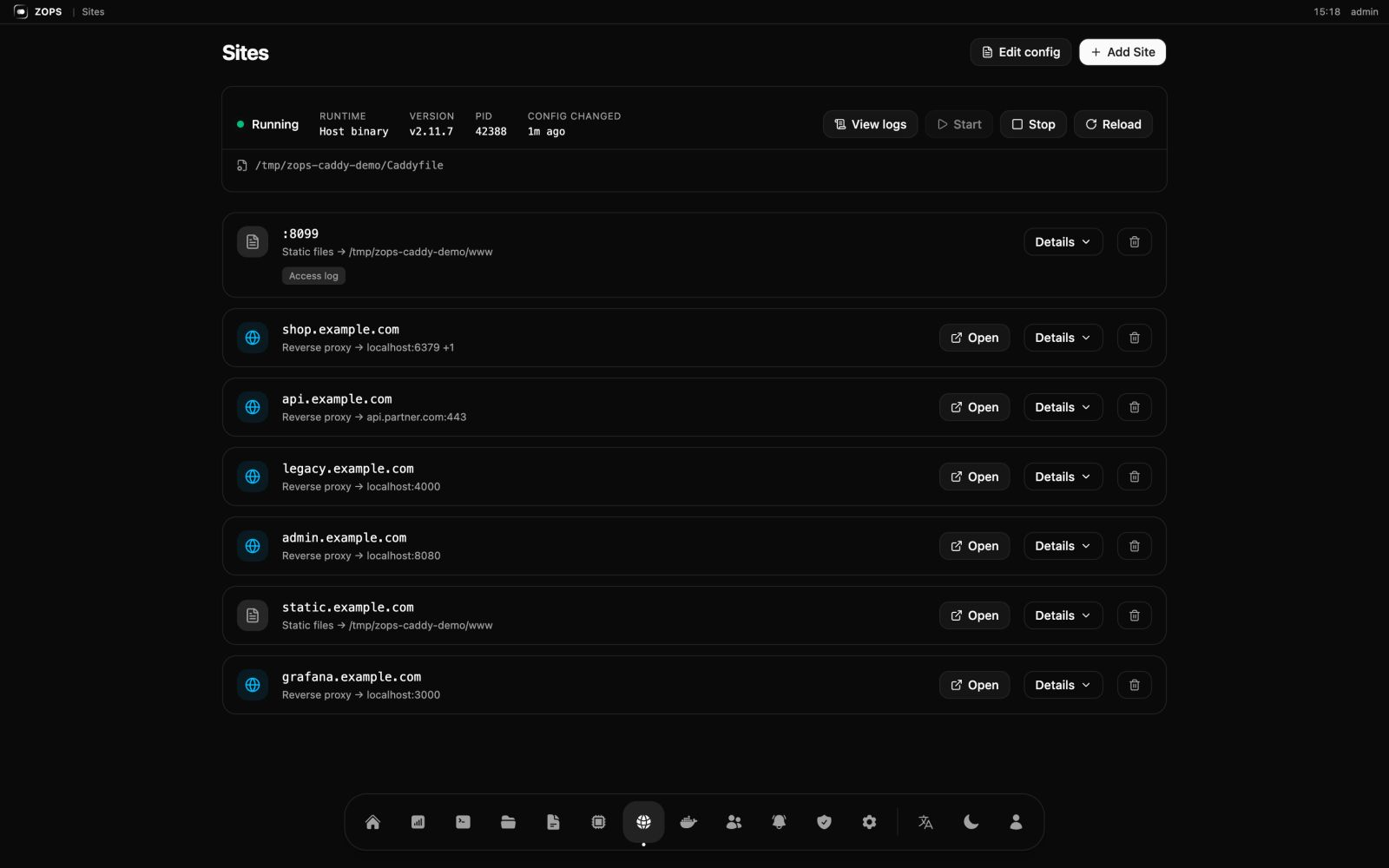 Sites — visual entries next to the raw Caddyfile, validated before saving, versioned in SQLite |
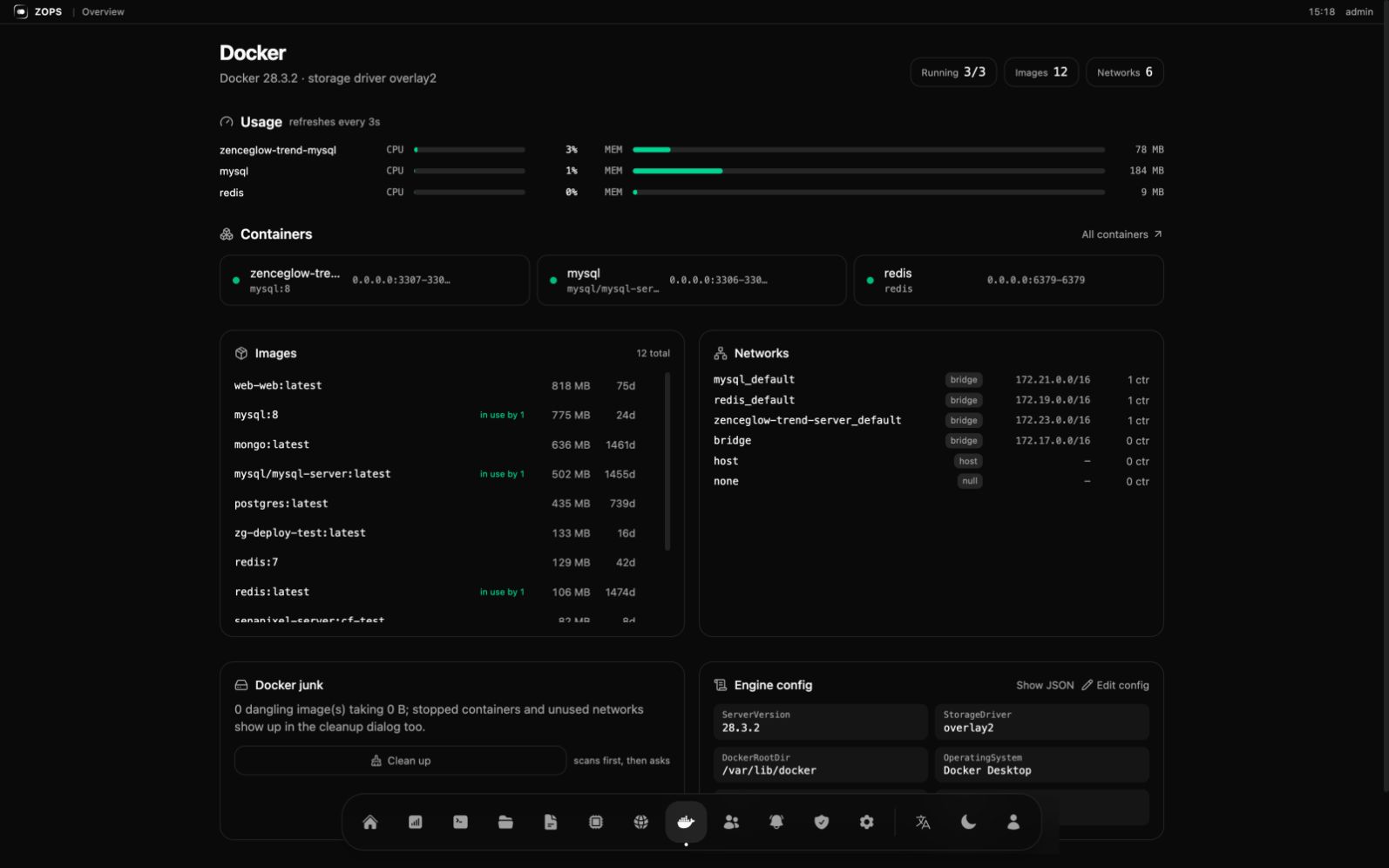 Docker — per-container usage, images with sizes, networks, junk, and an editable engine config (registry mirrors) | 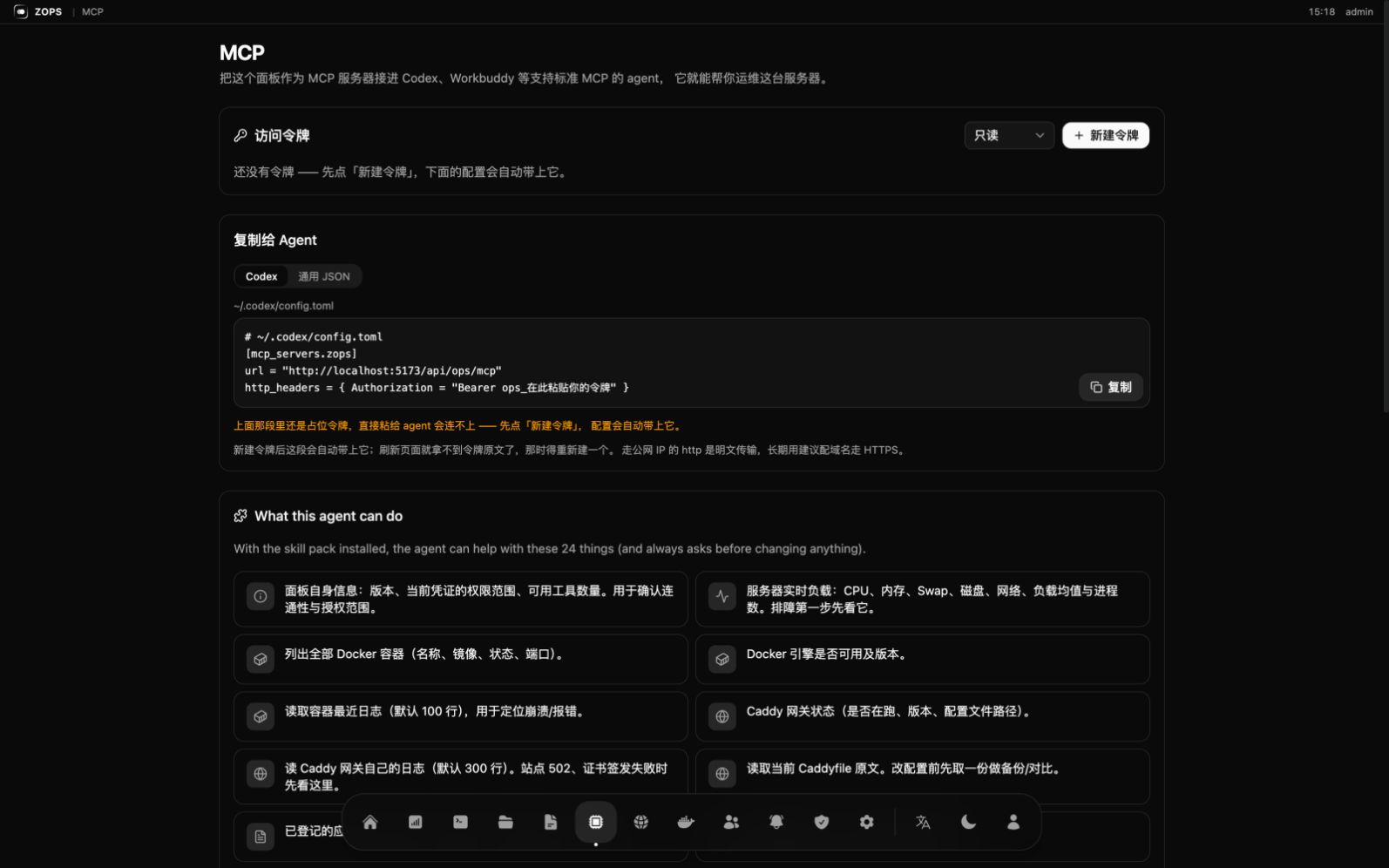 MCP — create a token, copy the config into your agent, and see exactly what it is allowed to do |
Why not another panel
Panels like 宝塔 / 1Panel / Cockpit are forms for humans; agent support, when it exists, is a bolt-on. ZOPS starts from the other end — the panel is the only door, for you and for the agent. That is what makes it safe to let an agent near production:
Features
Desktop — a health score ring, live CPU / memory / disk / swap, and a request path map from domain to container. Not a wall of tables.
Server — timezone, swap file, firewall, and patch management that detects the distro (Ubuntu / Debian / CentOS / Rocky…) and folds outstanding security updates into the health score. Cleanup scans first, shows you what it found, then asks.
Docker — containers (start / stop / restart / delete), images (size, in use
by, delete), networks, junk, and the engine config: edit registry-mirrors and
insecure-registries in a form, or the raw JSON. Validated, backed up, written
atomically, then Docker restarts.
Caddy gateway — every site is written between # ZOPS:BEGIN/END markers, so
edits and deletions touch one site instead of the whole file, and nothing is
saved until caddy validate passes. Config history lives in SQLite.
Also — SSH terminal, application log viewer, scheduled tasks, notification channels (Feishu / DingTalk / WeCom / Slack / Discord / Telegram / webhook), members with RBAC, an operation audit log, and in-panel self-update.
Storage — everything the panel knows lives in one SQLite file, so that file is also the thing that can quietly eat the disk. Settings → Storage shows its real size (main file + WAL), how many rows each table holds, which ones shrink on their own and which don't, with a retention window you can change and a Compact button that actually gives the space back. Deleting rows never shrinks a SQLite file on its own — that distinction is the whole point of the page.
Connect an agent
Open MCP in the panel, create a token (read or write) and copy the config:
# ~/.codex/config.toml
[mcp_servers.zops]
url = "https://ops.example.com/api/ops/mcp"
http_headers = { Authorization = "Bearer ops_xxxxxxxx" }
The same page gives you a one-liner that installs the skill pack into the agent's skill directory — that is the difference between "the agent has 34 tools" and "the agent knows what to do with them".
panel       ops_panel_info            ops_system_overview
container   ops_container_list        ops_container_status     ops_container_logs
            ops_container_start       ops_container_stop       ops_container_restart
gateway     ops_gateway_status        ops_gateway_logs         ops_gateway_reload
            ops_caddyfile_get         ops_caddyfile_put
logs        ops_log_source_list       ops_log_tail
server      ops_port_list             ops_member_list          ops_automation_task_list
            ops_automation_task_run
notify      ops_notify_channel_list   ops_notify_send
deploy      ops_deploy_list           ops_deploy_plan          ops_deploy_apply
job         ops_deploy_job_list       ops_deploy_job_get       ops_deploy_job_create
            ops_deploy_job_put_script ops_deploy_job_put_file  ops_deploy_job_run
            ops_deploy_job_log
app         ops_app_list              ops_app_plan             ops_app_install
ops_deploy_job_* is how a compiled binary reaches the box without SSH: create the
job, push text artifacts over MCP, upload binaries with curl -T, run the script,
poll the log.
Tokens are hashed server-side and shown once. State-changing tools carry an explicit "changes the server" flag, and the skill instructs the agent to get your confirmation before calling them.
Deploy your own apps
Give the agent a project directory and it will:
- Look at the machine first —
ops_port_listfor a free port,ops_deploy_listto avoid name collisions, instead of guessing. - Run a production check — restart policy, log rotation, time zone, network,
plaintext credentials. Missing items come back as
warnorblock. - Ask only when it matters — a missing log rotation policy is a warn; a hardcoded database password is a block.
- Write and start it — generates the compose file, runs
docker compose up -d --build, reports the port and URL.
You stop writing Docker configs by hand and still get the layout you would have written yourself.
Security model
- One door. Agents go through the panel, never the host. Every write is a typed tool call, not an arbitrary shell.
- Scopes.
readtokens cannot call state-changing tools, and MCPtools/listfilters by permission — the agent does not even see them. - Audit. Every write, human or agent, records actor, kind, IP, method, path, status, a summary and a redacted body. Secrets are stripped before writing.
- Validate before save. Caddy config is validated in a temp file first, so a bad site can no longer take the whole gateway down.
- Accounts. Argon2 hashes, JWT sessions, role-based permissions. Locked out?
zenceglow-ops --reset-password <user> <new>on the box.
Develop
./dev.sh              # frontend :5173, backend :127.0.0.1:5200
cargo test            # backend tests
cd frontend && npx tsc --noEmit
Rust (axum + SQLite) and React + Vite + Tailwind, embedded into the binary with
rust-embed so production is a single file. See
API-CONVENTIONS.md for the response envelope and route
conventions.
Release
# 1. bump Cargo.toml version — it is the only source of truth
# 2. commit (the commit subject becomes the release note)
git commit -am "feat: ..."
./deploy.sh
deploy.sh builds the frontend, cross-compiles with cargo zigbuild, smoke-tests
the binary locally (must start, /api/ops/version must answer, unknown /api
paths must return JSON 404 rather than falling through to the SPA), then uploads to
R2 under four keys:
All served from https://cdn.zenceglow.com/app/ops/… with max-age=300.
The version must be strictly greater than latest.json on the CDN. Forgetting to
bump it fails silently: everything uploads fine and installed panels never see the
update.
Credentials: wrangler login, or CLOUDFLARE_API_TOKEN + CLOUDFLARE_ACCOUNT_ID
for CI. --remote is mandatory on the wrangler r2 calls — without it wrangler
writes to a local simulator and still prints "upload complete".
Once published, the panel updates itself: it downloads, verifies (size → ELF magic →
runs --version), swaps atomically, keeps a .bak, restarts.
Keywords
AI agent server management · MCP server for DevOps · Codex skill · Workbuddy · agent operations tool · Agent 运维工具 · Docker panel · Caddy GUI · single-server ops · self-hosted panel · 宝塔替代 · 1Panel alternative · deploy your app from an agent
License
MIT © 2026 Zenceglow (广州境际之光科技有限公司) · [email protected] · https://ops.zenceglow.com