
Hayba
Build Unreal worlds with agents that can share an editor.
Inspect, plan, build, and validate Unreal Engine worlds through MCP. Native editor checks keep agent work accountable to the state of the project.
Get started · Explore the architecture · Browse the tools · Contribute
Hayba connects MCP-capable agents to Unreal Editor. It gives them a wide tool library, a focused in-editor workspace, and a native safety boundary for changes to a shared project.
Release status:
v0.3.0is the latest completed release. The editor workspace and0.4.0safety train shown here are development previews under final validation. Versioning and deploy stages
Actual scratch-editor captures from the development branch. Chat shows the empty workspace; it does not demonstrate a connected conversation. World shows 130,048 sampled points from 1,024 synthetic actors, not an entire unloaded project.
See the workflow
A typical request is concrete: “Inspect this level, propose a route to the focal point, then make the approved changes.” Hayba exposes the scene and relevant tools, lets the agent prepare a reviewable plan, and checks the editor before writes. The getting-started guide walks through installation.
Why Hayba
The tool reference covers individual operations. Optional GAS and MetaSound plugins extend the core. The distinction is how the tools work together under a shared editor's live constraints.
See the safety boundary
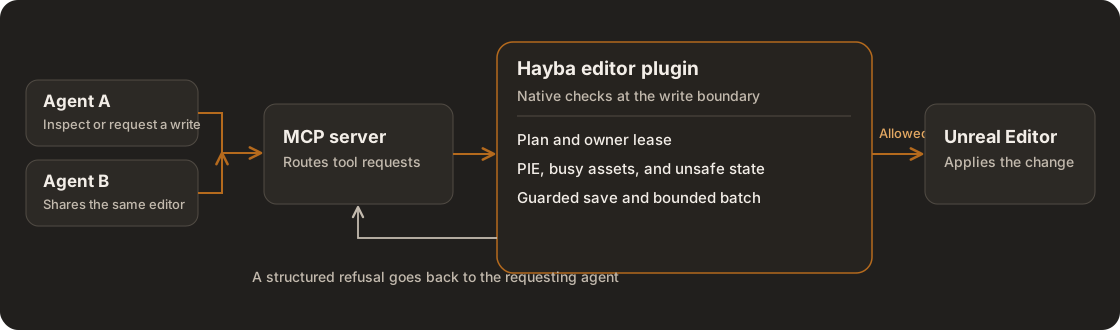
The TypeScript MCP server routes requests to the C++ editor plugin. The editor plugin checks state and ownership where writes actually happen. The visual sidecar is optional. Explore the architecture.
Safety is part of the workflow
The 0.4.0 candidate adds a coordinated set of protections: sticky refusal after a contained native fault, PIE and asset-busy checks, guarded save paths, owner-bound leases with recovery, and bounded batch execution. These address a shared editor's real failure modes: one agent can hold a resource while another reads stale state, Play can begin during a build, or a native fault can leave the editor unsafe for more writes. The candidate is still finishing release validation; the scratch-host safety guide records the live verification boundaries.
Hayba does not treat every refusal as failure. A structured refusal tells the agent whether to wait, refresh state, request a lease, stop Play, or return control to the user. Plan Mode requires approval for destructive commands when enabled; owner-bound leases, PIE and editor-health guards apply independently. Native undo covers supported operations, with documented exceptions. Read the safety model · Security policy · Decision records
World, from scene evidence
The current preview progressively scans loaded static meshes. The scratch-editor capture above shows 130,048 surface samples from 1,024 synthetic actors, with source links for those mesh samples. A second scratch capture includes 37,277 depth-derived points from a 256×256 capture of first-visible surfaces. A zoom-local tile adds 8,192 points sampled from mesh triangles. An agent can start a loaded-world tile capture with world_tile_capture, then inspect its bounded geometry, source nodes, and authored semantic groups with world_semantic_snapshot. The latest depth observation also has queryable pages with a capture ID, camera, coverage, and gaps. Uncaptured regions report not_captured. The depth pass covers one editor-camera view, not an entire level; only sparse depth-matched collision labels identify possible sources. Unloaded cells and occluded surfaces remain unknown.
Open the World capture · Zoom-local mesh detail · Read the World model
The next World layer
The next layer will use that evidence to compare scene composition and production options: sightlines, routes, streaming and NPC pressure, memory, texel density, PCG placement, and hand-placed focal assets. It should score alternatives with measured constraints and call out unknowns. That decision layer is planned work, not a shipped capability. Read the World direction.
Install in a scratch project
Requirements: Node.js 22.5+, Unreal Engine 5.7+, and Visual Studio 2022 on Windows. The optional visual sidecar has separate Python dependencies.
git clone https://github.com/zajalist/hayba.git
cd hayba
npm install
npm --prefix mcp-tools/hayba-mcp run build
Copy unreal/HaybaMCPToolkit into a scratch Unreal project's Plugins/ directory and build the project. Then register the built server with your MCP host. For Claude Code:
claude mcp add hayba-toolkit -- node /absolute/path/to/hayba/mcp-tools/hayba-mcp/dist/index.js
Open the scratch project and use the Hayba MCP Toolkit panel to complete setup. The step-by-step guide includes other hosts, add-ons, and troubleshooting. Start with a scratch project while evaluating any tool that can modify editor state.
Explore the repository
Developers can run npm --prefix mcp-tools/hayba-mcp test for the Node gate. Unreal tests require a separately built project; CONTEXT.md and the architecture guide explain the boundaries before changing them.
A worldbuilding tool should understand the world—and know when to stop.